
Della 048-OPAC-6H
Della 10000 BTU Portable Air Conditioner User Manual
Model: 048-OPAC-6H | Brand: Della
1. Émbaran Kasalametan penting
Please read this manual carefully before operating your portable air conditioner. Keep this manual for future reference. Always follow basic safety precautions to reduce the risk of fire, electric shock, or injury.
- Pastikeun unit disimpen dina datar, permukaan stabil pikeun nyegah tipping.
- Ulah ngajalankeun unit ku kabel ruksak atawa colokan.
- Ulah nyelapkeun ramo atawa objék kana inlet hawa atawa outlet.
- Jauhkeun unit tina bahan anu gampang kaduruk sareng seuneu kabuka.
- Salawasna cabut colokan unit sateuacan beberesih atanapi ngalakukeun perawatan naon waé.
- Alat ieu henteu dimaksudkeun pikeun dianggo ku jalma (kalebet murangkalih) anu ngirangan kamampuan fisik, indrawi atanapi mental, atanapi kirang pangalaman sareng pangaweruh, kecuali aranjeunna dipasihan pangawasan atanapi petunjuk ngeunaan panggunaan alat ku jalma anu tanggung jawab kana kasalametanana.
2. Produk Langkungview
The Della 10000 BTU Portable Air Conditioner is a versatile unit designed to provide cooling, heating, dehumidification, and fan functions for spaces up to 450 sq. ft. It features smart WiFi connectivity for convenient control via a mobile app, a remote control, and an intuitive soft-touch control panel.

Image: Della Portable Air Conditioner unit, remote control, and smartphone displaying the control app.
Key components include the main unit with integrated handle, exhaust hose, window installation kit, and remote control.

Image: Diagram showing the dimensions of the portable air conditioner: 12.2 inches (width) x 12.2 inches (depth) x 27.6 inches (height).
3. Setélan
3.1 Ngabongkar bungkusan
Carefully remove the unit and all accessories from the packaging. Retain the original packaging for future storage or transport. Allow the unit to stand upright for at least 24 hours before initial use to allow the refrigerant to settle.
3.2 Nempatkeun
Place the air conditioner on a firm, level surface in a location that allows for proper air circulation. Ensure there is at least 20 inches (50 cm) of space from walls or other objects to allow for adequate airflow around the unit.
3.3 Instalasi Kit Jandéla
The included window kit is designed for easy installation in both horizontal and vertical sliding windows. No drilling is required.

Image: Diagrams illustrating the installation of the window kit in both horizontal and vertical sliding windows, showing compatibility with window openings from 25.5 to 64.1 inches.
- Assemble the window slider kit by sliding the adjustable panels together to fit your window opening. The kit is compatible with window sizes from 25.5 to 64.1 inches.
- Secure the panels with the provided screws.
- Open the window and place the assembled window kit into the window frame. Extend the panels to fit snugly and close the window against the kit to secure it.
- Ensure the window kit is sealed properly to prevent air leakage. Use foam seals if necessary.
3.4 Sambungan Selang knalpot
- Attach the exhaust hose connector to one end of the exhaust hose.
- Gantelkeun adaptor jandela kit ka tungtung séjén selang knalpot.
- Insert the exhaust hose connector into the exhaust outlet on the back of the air conditioner unit.
- Insert the window kit adapter into the opening on the window slider kit.
- Pastikeun sadaya sambunganna pageuh pikeun nyegah hawa panas asup deui ka rohangan.
3.5 Sambungan Daya
Plug the power cord into a grounded 115V/60Hz electrical outlet. Do not use extension cords or power strips.
4. Parentah Operasi
4.1 Panel kontrol
The unit features an intuitive soft-touch control panel on the top of the unit.
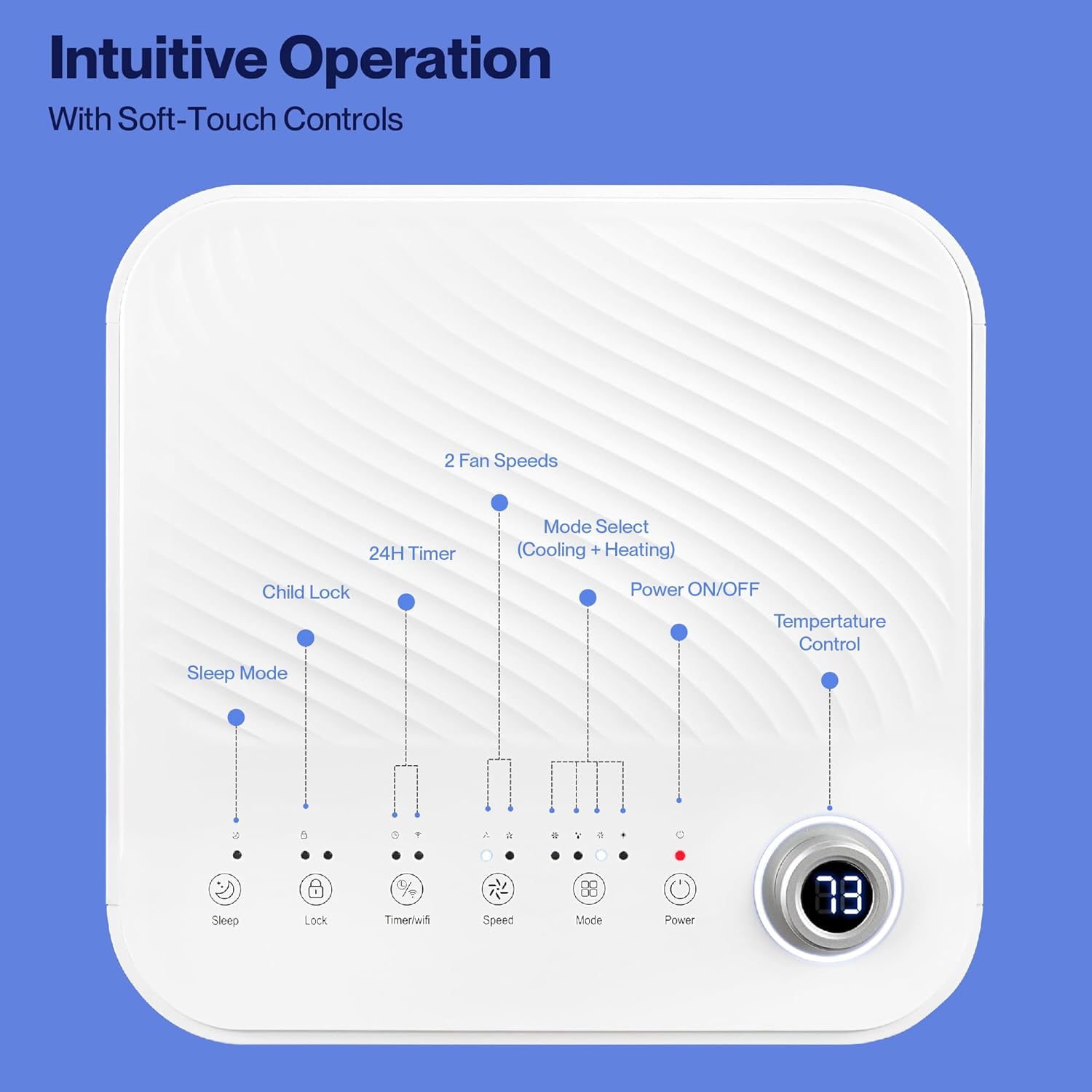
Image: Detailed diagram of the control panel with labels for each button: Sleep, Child Lock, Timer/WiFi, Fan Speed, Mode Select (Cooling + Heating), Power ON/OFF, and Temperature Control with digital display.
- Daya ON/OFF: Pencét pikeun ngaktipkeun atanapi mareuman unit.
- Pilih Mode: Cycle through Cooling, Heating, Dehumidification, Ventilation (Fan), and Sleep modes.
- Kontrol Suhu: Use the up/down arrows to adjust the desired temperature.
- Laju kipas: Select between 2 fan speeds (Low, High).
- Timer: Setel timer 24 jam pikeun operasi on/off otomatis.
- Konci Budak: Ngaktipkeun atanapi mareuman fungsi konci anak.
- Modeu Bobo: Activates sleep mode for quieter operation and gradual temperature adjustment.
4.2 Jauh Jauh
The unit comes with a remote control for convenient operation from a distance. All functions available on the control panel can be accessed via the remote.
4.3 WiFi/Smart App Control
Control your Della Portable Air Conditioner from anywhere using the free DELLA+ app on your smartphone. The unit is compatible with Google Assistant and Amazon Alexa for voice control.

Image: A person relaxing on a couch, using a smartphone to control the air conditioner, with text indicating compatibility with Google Assistant and Amazon Alexa.
- Download the DELLA+ app from your smartphone's app store.
- Follow the in-app instructions to connect your air conditioner to your home WiFi network.
- Once connected, you can control modes, temperature, fan speed, and set schedules remotely.
The app also supports Smart Geo Location, allowing the unit to automatically turn on or off based on your proximity to home.

Image: A smartphone screen showing a map with a car icon and a notification indicating the AC unit automatically turned on due to Smart Geo Location.
5. Pangropéa
Regular maintenance ensures optimal performance and extends the lifespan of your unit. Always unplug the unit before cleaning.
5.1 Ngabersihan Saringan Udara
Saringan hawa kedah dibersihkeun unggal dua minggu atanapi langkung sering gumantung kana panggunaan sareng kualitas hawa.
- Panggihan panel saringan hawa (biasana di tukang atanapi sisi unit).
- Cabut saringan.
- Ngumbah saringan ku cai haneut, sabun. Bilas sacara saksama sareng ngantepkeun hawa dugi ka garing sateuacan diselapkeun deui.
5.2 Draining Cai
The unit has a self-evaporating system, but in high humidity conditions, water may accumulate. The "Water-full indicator" will illuminate when the water tank needs draining.
- Place a shallow pan or tray under the drain port (located at the bottom rear of the unit).
- Cabut colokan solokan.
- Allow all accumulated water to drain out.
- Ngaganti colokan solokan aman.
5.3 Panyimpenan
Upami nyimpen unit kanggo waktos anu panjang:
- Solokan sakabéh cai akumulasi.
- Ngabersihan saringan hawa.
- Jalankeun unit dina modeu kipas wungkul salami sababaraha jam pikeun ngagaringkeun interiorna.
- Cabut colokan kabel listrik jeung coil eta rapih.
- Simpen unit dina tempat anu tiis sareng garing, langkung saé dina bungkusan aslina.
6. Cara ngungkulan
Tingali kana bagian ieu pikeun masalah umum sareng solusina.
| Masalah | Mungkin Cukang lantaranana | Solusi |
|---|---|---|
| Unit teu hurung | No power; Power cord unplugged; Circuit breaker tripped; Water tank full | Check power outlet; Plug in power cord; Reset circuit breaker; Drain water tank |
| Unit teu cooling éféktif | Air filter dirty; Exhaust hose not properly installed; Room too large; Doors/windows open; Temperature setting too high | Clean air filter; Ensure exhaust hose is sealed; Close doors/windows; Lower temperature setting |
| Unit ribut | Unit not on level surface; Air filter dirty; Obstruction in fan | Place unit on level surface; Clean air filter; Check for obstructions |
| Leak cai | Drain plug loose or missing; Unit tilted | Secure drain plug; Ensure unit is level |
| Masalah sambungan WiFi | Incorrect WiFi password; Unit too far from router; Router issues | Verify password; Move unit closer to router; Restart router |
Lamun masalah persists sanggeus nyobian solusi ieu, mangga ngahubungan rojongan customer.
7. Spésifikasi
| Fitur | Spésifikasi |
|---|---|
| Nomer modél | 048-OPAC-6H |
| Kamampuh cooling | 10000 BTU |
| Wewengkon Cakupan | Nepi ka 450 Sq. Ft. |
| Fungsi | Cooling, Heating, Dehumidifier, Fan, Sleep Mode |
| Voltage | 115 volt |
| Tingkat Noise | 54 dB |
| Refrigerant | Urang Sunda 410A |
| Ukuran (L x W x H) | 12.2 x 12.2 x 27.6 inci |
| Bahan | Plastik ABS |
| Fitur husus | Portable, Dehumidifier, WiFi Enabled, Remote Control, Built-in Handle, 24-hour timer, Child Lock |
8. Garansi sarta Rojongan Palanggan
For warranty information or technical assistance, please refer to the warranty card included with your product or visit the official Della website. You may also contact Della customer support directly for further assistance with troubleshooting or parts replacement.
Ask a question about this manual
Ask about setup, troubleshooting, compatibility, parts, safety, or missing instructions. Manuals+ will review the question and use this page’s manual context to help answer it.