
ATTACK SHARK M71
Buku Panduan Pangguna Keyboard Mékanis Nirkabel ATTACK SHARK M71
Modél: M71
Bubuka
This manual provides detailed instructions for the setup, operation, and maintenance of your ATTACK SHARK M71 75% TKL Wireless Mechanical Keyboard. Please read this guide thoroughly to ensure proper use and to maximize your keyboard's performance and lifespan.

Image: The ATTACK SHARK M71 keyboard showcasing its 68% layout and key features like aluminum alloy body, three-mode connection, and RGB backlight.
Eusi pakét
Pastikeun yén sadaya item aya dina bungkusan:
- ATTACK SHARK M71 Wireless Mechanical Keyboard
- Kabel Tipe-C
- 2.4G Wireless panarima
- Keycap Puller / Switch Puller (Two-in-one tool)
- Complimentary 61 additional PBT OEM keycaps (different color layout)
- Manual pamaké

Image: A visual representation of the items included in the ATTACK SHARK M71 keyboard package, including the keyboard, cables, and extra keycaps.
Video: Unboxing the Blueberry version of the M71 keyboard, showing the package contents and a demonstration of its typing sound.
Produk Leuwihview
The ATTACK SHARK M71 is a 75% TKL wireless mechanical keyboard featuring a full aluminum CNC chassis, multi-mode connectivity, hot-swappable switches, and RGB lighting. Its compact design and robust construction are engineered for both gaming and productivity.
Fitur konci:
- Full Aluminum CNC Body: Constructed from international standard 6063 aluminum alloy for durability and a premium feel.
- Konektipitas tilu-mode: Supports Bluetooth 5.0/3.0, 2.4G wireless, and wired USB-C connections.
- Saklar Hot-Swappable: Compatible with 3/5-pin switches, allowing for easy customization without soldering.
- Struktur Pemasangan Gasket: Incorporates anti-static IPEX switch pads, PORON sound-absorbing cotton, and PET acoustic switch pads to enhance typing feel and reduce noise.
- Lampu LED RGB: Features customizable RGB backlighting and a side LED light strip.
- Batré 4600 mAh: Nyayogikeun panggunaan nirkabel anu langkung lami.
- PBT OEM Keycaps: Durable keycaps with GMK-like characters.
komponén:
Familiarize yourself with the main components of your keyboard:
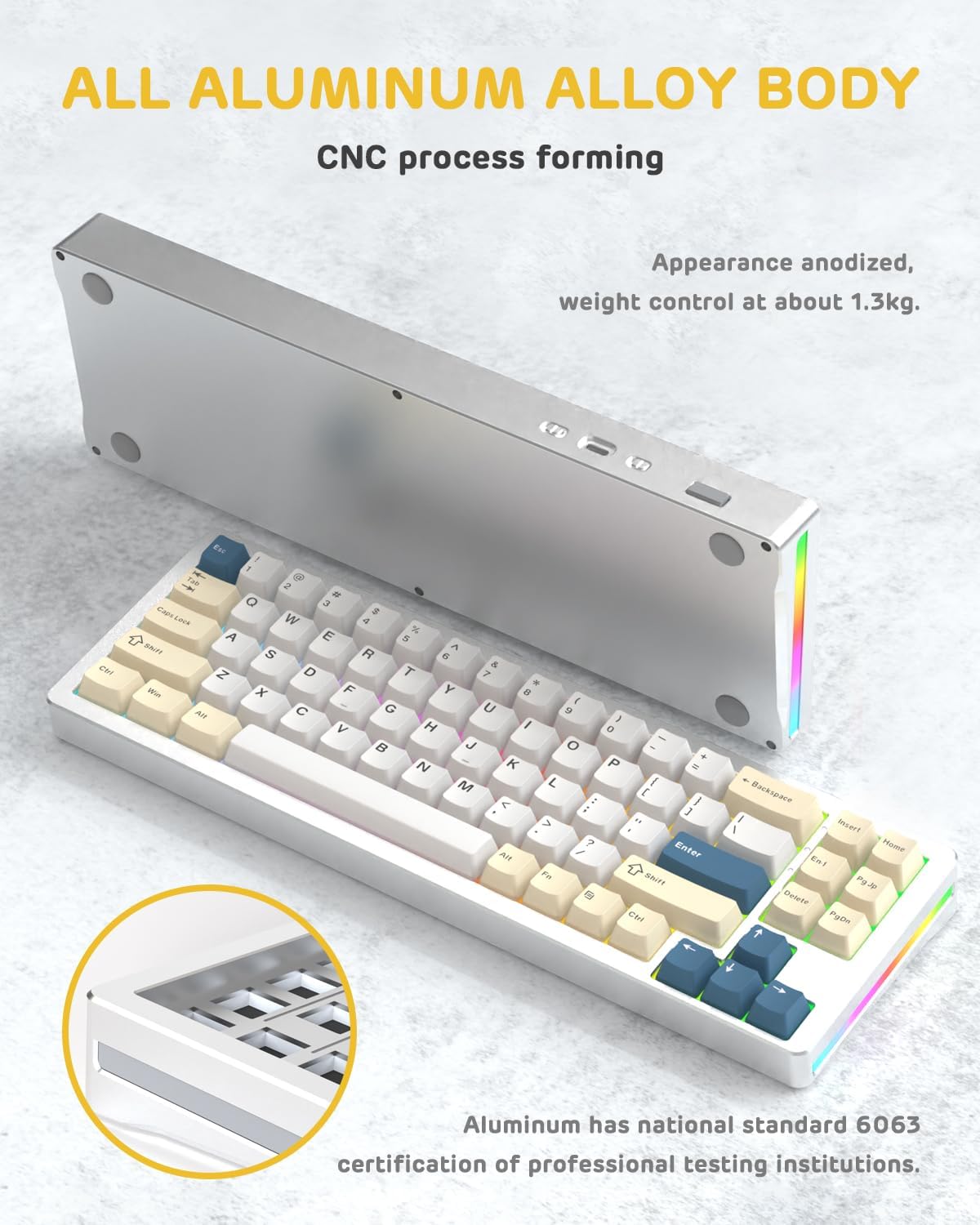
Gambar: Hiji sisi view of the M71 keyboard highlighting its full aluminum alloy body and CNC process forming.

Gambar: Hiji ngabeledug view illustrating the multi-layered gasket mount structure, including the PBT keycaps, aluminum alloy upper cover, customized switch body, PC positioning board, PORON filled cotton, anti-static IPEX switch underpad, PET singing pad, PCB board, PORON shaft seat cushion, PET sound backing pad, wing light strip, and aluminum alloy base.
Disetél
1. Connectivity Modes:
The M71 keyboard supports three connection modes: Bluetooth, 2.4G wireless, and wired USB-C.
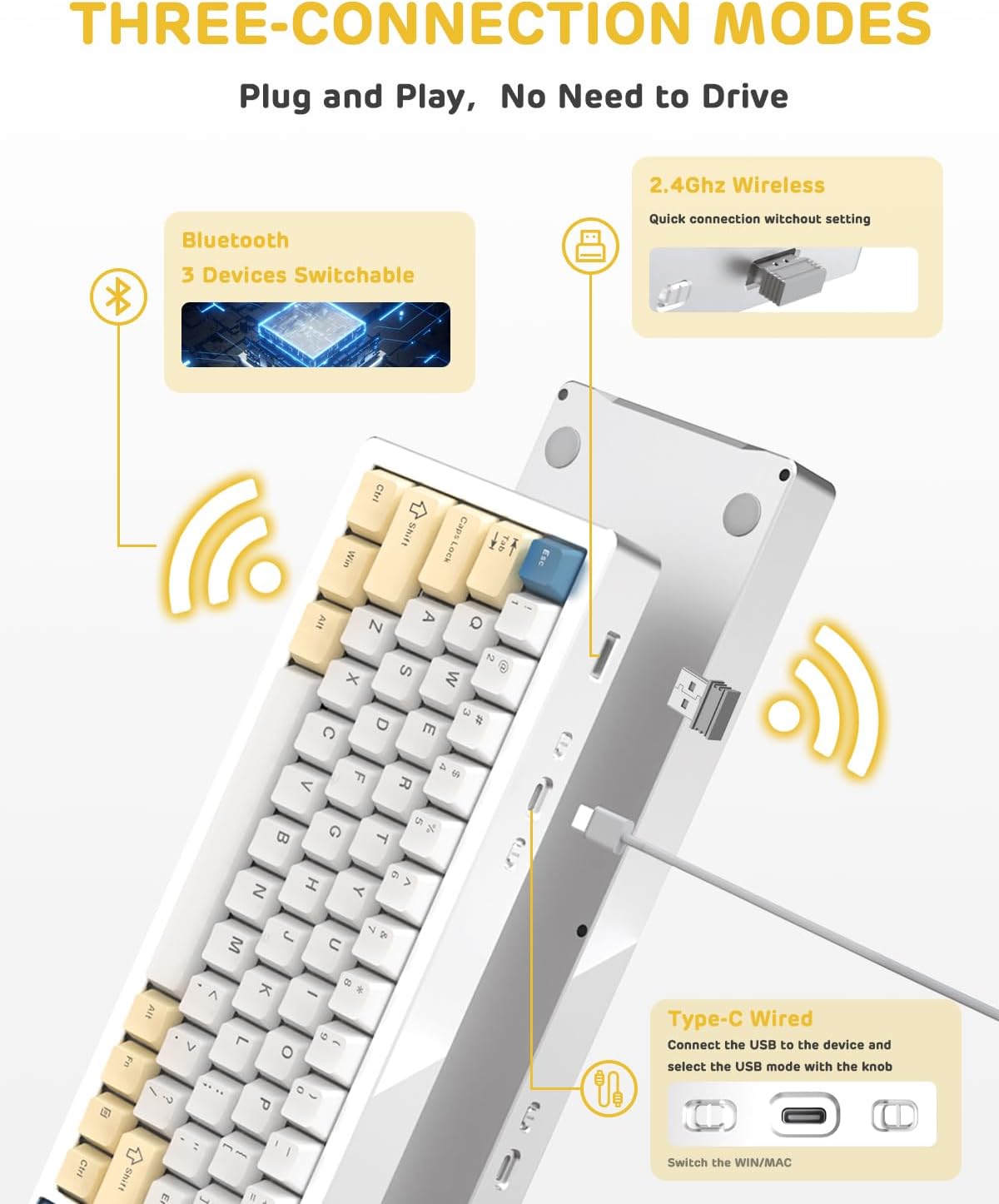
Image: A visual guide to the three connectivity options: Bluetooth for up to 3 devices, 2.4GHz wireless with a receiver, and wired Type-C connection.
Sambungan kabel:
- Connect the provided Type-C cable to the keyboard's USB-C port and to your computer's USB port.
- Ensure the mode switch on the keyboard is set to the wired (USB-C) position.
- Kibor bakal otomatis dikenal ku sistem anjeun.
Sambungan Nirkabel 2.4G:
- Locate the 2.4G wireless receiver (dongle) in the package.
- Colokkeun panarima 2.4G kana port USB nu sadia dina komputer Anjeun.
- Set the mode switch on the keyboard to the 2.4G wireless position.
- Kibor kedah nyambung sacara otomatis.
Sambungan Bluetooth:
- Set the mode switch on the keyboard to the Bluetooth position.
- Dina komputer atawa alat Anjeun, buka setelan Bluetooth tur neangan alat anyar.
- The keyboard should appear as "ATTACK SHARK M71" or similar. Select it to pair.
- Kibor ieu tiasa nyambung ka dugi ka 3 alat Bluetooth. Anggo Fn + 1/2/3 pikeun pindah antara alat nu dipasangkeun.
2. Battery Charging and Status:
The M71 keyboard is equipped with a 4600mAh battery. To charge, connect the keyboard via the USB-C cable to a power source (e.g., computer USB port, USB wall adapter).

Image: A diagram showing how to check the battery level using Fn+ALT(R) and the visual indicators on the keyboard's side LED strip.
- Pikeun mariksa tingkat batré dina modeu nirkabel, pencét Fn + ALT (Right). The side LED strip will indicate the charge level.
- Battery life is approximately 1-2 weeks with lighting enabled and up to 4 weeks with lighting disabled.
Parentah Operasi
1. Konci Multimédia:
The keyboard features 12 multimedia keys accessible via the Fn kombinasi konci:
- Fn + F1-F12: Access various multimedia functions (e.g., volume control, play/pause, calculator, email).
- Fn + 1/2: Ngatur kacaangan layar.
2. Kontrol Lampu RGB:
Customize the keyboard's RGB backlight and side LED strip:

Image: The M71 keyboard displaying its RGB backlight and side LED strip, along with a close-up of the PBT keycaps.
- Fn + Ctrl (Katuhu): Switch between different side LED light strip modes.
- Fn + Tab: Toggle white light mode.
- Refer to the full user manual for additional lighting effect controls and customization options via the programmable software.
3. Programmable Software:
The keyboard supports a dedicated driver program for advanced customization. You can download the software from the official ATTACK SHARK website to personalize lighting effects, key assignments, and macros. The keyboard is compatible with Windows 2000/XP/Vista/7/8/10/11, Android, and iOS.
Pangropéa
1. beberesih:
- Anggo lawon anu lemes sareng garing pikeun ngusap permukaan kibor.
- For deeper cleaning, remove keycaps using the provided keycap puller and use compressed air to clear debris from between switches.
- Hindarkeun ngagunakeun bahan kimia anu kasar atanapi bahan abrasive.
2. Hot-Swapping Switches:
The M71 keyboard features hot-swappable sockets, allowing you to change switches without soldering.

Gambar: A close-up view of the hot-swappable White Jade linear switches on the M71 keyboard, demonstrating how they can be easily removed and replaced.
- Pareuman keyboard atawa pegatkeun sambungan tina alat Anjeun.
- Use the switch puller tool to carefully grip the switch and pull it straight up.
- Align the pins of the new switch with the holes on the PCB and press down gently until it clicks into place. Ensure pins are not bent.
- The PCB supports both 3-pin and 5-pin switches.
Video: A demonstration of the disassembly process for the M71 keyboard, showing how to remove keycaps and switches, revealing the gasket mount structure.
Pamérésan masalah
| Masalah | Solusi anu mungkin |
|---|---|
| Kibor teu ngaréspon dina modeu nirkabel. |
|
| Konci teu kadaptar atanapi ngetik dua kali. |
|
| Lampu RGB teu jalan atanapi lepat. |
|
| Masalah papasangan Bluetooth. |
|
spésifikasi
| Fitur | Rincian |
|---|---|
| Modél | M71 |
| Tata perenah | 75% TKL (71 keys) |
| Konektipitas | Bluetooth 5.0/3.0, 2.4G Wireless, USB-C Wired |
| Saklar | Hot-swappable (3/5-pin compatible), Pre-lubed Linear White Jade Switch |
| Kancing konci | Keycaps PBT OEM |
| Gaya Pamasangan | Gasket Gunung |
| Bahan Chassis | Full Aluminum CNC (6063 alloy) |
| Kapasitas batré | 4600 mah |
| cahayaan | RGB Backlight, RGB LED Side Light Strip |
| Kasaluyuan | Windows 2000/XP/Vista/7/8/10/11, Android, iOS, Mac |
| Dimensi produk | 13.78 "L x 4.53" W x 1.22" H |
| Item Beurat | 2.86 pon |
Garansi sareng Rojongan
Kanggo inpormasi garansi sareng dukungan téknis, mangga tingal situs resmi ATTACK SHARK. websitus atanapi ngahubungan layanan palanggan maranéhanana langsung. Simpen resi pameseran anjeun salaku bukti pameseran pikeun klaim garansi.
Pabrikan: SERANG HIU
Penjual: Ajazz US
Titimangsa munggaran sadia: 4 Agustus 2023
Ask a question about this manual
Ask about setup, troubleshooting, compatibility, parts, safety, or missing instructions. Manuals+ will review the question and use this page’s manual context to help answer it.