1. Bubuka
This manual provides instructions for the Generic replacement remote control, designed to operate Sine Audio DS6503 and Monster Soundbar SB2 DS6603 speaker systems. This infrared (IR) replacement remote offers essential functions for controlling your soundbar.
Important: Ensure your original remote control matches the appearance of this replacement remote for compatibility. If your model number is not explicitly listed in the product title, please verify compatibility before use.
2. Eusi Paket
- 1 x Generic Replacement Remote Control
Note: Batteries and a separate instruction booklet are not included with this replacement remote. Please refer to your soundbar's original manual for specific operational details if needed.
3. Setélan
3.1 Pamasangan batré
Remot kontrol ieu peryogi 2 batré AAA (teu kalebet). Turutan léngkah-léngkah ieu pikeun masang batréna:
- Panggihan kompartemen batré dina tonggong kadali jauh.
- Geser panutup kompartemen batré ka handap pikeun mukakeunana.
- Selapkeun dua batré AAA, mastikeun terminal positif (+) jeung négatip (-) align bener jeung markings jero kompartemen nu.
- Geser panutup kompartemen batré deui kana tempatna nepi ka klik aman.

Image: Back of the remote control with the battery compartment open, illustrating the correct orientation for AAA battery insertion.
3.2 Pamakéan awal
No setup or code is required for this replacement remote. Once batteries are installed, the remote is ready for immediate use with compatible Sine Audio DS6503 and Monster Soundbar SB2 DS6603 speaker systems.
4. Parentah Operasi
The replacement remote control provides direct access to common functions. Point the remote directly at your soundbar when pressing buttons.
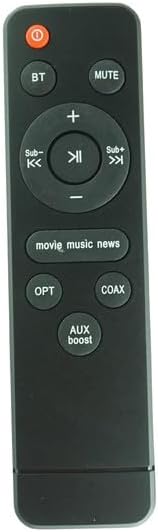
Gambar: Hareupeun view of the replacement remote control, highlighting the button layout.
- Power Button (Red Circle with Line): Ngahurungkeun atanapi mareuman soundbar.
- BT (Bluetooth): Selects Bluetooth input mode.
- BISA: Mutes or unmutes the soundbar audio.
- Volume Naik (+) / Volume Turun (-): Adjusts the main volume level.
- Sub- / Sub+: Adjusts the subwoofer level.
- Previous Track (<<) / Play/Pause (►►) / Next Track (>>|): Controls media playback (functionality may vary based on soundbar and input source).
- movie_music_news: Cycles through preset equalizer modes (e.g., Movie, Music, News).
- OPT (Optik): Selects Optical input mode.
- COAX (Coaxial): Selects Coaxial input mode.
- naekeun AUX: Selects Auxiliary input mode and may activate a boost feature.
5. Cara ngungkulan
- Jauh teu ngabales:
- Pariksa naha batréna diselapkeun leres kalayan polaritasna anu leres.
- Ganti batré anu lami ku batré AAA anu énggal.
- Ensure there are no obstructions between the remote and the soundbar's IR receiver.
- Confirm that the remote is compatible with your specific soundbar model (Sine Audio DS6503 or Monster Soundbar SB2 DS6603).
- Fungsi terbatas:
- Some advanced functions may be specific to the original manufacturer's remote. This replacement remote provides core operational controls.
- Refer to your soundbar's original manual for detailed information on all available features.
6. Spésifikasi
- Tipe: Infrabeureum (IR) Ngagantian Jauh Control
- Sumber Daya: 2 x Batré AAA (teu kalebet)
- Alat anu cocog: Sine Audio DS6503, Monster Soundbar SB2 DS6603
- warna: Hideung
- Fitur husus: Desain ergonomis, fungsi panggantian langsung
7. Garansi jeung Rojongan
For warranty information or support regarding this replacement remote control, please contact the seller directly through your purchase platform. Please note that this is a generic replacement product and not an OEM (Original Equipment Manufacturer) item.