
1. Bubuka
Welcome to the user manual for your JKZTJOF K-1028E Universal Air Conditioner Remote Control. This manual provides detailed instructions on how to set up, operate, and troubleshoot your new remote control. Please read this manual carefully before use to ensure optimal performance and longevity of your device.
The K-1028E is designed to be compatible with over 99% of air conditioner brands, offering a convenient 1000-in-1 solution. Punten Catet: This universal remote control is not compatible with WINDOW and PORTABLE air conditioner units.

Image: The K-1028E universal A/C remote control with text highlighting its compatibility with over 1000 air conditioner brands and a note about incompatibility with window and portable units.
2. Produk Langkungview
Fitur konci
- Kasaluyuan lega: Controls over 1000 different air conditioner brands.
- Fungsi merenah: Includes clock, timer (ON/OFF), factory default reset, fast cooling, and fast heating functions.
- Gampang dianggo: Simple programming methods for quick setup.
- Pintonan layar ageung: Clear LCD screen for easy viewing of settings.
- Lampu LED: Integrated light for use in dark environments.
- Desain ergonomis: Nyaman dicekel sareng dioperasikeun.
Layout kadali jauh

Image: A detailed diagram of the K-1028E universal A/C remote control, labeling each button and display element such as temperature display, wind strength, mode key, timer keys, and set key.
The remote control features a clear LCD screen at the top, displaying temperature, mode, fan speed, and other indicators. Below the screen are various function buttons:
- LIGHT Key: Activates the backlight for the LCD screen.
- ON/OFF konci: Ngahurungkeun atanapi mareuman AC.
- TEMP +/- Keys: Saluyukeun setelan suhu.
- konci MODE: Ngaliwatan mode operasi (contona, Tiis, Panas, Kipas, Garing, Otomatis).
- F.SPEED Key: Saluyukeun laju kipas.
- M.SWING / A.SWING Keys: Controls manual or automatic swing of the air deflector.
- TIME ON / TIME OFF Keys: Nyetél timer pikeun ngahurungkeun atanapi mareuman otomatis.
- F.COOL / F.HEAT Keys: Activates fast cooling or fast heating modes.
- SET konci: Used for programming and setting functions.
- CLOCK Key: Nyetél waktos ayeuna.
- OK konci: Confirms selections during programming or setting.
3. Setelan sareng Pemrograman
Pamasangan batré
Before using the remote control, you need to install two AAA batteries (not included). Ensure correct polarity (+/-) when inserting the batteries.
- Buka tutup kompartemen batréna dina tonggong kadali jarak jauh.
- Insert two AAA batteries, matching the polarity indicators inside the compartment.
- Tutup panutup kompartemen batré aman.

Gambar: Hareup jeung tukang view of the K-1028E universal A/C remote control, showing the LCD screen, buttons, and battery compartment with manual code input instructions.
Programming Your Air Conditioner
Some air conditioners may work directly with the K-1028E remote without programming. If your air conditioner does not respond, follow one of the programming methods below. It is recommended to try the Manual Code Input method first if you know your AC brand.
Method 1: Manual Code Input
This method requires you to find the specific code for your air conditioner brand from the provided code list (usually found in the remote's packaging or on the back of the remote itself).
- Manually power on your air conditioner unit.
- Pencét jeung tahan tombol SET button on the remote control for approximately 3 seconds until the code on the LCD screen starts flashing.
- Ngagunakeun éta TEMP + or SUHU - buttons to input the 3-digit code for your air conditioner brand.
- Point the remote at your air conditioner and press the ON/OFF button repeatedly. If the air conditioner responds (e.g., turns on/off, changes mode), you have found the correct code.
- Pencét éta OK button to confirm and save the code. The code will stop flashing.
Method 2: Automatic Search
This method allows the remote to automatically search for a compatible code.
- Manually power on your air conditioner unit.
- Pencét jeung tahan tombol SET button for approximately 6 seconds. The code on the LCD screen will start flashing and automatically increase. The remote is now in automatic search mode.
- Point the remote at your air conditioner. The remote will send out codes one by one.
- When your air conditioner responds (e.g., turns on/off, beeps), immediately press the OK button to confirm and save the code.
Method 3: Manual Code Search
This method is similar to automatic search but allows for manual incrementing of codes.
- Manually power on your air conditioner unit.
- Pencét jeung tahan tombol SET button for approximately 3 seconds until the code on the LCD screen starts flashing.
- Pencét éta SET button repeatedly to manually cycle through the codes.
- Point the remote at your air conditioner. When your air conditioner responds, immediately press the OK button to confirm and save the code.
4. Parentah Operasi
Operasi Dasar
- Hurungkeun/Pareuman: Pencét éta ON/OFF tombol pikeun ngahurungkeun atawa mareuman AC.
- Pilihan Mode: Pencét éta MODÉ button to cycle through available modes (e.g., Cool, Heat, Fan, Dry, Auto). The current mode will be displayed on the LCD screen.
- Penyesuaian Suhu: Ngagunakeun éta TEMP + or SUHU - tombol pikeun ningkatkeun atawa ngurangan suhu nu dipikahoyong.
- Penyesuaian Laju Kipas: Pencét éta F.SPEED tombol pikeun ngarobah kecepatan kipas anu béda-béda (contona, Otomatis, Handap, Sedeng, Luhur).
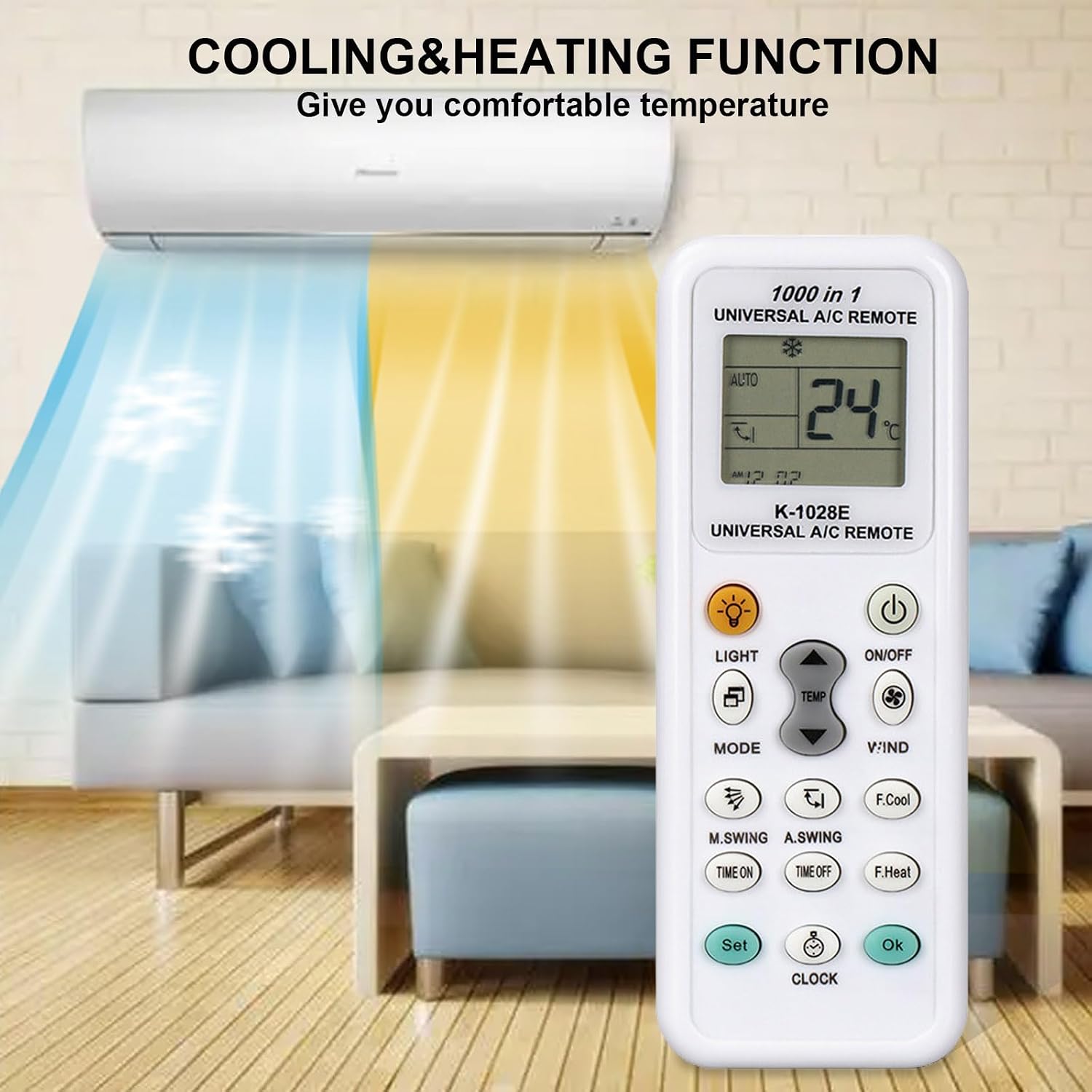
Image: The K-1028E remote control in a living room setting, illustrating its cooling and heating functions with blue and orange airflows from an air conditioner unit.
Fungsi canggih
- Pangatur Waktu ON/OFF: Pencét WAKTU TEH or WAKTU MATI to set a specific time for the air conditioner to turn on or off automatically. Use TEMP + or SUHU - to adjust the time, then press OK pikeun mastikeun.
- Setélan jam: Pencét éta JAM tombol, lajeng nganggo TEMP + or SUHU - pikeun nyetél waktos ayeuna. Pencét JAM deui atawa OK pikeun mastikeun.
- Fungsi cahaya: Pencét éta CAHAYA button to illuminate the remote's LCD screen for better visibility in low light conditions.
- Kontrol ayun: Ngagunakeun éta M.SWING (Manual Swing) or A.SWING (Automatic Swing) buttons to adjust the direction of the air deflector.
- Fast Cooling/Heating: Pencét F.COOL for rapid cooling or F.HEAT for rapid heating.

Image: The K-1028E remote control being used in a bedroom, demonstrating its long-distance control capability (up to 26 feet) and fast response time (0.2 seconds).
5. Pangropéa
beberesih sarta Panyimpenan
- Ngusap kadali jauh ku lawon lemes, garing. Ulah make cleaners cair atawa bahan abrasive.
- Upami remot moal dianggo dina waktos anu lami, cabut batréna pikeun nyegah bocor sareng karusakan.
- Nyimpen remote di tempat anu tiis sareng garing jauh tina sinar panonpoé langsung sareng suhu anu ekstrim.
6. Cara ngungkulan
Isu umum jeung Solusi
- Jauh teu jalan:
- Check if batteries are installed correctly and have sufficient power. Replace if necessary.
- Pastikeun teu aya halangan antara remot sareng panarima AC.
- Verify that the remote is programmed with the correct code for your air conditioner. Re-program if unsure.
- AC teu ngaréspon kana paréntah:
- Pastikeun remot diarahkeun langsung ka AC.
- The remote's operating range is approximately 26 feet (8 meters). Ensure you are within this range.
- If the air conditioner has its own power button, try operating it manually to confirm it is functioning.
- Display issues (e.g., dim screen, missing segments):
- Replace the batteries. Low battery power can affect display clarity.
- Cannot find a compatible code:
- Try all programming methods (Manual Code Input, Automatic Search, Manual Code Search).
- Ensure your air conditioner is not a window or portable unit, as these are generally not compatible.
7. Spésifikasi
Spésifikasi produk
- model: K-1028E
- merek: JKZTJOF
- Kasaluyuan: Universal for over 99% of air conditioner brands (not compatible with window or portable A/C units).
- kakuatan: 2 x batré AAA (teu kaasup)
- Jumlah Max Alat anu Dirojong: 1 (controls one A/C unit at a time)
- Fitur husus: Universal control with clock, timer, fast cool/heat, LED light.
- warna: Bodas
8. Garansi jeung Rojongan
Émbaran jaminan
Specific warranty details for the JKZTJOF K-1028E Universal Air Conditioner Remote Control are not provided in this manual. Please refer to the product packaging or contact your retailer for warranty terms and conditions.
Rojongan Palanggan
If you encounter any issues that cannot be resolved using the troubleshooting guide, or if you require further assistance, please contact the seller or manufacturer's customer support. Have your product model number (K-1028E) and purchase details ready when contacting support.