
Bubuka
This manual provides instructions for the setup, programming, and operation of your JKZTJOF K-1028E Universal Air Conditioner Remote Control. This remote is designed for compatibility with over 1000 brands of air conditioners. Please note, it is not compatible with window or portable air conditioner units.

Hareupeun view of the K-1028E Universal Air Conditioner Remote Control, highlighting its compatibility with over 1000 brands.
Disetél
1. Pamasangan batré
The remote control requires two (2) AAA batteries (not included). To install:
- Buka panutup kompartemen batré anu aya dina tonggong kadali jauh.
- Selapkeun dua batré AAA, mastikeun polaritasna bener (+ jeung -).
- Tutup panutup kompartemen batré aman.
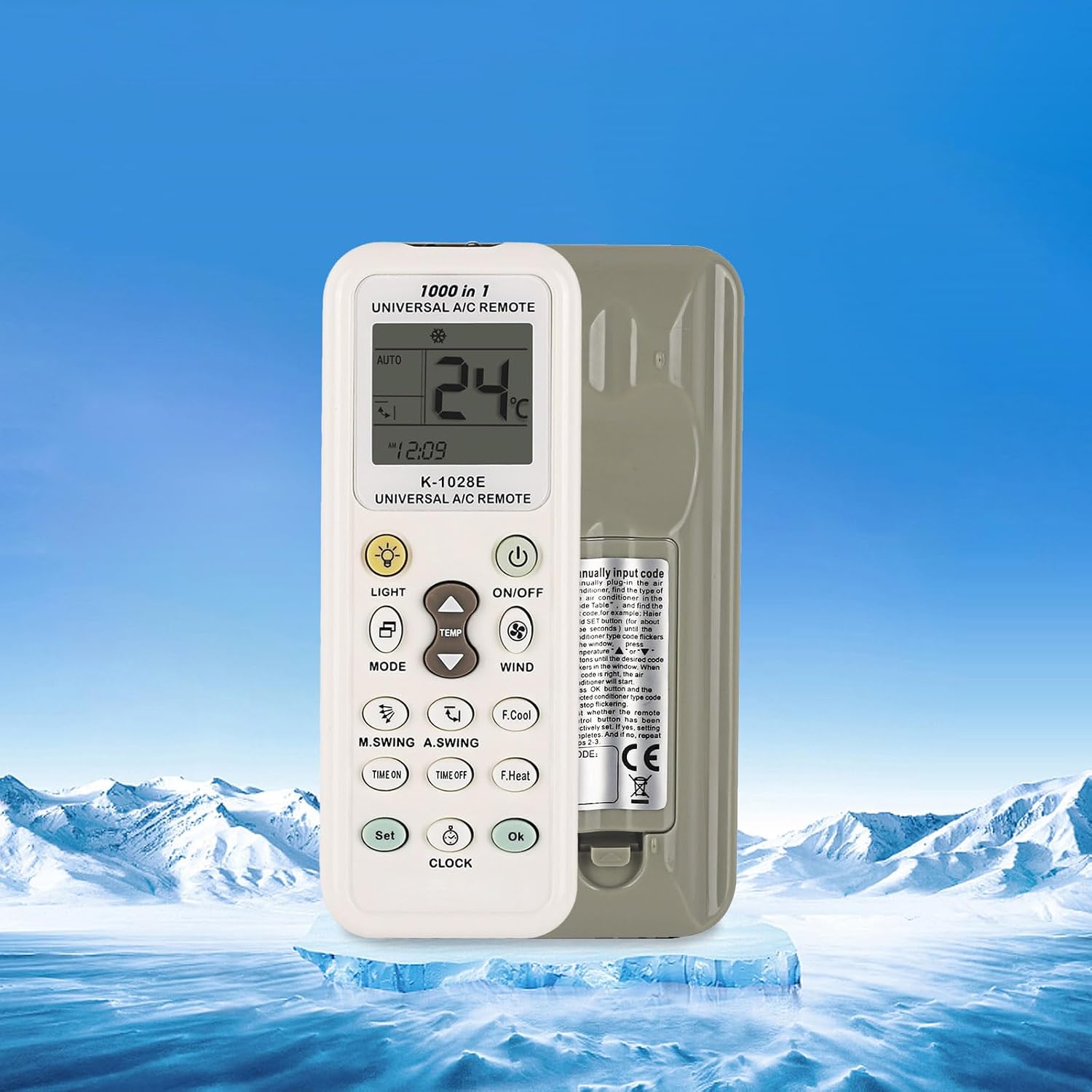
Tukangeun view of the K-1028E remote control, indicating the battery compartment location.
Métode Programming
The K-1028E remote control offers four methods for programming to your air conditioner. If the remote does not work directly, follow one of these programming procedures.
1. Brand Button Programming
This method uses a dedicated button for specific brands.
- Pastikeun AC anjeun hurung.
- Press and hold the brand-specific button (if available for your AC brand) on the remote.
- Release the button when your air conditioner responds (e.g., beeps or turns on/off).
- Test basic functions like ON/OFF and temperature adjustment. If successful, programming is complete.
2. Automatic Search Programming
This method scans through codes automatically.
- Pastikeun AC anjeun hurung.
- Press and hold the 'SET' button for approximately 3-5 seconds until the code on the remote's display starts flashing.
- The remote will automatically transmit codes. Point the remote at your air conditioner.
- When your air conditioner responds (e.g., beeps or turns on/off), immediately press the 'OK' button to confirm the code.
- Test basic functions. If successful, programming is complete.
3. Manual Code Input Programming
This method requires you to manually enter a known code for your AC brand.
- Pastikeun AC anjeun hurung.
- Refer to the code list provided with your remote (not included in this manual) to find the code(s) for your air conditioner brand.
- Press and hold the 'SET' button for approximately 3-5 seconds until the code on the remote's display starts flashing.
- Use the 'Temperature +' or 'Temperature -' buttons to input the 3-digit code.
- Once the code is entered, press the 'OK' button to confirm.
- Test basic functions. If successful, programming is complete. If not, try the next code for your brand.
4. Manual Code Search Programming
This method allows you to manually cycle through codes.
- Pastikeun AC anjeun hurung.
- Press and hold the 'SET' button for approximately 3-5 seconds until the code on the remote's display starts flashing.
- Repeatedly press the 'SET' button (or 'Temperature +' button) to advance through the codes one by one. Point the remote at your air conditioner.
- When your air conditioner responds (e.g., beeps or turns on/off), immediately press the 'OK' button to confirm the code.
- Test basic functions. If successful, programming is complete.
Parentah Operasi
Familiarize yourself with the remote's buttons and display for optimal use.

Detailed diagram of the K-1028E remote control, labeling each button and display element for easy identification and operation.
Fungsi Tombol:
- ON/OFF: Ngahurungkeun atanapi mareuman AC.
- MODÉ: Cycles through operating modes (e.g., Auto, Cool, Dry, Fan, Heat).
- TEMP ▲/▼: Saluyukeun setelan suhu kaluhur atanapi kahandap.
- ANGIN: Saluyukeun laju kipas.
- CAHAYA: Turns the remote's backlight or AC display light on/off.
- F.Cool (Fast Cool): Activates a rapid cooling function.
- F.Heat (Fast Heat): Activates a rapid heating function.
- TIME ON: Nyetél timer supados AC hurung.
- WAKTU PUTUS: Nyetél timer supados AC pareum.
- SET: Used for programming and setting various functions.
- JAM: Sets the current time on the remote.
- OKÉ: Confirms selections or settings.
- M.SWING (Manual Swing): Controls the horizontal swing of the air conditioner's louvers.
- A.SWING (Auto Swing): Activates or deactivates automatic vertical swing of the air conditioner's louvers.
Indikator tampilan:
- Suhu Témbong: Némbongkeun suhu ayeuna atawa disetel.
- Wind Strength Display: Indicates the fan speed setting.
- Kode Mesin: Displays the currently selected or programmed code.
- Jam: Némbongkeun waktu ayeuna.
- Mode Icons: Indicate the active operating mode (e.g., snowflake for cool, sun for heat).

The K-1028E remote control operating an air conditioner, illustrating its cooling and heating functionalities.
Pangropéa
Ngagantian batré:
Replace batteries when the remote's display becomes dim or the remote stops responding. Always replace both batteries at the same time with new AAA batteries. Do not mix old and new batteries or different types of batteries.
beberesih:
Ngusap kadali jauh ku lawon lemes, garing. Ulah make pembersih cair atawa bahan abrasive, sabab ieu bisa ngaruksak beungeut jauh atawa komponén internal.
Pamérésan masalah
- Remote not responding to AC unit:
- Pariksa naha batréna leres dipasang sareng gaduh kakuatan anu cekap. Ganti lamun perlu.
- Pastikeun teu aya halangan antara remot sareng panarima AC.
- Verify that the remote is programmed to the correct code for your air conditioner. Re-attempt programming if unsure.
- Tampilan taram atanapi kosong:
- Ganti batréna ku nu anyar.
- Air conditioner responds incorrectly to commands:
- The remote may be programmed with an incorrect or partially compatible code. Try re-programming using a different code for your brand.
spésifikasi
| Nomer modél | K-1028E |
| merek | JKZTJOF |
| Alat nu cocog | Universal Air Conditioners (over 1000 brands) |
| Alat anu teu cocog | Jandéla sareng AC Portabel |
| Sumber Daya | 2 x Batré AAA (teu kalebet) |
| Item Beurat | 1.76 ons |
| Ukuran Paket | 5.12 x 0.79 x 0.47 inci |
| Fitur husus | Ergonomic Design, Large Screen Display, LED Light |
Garansi sareng Rojongan
For warranty inquiries or product support, please contact the manufacturer or your point of purchase. If you have any questions, please feel free to reach out for assistance.