
1. Bubuka
Thank you for choosing the FLEXISPOT L-Shaped Electric Standing Desk. This manual provides essential information for the safe assembly, operation, and maintenance of your new desk. Please read these instructions carefully before use and retain them for future reference. This desk is designed to provide a versatile and ergonomic workspace, allowing seamless transitions between sitting and standing positions.
2. Parentah Kasalametan
Pikeun mastikeun operasi anu aman sareng nyegah tatu atanapi karusakan, mangga perhatoskeun pedoman kaamanan ieu:
- Pastikeun yén sadaya komponén dipasang sacara aman sateuacan dianggo.
- Jauhkeun barudak sareng piaraan tina méja nalika dianggo.
- Do not place hands or other body parts near moving parts of the desk frame.
- Avoid overloading the desk. The maximum load capacity is 80 kg.
- Ulah diuk atawa nangtung dina meja.
- Anggo méja ngan ukur di jero rohangan dina lingkungan anu garing.
- Pegatkeun sambungan kakuatan saméméh beberesih atawa perawatan.
- Upami aya bagian anu ruksak atanapi leungit, langsung hubungi layanan palanggan. Tong nyobian ngalereskeun méja nyalira.
3. Eusi Paket
Please verify that all parts are present and undamaged before beginning assembly. Refer to the assembly diagram for a complete list of components.
- L-Shaped Desktop (2 parts)
- 4-Leg Frame (Dual Motor Mechanism)
- Panel Control calakan
- Adaptor Daya sareng Kabel
- Parabot Perakitan (sekrup, alat, jsb.)
- Manual pamaké
4. Setup jeung Majelis
Assembly typically requires two people. Follow these steps carefully:
- Ngabongkar komponén: Cabut sadaya bagian tina bungkusna kalayan ati-ati teras simpen dina permukaan anu lemes sareng bersih pikeun nyegah goresan.
- Assemble the 4-Leg Frame: Connect the frame components according to the included diagram. Ensure all bolts are tightened securely. The 4-leg design provides enhanced stability.
- Install Dual Motor Mechanism: The dual motor system is integrated into the frame. Ensure all motor connections are secure. This mechanism allows for smooth and precise height adjustments.
- Gantelkeun Panel Desktop: Carefully place the two desktop panels onto the assembled frame. Align the pre-drilled holes and secure the desktop to the frame using the provided screws. The L-shaped design offers ampruang gawé.
- Pasang Panel Kontrol: Attach the intelligent control panel to the underside of the desktop in an easily accessible location. Connect the control panel cable to the main control box.
- Sambungkeun Kakuatan: Plug the power adapter into the control box, then plug the power cord into a standard electrical outlet.
- Initial Reset: After connecting power, perform an initial reset. Press and hold the 'Reset' button (usually marked with a circular arrow) until the desk reaches its lowest position and then slightly rises. This calibrates the desk.
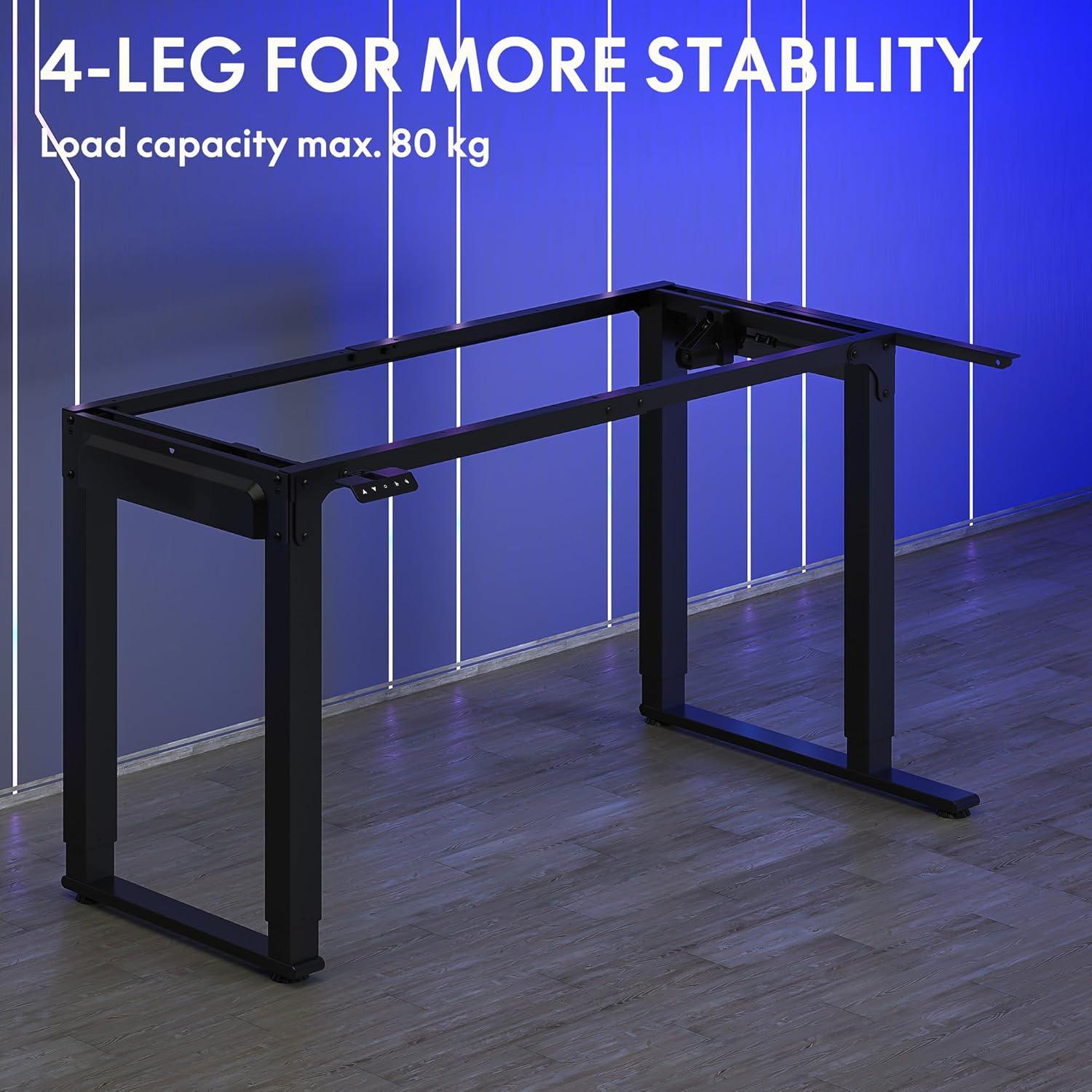
Image: The robust 4-leg frame provides superior stability for the L-shaped standing desk.

Image: Detail of the dual-motor mechanism, ensuring accurate and smooth height positioning.
5. Parentah Operasi
Your FLEXISPOT L-Shaped Electric Standing Desk features an intelligent control panel for easy height adjustment and memory presets.
5.1 Fungsi Panel Control

Image: The intelligent control panel with clearly labeled buttons for desk operation.
- Tombol Luhur/Turun (▲ / ▼): Press and hold to continuously adjust the desk height up or down. Release to stop at the desired height.
- Reset Button (↺): Used for initial calibration or to reset the desk if an error occurs. Press and hold until the desk moves to its lowest point and slightly rises.
- Sitting Preset Button (👭): Press to automatically move the desk to your programmed sitting height.
- Standing Preset Button (👭 with upward arrow): Press to automatically move the desk to your programmed standing height.
5.2 Nyetél mémori prasetél
To save your preferred sitting or standing height:
- Atur méja kana jangkungna anu dipikahoyong nganggo tombol Luhur/Turun.
- Press and hold the desired preset button (Sitting or Standing) for approximately 3-5 seconds until you hear a beep or see the display flash. This indicates the height has been saved.

Image: The desk can be adjusted from a minimum height of 72cm to a maximum of 117cm.

Image: The spacious L-shaped desktop (180cm x 110cm) provides ample room for multiple computers and accessories.
6. Pangropéa
Pangropéa rutin mastikeun umur panjang sareng kinerja anu optimal tina méja anjeun.
- beberesih: Lap méja sareng pigura nganggo kaén anu lemes,amp lawon. Hindarkeun bahan kimia anu kasar atanapi pembersih abrasive.
- Pamariksaan: Pariksa sadaya sekrup sareng sambungan sacara berkala pikeun mastikeun éta pageuh. Kencengkeun deui upami diperyogikeun.
- Manajemén Kabel: Ensure power cables and other device cables are properly managed to prevent entanglement or damage during height adjustments.
- Perawatan Motor: The dual motors are designed for durability. Avoid obstructing the desk's movement or exceeding the weight limit to prevent strain on the motors.

Image: The desk features safe and stylish rounded corners.
7. Cara ngungkulan
Upami anjeun ngalaman masalah sareng méja anjeun, tingali masalah sareng solusi umum ieu:
| Masalah | Mungkin Cukang lantaranana | Solusi |
|---|---|---|
| Méja teu obah. | Power cable disconnected; Control panel cable loose; Overload protection activated. | Check power connections; Ensure control panel cable is secure; Reduce weight on desk and perform a reset. |
| Méja obah teu rata atawa ngaluarkeun sora anu teu biasa. | Unbalanced load; Loose connections; Obstruction. | Distribute weight evenly; Check and tighten all frame connections; Remove any obstructions. Perform a reset. |
| Preset jangkungna teu tiasa dianggo. | Preset teu disimpen kalawan bener. | Re-save the desired height by holding the preset button until confirmation. |
| Méja eureun di tengah gerakan. | Overload protection; Overheating protection. | Reduce weight on the desk. Allow the desk to cool down for 20-30 minutes if it has been used continuously. |
Upami masalahna teras-terasan saatos nyobian solusi ieu, mangga ngahubungi dukungan palanggan FLEXISPOT.
8. Spésifikasi
| Fitur | Rincian |
|---|---|
| Nomer modél | QS2LB-1811 |
| merek | FLEXISPOT |
| Tipe Méja | L-ngawangun Electric nangtung meja |
| Tipe Motor | Motor Ganda |
| Jinis pigura | 4-Leg Frame |
| Jangkungna adjustment Range | 72 cm nepi ka 117 cm |
| Diménsi Desktop (P x L) | 180 cm x 110 cm |
| Kapasitas beban maksimum | 80 kg |
| Tingkat Noise | <50 dB |
| Bahan | Baja Paduan (Pigura) |
| Warna | Hideung |
| Item Beurat | 30 kg |
9. Garansi jeung Rojongan
FLEXISPOT products are designed for quality and durability. For specific warranty information, please refer to the warranty card included with your purchase or visit the official FLEXISPOT website. If you require technical assistance, have questions about assembly, or need to report a missing/damaged part, please contact FLEXISPOT customer support directly. Ensure you have your model number (QS2LB-1811) and purchase details available when contacting support.
Inpormasi kontak: Please refer to the contact details provided on the FLEXISPOT official websitus wéb atanapi dokuméntasi pameseran anjeun pikeun saluran dukungan anu pangénggalna.