
VeriFone MSC445-032-01-A
VeriFone M400 Multiport Berg Adapter and Cable Assembly User Manual
Model: MSC445-032-01-A
Produk Leuwihview
The VeriFone M400 Multiport Berg Adapter and Cable Assembly (MSC445-032-01-A) is designed to provide enhanced connectivity for Verifone Vx820 devices. This assembly includes an Ethernet Latch Lock 6P Din F 2M Cable, facilitating reliable data transmission and connection management. It is an essential component for integrating your Verifone Vx820 terminal into a network infrastructure.
fitur konci ngawengku:
- Ethernet Latch Lock 6P Din F 2M Cable for Verifone Vx820
- Part Number: CBL282-060-01-A
- Panjang kabel: 2 Méter
Parentah Setup
Follow these steps to properly set up your VeriFone M400 Multiport Berg Adapter and Cable Assembly:
- Unpack the Assembly: Carefully remove the VeriFone M400 Multiport Berg Adapter and Cable Assembly from its packaging. Inspect for any visible damage.
- Identipikasi palabuhan: Locate the Ethernet Latch Lock 6P Din F connector on the cable and the corresponding port on your Verifone Vx820 device. The adapter itself features multiple Ethernet ports for connection.
- Connect to Verifone Vx820: Insert the Ethernet Latch Lock 6P Din F connector of the cable into the designated port on your Verifone Vx820 terminal. Ensure the latch locks securely into place to prevent accidental disconnection.
- Sambungkeun kabel jaringan: Use standard Ethernet cables (not included) to connect your network devices (e.g., router, switch) to the Ethernet ports on the Multiport Berg Adapter. The adapter typically has multiple numbered ports (e.g., 1, 2, 3) as shown in the image below.
- Panempatan Aman: Place the adapter in a stable location, ensuring cables are not strained or kinked.
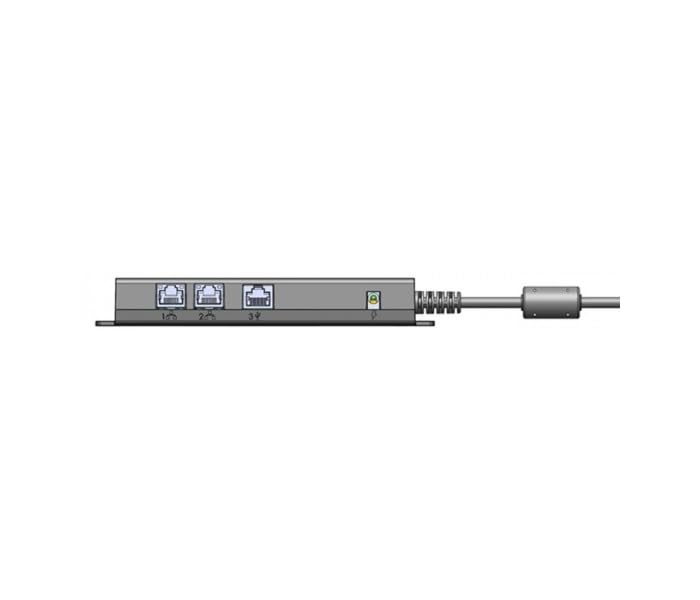
Image: The VeriFone M400 Multiport Berg Adapter showing its three Ethernet ports (labeled 1, 2, 3) and the attached cable assembly extending to the right. This adapter facilitates multiple network connections for compatible devices.
Parentah Operasi
Once the VeriFone M400 Multiport Berg Adapter and Cable Assembly is properly connected, its operation is largely passive, facilitating network communication for the connected Verifone Vx820 device.
- Konektipitas Jaringan: The adapter acts as a bridge, allowing the Verifone Vx820 to communicate with your network via the connected Ethernet cables.
- Pangiriman Data: Data will flow through the adapter to and from the Verifone Vx820 terminal, enabling transactions and other network-dependent functions.
- Indikator Status: Some network devices or the Verifone Vx820 itself may have LED indicators to show network activity or connection status. Refer to the Verifone Vx820 manual for specific indicator meanings.
Pangropéa
The VeriFone M400 Multiport Berg Adapter and Cable Assembly requires minimal maintenance to ensure optimal performance and longevity.
- beberesih: Periodically wipe the adapter and cable with a soft, dry, lint-free cloth. Do not use liquid cleaners, aerosols, or harsh chemicals, as these can damage the components.
- Pamariksaan kabel: Regularly inspect the cable for any signs of wear, fraying, or damage. Ensure the connectors are clean and free of debris.
- Kaayaan Lingkungan: Store and operate the adapter in a dry environment, away from extreme temperatures, direct sunlight, and excessive dust.
- Sambungan Aman: Ensure all cable connections remain secure. Loose connections can lead to intermittent network issues.
Pamérésan masalah
If you encounter issues with your VeriFone M400 Multiport Berg Adapter and Cable Assembly, consider the following troubleshooting steps:
- Henteu aya konektipitas jaringan:
- Verify that the Ethernet Latch Lock cable is securely connected to both the Verifone Vx820 and the adapter.
- Ensure that the Ethernet cables from your network devices are properly plugged into the adapter's ports.
- Check the status of your network router or switch to confirm it is operational.
- Try using different Ethernet cables to rule out faulty cables.
- Sambungan Intermittent:
- Pariksa sadaya sambungan kabel, naha aya anu kendor.
- Ensure the cable is not bent sharply or pinched, which can damage internal wires.
- Pariksa gangguan éléktromagnétik tina alat éléktronik anu sanés.
- Ruksakna Fisik:
- If the adapter or cable shows signs of physical damage, discontinue use and contact support for replacement.
spésifikasi
| Fitur | Rincian |
|---|---|
| merek | VeriFone |
| Nomer modél | MSC445-032-01-A |
| Alat nu cocog | Verifone Vx820, Router |
| Tipe Kabel | Multiport Berg Adaptor, Ethernet Latch Lock 6P Din F 2M Cable |
| Tipe Panyambung | Ethernet |
| Panjang kabel | 2 méter |
| Item Beurat | 1 pon |
Émbaran jaminan
This VeriFone product is covered by a standard manufacturer's warranty. For specific details regarding warranty terms, duration, and claim procedures, please refer to the documentation provided with your original purchase or visit the official VeriFone websitus. Simpen bukti pameseran anjeun pikeun klaim garansi.
Rojongan Palanggan
For technical assistance, troubleshooting beyond this manual, or inquiries regarding your VeriFone M400 Multiport Berg Adapter and Cable Assembly, please contact VeriFone customer support. Contact information can typically be found on the official VeriFone websitus atanapi dina bungkusan produk.
Ask a question about this manual
Ask about setup, troubleshooting, compatibility, parts, safety, or missing instructions. Manuals+ will review the question and use this page’s manual context to help answer it.