
Bubuka
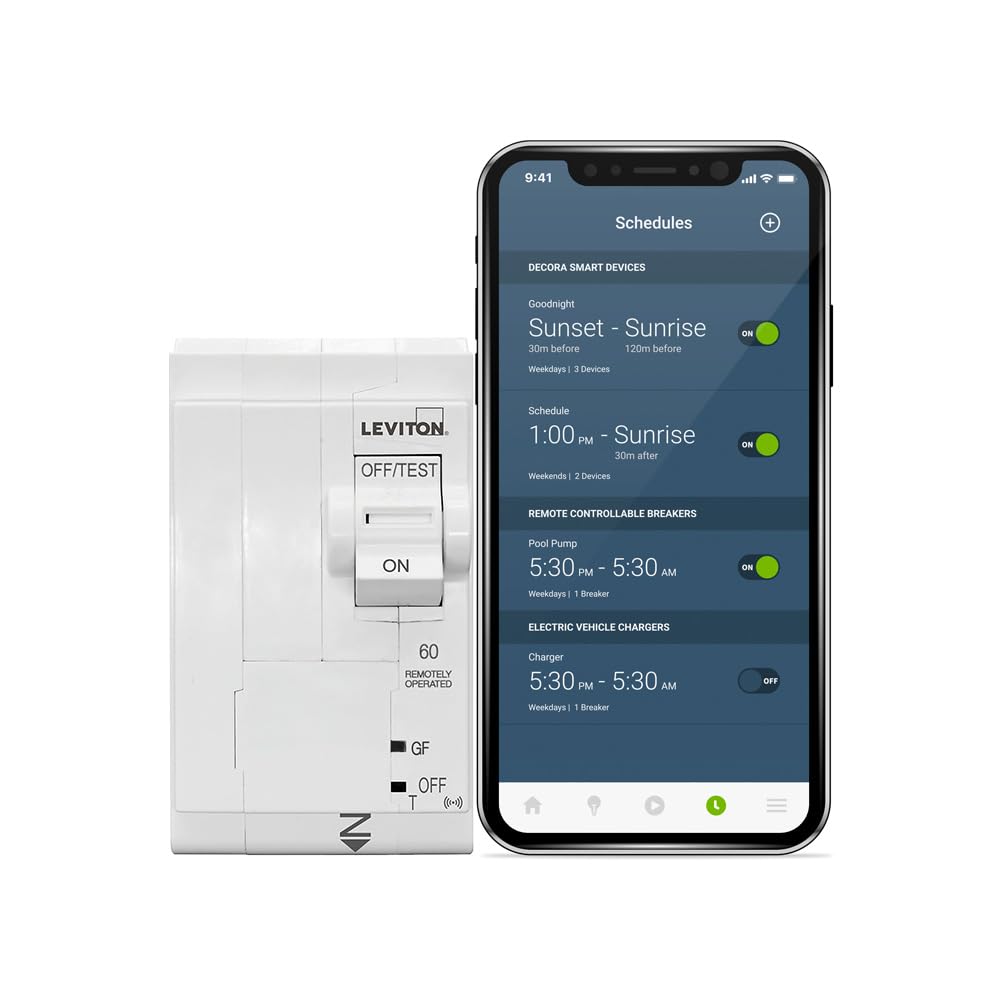
This manual provides essential information for the safe and efficient installation, operation, and maintenance of your Leviton 2nd Generation Smart GFPE (Ground Fault Protection of Equipment) Branch Circuit Breaker, Model LB260-EST. This smart circuit breaker features remote control capabilities and plug-on installation, supporting both 120/208 VAC and 120/240 VAC applications. It is designed to integrate with the My Leviton app for enhanced energy management and safety features.
Émbaran Kasalametan
PERHATOSAN: Risk of electric shock. Installation and servicing of this product must be performed by a qualified electrician. Ensure power is disconnected at the main service panel before installation or maintenance. Failure to follow these instructions may result in serious injury or death.
- Always turn off power at the main circuit breaker before working on electrical circuits.
- Anggo alat pelindung diri (PPE) anu pas.
- Pastikeun sadaya sambungan aman sareng kabelna leres numutkeun kode listrik lokal sareng nasional.
- Ulah ngoperasikeun pemutus sirkuit upami katingalina ruksak.
- This device is intended for use with the Leviton Load Center only.
Naon dina Box
Paket anjeun kedah ngandung barang-barang ieu:
- 1 x Leviton 2nd Gen Smart Circuit Breaker (Model LB260-EST)
- 1 x Pitunjuk Pamasangan (manual ieu)
Setup sareng Instalasi
The Leviton LB260-EST Smart Circuit Breaker is designed for plug-on installation within a Leviton Load Center. A Whole Home Energy Monitor (LWHEM) is required for smart functionality.
- Nyiapkeun Pusat Beban: Ensure all power to the Leviton Load Center is OFF at the main disconnect.
- Wire the Load Center: The Leviton Load Center's design allows for branch phase and neutral connections to be made directly on the panel. Wires can be neatly landed at rough-in without any circuit breakers present, simplifying the wiring process.
- Install the Circuit Breaker: Once wiring is complete, align the LB260-EST circuit breaker with the appropriate slot in the Leviton Load Center. Firmly push the breaker into place until it clicks, ensuring a secure plug-on connection. No additional wiring is required for the breaker itself once the panel is wired.
- Mulangkeun Daya: After all circuit breakers are installed and the panel cover is secured, restore power to the main service panel.
- My Leviton App Integration: Download the My Leviton app from your device's app store. Follow the in-app instructions to connect your Leviton Load Center and LB260-EST Smart Circuit Breaker to your home network. This step requires a Leviton Whole Home Energy Monitor (LWHEM).

Parentah Operasi
Operasi Manual
- Hurungkeun: Push the switch lever to the "ON" position.
- Pareuman: Push the switch lever to the "OFF" position.
- Testing GFPE Function: Press the "TEST" button on the breaker. The breaker should trip to the "OFF" position, indicating the GFPE function is working correctly. Reset by pushing the lever fully to "OFF" then to "ON".
Smart Features (via My Leviton App)
With the My Leviton app and a Whole Home Energy Monitor (LWHEM), you can access advanced features:
- Kadali jauh: Remotely turn the LB260-EST circuit breaker ON or OFF from anywhere using the My Leviton app.
- Circuit Scheduling: Set up custom schedules for your circuits based on time and day to optimize energy usage and save power.
- Ngawas énergi: Gain insightful data on home energy consumption, allowing you to track usage patterns and identify areas for efficiency improvements.
- Electrical Anomaly Notifications: Receive alerts for unusual electrical activity, enhancing safety and allowing for prompt action.
Video: Leviton Load Center Overview. This video demonstrates the features and benefits of the Leviton Load Center, including the easy installation of smart circuit breakers and smart home integration for energy management.
Pangropéa
The Leviton LB260-EST circuit breaker is designed for minimal maintenance. Regular checks can help ensure continued safe operation:
- Monthly GFPE Test: Press the "TEST" button on the circuit breaker monthly to ensure the Ground Fault Protection of Equipment (GFPE) function is operational. If the breaker does not trip, it should be replaced by a qualified electrician.
- Inspeksi Visual: Periodically inspect the circuit breaker for any signs of physical damage, discoloration, or loose connections. If any issues are observed, contact a qualified electrician.
- beberesih: Keep the circuit breaker and surrounding area clean and free of dust and debris. Use a dry cloth for cleaning; do not use liquids or abrasive cleaners.
Pamérésan masalah
If you experience issues with your Leviton LB260-EST Smart Circuit Breaker, consider the following:
- Breaker Trips: If the breaker trips, it indicates a ground fault or an overload condition. Disconnect appliances or devices on the affected circuit and attempt to reset the breaker by pushing the lever fully to "OFF" then to "ON". If it trips again immediately, there may be a persistent fault or overload. Consult a qualified electrician.
- Taya Daya pikeun Circuit: Ensure the breaker is in the "ON" position. If it is, check the main service panel for any tripped main breakers. If power is still not restored, contact a qualified electrician.
- Masalah Konektipitas Aplikasi:
- Ensure your home Wi-Fi network is active and the signal is strong near the Leviton Load Center.
- Verify that the Whole Home Energy Monitor (LWHEM) is properly installed and connected.
- Check the My Leviton app for any error messages or updates.
- Restart your Wi-Fi router and the Whole Home Energy Monitor.
- Remote Control Teu Gawé: Confirm that the circuit breaker is connected to the My Leviton app and your home network. Check for app updates.
For persistent issues, contact Leviton Customer Support or a qualified electrician.
spésifikasi
| Fitur | Spésifikasi |
|---|---|
| Nomer modél | LB260-EST |
| Peunteun ayeuna | 60 Amps |
| Voltage | 120/240-Volt and 120/208-Volt AC |
| Jumlah kutub | 2 |
| Ngaganggu Peunteun | 10kA |
| Sirkuit Tipe Breaker | GFPE (Ground Fault Protection of Equipment, 30 mA) |
| Tipe Pamasangan | Snap-In Mount (Plug-On) |
| Ukuran produk (D x W x H) | 3.1" x 2" x 3.9" |
| Item Beurat | 1.23 pon |
| Smart Home kasaluyuan | Smart Home Compatible (requires My Leviton app & LWHEM) |
Garansi sareng Rojongan
For detailed warranty information, please refer to the official Leviton website or contact Leviton Customer Support. Keep your purchase receipt as proof of purchase.
Rojongan Palanggan Leviton:
- Websitus: Nganjang ka resmi Leviton websitus pikeun pendaptaran produk, FAQs, jeung sumber rojongan.
- Telepon: Refer to the contact information provided on the Leviton website or product packaging for technical assistance.
Always ensure you are consulting official Leviton resources for the most accurate and up-to-date information.