
Bubuka
This manual provides essential instructions for the Generic Replacement Remote Control. This remote is designed to function as a direct replacement for original remote controls of various Polaroid and AKI television models. Please ensure your original remote matches the appearance of this replacement remote for optimal compatibility and functionality.
Disetél
Pamasangan batré
Remot kontrol ieu peryogi dua (2) batré AAA (teu kalebet) pikeun dioperasikeun. Turutan léngkah-léngkah ieu pikeun masang batréna:
- Teangan tempat panutup kompartemen batré dina tonggong kadali jauh.
- Pencét tab sareng geser panutup ka handap pikeun muka kompartemen.
- Selapkeun dua batré AAA, mastikeun terminal positif (+) jeung négatip (-) align bener jeung markings jero kompartemen nu.
- Geser panutup kompartemen batré deui kana tempatna nepi ka klik aman.
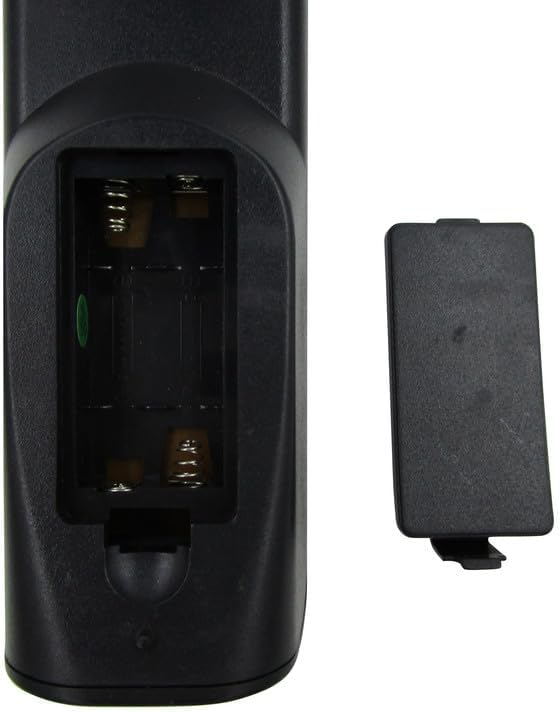
Gambar 1: Open battery compartment of the remote control. Insert two AAA batteries according to polarity markings.
Catetan: Always replace both batteries at the same time. Do not mix old and new batteries or different types of batteries. Remove batteries if the remote will not be used for an extended period.
Parentah Operasi
Once batteries are installed, the remote control is ready for use with compatible television models. Point the remote directly at the TV's infrared sensor.
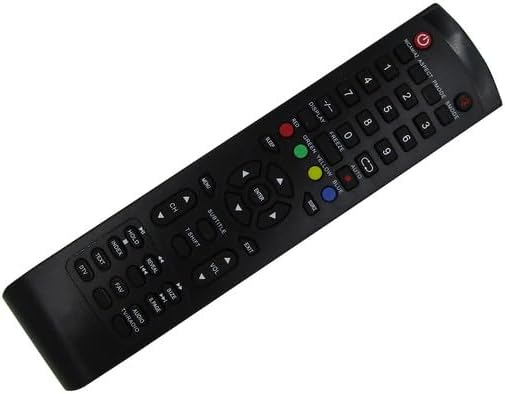
Gambar 2: Hareupeun view tina kadali jauh jeung perenah tombol.
Fungsi dasar:
- kakuatan (●): Ngahurungkeun atawa mareuman televisi.
- Tombol Jumlah (0-9): Pilih saluran langsung.
- CH +/-: Robah saluran sacara berurutan.
- VOL +/-: Saluyukeun tingkat polumeu.
- Bisu: Ngajempékeun atanapi nganonaktipkeun audio televisi.
- SOURCE/INPUT: Milih sumber input (HDMI, AV, jsb.).
- MENU: Ngaksés ménu utama TV.
- Tombol Navigasi (Luhur, Handap, Kénca, Katuhu, ENTER): Napigasi ngaliwatan ménu jeung mastikeun selections.
- KALUAR: Kaluar tina ménu atanapi pungsi ayeuna.
- Color Buttons (RED, GREEN, YELLOW, BLUE): Used for specific functions within certain TV menus or smart features, if supported by your TV model.
For advanced functions or specific TV features, refer to your television's original user manual, as this replacement remote provides standard infrared control.
Pangropéa
beberesih:
Pikeun ngabersihkeun remot kontrol, anggo lawon anu lemes sareng garing. Pikeun kokotor anu bandel, usap sakedikampen the cloth with water or a mild cleaning solution. Do not use abrasive cleaners, alcohol, or solvents, as these can damage the remote's surface or internal components.
Panyimpenan:
Store the remote control in a cool, dry place away from direct sunlight and extreme temperatures. If the remote will not be used for an extended period, remove the batteries to prevent leakage and potential damage.
Pamérésan masalah
- Jauh teu ngabales:
- Ensure the remote is pointed directly at the TV's infrared sensor.
- Check the batteries. Replace them if they are old or depleted. Refer to the Pamasangan batré bagian.
- Verify there are no obstructions between the remote and the TV.
- Sababaraha tombol teu jalan:
- This replacement remote is designed for basic TV functions. Some advanced or smart TV features may not be supported if they require specific codes or functions not present on this generic remote.
- Clean the remote's surface, especially around the unresponsive buttons, to ensure no debris is interfering.
- TV not turning on/off:
- Confirm the TV is plugged into a power source and is not in standby mode due to a power outage.
- Ensure the remote's batteries are fresh and correctly installed.
Lamun masalah persist sanggeus nuturkeun léngkah ieu, mangga ngahubungan rojongan customer.
spésifikasi
| merek | Generik |
| Nomer modél | Easytry22233 |
| Alat nu cocog | Television (Various Polaroid and AKI models) |
| Téhnologi konektipitas | Infrabeureum (IR) |
| Rentang maksimum | 8 méter |
| Jumlah batré diperlukeun | 2 AAA |
| Warna | Hideung |
| Fitur husus | Ergonomis, Panggantian |
Émbaran jaminan
Produk ieu hadir kalawan a garansi 90 poé from the date of purchase. This warranty covers manufacturing defects and ensures hassle-free returns for eligible issues. Please retain your proof of purchase for warranty claims.
Rojongan Palanggan
For any questions, concerns, or troubleshooting assistance not covered in this manual, please contact the seller or manufacturer directly. Provide your product model number (Easytry22233) and details of your issue for prompt support.