
Bubuka
This manual provides essential information for the safe and efficient assembly, operation, and maintenance of your ErGear Electric Standing Desk with Drawers, Model EGESD38V-US. Please read all instructions carefully before use and retain this manual for future reference.
Émbaran Kasalametan
To ensure safe operation and prevent damage, observe the following guidelines:
- Ensure proper assembly according to the instructions provided.
- Ulah ngaleuwihan wates beurat maksimum 132 pon.
- Anchor the desk if using at maximum height for enhanced stability.
- Jauhkeun barudak sareng piaraan tina méja nalika ngatur jangkungna.
- Ensure no obstacles are in the path of the desk during movement to prevent collisions.
Fitur produk
Your ErGear Electric Standing Desk is designed with several features to enhance your workspace:
- Ultimate Stability: Crafted with automotive-grade cold-rolled steel and a powerful motor tested to withstand 50,000 lift cycles, ensuring durable and reliable support for up to 176 lbs of weight.
- C-Clamp Gunung cocog: Designed with an extended 2.95″ rear edge, compatible with C-clamp monitor mounts on the top platform. Monitors can also be placed directly on the stand to elevate screens closer to eye level.
- Customize Your Height: Features a wide adjustable height range from 28″ to 47″ tall, allowing easy switching between sitting and standing work positions.
- Triple Desktop Storage: Boasts a deeper 27.3″ desktop with two drawers for concealed storage. Includes an open storage cubicle for keyboard, mouse, and accessories, and an integrated monitor riser.
- Loaded with Ergonomic Features: Includes 4 custom height presets for one-press adjustment. Raised anti-drop edges keep items secure, and advanced anti-collision detection helps avoid damage during height adjustment.
Dimensi produk
Tingali diagram di handap ieu kanggo dimensi produk anu langkung lengkep.
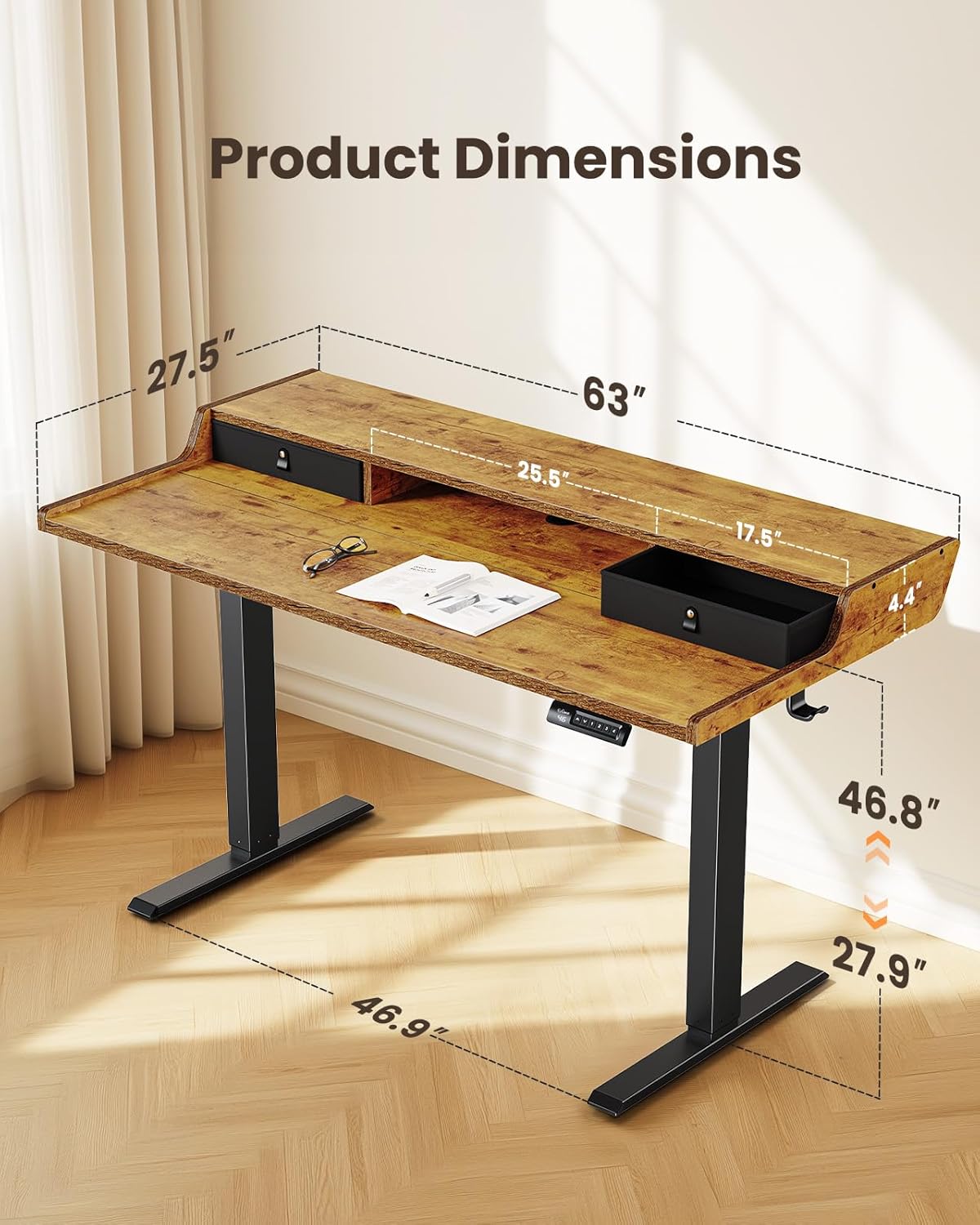
- Item Dimensi: 28 x 63 x 28.3 inci (Jerona x Lebar x Jangkungna)
- Jangkungna minimum: 28 inci
- Jangkungna maksimum: 47 inci
- Ketebalan Tabletop: 15 milimeter
- Gawé Surface Diagonal Panjang: 70.71 inci
Setup sareng Majelis
Follow these steps to assemble your ErGear Electric Standing Desk. For a visual guide, please refer to the assembly video below.
Léngkah-léngkah Majelis:
- Disadiakeun Bagian jeung Hardware: Unpack all components and verify against the parts list in your physical manual. Ensure all parts are present and undamaged before proceeding.
- Step 1: Assembling the Frame: Attach the motor and crossbar to the desk legs using the provided screws. Ensure all connections are secure.
- Step 2: Assembling the Top Stand: Secure the side supports to the main monitor stand panel using the dowels and screws.
- Step 3: Assembling the Desktop: Connect the two main desktop panels using the wooden dowels and metal plates. Press firmly to ensure no gap remains between the panels. Attach the side panels of the desktop.
- Step 4: Attaching the Desktop to the Frame: Carefully place the assembled desktop onto the frame. Align the screw holes and secure the desktop to the frame using the provided screws. Attach the headphone hook.
- Step 5: Connecting the Cables: Connect the motor cables to the control box. Route the cables neatly using the cable management grommets and ties. Insert the cable hole cover.
- Step 6: Attaching the Drawers: Place the fabric drawers into their designated slots on the desktop.
Parentah Operasi
Your ErGear Electric Standing Desk features an intuitive control panel for easy height adjustment and preset management.
Penyesuaian Jangkungna:
- Use the up (▲) and down (▼) arrows on the control panel to manually adjust the desk height.
- The desk has a wide adjustable height range from 28 inches to 47 inches.
Jangkungna anu tos disetel:
The desk offers 4 custom height presets for quick transitions between your preferred sitting and standing positions.
- To Set a Preset: Adjust the desk to your desired height. Press the 'M' button, then press one of the number buttons (1, 2, 3, or 4) within 3 seconds. The height is now saved to that preset.
- Pikeun Nganggo Preset: Kantun pencét tombol angka anu saluyu (1, 2, 3, atanapi 4) pikeun otomatis mindahkeun méja ka jangkungna anu disimpen.

Deteksi Anti Tabrakan:
The desk is equipped with advanced anti-collision detection. If the desk encounters an obstacle during height adjustment, it will automatically stop and reverse slightly to prevent damage to the desk or surrounding objects.
Pangropéa
Regular maintenance ensures the longevity and optimal performance of your standing desk:
- beberesih: Ngusap beungeut meja ku hipu, damp lawon. Hindarkeun pembersih abrasive atanapi bahan kimia kasar anu tiasa ngarusak finish.
- Manajemén Kabel: Periodically check and organize cables to prevent tangling or interference with the desk's movement.
- Pengikat: Ensure all screws and fasteners are tight. Retighten if necessary to maintain stability.
- Inspeksi Motor: If you notice any unusual noises or irregular movement, discontinue use and contact customer support.
Pamérésan masalah
If you encounter issues with your ErGear Electric Standing Desk, refer to the following common solutions:
- Meja teu gerak: Check if the power cord is securely plugged into both the desk and the wall outlet. Ensure no cables are pinched or disconnected.
- Kode kasalahan dina tampilan: Refer to your physical manual for specific error code meanings and troubleshooting steps. Often, unplugging the desk for 10 seconds and plugging it back in can reset the system.
- Gerakan henteu rata: Pastikeun méja disimpen dina permukaan anu rata. Pariksa yén sadaya komponén suku parantos dipasang pageuh.
- Anti-Collision Triggered Frequently: Ensure there are no objects under or above the desk that could interfere with its movement.
- Noise Salila Operasi: A slight motor hum is normal. Excessive or unusual noise may indicate an issue; contact customer support.
If problems persist after attempting these steps, please contact ErGear customer support.
spésifikasi
| Spésifikasi | Nilai |
|---|---|
| merek | ErGear |
| Nomer modél | EGESD38V-US |
| Wangun | Sagi opat |
| Warna | Vintage Coklat |
| Bahan Dasar | logam |
| Jumlah laci | 2 |
| Dianjurkeun Mangpaat | Kantor, Kaulinan |
| Bahan Leg Jati | Kayu direkayasa |
| Ukuran | 63 x 28 inci |
| Warna Top | coklat |
| Warna Dasar | coklat |
| Komponén Kaasup | Gaming Desk, Dedicated Monitor Stand, Built-in Drawers, Storage Shelf |
| Majelis diperlukeun | Sumuhun |
| Rekomendasi beurat maksimum | 132 pon |
| Ketebalan Tabletop | 15 milimeter |
| Jangkungna Minimum | 28 inci |
| Jangkungna maksimum | 47 inci |
| Jero Item | 28 inci |
| Jinis Bahan Pigura | Baja |
| Mékanisme Angkat | Listrik |
| Pilihan Panyimpenan | Drawers, Open Storage Cubicle |
| Jumlah Posisi Jangkungna | 4 |
| Nyaéta Listrik | Sumuhun |
Garansi sareng Rojongan
ErGear provides a Limited Warranty for this product. For specific details regarding the warranty period and coverage, please refer to the documentation included with your purchase.
For any questions, technical assistance, or warranty claims, please visit the official ErGear Store or contact their customer support directly.