
1. Bubuka
Thank you for choosing the ErGear Electric Standing Desk. This manual provides essential information for the safe assembly, operation, and maintenance of your new desk. Designed for ergonomic comfort and enhanced productivity, this height-adjustable desk features integrated storage and monitor compatibility to optimize your workspace.
2. Émbaran Kasalametan
Mangga baca sagala parentah taliti saméméh assembly sarta pamakéan. Simpen manual ieu pikeun rujukan ka hareup.
- Salawasna turutan parentah assembly taliti.
- Ensure the desk is properly anchored to the floor or wall to prevent tipping.
- Do not exceed the maximum weight recommendation of 176 pounds (80 kg) to maintain stability and prevent damage.
- Jauhkeun barudak sareng piaraan tina méja nalika dianggo pikeun nyegah cilaka.
- Ensure all cables are properly managed to avoid tripping hazards or damage during height adjustments.
- Ulah diuk atawa nangtung dina meja.
3. Fitur Produk
- Pangaluyuan Jangkungna Lemes: Freely select adjustable standing desk height, from 28.35" to 46.46" (71.12 cm to 118 cm). Save your favorite three settings and smoothly switch the electric standing desk between them.
- Dual Drawers: Two integrated drawers provide convenient storage for your essentials, helping to maintain a clutter-free workspace.
- Stabilitas Luar Biasa: Features a sturdy solid steel frame with aerospace-grade lifting column connectors, tested for over 100,000 cycles to ensure stability and security, even at full height.
- Motor anu Ditingkatkeun: Equipped with a powerful motor for lifting performance (Max 176 lbs load) and reliable long-term operation (tested 50,000 times).
- Built-In Monitor Stand: Position your monitor/laptop and speakers or other devices at an ergonomic height.
- C-Clamp Kasaluyuan Gunung: Designed to accommodate C-clamp mounted accessories, such as monitor arms, for flexible setup options.
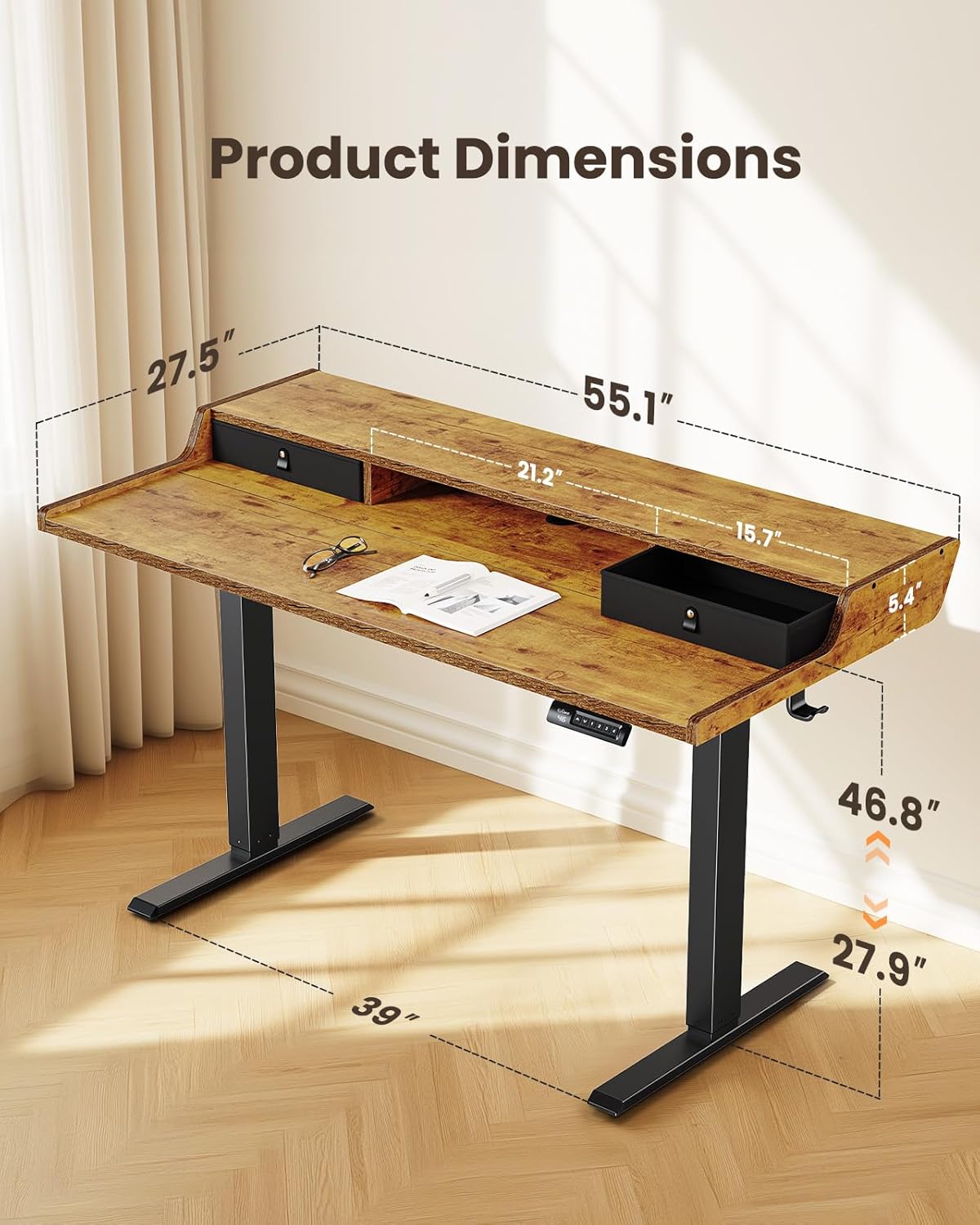
This image illustrates the key dimensions of the ErGear Electric Standing Desk, including its overall width, depth, and adjustable height range.

The desk's electric height adjustment feature is highlighted, showing its ability to transition smoothly between sitting (28 inches) and standing (47 inches) positions.

The desk offers versatile storage solutions, including two integrated drawers, an open cubicle, and a monitor riser to keep your workspace tidy.

The desk is designed with compatibility for C-clamp mounting, allowing users to easily attach monitor arms and other accessories for an optimized setup.
4. Parentah Majelis
For detailed visual guidance, please refer to the official assembly video below. Ensure all parts are present before beginning assembly.
This video provides a step-by-step guide for assembling the ErGear Electric Standing Desk, covering frame assembly, top stand installation, desktop attachment, and cable connections.
Léngkah Majelis Umum:
- Hambalan 1: Assembling pigura
Connect the motor rod to the lifting columns and attach the support beams. Ensure all screws are tightened securely. - Step 2: Assembling the Top Stand
Attach the monitor stand components to the main desktop panel using the provided dowels and screws. - Lengkah 3: Masang Desktop
Join the desktop panels together, ensuring a tight fit without gaps. Secure them with the connecting plates and screws. - Step 4: Attaching the Desktop to the Frame
Carefully place the assembled desktop onto the lifting frame. Align the pre-drilled holes and secure the desktop to the frame using the provided screws. Attach any cable management hooks. - Lengkah 5: Nyambungkeun Kabel
Connect the motor cables to the control box. Route all cables neatly using the integrated cable management features and secure them. - Step 6: Attaching the Drawers
Insert the fabric drawers into their designated slots on the desktop.
5. Parentah Operasi
Your ErGear Electric Standing Desk is equipped with an intuitive control panel for easy height adjustment.
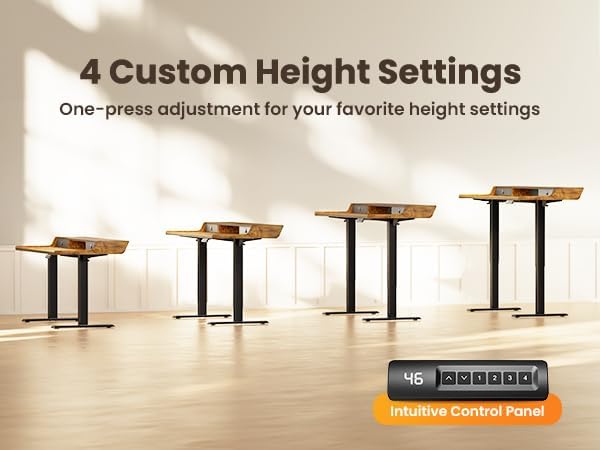
The intuitive control panel allows for easy adjustment of the desk height and features four programmable preset buttons for quick transitions between preferred sitting and standing positions.
Penyesuaian Jangkungna:
- adjustment manual: Use the up (▲) and down (▼) arrow buttons on the control panel to adjust the desk to your desired height.
- Jangkungna anu tos disetel: The desk features four programmable memory presets (1, 2, 3, 4). To save a height setting:
- Saluyukeun meja ka jangkungna pikaresep Anjeun.
- Pencét tombol 'M'. Layar bakal kedip-kedip.
- Press the desired number button (1, 2, 3, or 4) before the display stops flashing. The height is now saved.
- Pikeun nginget jangkungna anu disimpen, cukup pencét tombol angka anu saluyu. Méja bakal otomatis pindah ka posisi anu disimpen.
Hiji leuwihview pidéo casing the features of the ErGear Standing Desk, including its integrated drawers, C-clamp mounting compatibility, and ergonomic benefits for a dynamic workspace.
6. Pangropéa
- Usap permukaan méja sacara rutin nganggo kaén anu lemes,amp lawon. Hindarkeun bahan kimia kasar anu tiasa ngarusak finish.
- Check all screws and connections periodically to ensure they remain tight. Re-tighten if necessary.
- Inspect power cords and cables for any signs of wear or damage. Replace immediately if damage is found.
- Keep the lifting columns free from obstructions to ensure smooth operation.
7. Cara ngungkulan
Upami anjeun ngalaman masalah sareng Meja Standing ErGear Electric anjeun, mangga tingali solusi umum ieu:
- Méja teu ngaréspon: Check if the power cord is securely plugged into both the desk and the wall outlet. Ensure all motor cables are correctly connected to the control box.
- Uneven height or tilting: Perform a reset procedure (refer to your specific model's detailed manual for exact steps, usually involving holding down a specific button or combination of buttons). Ensure the desk is on a level surface.
- Kodeu kasalahan dina tampilan: Consult the detailed user manual for a list of error codes and their corresponding solutions. A common solution is to perform a reset.
- Noise salila operasi: While the motor is designed for quiet operation, minor sounds can occur. Ensure no cables are rubbing against moving parts. If the noise is excessive or unusual, contact customer support.
8. Spésifikasi
| Spésifikasi | Rincian |
|---|---|
| merek | ErGear |
| Warna | Vintage Coklat |
| Ukuran produk (L x W x H) | 139.7 x 71.12 x 71.88 cm (55.1 x 27.5 x 28.3 inci) |
| Rentang Jangkungna adjustable | 28.35" nepi ka 46.46" (71.12 cm nepi ka 118 cm) |
| Item Beurat | 29.5 kg (65 lbs) |
| Max Beban Kamampuh | 176 lbs (80 kg) |
| Bahan | Wood (Top), Metal (Base) |
| Fitur husus | Electric Height Adjustment, Dual Drawers, Built-in Monitor Stand, C-Clamp Gunung Cocog |
This video demonstrates the rigorous quality and durability testing processes that the ErGear Electric Standing Desk undergoes, including BIFMA X5.5, EN527 series testing, pendulum hammer tests, ISTA series packaging tests, radiated emissions tests, EMC tests, EFT immunity tests, harmonic current tests, and semi-anechoic chamber testing for noise improvement.
9. Garansi jeung Rojongan
ErGear products are designed for durability and performance. For warranty information, technical support, or any questions regarding your product, please contact ErGear customer service through the retailer's platform or the official ErGear websitus.
Please have your purchase receipt and product model information ready when contacting support.
This video highlights the versatility and ergonomic design of ErGear products, showcasing how they adapt to various work and lifestyle needs to enhance comfort and productivity.