
Bubuka
This manual provides detailed instructions for the Fuzion Digital Pocket Gram Scale FZ-200 Pro. Designed for precision, this scale offers 0.01g accuracy up to 200g, making it suitable for various applications including weighing food, jewelry, herbs, spices, and coins. Please read this manual thoroughly before using your scale to ensure proper operation and longevity.
Fitur produk
- Timbangan precision: 0.01g accuracy with a capacity from 0.03g to 200g.
- Pangwangunan Premium: Crafted with stainless steel and gold titanium plating for durability and a sleek finish.
- Pro Calibration: Includes a 100g calibration weight for maintaining accuracy.
- Versatile Weighing Modes: Six modes available (g, oz, ozt, dwt, ct, gn) for diverse applications.
- Tare Function & Clear Display: Easy net weight measurement and a backlit LCD for clear readings.
- Portabel sareng Kompak: Lightweight design (140g) for on-the-go use.
Disetél
Pamasangan batré
The Fuzion Digital Pocket Gram Scale requires 2 AAA batteries (included).
- Open the battery compartment cover on the underside of the scale.
- Pasangkeun 2 batré AAA, pastikeun polaritasna bener (+/-).
- Tutup panutup kompartemen batré aman.
Daya Awal Hurung
Pencét éta ON/OFF button to turn the scale on. The display will show "88888" then "0.00g".
Parentah Operasi
Timbangan
- Tempatkeun skala dina permukaan anu rata sareng stabil.
- Pencét éta ON/OFF button to turn the scale on. Wait for "0.00g" to appear.
- Gently place the item to be weighed on the center of the weighing platform.
- Baca beurat dipintonkeun dina layar LCD.

Gambar 1: Leuwihview of weighing, taring, and calibration instructions on the scale's lid.
Fungsi Tare
The tare function allows you to subtract the weight of a container, so you only measure the net weight of its contents.
- Simpen wadah kosong dina platform timbangan.
- Pencét éta TAREUT button. The display will reset to "0.00g".
- Tambahkeun barang anu bakal ditimbang kana wadahna. Pintonan bakal nunjukkeun beurat net barang.

Figure 2: Step-by-step guide for using the tare function.
Ngarobah Unit Timbangan
The scale supports six different weighing modes: grams (g), ounces (oz), troy ounces (ozt), pennyweights (dwt), carats (ct), and grains (gn).
- With the scale turned on and displaying "0.00g", press the MODÉ tombol sababaraha kali.
- The display will cycle through the available units. Stop when your desired unit is shown.
Kalibrasi
For optimal accuracy, periodic calibration is recommended. A 100g calibration weight is included with your scale.
- Turn the scale on and wait for "0.00g".
- Pencét jeung tahan tombol MODÉ button until the display shows "CAL".
- Ngaleupaskeun MODÉ button, then press it again. The display will flash "200.00g" (or the required calibration weight).
- Place the included 100g calibration weight on the center of the platform.
- The display will show "PASS" and then return to normal weighing mode, indicating successful calibration.

Figure 3: Calibrating the scale with the included 100g weight.
Pangropéa
beberesih
Pikeun ngabersihan timbangan, usap ku rada damp lawon. Ulah neuleumkeun skala dina cai atawa make cleaners abrasive.
Panyimpenan
Store the scale in a cool, dry place. The protective cover should be used when not in use to prevent damage to the weighing platform.
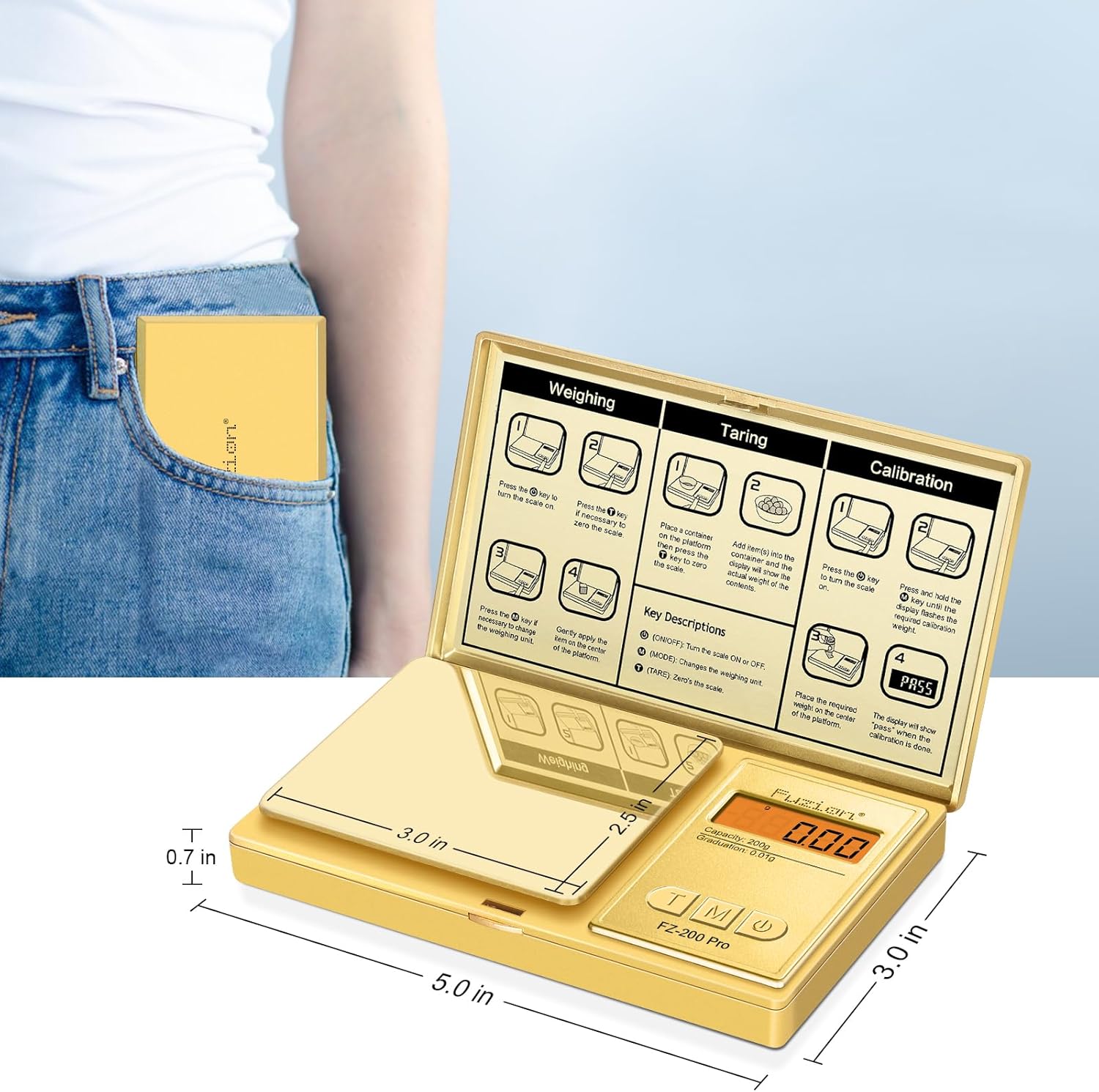
Figure 4: The compact Fuzion scale is easy to store and carry.
Pamérésan masalah
Isu umum jeung Solusi
| Masalah | Solusi |
|---|---|
| Layar nunjukkeun "Lo" | Batteries are low. Replace with new AAA batteries. |
| Display shows "OUE2" | Overload error. Remove excess weight from the platform. |
| Bacaan teu akurat | Ensure the scale is on a flat, stable surface. Recalibrate the scale using the 100g calibration weight. |
| Skala teu hurung | Pariksa pamasangan batré sareng pastikeun batréna henteu béak. |
Lamun masalah persist, mangga ngahubungan rojongan customer.
spésifikasi
Rincian Téknis
- merek: Kaburu
- warna: emas
- Pamakéan anu disarankeun: Food, Coins, Jewelry, Herbs, Spice, Gemstones
- Fitur husus: Tampilan Backlit
- Jenis tampilan: LCD
- Batesan Beurat: 200 gram
- Faktor Bentuk: Mini
- Bahan: Gold Titanium Plating Stainless Steel, ABS
- Akurasi maca: 0.01 gram
- Beurat barang: 8.4 ons (0.24 Kilogram)
- Ukuran produk: 5 x 3 x 0.7 inci
- Batré: 2 batré AAA diperlukeun (kaasup)
- UPC: 628719230268
Garansi sareng Rojongan
Émbaran jaminan
The Fuzion Digital Pocket Gram Scale comes with a two-year warranty. This warranty covers manufacturing defects and ensures reliable performance.
Rojongan Palanggan
For any questions, technical assistance, or warranty claims, please visit the official Fuzion websitus atanapi ngahubungan tim rojongan customer urang.