
1. Bubuka
This manual provides detailed instructions for the setup, operation, and maintenance of your Bmax B6 Power Mini PC. This compact desktop computer is designed for various applications, from office tasks to multimedia consumption, offering a balance of performance and space efficiency.

Image 1.1: The Bmax B6 Power Mini PC, showcasing desain kompak na port hareup.
2. Naon dina Box
Mangga parios eusi pakét anjeun pikeun mastikeun yén sadaya barang aya:
- 1 x Bmax B6 Power Mini PC (16GB+1TB configuration)
- 1 x kabel HDMI
- 1 x Manual Pamaké
- 1 x Adaptor Daya AS
- 1 x VESA Gunung kalawan screws
3. Produk Langkungview
The Bmax B6 Power Mini PC is equipped with advanced components for efficient performance.

Gambar 3.1: Leuwihview of key features including processor, memory, storage, and connectivity.
3.1 Fitur konci
- Prosesor: Intel Core i7-1060NG7, 4 Cores/8 Threads, up to 3.8GHz.
- Mémori: 16GB LPDDR4 RAM.
- Panyimpenan: 1TB NVMe SSD, with support for dual NVMe SSDs and expandable up to 2TB via 2.5" HDD (SATA cable included).
- Grafik: Intel Iris Xe Graphics, supporting 4K@60Hz output.
- Kaluaran tampilan: Supports three simultaneous displays via 2x HDMI 2.0 and 1x Full-Featured Type-C port.
- Konéktipitas nirkabel: Wi-Fi 6 (2.4G/5G 802.11a/b/g/n/ac) and Bluetooth 5.2.
- Konektipitas kabel: 1x Gigabit Ethernet (RJ45).
- Palabuhan: 3x USB 3.0, 1x Full-Featured Type-C, 2x HDMI 2.0, 1x Earphone/Microphone Jack, 1x DC Power Input.
- Fitur tambahan: VESA mount compatibility, Wake On LAN, PXE Boot, RTC Wake, Auto Power On, One-key Smart Recovery.

Image 3.2: Detailed diagram of the front and rear ports and their functions.
4. Setup Guide
4.1 Nyambungkeun périferal
- Sambungkeun tampilan: Use the provided HDMI cable to connect your monitor or TV to one of the HDMI ports on the Mini PC. Alternatively, use a compatible USB-C to display cable for the Type-C port.
- Sambungkeun kibor sareng beurit: Plug your USB keyboard and mouse into the available USB 3.0 ports. For wireless devices, ensure Bluetooth is enabled and pair them as per their instructions.
- Sambungkeun Jaringan (Opsional): For a wired internet connection, connect an Ethernet cable from your router or modem to the RJ45 port on the Mini PC.
- Sambungkeun Kakuatan: Plug the US Power Adapter into the DC power input port on the Mini PC, then plug the adapter into a power outlet.
4.2 Daya Awal Hurung
- Ensure all peripherals are connected.
- Pencét tombol daya anu aya di payuneun Mini PC.
- The system will boot up. Follow the on-screen instructions to complete the Windows setup process. It is recommended to keep the Ethernet cable unplugged during the first boot for faster setup if prompted.
5. Parentah Operasi
5.1 Operasi Dasar
- Hurungkeun/Pareuman: Press the power button to turn on the PC. To turn off, use the Windows Shut Down option or press and hold the power button for 5 seconds.
- Uihan deui: Use the Windows Restart option.
- Modeu Bobo: Use the Windows Sleep option or briefly press the power button.
5.2 Konfigurasi tampilan
The Bmax B6 Power supports up to three 4K@60Hz displays simultaneously.
- Connect your displays to the available HDMI 2.0 ports and the Full-Featured Type-C port.
- Dina Windows, klik-katuhu dina desktop sareng pilih "Setélan tampilan" pikeun ngonpigurasikeun sababaraha tampilan (manjangan, duplikat, atanapi ngan ukur nunjukkeun hiji).

Image 5.1: Illustration of the Mini PC connected to multiple displays, demonstrating its multi-tasking capabilities.
5.3 Konektipitas jaringan
- Wifi: Pikeun nyambung ka jaringan nirkabel, klik ikon Wi-Fi dina taskbar, pilih jaringan anjeun, teras lebetkeun kecap aksesna.
- Ethernet: If an Ethernet cable is connected, the PC will automatically establish a wired network connection.
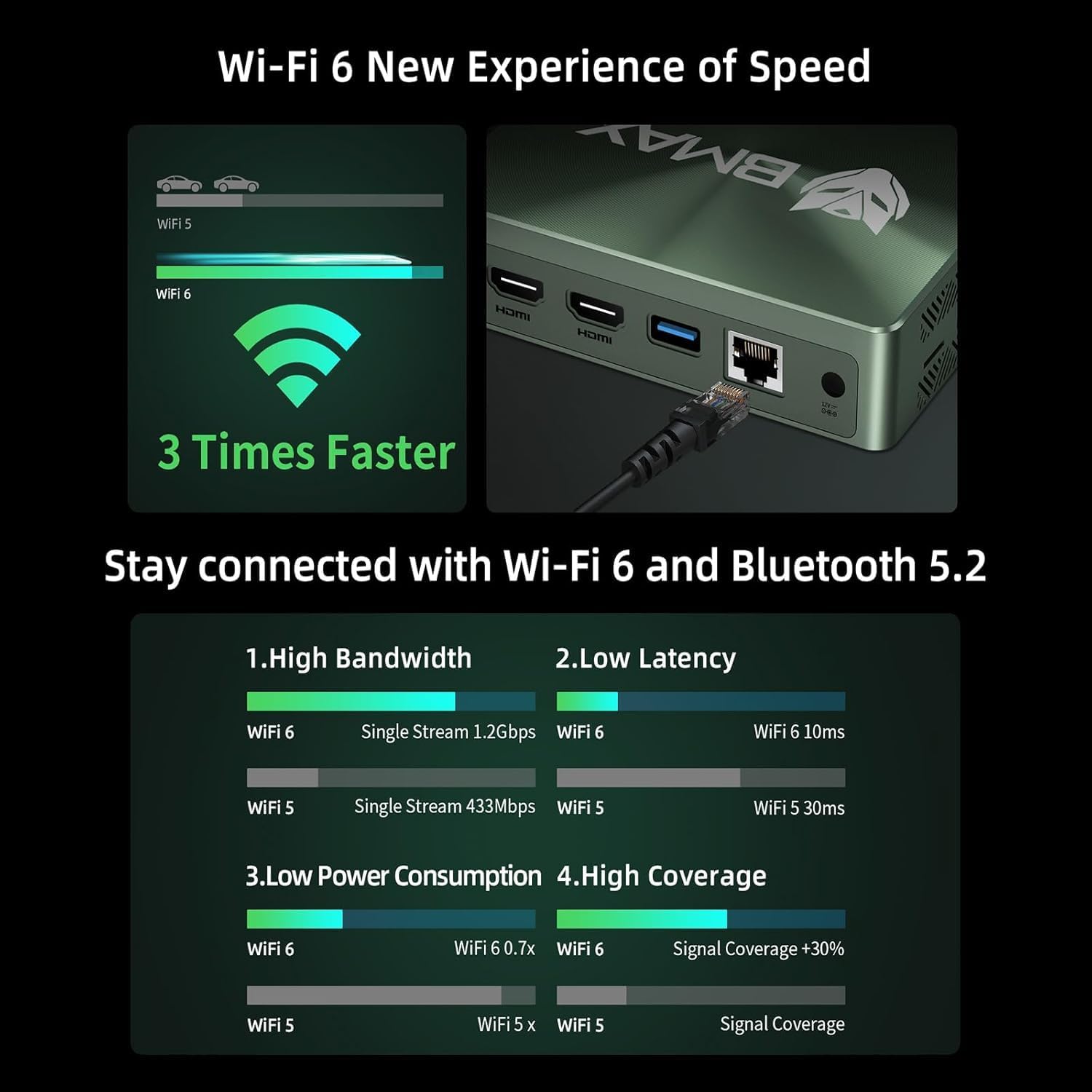
Image 5.2: Visual representation of Wi-Fi 6 and Bluetooth 5.2 capabilities, highlighting speed and connectivity benefits.
6. Pangropéa
6.1 beberesih
- Pastikeun Mini PC pareum sareng dicabut tina colokan sateuacan dibersihkeun.
- Anggo lawon anu lemes sareng garing pikeun ngusap bagian luarna.
- Pikeun ngumpulna lebu dina ventilasi, anggo hawa anu dikomprés. Ulah ngasupkeun barang kana ventilasi.
6.2 Ékspansi gudang
The Bmax B6 Power supports additional storage. You can install a second M.2 NVMe SSD or a 2.5-inch HDD/SSD.
- Refer to the detailed instructions in the included user manual for safe installation of additional storage devices.
- Ensure the device is powered off and unplugged before opening the chassis.

Image 6.1: Diagram illustrating the M.2 NVMe SSD slot and the option for expanded storage.
7. Cara ngungkulan
7.1 Taya Daya
- Pariksa lamun adaptor kakuatan disambungkeun aman ka duanana Mini PC jeung stop kontak kakuatan.
- Pastikeun stop kontak listrik fungsina.
- Coba colokan listrik anu béda.
7.2 Taya Kaluaran Témbongkeun
- Verify that the HDMI or USB-C cable is securely connected to both the Mini PC and the monitor.
- Pastikeun monitor dihurungkeun tur disetel ka sumber input nu bener.
- Coba kabel tampilan atanapi monitor anu sanés upami sayogi.
7.3 System Recovery (One-key Smart Recovery)
If your Windows operating system encounters issues, the Bmax B6 Power features a "Smart Recovery" environment to restore factory settings.
- Step 1: Power On Mini PC.
- Step 2: Enter Recovery Mode. As soon as the screen lights up, immediately and repeatedly press the F9 key until the System Recovery menu appears.
- Step 3: Start the Recovery. Anjeun gaduh dua pilihan:
- Using Keyboard: Press the 'Y' key to begin the Factory Reset.
- Using Mouse: Click the [Restore System] button.
- Step 4: Set Up Windows Once Complete. You will be greeted by the initial Windows setup screen. Simply follow the on-screen instructions to set up your fresh system.

Image 7.1: Screenshot of the Bmax Smart Recovery environment, showing options for Factory Reset and Exit.
8. Spésifikasi
| Fitur | Rincian |
|---|---|
| merek | Bmax |
| Nomer modél | B6 kakuatan |
| Prosesor | Intel Core i7-1060NG7 (4C/8T, up to 3.8 GHz) |
| Ram | 16 GB LPDDR4 |
| Panyimpenan | 1 TB NVMe SSD (expandable up to 2 TB via 2.5" HDD/SSD) |
| Grafika | Grafik Intel Iris Xe (Terpadu) |
| Resolusi layar Max | 3840 x 2160 piksel (4K) |
| Kaluaran tampilan | 2x HDMI 2.0, 1x Full-Featured Type-C (supports triple 4K@60Hz displays) |
| Konéktipitas Wireless | Wi-Fi 6 (802.11a/b/g/n/ac), Bluetooth 5.2 |
| Konektipitas kabel | 1x Gigabit Ethernet (RJ45) |
| palabuhan USB | 3x USB 3.0, 1x Full-Featured Type-C |
| Audio | 1x Earphone/Microphone Jack |
| Sistem operasi | OS (Typically Windows, specific version may vary) |
| Item Beurat | 1.61 pon |
| Warna | Hideung |
| Fitur husus | VESA Mount, Wake On LAN, PXE Boot, RTC Wake, Auto Power On, Smart Recovery |
9. Garansi jeung Rojongan
Bmax provides comprehensive support for your Mini PC.
- Garansi: Your Bmax Mini PC comes with a 12-month warranty.
- Wangsul: Kawijakan mulang barang 30 dinten sayogi.
- Palayanan palanggan: 7x24-hour customer service support is provided.
- Bantosan Téknis: Pangrojong téknis hirupna sayogi.
9.1 Kumaha Ngahubungi Dukungan
For inquiries, system updates, or troubleshooting assistance, please contact customer service through your Amazon account:
- Log in to Amazon.
- Go to "Your Account".
- Navigate to "Your Orders".
- Select the Bmax B6 Power Mini PC order and click "Ask Product Question".

Image 9.1: Information on contacting Bmax after-sales support via Amazon.