
1. Bubuka
Thank you for choosing the TECLAST Mini PC N15. This compact and powerful mini computer is designed for a wide range of applications, from home entertainment and office tasks to creative work and light gaming. Featuring an Intel N5095 processor, 16GB DDR4 RAM, and a 512GB PCI-e 3.0 SSD, it offers efficient performance in a small form factor. This manual provides essential information for setting up, operating, maintaining, and troubleshooting your device.
2. Eusi Paket
Please verify that all items listed below are included in your package. If any items are missing or damaged, please contact TECLAST customer support.
- 1x TECLAST N15 Mini PC
- 1 x Manual Pamaké
- 1 x Kabel HDMI
- 1x VESA Gunung
- 1 x adaptor kakuatan
- 1 x Kabel Daya

Image: Package contents of the TECLAST N15 Mini PC.
3. Produk Langkungview
3.1. Fitur konci
- Prosesor: Intel N5095 (4 Cores, 4 Threads, up to 2.9GHz Turbo Frequency)
- Grafik: Intel UHD Grafika
- Mémori: 16 GB DDR4 RAM
- Panyimpenan: 512GB PCI-e 3.0 SSD
- Konektipitas: Dual 2.5GbE RJ45 Ethernet, Wi-Fi (2.4G+5G ac), Bluetooth 4.2
- Kaluaran Video: Supports up to three 4K displays (HDMI, DisplayPort, Full-Function Type-C)
- Palabuhan: Multiple USB 3.2, USB 2.0, Full-Function Type-C, DisplayPort, HDMI, COM Port, Micro SD Card Reader, Headphone Output, Microphone Input
- Desain: Compact (0.53L volume, 400g weight), Aluminum Body, VESA Mountable

Image: Intel N5095 Processor specifications and architecture.
3.2. Palabuhan sarta Interfaces
The TECLAST N15 Mini PC offers a comprehensive set of ports for versatile connectivity:
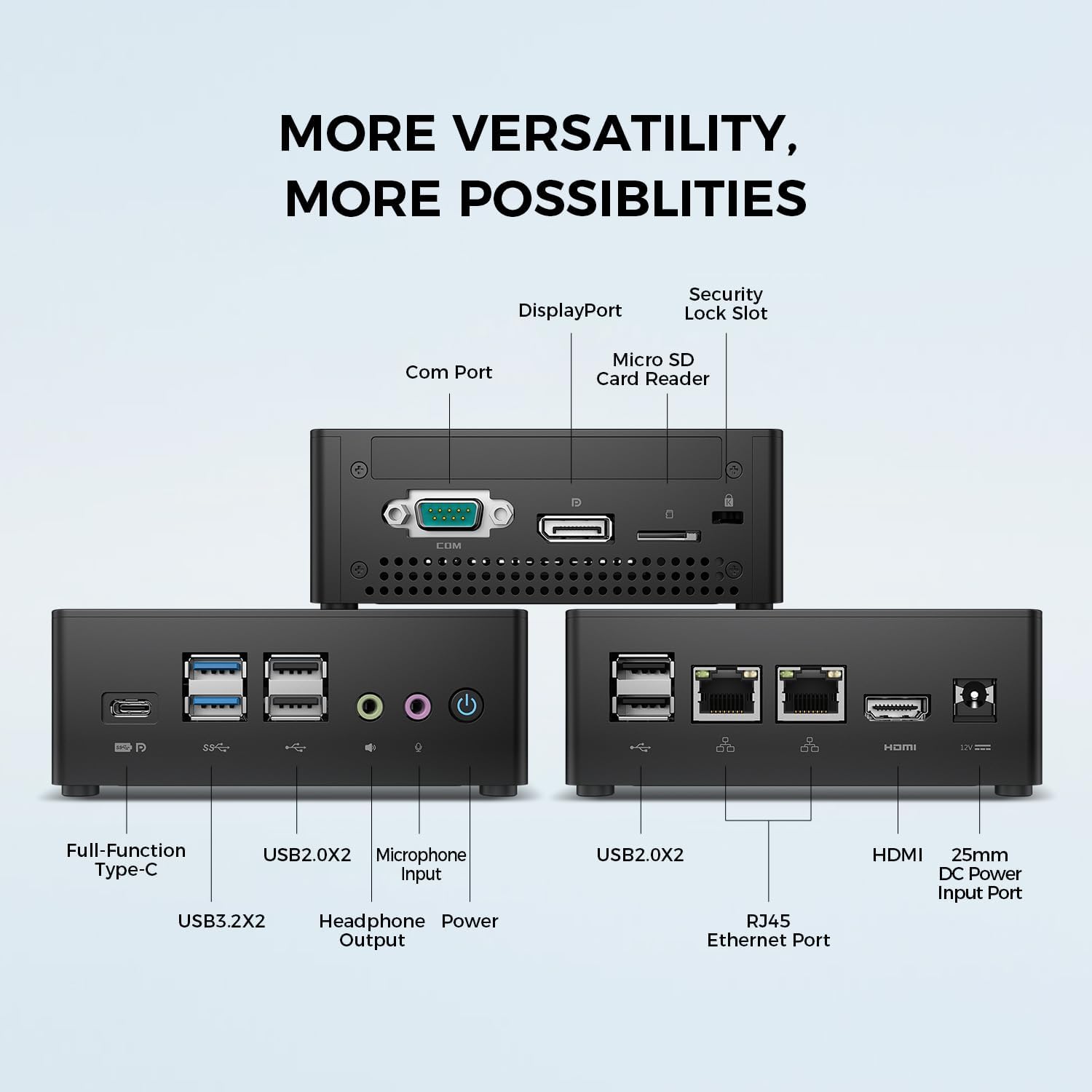
Gambar: Detil view of the TECLAST N15 Mini PC's front, side, and rear ports.
- Panel hareup: Full-Function Type-C (supports charging, data, video, audio), 2x USB 3.2, 2x USB 2.0, Headphone Output, Microphone Input, Power Button.
- Panel Sisi: COM Port, DisplayPort, Micro SD Card Reader, Security Lock Slot.
- Panel Pungkur: 2x USB 2.0, 2x RJ45 Ethernet Ports (2.5GbE), HDMI, DC Power Input.

Image: Dual 2.5GbE RJ45 Ethernet Ports for high-speed networking.
3.3. Sistim cooling
The N15 Mini PC is designed for efficient heat dissipation to ensure stable and quiet operation. It features a 15W TDP, nickel-plated heat pipe, and a turbo fan, providing over 16000mm² of heat dissipation area.

Image: Internal cooling system design for quiet and efficient operation.
3.4. Desain kompak
With a compact volume of approximately 0.53L and a weight of 400g, the N15 Mini PC is highly portable and can be easily integrated into any workspace. Its aluminum body ensures durability.

Image: Compact size and lightweight design of the Mini PC.
4. Parentah Setup
4.1. Nyambungkeun périferal
- Sambungkeun Monitor: Use the provided HDMI cable to connect your monitor to the HDMI port on the Mini PC. Alternatively, use a DisplayPort cable or a Full-Function Type-C cable for compatible monitors.
- Sambungkeun kibor sareng beurit: Plug your USB keyboard and mouse into any available USB ports on the Mini PC.
- Nyambung ka Jaringan (Opsional): For a wired connection, connect an Ethernet cable from your router or modem to one of the RJ45 ports on the Mini PC. For wireless, ensure your Wi-Fi network is available during initial setup.
- Sambungkeun Kakuatan: Connect the power adapter to the DC Power Input port on the Mini PC, then plug the power cable into a wall outlet.
4.2. Ngahurungkeun sareng Setup Awal
- Pencét Tombol Daya di payun Mini PC.
- The system will boot up. If it's the first time, it will guide you through the Windows operating system setup process. Follow the on-screen instructions to configure language, region, network, and user accounts.
- Ensure all drivers are installed. Windows Update typically handles this automatically.
5. Parentah Operasi
5.1. Operasi dasar
Once setup is complete, your TECLAST N15 Mini PC functions like a standard desktop computer. You can launch applications, browse the internet, and manage files using your connected keyboard and mouse.
5.2. Multi-Display Setup
The Mini PC supports connecting up to three 4K displays simultaneously, enhancing productivity and entertainment experiences.
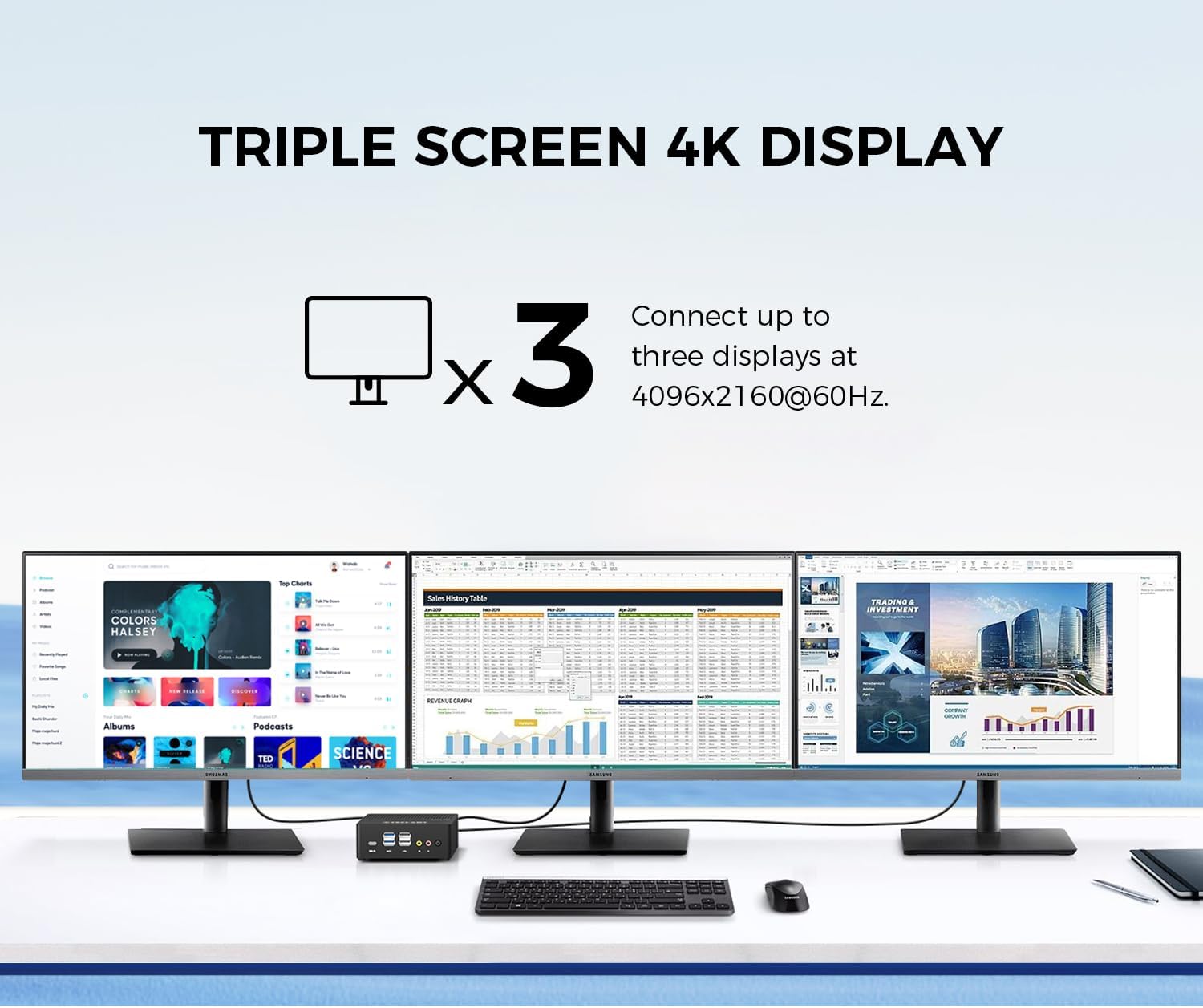
Image: Triple screen 4K display setup with the Mini PC.
- Connect your primary monitor via HDMI.
- Connect a second monitor via DisplayPort.
- Connect a third monitor via the Full-Function Type-C port (requires a compatible Type-C to DisplayPort/HDMI adapter or monitor).
- In Windows, right-click on the desktop and select "Display settings" to configure your multiple displays (extend, duplicate, or show only on one).
5.3. Konéktipitas Wireless
The Mini PC supports 2.4G+5G ac Wi-Fi and Bluetooth 4.2 for wireless connections.
- Wifi: Access Wi-Fi settings in Windows to connect to your preferred wireless network.
- Bluetooth: Pair Bluetooth devices like keyboards, mice, or headphones through Windows Bluetooth settings.
6. Pangropéa
Pangropéa rutin ngabantosan mastikeun umur panjang sareng kinerja Mini PC anjeun anu optimal.
- beberesih: Use a soft, dry cloth to clean the exterior. For dust accumulation in vents, use compressed air. Ensure the device is powered off and unplugged before cleaning.
- Apdet parangkat lunak: Regularly check for and install Windows updates and driver updates to maintain system security and performance.
- Manajemén Panyimpenan: Périodik ngabersihan anu teu perlu files and applications to free up storage space and improve system responsiveness.
- Ventilasi: Ensure the Mini PC is placed in a well-ventilated area and that its vents are not obstructed to prevent overheating.
7. Cara ngungkulan
If you encounter issues with your TECLAST N15 Mini PC, refer to the following common troubleshooting steps:
| Masalah | Solusi anu mungkin |
|---|---|
| Henteu aya tampilan dina monitor | Check all cable connections (HDMI, DisplayPort, Type-C). Ensure the monitor is powered on and set to the correct input source. Try a different cable or monitor if possible. |
| Mini PC teu hurung | Verify the power adapter is securely connected to both the Mini PC and a working power outlet. Try a different power outlet. |
| Henteu aya sambungan internét (Wi-Fi) | Pariksa naha Wi-Fi diaktipkeun dina setélan Windows. Pastikeun anjeun nyambung ka jaringan anu leres sareng parantos ngalebetkeun kecap akses kalayan leres. Pareuman terus hurungkeun deui router/modem anjeun. |
| No internet connection (Wired) | Ensure the Ethernet cable is securely connected to both the Mini PC and your router/modem. Check the network status in Windows. Restart your router/modem. |
| kinerja lalaunan | Close unnecessary applications. Check for background processes consuming resources. Ensure sufficient free storage space. Run a system scan for malware. |
| Peripheral devices not recognized | Try connecting the device to a different USB port. Ensure device drivers are installed. Restart the Mini PC. |
Upami masalahna teras-terasan saatos nyobian léngkah-léngkah ieu, mangga ngahubungi dukungan palanggan TECLAST kanggo bantosan salajengna.
8. Spésifikasi
Detailed technical specifications for the TECLAST N15 Mini PC:
| Fitur | Spésifikasi |
|---|---|
| merek | TECLAST |
| Nomer modél | N15 |
| Modél CPU | Intel Celeron N5095 |
| Laju CPU | Up to 2.9 GHz (Turbo Frequency) |
| Jumlah prosésor | 4 |
| Mémori RAM Dipasang | 16 GB DDR4 |
| RAM Mémori Ukuran Maximum | 16 GB |
| Kapasitas Panyimpenan Mémori | 512 GB PCI-e 3.0 SSD |
| Grafik Coprocessor | Intel UHD Grafika |
| Resolusi tampilan Maximum | 3840 x 2160 piksel (4K) |
| Antarmuka Kaluaran Video | HDMI, DisplayPort, Type-C |
| Téhnologi konektipitas | Ethernet (Dual RJ45 2.5GbE), HDMI, LAN, Wi-Fi (802.11ac), Bluetooth 4.2 |
| Total palabuhan USB | 6 (2x USB 3.2, 4x USB 2.0) |
| Item Beurat | 400 gram |
| Konsumsi Daya | 15 Watt |
| Métode Cooling | Air (with Turbo Fan and Nickel-Plated Heat Pipe) |
| Warna | Hideung |
9. Garansi jeung Rojongan
TECLAST products are designed for quality and reliability. For any product-related inquiries, technical support, or warranty claims, please contact TECLAST customer service. Most questions are answered within 24 hours.
For further assistance, please visit the official TECLAST website or contact their support channels directly.
10. Video produk
Lalajo video produk resmi ieu pikeun visual leuwihview of the TECLAST N15 Mini PC's features and connectivity.
Video: Leuwihview of the TECLAST N15 Mini PC, showcasing its design, ports, and internal components.