
Della 9000 BTU - 115V - 24 SEER2 (Model: 048-TP-9K1V-23S-I+O)
DELLA Hyper Heat 9,000 BTU Mini Split Instruction Manual
merek: Della | model: 9000 BTU - 115V - 24 SEER2 (048-TP-9K1V-23S-I+O)
1. Émbaran Kasalametan penting
Please read all instructions carefully before installation and operation. Failure to follow these instructions may result in property damage, personal injury, or death.
- This system mandates professional installation. It is not a DIY mini split AC.
- Line set vacuuming is required during installation.
- No refrigerant adjustment is needed if the tube is under 25 ft; over 25 ft requires adjustment according to the manual.
- Ensure proper electrical connections. Maximum fuse size is 20A.
- Produk ieu tiasa ngandung bahan kimia anu dipikanyaho ku Nagara Bagian California tiasa nyababkeun kanker sareng cacad lahir atanapi gangguan réproduktif anu sanés (peringatan Proposisi 65).
2. Produk Langkungview & Komponén
The DELLA Hyper Heat Mini Split system provides efficient cooling and heating for spaces up to 400 sq. ft. It features a durable and stylish indoor unit and a robust outdoor unit, designed for optimal performance and energy savings.

Figure 2.1: Main Components of the DELLA Mini Split System
Komponén Kaasup:
| Item No. | komponén |
|---|---|
| 1 | Unit jero rohangan |
| 2 | Unit Luar |
| 3 | Pipa Refrigeran (set jalur tambaga 16.4 kaki anu tos di-flared sareng diisolasi) |
| 4 | Saluran solokan (perpanjangan saluran solokan 6.56 kaki) |
| 5 | Kadali jauh |
| 6 | Suku karét |
| 7 | Insulasi Foam |
| 8 | Lempeng Pamasangan |
| 9 | 2 Batré AAA |
| 10 | Solokan Siku |
| 11 | Tembok leungeun baju |
| 12 | Plasticine Putty |
| 13 | Screws |
| 14 | Jangkar |
| 15 | Tembok Cap |
| 16 | Bungkus Plastik |
| 17 | Kabel Komunikasi |
| 18 | Citakan Kurung |
3. Setup & Instalasi
Installation of the DELLA Mini Split AC unit requires specialized knowledge and tools. It is strongly recommended that installation be performed by a certified HVAC professional to ensure proper function, safety, and warranty validity.
Pertimbangan instalasi konci:
- Pilihan Situs: Choose a location for both indoor and outdoor units that allows for proper airflow, drainage, and accessibility for maintenance.
- Pamasangan: Securely mount the indoor unit to a wall using the provided mounting plate and the outdoor unit on a stable surface or wall bracket.
- Sambungan Set Jalur: Connect the pre-flared and insulated copper line set between the indoor and outdoor units. Ensure all connections are tight to prevent refrigerant leaks.
- Vacuuming: A vacuum pump must be used to evacuate the air and moisture from the refrigerant lines before releasing refrigerant. This is a critical step for system efficiency and longevity.
- Kawat listrik: Connect the power supply and communication cable according to local electrical codes and the wiring diagram in the full user manual.
- Drainase: Ensure the drainage hose from the indoor unit is properly sloped to allow for continuous condensate removal.
For detailed step-by-step installation instructions, please refer to the comprehensive User Manual available for download from the product page or the manufacturer's websitus.
4. Parentah Operasi
The DELLA Mini Split offers multiple ways to control your comfort, including a remote control, a mobile app, and voice commands.
Operasi Remote Control:

Gambar 4.1: Tata Letak sareng Fungsi Kontrol Jarak Jauh
- Hurung/Pareuman: Hurungkeun atanapi pareuman unit.
- Mode: Cycle through 6 modes: Cooling, Heating, Dry, Auto, Dehumidifying, and Fan.
- Suhu luhur/handap: Saluyukeun suhu anu dipikahoyong.
- Laju kipas: Select from 7 wind speeds (Quiet, Low, Mid Low, Mid, Mid High, High, Turbo).
- Ayun: Control vertical and horizontal airflow direction (4D airflow).
- Mode Eco: Ngaktipkeun operasi hemat énergi.
- Modeu Bobo: Adjusts temperature automatically for comfortable sleep.
- Timer: Set a schedule for the unit to turn on or off automatically.
- Modeu Rasa Kuring: Senses the temperature at the remote's location for precise comfort.
Della+ App & WiFi Connectivity:
Control your mini split from anywhere using the free Della+ app on your smartphone. The unit supports WiFi connectivity for seamless remote management.

Figure 4.2: Della+ App Interface for Comprehensive Control
- Kadali jauh: Adjust settings, change modes, and set schedules from your phone.
- Lokasi Geo Pinter: The app can automatically turn your AC unit on or off based on your location, providing hands-free control while driving.
- Schedules & Timer: Create custom schedules for daily or weekly operation to optimize energy usage.
Kasaluyuan Kontrol Sora:
The DELLA Mini Split seamlessly integrates with Amazon Alexa and Google Assistant, allowing for convenient voice commands.
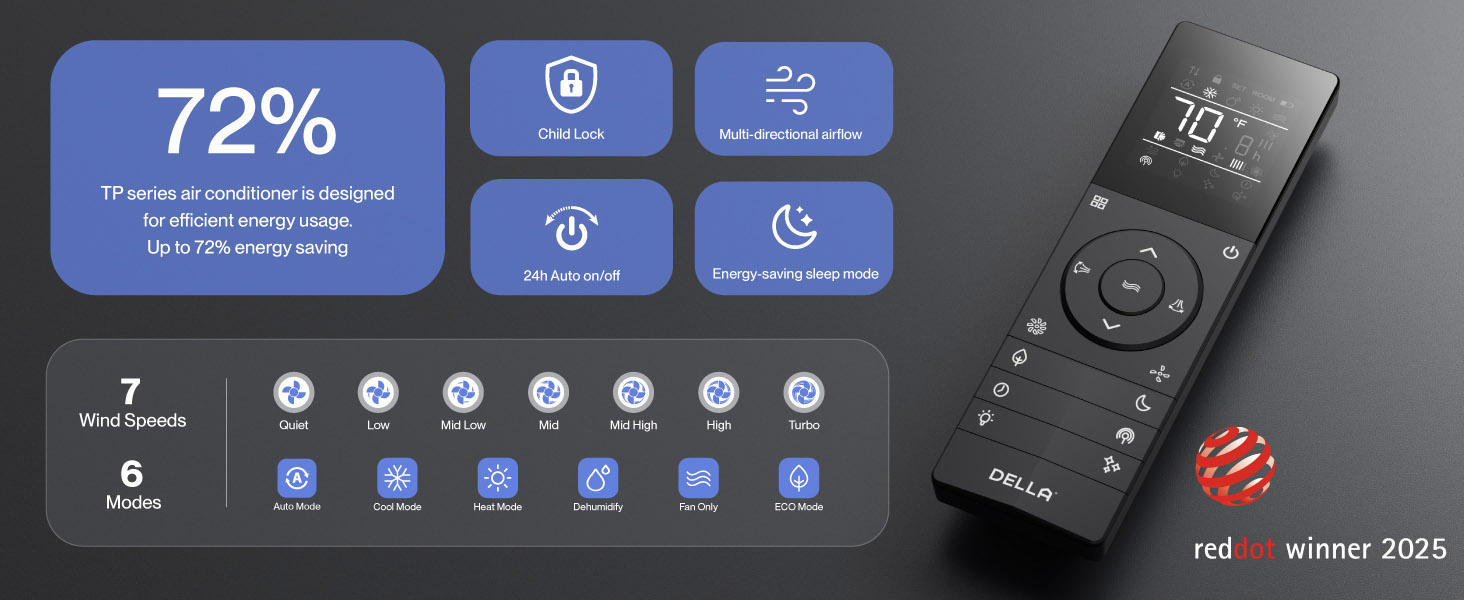
Figure 4.3: Voice Control Integration with Smart Home Devices
Simply use voice commands like "Alexa, turn on the air conditioner" to control your unit.
5. Pangropéa
Pangropéa rutin mastikeun kinerja anu optimal sareng umur panjang sistem DELLA Mini Split anjeun.
- Saringan beberesih: Regularly clean the air filters in the indoor unit to maintain air quality and efficiency. Refer to the full manual for frequency and procedure.
- Téhnologi PureClean: The unit features PureClean tech that helps stop dust buildup and defrosts your indoor unit, contributing to cleaner air and advanced sterilization.
- Téhnologi FIN Berlapis Emas: The gold plated FIN technology in the outdoor unit prevents freezing and rust corrosion, enhancing durability and boosting heat efficiency, even in extreme temperatures down to -13°F (-25°C).

Figure 5.1: PureClean Technology for Cleaner Air

Figure 5.2: Gold Plated FIN Technology for Enhanced Durability
6. Cara ngungkulan
If you encounter issues with your DELLA Mini Split, refer to the following common troubleshooting tips. For more detailed solutions, consult the full user manual.
- Unit teu hurung: Pariksa catu daya, pemutus sirkuit, sareng pastikeun batré remot kontrol henteu béak.
- Cooling / Pemanasan teu cukup: Verify correct mode selection, temperature setting, and ensure air filters are clean. Check for obstructions around indoor and outdoor units.
- Sora anu teu biasa: Some operational noises are normal (e.g., refrigerant flow). If noises are loud or unusual, consult the manual or contact support.
- Masalah Sambungan Wi-Fi: If the unit occasionally loses connection with Wi-Fi, try resetting the unit by cycling power at the breaker. Ensure your Wi-Fi network is stable.
- Kode Kasalahan: If an error code appears on the display, note the code and refer to the troubleshooting section in the comprehensive user manual for specific instructions.
If problems persist after attempting these solutions, please contact DELLA customer support.
7. Spésifikasi
Key technical specifications for the DELLA Hyper Heat 9,000 BTU Mini Split.

Angka 7.1: Dimensi Produk sareng Spésifikasi Konci
| Spésifikasi | Nilai |
|---|---|
| Nomer modél | 048-TP-9K1V-23S-I+O |
| Kamampuh cooling | 9000 BTU/h (0.75 Tons) |
| Kapasitas pemanasan | 10000 BTU/h |
| Sasayogian tanaga | 115V~/60Hz/1PH |
| Max Daya Input | 730 watt |
| Volume Aliran hawa | 554 m³/jam |
| Max. Ukuran sekering | 20A |
| Peunteun SEER2 | 24 |
| Rating HSPF2 | 10 |
| Suhu Operasi (Pemanasan) | Functional up to -13°F (-25°C) |
| Tingkat Noise (Unit Indoor) | Sahandapeun 30 dB(A) |
| Disarankeun Ukuran Kamar | Nepi ka 400 sq. |
| Sertifikasi | Energy Star, ETL listed, AHRI certified |

Figure 7.2: Energy Efficiency Comparison (24 SEER2)
8. Jaminan & Dukungan
DELLA is committed to providing exceptional product quality and customer service.
Garansi saumur hirup:
The DELLA Hyper Heat Mini Split is backed by a lifetime warranty, offering unmatched support and peace of mind. This warranty covers manufacturing defects and ensures long-term reliability without additional costs.

Figure 8.1: Lifetime Coverage and Support
Rojongan Palanggan:
For any inquiries, technical assistance, or warranty claims, please contact DELLA customer support:
- Rojongan Telepon: Available Monday - Friday, 6 AM - 4 PM PST.
- Live Chat: Sadia 24/7 kanggo bantosan langsung.

Figure 8.2: Della Customer Support Options
You can also find the full User Manual (PDF) and User Guide (PDF) for this product at the following links:
Ask a question about this manual
Ask about setup, troubleshooting, compatibility, parts, safety, or missing instructions. Manuals+ will review the question and use this page’s manual context to help answer it.