
Émbaran Kasalametan penting
Mangga baca sagala parentah taliti saméméh assembly sarta pamakéan. Simpen manual ieu pikeun rujukan ka hareup.
- This product has a maximum weight recommendation of 350 LBS (158 kg). Do not exceed this weight limit.
- Improper assembly or use may lead to instability or malfunction, potentially causing injury.
- To avoid health issues associated with prolonged sitting, take regular breaks and adjust your posture during extended use.
- Ensure all screws and connections are tightened securely before use and periodically check for looseness.
Eusi pakét
Pariksa heula sadaya komponén parantos aya sateuacan ngamimitian perakitan. Upami aya bagian anu leungit atanapi ruksak, mangga ngahubungi layanan palanggan.
- Sandaran leungeun (2)
- Karéta (5)
- Angkat Gas (1)
- Headrest (1)
- Pitunjuk pangguna (1)
- Pakakas Perakitan (1 sét)
- Chair Base (1)
- Bantal Korsi (1)
- Sandaran (1)

Gambar 1: Example of a caster wheel, part of the chair's base assembly.
Setup sareng Majelis
The FLEXISPOT OC4 Lite chair is designed for straightforward assembly. A detailed user manual with step-by-step instructions and all necessary tools are included in the package. Assembly can typically be completed in approximately 30 minutes.
- Ngabongkar komponén: Sacara saksama piceun sadaya bagian tina bungkusan sareng teundeun dina tempat anu bersih sareng datar.
- Gantelkeun Casters ka Base: Insert the five caster wheels into the holes on the chair base until they click securely into place.
- Selapkeun Angkat Gas: Pasangkeun tabung pengangkat gas kana liang tengah dasar korsi.
- Pasang Korsi sareng Sandaran: Follow the specific instructions in the included user guide to attach the backrest to the seat cushion and then to the chair mechanism.
- Pasang Headrest: Secure the headrest to the top of the backrest.
- Connect to Gas Lift: Sacara ati-ati tempatkeun korsi sareng sandaran anu parantos dirakit kana tabung pengangkat gas.
- Cék ahir: Pastikeun sadaya sambungan pageuh sareng korsi stabil sateuacan dianggo.
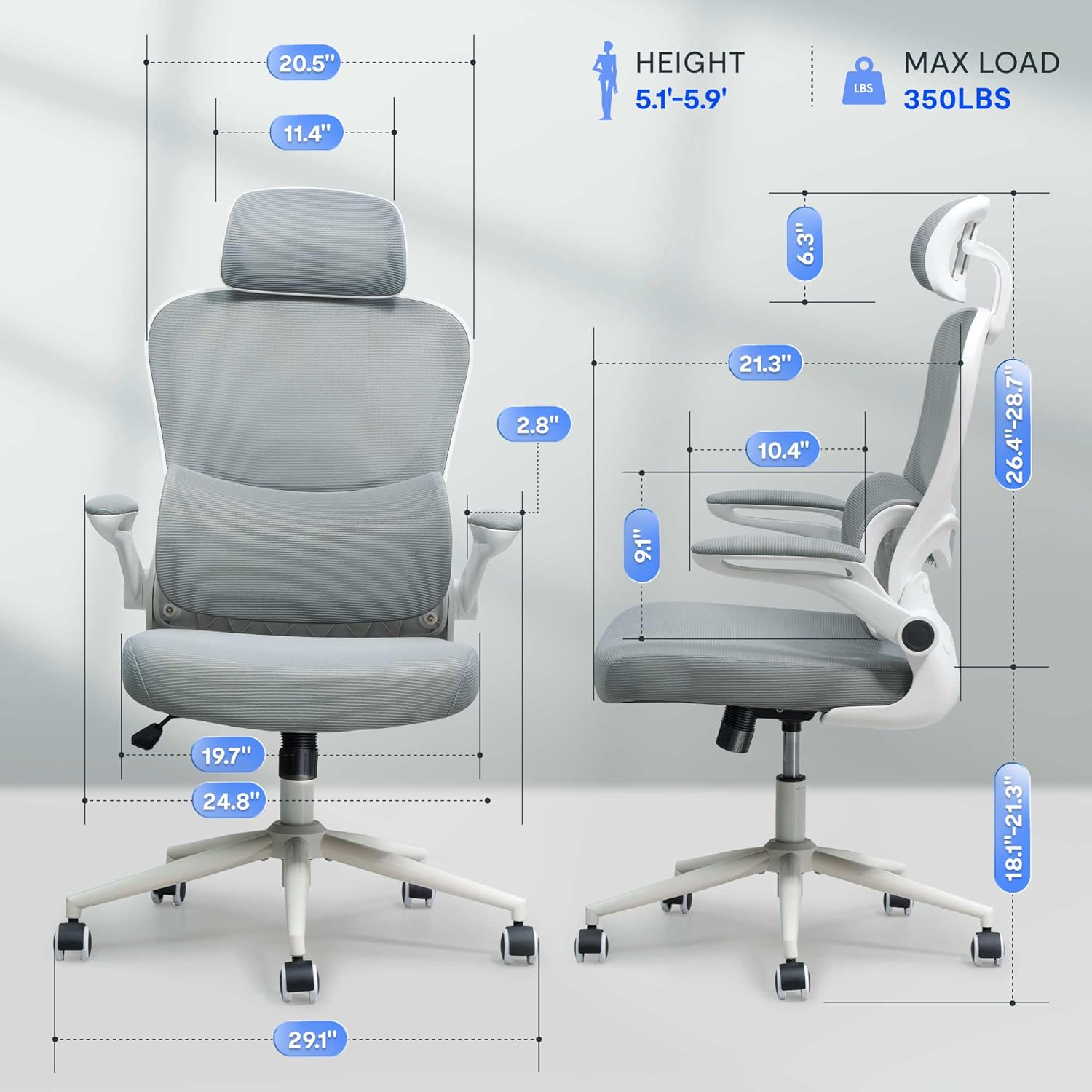
Gambar 2: Assembled chair with key dimensions for reference.
Parentah Operasi
The FLEXISPOT OC4 Lite chair offers multiple adjustment points to customize your seating experience for optimal comfort and support.
1. Korsi Jangkungna adjustment
To adjust the seat height, locate the lever on the right side beneath the seat. Pull the lever up while seated to lower the seat, or pull it up while standing to raise the seat. Release the lever at the desired height.
2. Tilt Function and Tension Control
The chair features a tilt function allowing the backrest and seat to recline together. Use the lever on the left side beneath the seat to lock or unlock the tilt. The tilt tension knob, located at the front center beneath the seat, can be rotated to adjust the resistance of the tilt mechanism.

Gambar 3: Adjusting the chair's tilt angle and tension.
3. Rojongan Lumbar adjustable
The chair includes adjustable lumbar support that adapts to your waist movement, providing dynamic support. The lumbar support can be adjusted vertically by sliding it up or down along the backrest frame to align with the natural curve of your spine.
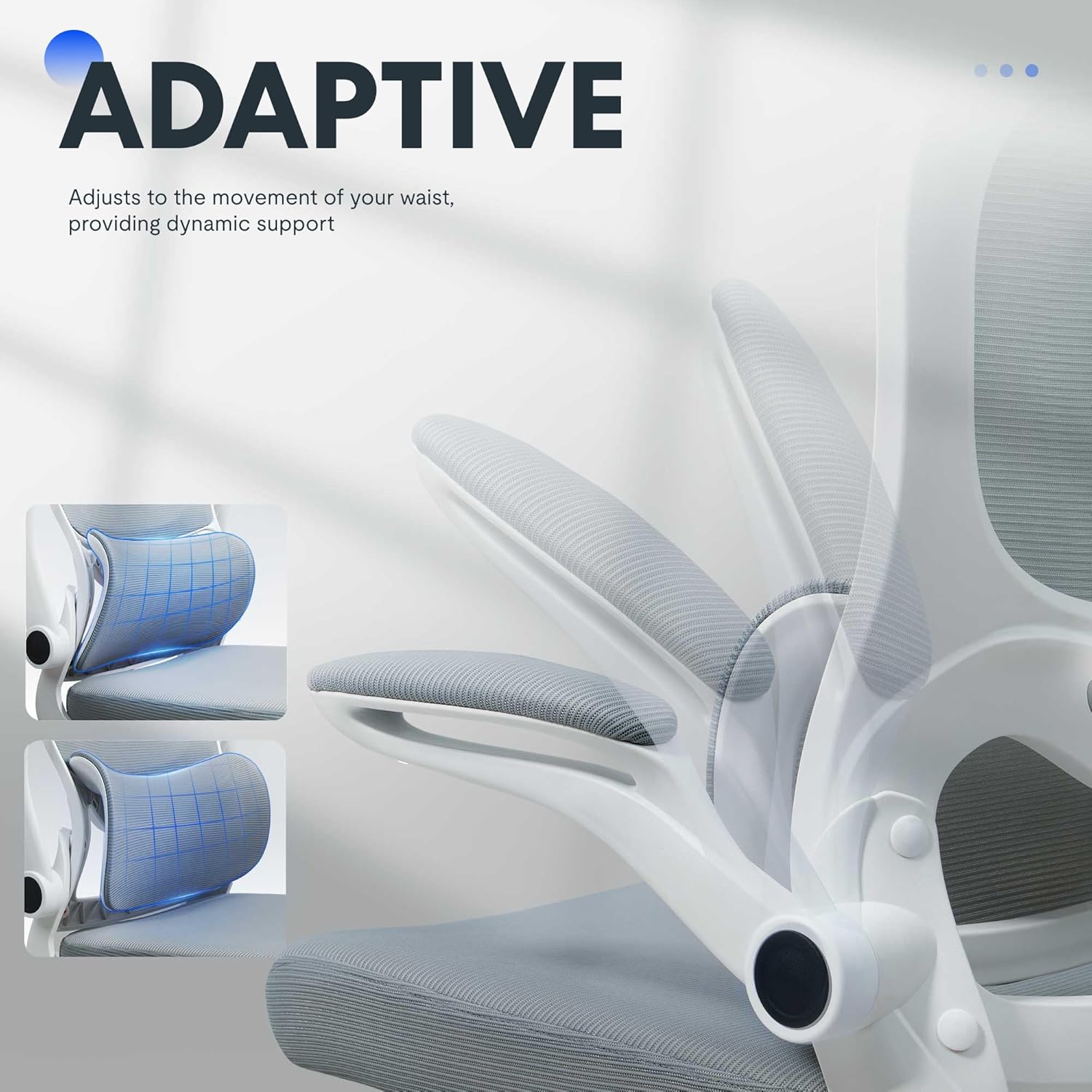
Gambar 4: Adaptive lumbar support for personalized comfort.
4. Headrest adjustable
The headrest can be adjusted for height and angle to provide optimal neck and head support. Gently push or pull the headrest to move it to your preferred position.
5. Sandaran Leungeun anu Bisa Dibalikkeun
The armrests can be flipped up to allow the chair to be pushed closer to a desk, saving space. To flip them up, lift the armrests until they lock into the vertical position. To return them, gently pull them down.

Gambar 5: Chair with armrests flipped up for space-saving storage.
Pangropéa
Perawatan anu leres bakal manjangkeun umur sareng penampilan korsi kantor anjeun.
- beberesih: Pikeun beberesih umum, usap permukaan ku adamp cloth. For fabric areas, dry clean or wipe clean as needed. Avoid harsh chemical cleaners that may damage the material.
- Pamariksaan: Periodically check all bolts and screws to ensure they are tight. Re-tighten if necessary to maintain stability and safety.
- Perawatan Caster: Tetep casters bébas tina bulu jeung lebu pikeun mastikeun gerakan lemes.
Pamérésan masalah
Upami anjeun ngalaman masalah sareng korsi anjeun, tingali masalah umum sareng solusina di handap.
| Masalah | Mungkin Cukang lantaranana | Solusi |
|---|---|---|
| Korsi teu nyaluyukeun jangkungna | Gagalna angkat gas atanapi tuas henteu aktip. | Pastikeun tuas pangaturan jangkungna parantos dipasang sapinuhna. Upami masalahna teras-terasan, lift gas panginten kedah digentos. Hubungi layanan palanggan. |
| Korsi goyah atawa karasa teu stabil | screws leupas atawa lanté henteu rata. | Pariksa jeung tighten sadaya screws assembly. Pastikeun korsi aya dina permukaan datar, rata. |
| Casters teu gulung mulus | Runtah dina roda atawa roda nu ruksak. | Cabut bulu atanapi kokotor tina roda kastor. Upami roda kastor ruksak, éta panginten kedah digentos. |
| Backrest does not tilt or lock | Tilt mechanism locked or tension too high. | Ensure the tilt lock lever is disengaged. Adjust the tilt tension knob to a lower setting. |
Spésifikasi produk
| merek | FLEXISPOT |
| Ngaran modél | OC4-V2 |
| Warna | Bodas |
| Bahan | Alloy Steel, Mesh, Nylon |
| Ukuran produk (D x W x H) | 29.1" x 29.1" x 50" (73.9 cm x 73.9 cm x 127 cm) |
| Item Beurat | 32 Pon (14.5 kg) |
| Rekomendasi beurat maksimum | 350 Pon (158 kg) |
| Jero korsi | 21.3 inci (54.1 cm) |
| Kursi Backrest Width | 20.5 Inci (52.1 cm) |
| Gaya Balik | Jaring Tukang |
| Gaya panangan | Leungeun nu bisa dibalikkeun |
| Gerakan Dasar Jati | Puteran |
| Majelis diperlukeun | Sumuhun |
| Sertifikasi | BIFMA, SGS |
Garansi sareng Rojongan
The FLEXISPOT OC4 Lite Ergonomic Office Chair is rigorously tested and certified by BIFMA and SGS, ensuring durability and safety. The reinforced nylon base is capable of supporting significant weight, and the resilient mesh fabric is designed to maintain its shape over time.
For any questions, concerns, or assistance with assembly, operation, or troubleshooting, please contact our professional customer service team. Refer to the contact information provided with your purchase or visit the official FLEXISPOT websitus pikeun detil rojongan.