
FLEXISPOT OC4-PRO
FLEXISPOT OC4-PRO Office Chair User Manual
Model: OC4-PRO
1. Bubuka
Thank you for choosing the FLEXISPOT OC4-PRO Office Chair. This ergonomic chair is designed to provide maximum comfort and support for extended periods, featuring multiple adjustment points including headrest, lumbar support, armrests, and seat height. This manual provides essential information for assembly, operation, maintenance, and troubleshooting to ensure optimal use and longevity of your chair.
2. Émbaran Kasalametan
- Baca sagala parentah taliti saméméh assembly sarta pamakéan.
- Ensure all components are securely fastened before using the chair.
- Ulah nangtung dina korsi atawa make eta salaku stool hambalan.
- Ulah ngaleuwihan kapasitas beurat maksimum 400 LBS (181.44 kg).
- Tetep barudak jeung pets jauh ti korsi salila assembly.
- Anggo korsi dina permukaan anu datar sareng stabil.
- Hindarkeun korsi ka sinar panonpoé langsung atanapi suhu anu ekstrim.
3. Eusi Paket
Please verify that all components are present before beginning assembly. If any parts are missing or damaged, contact customer service.
- Panangan leungeun
- Rojongan Lumbar
- Casters
- Angkat Gas
- Headrest
- Pituduh Pamaké (manual ieu)
- Parabot Majelis
- Dasar Kursi
- Bantalan korsi
- Tukang tonggong
4. Parentah Majelis
Assembly of the FLEXISPOT OC4-PRO chair is designed to be straightforward and can typically be completed within 30 minutes. A detailed user manual with step-by-step diagrams and all necessary assembly tools are included in the package. Please follow the specific instructions provided in the separate assembly guide for your model.
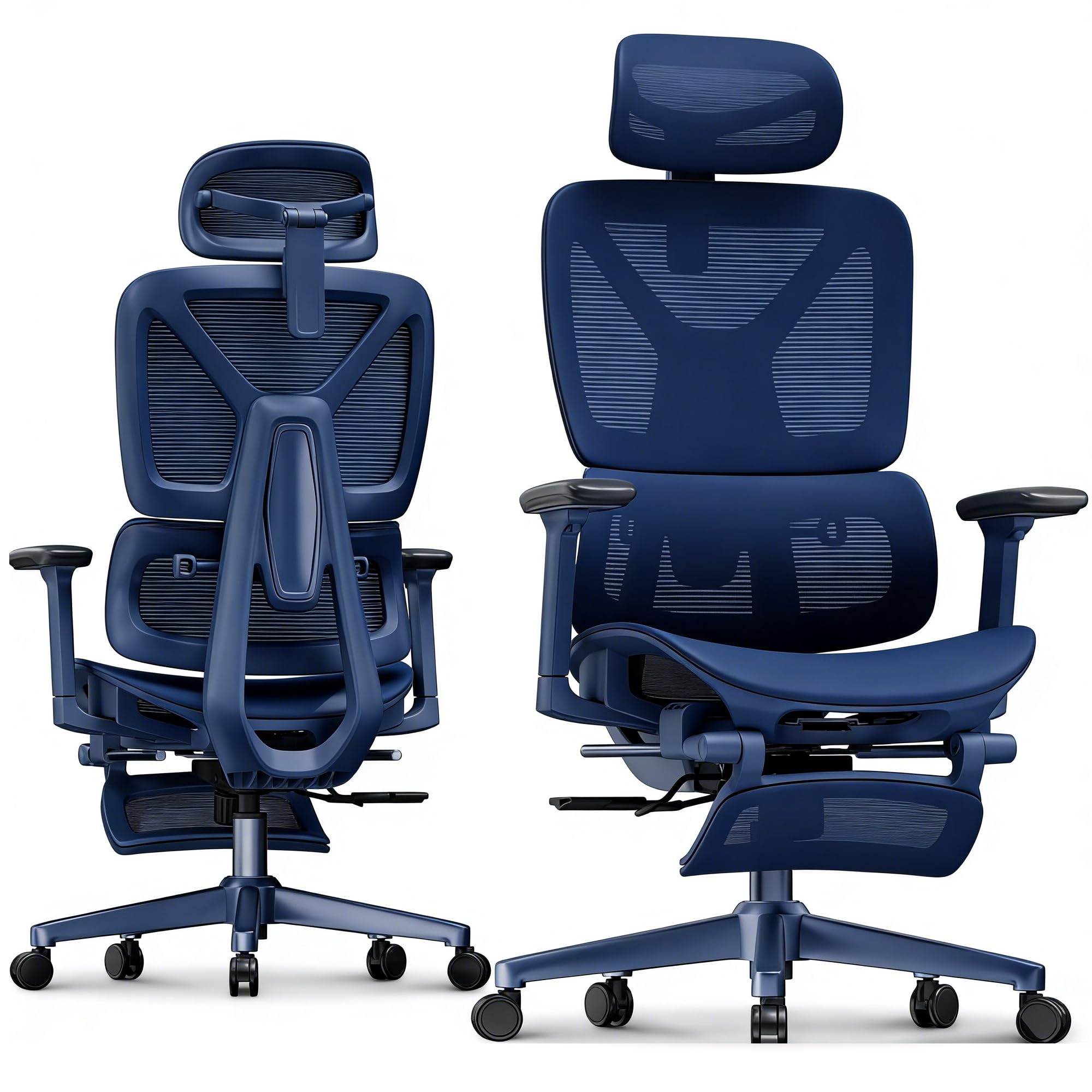
Image: FLEXISPOT OC4-PRO Office Chair. This image shows the fully assembled chair, highlighting its ergonomic design and mesh backrest.
5. Parentah Operasi
The FLEXISPOT OC4-PRO chair offers multiple adjustment features to customize your seating experience.
5.1. Korsi Jangkungna adjustment
Locate the lever on the right side beneath the seat. To raise the seat, lift the lever while taking your weight off the chair. To lower the seat, lift the lever while seated. Release the lever at the desired height.
5.2. Pangaluyuan Ngalengkung sareng Miring
The chair features an adjustable back angle and tilt tension. Use the lever on the left side to lock or unlock the recline function. Rotate the knob located beneath the seat, usually at the front, to adjust the tilt tension. Turn clockwise to increase tension (making it harder to recline) and counter-clockwise to decrease tension (making it easier to recline).
5.3. Lumbar Rojongan adjustment
The multi-functional lumbar support system can be adjusted vertically and horizontally to fit the curve of your lower back. Locate the adjustment controls on the backrest to position the lumbar support for optimal comfort.
5.4. Pangaluyuan Sandaran Leungeun
The 3D armrests can be adjusted in three dimensions: height, forward/backward, and pivot (inward/outward). Use the buttons or levers on the armrests to unlock and adjust them to your preferred position. Ensure they are locked securely after adjustment.
5.5. Pangaluyuan Sandaran Kepala
The headrest can be adjusted for height and angle. Gently push or pull the headrest to move it up or down, and tilt it to find the most comfortable position for your neck and head.
5.6. 360° Rotation and Casters
The chair is equipped with a 360° swivel mechanism and smooth-rolling casters for easy movement. Ensure the casters are clean and free of debris for optimal performance on hard floors.
6. Pangropéa
- beberesih: For general cleaning, wipe the chair with a damp cloth. For mesh and fabric areas, dry clean as needed. Avoid harsh chemical cleaners that may damage the material.
- Pamariksaan: Périodik pariksa sagala screws na bolts pikeun mastikeun aranjeunna kedap. Kencangkeun deui upami diperyogikeun.
- Perawatan Caster: Tetep casters bébas tina bulu jeung lebu pikeun mastikeun gerakan lemes.
- Panyimpenan: Simpen korsi di tempat anu tiis sareng garing, jauh tina sinar panonpoé langsung upami henteu dianggo salami lami.
7. Cara ngungkulan
| Masalah | Mungkin Cukang lantaranana | Solusi |
|---|---|---|
| Korsi teu nyaluyukeun jangkungna | Gagalna angkat gas atanapi tuas henteu aktip. | Pastikeun tuas pangaturan jangkungna parantos dipasang sapinuhna. Upami masalahna teras-terasan, lift gas panginten kedah digentos. Hubungi dukungan palanggan. |
| Korsi ngacir atawa oyag | Sekrup atawa komponénna leupas. | Check and tighten all screws and bolts, especially those connecting the seat, backrest, and base. |
| Casters teu gulung mulus | Uing bray dina casters atanapi casters ruksak. | Cabut bulu atanapi kokotor tina roda kastor. Upami roda kastor ruksak, éta panginten kedah digentos. |
| Sandaran teu bisa diuk atawa dikonci | Recline mechanism locked or tilt tension too high. | Ensure the recline lock lever is disengaged. Adjust the tilt tension knob counter-clockwise to reduce tension. |
8. Spésifikasi
| merek | FLEXISPOT |
| Ngaran modél | OC4-PRO (Ergonomic office chair) |
| Warna | Hideung |
| Bahan | Mesh & Nylon & Steel (Fill Material: Memory Foam) |
| Ukuran produk (D x W x H) | 73.9D x 73.9W x 133.1H Sentimeter |
| Item Beurat | 40 Pon (18.14 kg) |
| Rekomendasi beurat maksimum | 400 LBS (181.44 kg) |
| Fitur husus | Ergonomic, Adjustable Headrest, 3D Arm Rest, Adjustable Lumbar, Tilt, Back Support, Adjustable Recliner, Adjustable Height, Tilt Tension Control |
| Majelis Diperlukeun | Sumuhun |
| Sertifikasi | BIFMA, SGS |
9. Garansi jeung Rojongan
FLEXISPOT stands behind the quality of its products. For warranty information, technical support, or assistance with parts, please contact FLEXISPOT customer service. Refer to the official FLEXISPOT websitus atanapi dokuméntasi pameseran anjeun pikeun istilah jaminan khusus sareng detil kontak.
Palayanan palanggan: For any questions or concerns, please reach out to FLEXISPOT's professional customer service team.
Ask a question about this manual
Ask about setup, troubleshooting, compatibility, parts, safety, or missing instructions. Manuals+ will review the question and use this page’s manual context to help answer it.