
1. Bubuka
Thank you for choosing the FLEXISPOT QB2W-2080-IE Height Adjustable Standing Desk. This electric standing desk is designed to provide a versatile and ergonomic workspace, allowing you to easily switch between sitting and standing positions. Featuring a robust dual-motor lift system, intelligent control panel with memory functions, and an anti-collision system, this desk offers stability, efficiency, and safety for your daily work.
2. Émbaran Kasalametan
Please read all safety instructions carefully before assembly and use to prevent injury or damage to the product. Keep this manual for future reference.
- Kapasitas beurat maksimum: Do not exceed the maximum static load capacity of 120 kg (264 lbs) or dynamic load capacity of 100 kg (220 lbs)Kaleuwihan beban tiasa nyababkeun ketidakstabilan sareng karusakan.
- Rentang adjustment jangkungna: Ensure the desk operates within its specified height range of 70 cm nepi ka 119 cm (27.6 inci nepi ka 46.9 inci) for optimal stability and safety.
- Barudak jeung Pets: Jauhkeun barudak sareng piaraan tina méja salami operasi pikeun nyegah kacilakaan.
- Sasayogian tanaga: Connect the desk only to a properly grounded power outlet. Do not use damaged power cords or adapters.
- Clearance: Ensure there are no obstructions above or below the desk during height adjustments to allow the anti-collision system to function effectively.
- Majelis: Assembly requires two people. Ensure all components are securely fastened before use.
- Tumpahan cairan: Avoid spilling liquids on the control panel or electrical components. In case of a spill, immediately disconnect power and allow to dry completely before reconnecting.
3. Eusi Paket
Sateuacan ngawitan assembly, pariksa yen sakabeh bagian aya na undamaged. Lamun aya bagian nu leungit atawa ruksak, mangga ngahubungan rojongan customer.
- Desktop (4 parts)
- Suku Meja (2)
- Komponén pigura
- Sistem Angkat Motor Ganda
- Panél kontrol
- Adaptor Daya sareng Kabel
- All necessary assembly tools and connection elements
- Manual pamaké
4. Setup jeung Majelis
Assembly of the FLEXISPOT QB2W-2080-IE desk requires approximately 2 people and includes all necessary tools. Follow these general steps:
- Ngabongkar komponén: Sacara saksama piceun sadaya bagian tina bungkusan sareng teundeun dina permukaan anu bersih sareng lemes pikeun nyegah goresan.
- Kumpulkeun pigura: Attach the crossbars to the lifting columns (desk legs) using the provided hardware. Ensure all screws are tightened securely.
- Pasangkeun suku méja: Amankeun suku kana handapeun kolom pengangkat.
- Pasang Desktopna: Place the desktop sections onto the assembled frame. The desktop is made of 4 parts and includes connection elements for stability. Align the pre-drilled holes and secure the desktop to the frame using the provided screws.
- Sambungkeun Panel Kontrol sareng Daya: Connect the control panel cable to the motor control box. Then, connect the power adapter to the control box and plug it into a grounded power outlet.
- Manajemén Kabel: Use the included cable ties or management accessories to organize cables neatly under the desk.
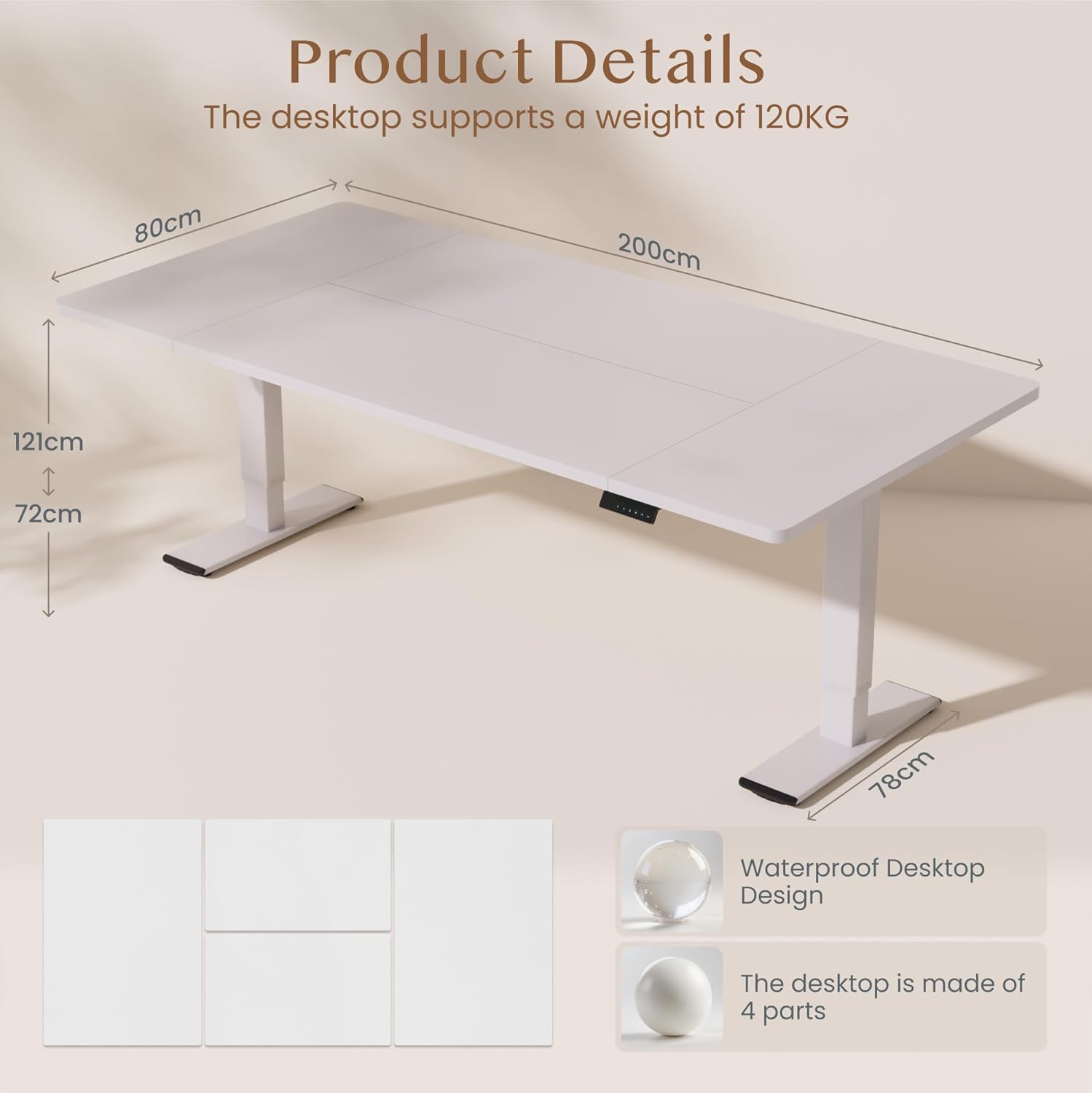
Gambar: Product details of the FLEXISPOT standing desk, illustrating its dimensions (200cm length, 80cm width, 72-121cm height range) and the four-part, waterproof desktop design. The desktop supports a weight of 120KG.

Gambar: The FLEXISPOT standing desk shown at its minimum (72cm) and maximum (121cm) height, demonstrating its height adjustability for both sitting and standing positions.
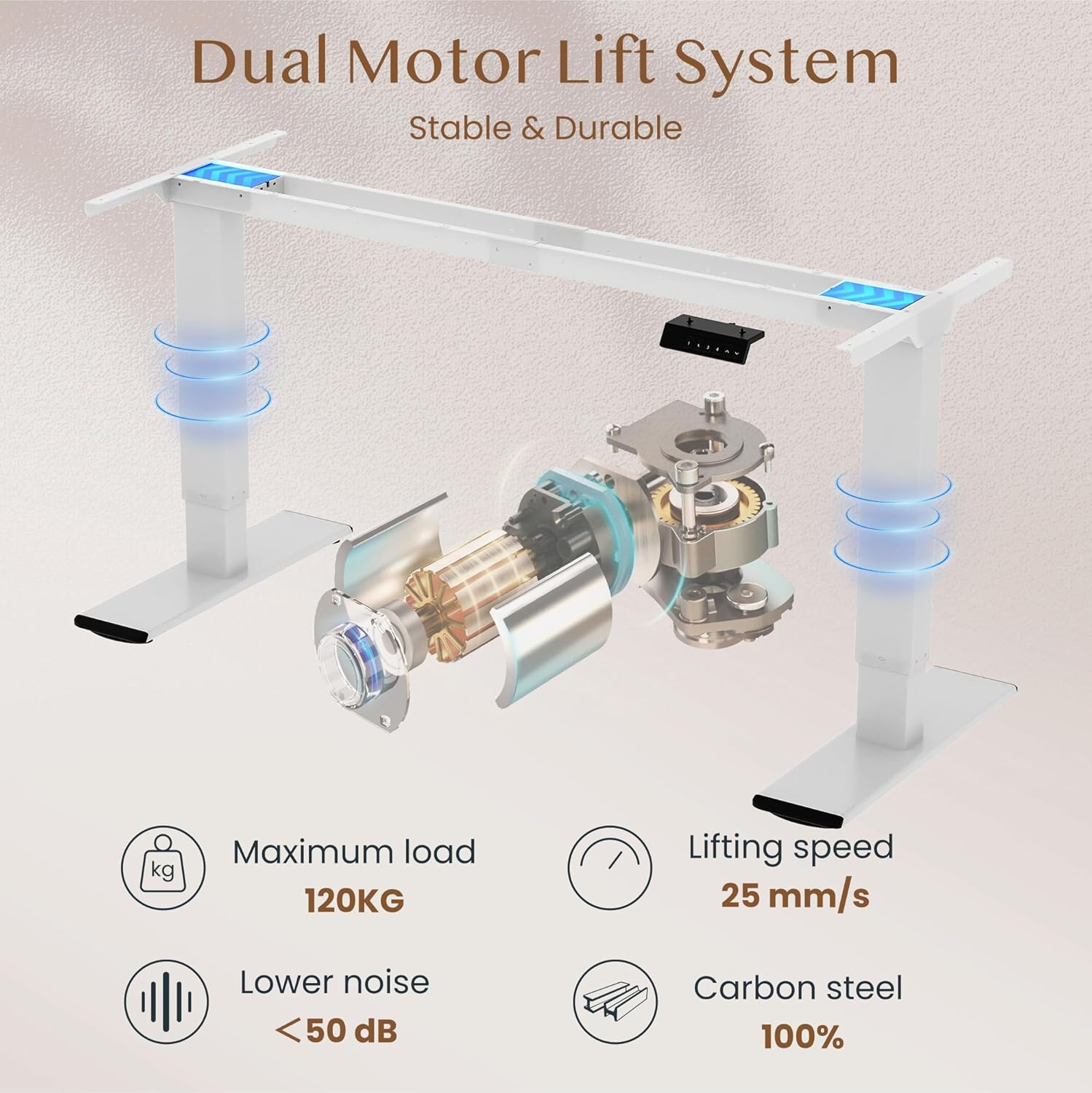
Gambar: Diagram illustrating the FLEXISPOT dual motor lift system, highlighting its stable and durable design. Key specifications like maximum load (120KG), lifting speed (25 mm/s), lower noise (<50 dB), and 100% carbon steel construction are visible.
5. Parentah Operasi
The FLEXISPOT QB2W-2080-IE desk features an intuitive control panel for easy height adjustment and memory functions.
5.1. Pangaluyuan Jangkungna Dasar
- Pencét éta "^" (Up) tombol pikeun ngangkat méja.
- Pencét éta "v" (Down) tombol pikeun nurunkeun méja.
- Release the button to stop the desk at the desired height.
5.2. Preset Mémori
Panel kontrol ngamungkinkeun anjeun nyimpen dugi ka opat setélan jangkungna anu dipikaresep.
- Atur méja kana jangkungna anu dipikahoyong nganggo tombol Luhur/Turun.
- Pencét éta "M" (Memory) button (often represented by a 'f' symbol). The LED display will show "S-".
- Pencét langsung salah sahiji tombol angka ("1", "2", "3", or "4") to save the current height to that preset. The display will show "S-1", "S-2", etc., to confirm.
- Pikeun nginget jangkungna anu disimpen, cukup pencét tombol angka anu saluyu. Méja bakal otomatis pindah ka posisi anu disimpen.
5.3. Fungsi Anti-Tabrakan
The desk is equipped with an anti-collision system that automatically stops and slightly reverses the desk's movement if it encounters an obstruction during height adjustment. This feature enhances safety and prevents damage to the desk or other objects.

Gambar: Close-up of the FLEXISPOT intelligent control panel, showing buttons for Up & Down adjustment, 4 Memory Heights, an LED Screen, and the Anti-Collision Function indicator.

Gambar: The FLEXISPOT standing desk in an office setting, illustrating its smooth and quiet operation with a lifting speed of 25mm/s and noise levels below 50 dB. The control panel is visible under the desk.

Gambar: A visual comparison demonstrating the FLEXISPOT safety collision avoidance system. One side shows an object being avoided by the desk's upward movement (WITH Anti-Collision Function), while the other side implies a collision without the function.
6. Pangropéa
Pangropéa rutin mastikeun umur panjang sareng kinerja optimal méja nangtung FLEXISPOT anjeun.
- beberesih: Wipe the desk surface and legs with a damp lawon. Hindarkeun ngagunakeun bahan kimia anu kasar atanapi pembersih abrasive anu tiasa ngaruksak finish.
- Pariksa sambungan: Périodik pariksa sagala screws na bolts pikeun mastikeun aranjeunna kedap. Kencangkeun deui upami diperyogikeun.
- Manajemén Kabel: Ensure all cables are neatly organized and not pinched or tangled, which could affect desk operation or cause damage.
- Hindarkeun Overloading: Do not place items exceeding the maximum weight capacity on the desk.
7. Cara ngungkulan
Upami anjeun ngalaman masalah sareng méja anjeun, tingali léngkah-léngkah ngungkulan masalah umum ieu:
- Meja teu gerak:
- Pariksa naha kabel daya parantos dipasang pageuh kana méja sareng stop kontak dina témbok.
- Pastikeun teu aya halangan anu ngahalangan gerakan.
- Cobi setel deui méja ku cara nyabut colokan listrik salami 10 detik teras colokkeun deui.
- Kodeu kasalahan dina tampilan:
- If an error code appears, consult the specific error code section in the full manual (if available) or contact customer support. Often, a reset (unplugging and replugging) can clear minor errors.
- Uneven Movement/Instability:
- Pastikeun meja aya dina permukaan anu rata.
- Pariksa yén sadaya sekrup rakitan parantos kenceng.
- Verify that the weight on the desk is evenly distributed and does not exceed the maximum capacity.
- Anti-Collision System Triggering Unnecessarily:
- Ensure there are no loose cables or objects near the desk's path that could be mistaken for an obstruction.
Upami léngkah-léngkah ieu henteu ngarengsekeun masalahna, mangga ngahubungi dukungan palanggan FLEXISPOT kanggo bantosan salajengna.
8. Spésifikasi
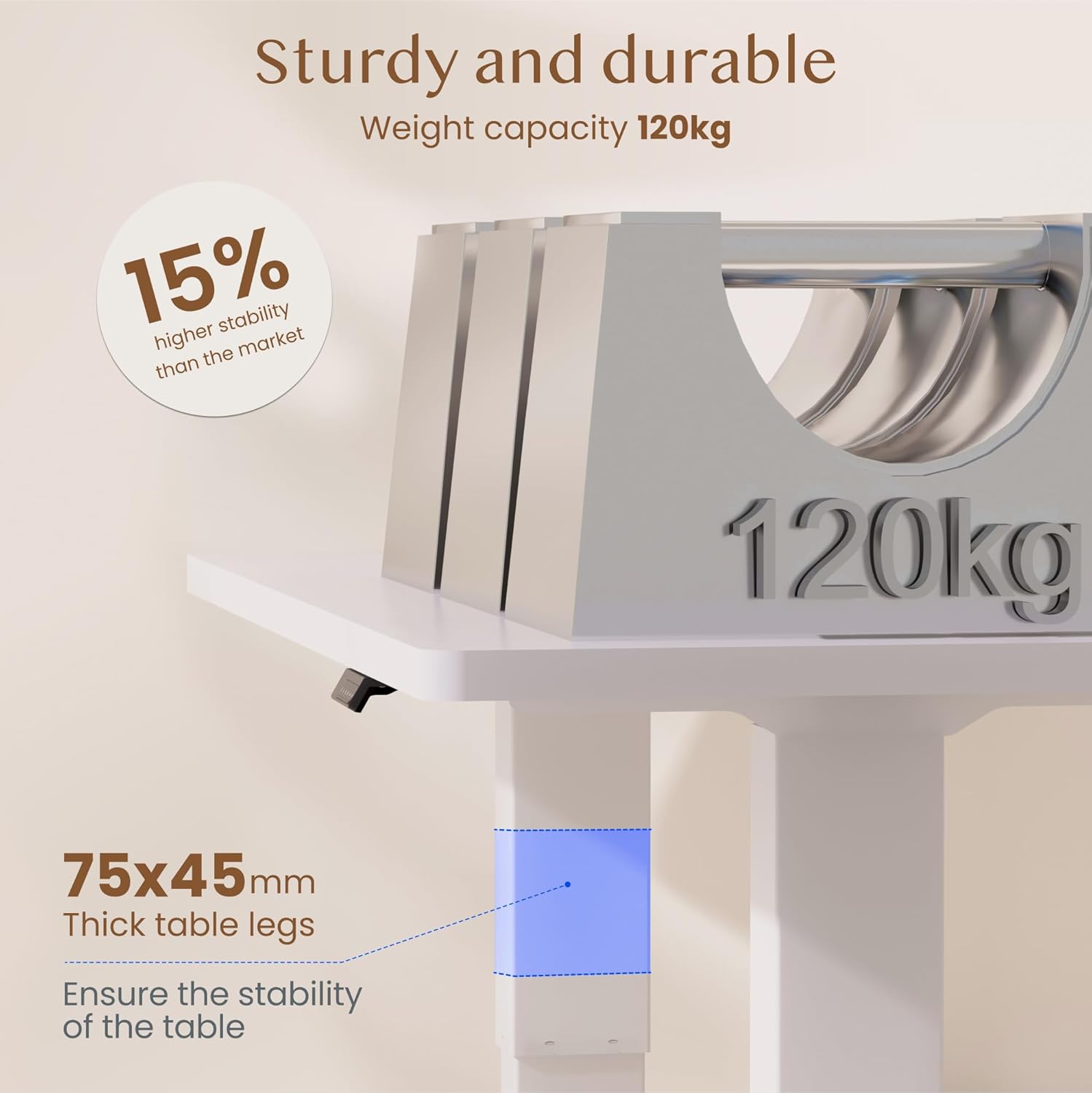
Gambar: The FLEXISPOT standing desk highlighting its sturdy and durable construction, specifically the 75x45mm thick table legs designed to ensure stability and support a weight capacity of 120kg.

Gambar: A nutup-up view of the FLEXISPOT desk's thickened table legs, illustrating the adjustable height range from 70cm to 119cm, providing unmatched stability.
| Fitur | Spésifikasi |
|---|---|
| Nomer modél | QB2W-2080-IE |
| merek | FLEXISPOT |
| Ukuran (L x W x H) | 200 x 80 x 72 cm (min height) |
| Jangkungna adjustment Range | 70 cm - 119 cm (27.6 inci - 46.9 inci) |
| Ketebalan Desktop | 25 mm |
| Maximum Load Capacity (Static) | 120 kg (264 lbs) |
| Maximum Load Capacity (Dynamic) | 100 kg (220 lbs) |
| Sistem Angkat | Motor Ganda |
| Laju Angkat | 25 mm/s |
| Tingkat Noise | <50 dB |
| Bahan | Alloy Steel (Base and Top Material) |
| Warna | Bodas |
| Majelis Diperlukeun | Muhun (2 jalmi disarankeun, alat-alat kalebet) |
| Fitur husus | Electric, 4 Memory Presets, Anti-Collision System |
| Beurat produk | 40.9 kg |
| UPC | 810072889508 |
9. Garansi jeung Rojongan
For warranty information, product support, or to report any issues, please contact FLEXISPOT customer service. Keep your purchase receipt and model number (QB2W-2080-IE) handy when contacting support.
The seller for this product is FLEXISPOT GmbH. Please refer to their official websitus atanapi dokuméntasi pameseran anjeun pikeun istilah jaminan khusus sareng detil kontak.