
1. Bubuka
This manual provides comprehensive instructions for the operation and maintenance of your Generic SQ122 Quran Speaker. This device combines a Quran player, a multi-color changing night light, a Bluetooth speaker, and an alarm clock, offering versatile functionality for daily use. Please read this manual carefully before using the product to ensure proper operation and to maximize its features.
2. Émbaran Kasalametan
- Ulah ngalaan alat ka cai atawa kaleuleuwihan Uap.
- Hindarkeun ragrag atanapi ngagentoskeun alat kana tabrakan anu kuat.
- Jauhkeun alat ieu tina sinar panonpoé langsung sareng suhu anu luhur.
- Use only the specified charging cable and power adapter (DC 5V).
- Ulah nyobian ngabongkar atanapi ngalereskeun alat nyalira. Hubungi petugas servis anu mumpuni.
- Jauhkeun tina jangkauan barudak.
3. Eusi Paket
Pastikeun sadaya item aya dina bungkusan:
- Generic SQ122 Quran Speaker
- Kadali jauh
- USB Charging Cable (DC 5V)
- Manual pangguna (dokumén ieu)
4. Produk Langkungview
Biasakeun diri anjeun sareng komponén sareng kontrol alat éta.

Figure 4.1: Front Panel Operation Buttons
- Light Switch (Touch Panel on top)
- Modeu Saklar
- Previous Song / Previous Recitation
- Next Song / Next Recitation
- Play / Reureuh

Figure 4.2: Bottom Panel Controls
- Jilid +
- Timing Pindah
- Volume -

Figure 4.3: Side Ports and Power Switch
- Slot Kartu Micro SD
- Input AUX
- DC 5V ngecas Port
- ON / OFF Power Pindah
5. Setélan
5.1 Ngecas Alat
Before first use, fully charge the Quran Speaker. Connect the provided USB charging cable to the DC 5V port on the device and plug the other end into a compatible USB power adapter (not included) or a computer USB port. The charging indicator will show the charging status.
5.2 Daya Hurung/Pareuman
To power on the device, slide the ON/OFF switch located on the side to the 'ON' position. To power off, slide the switch to the 'OFF' position.
5.3 Nyapasangkeun Bluetooth
- Turn on the Quran Speaker.
- The device will automatically enter Bluetooth pairing mode, indicated by a flashing light or an audible prompt.
- On your smartphone or other Bluetooth-enabled device, search for available Bluetooth devices.
- Select "SQ122" (or similar name) from the list to pair.
- Once paired, you will hear a confirmation sound, and the light indicator will become solid.
5.4 Pamasangan Aplikasi
For advanced control and features, download the dedicated app for the Quran Speaker. Refer to the packaging or a QR code on the device for app download instructions. The app allows for comprehensive control over Quran recitations, translations, light settings, and alarm functions.
6. Parentah Operasi
6.1 Control Lampu
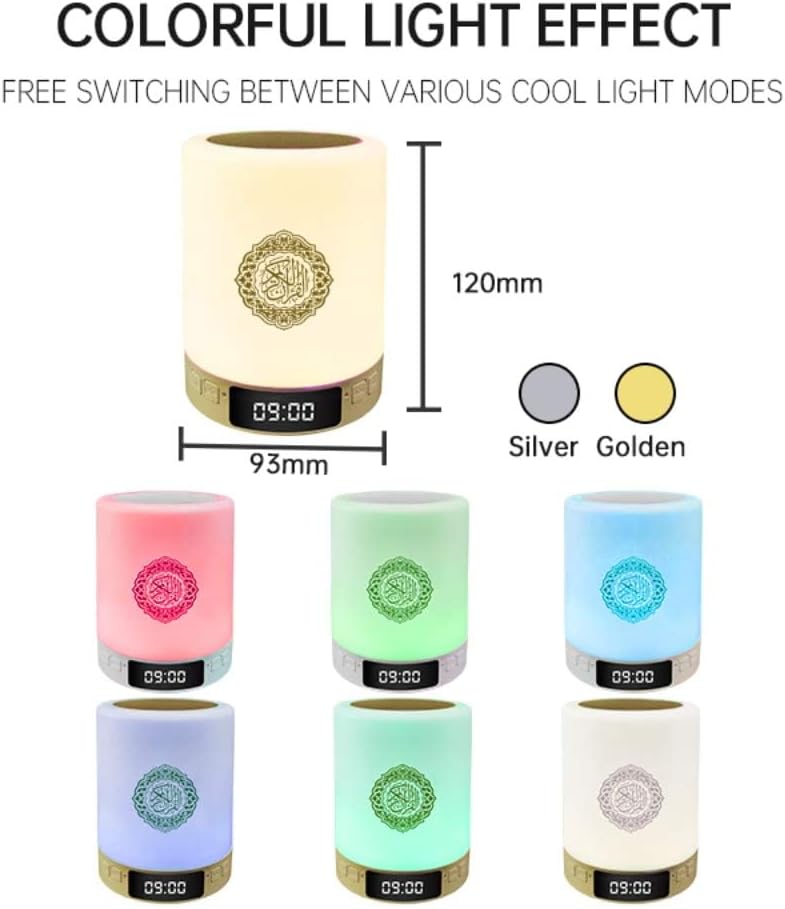
Figure 6.1: Colorful Light Effects
- Kontrol Toél: Gently touch the top panel (Light Switch) to cycle through different brightness levels and colors.
- Pareuman Lampu: Touch and hold the top panel for more than 3 seconds to turn off the night light.
- Robah Warna: The speaker features 7 colored LED lights and 2 flashing modes. Colors can change with music when in Bluetooth mode.
6.2 Audio Playback (Quran & Bluetooth)
- Pindah mode: Press the Mode Switch button (2) to toggle between Quran recitation mode, Bluetooth mode, and AUX input mode.
- Quran Recitations: In Quran mode, use the Previous Song (3) and Next Song (4) buttons to navigate through recitations. The app provides more detailed control over Imams and translations.
- Speaker Bluetooth: In Bluetooth mode, play audio from your paired device. Use Play/Pause (5), Previous Song (3), and Next Song (4) buttons to control playback.
- Kontrol volume: Use the Volume + (6) and Volume - (8) buttons on the bottom of the device to adjust the audio level.
- Kartu SD Mikro: Insert a Micro SD card into the slot to play audio files langsung tina kartu.
- Input AUX: Connect an external audio device using a 3.5mm AUX cable to the AUX port.
6.3 Fungsi Remote Control
The included remote control provides convenient access to various functions, including:
- Daya Hurung/Pareuman
- adjustment volume
- Track/Recitation Navigation
- Pamilihan Mode
- Light Brightness and Color Control
- Setélan alarem
- Quran Reciter Selection and Translation Language
6.4 Fungsi Kontrol Aplikasi
The dedicated app offers comprehensive control and customization:
- Full control over Quran recitations, including selection of famous Imams and various translation languages.
- Advanced light settings and scene selection.
- Alarm clock setup and management.
- Azan time setting and automatic location positioning.
6.5 Azan Time Setting
The device supports setting Azan times via the mobile app.

Figure 6.2: One-Click Positioning for Azan Time
- Lengkah 1: Enter the settings page in the app and select 'Location settings' or 'Longitudinal and Latitude Setting'.
- Lengkah 2: Enter your location manually or use the automatic positioning feature to quickly locate your current city and set the time zone.
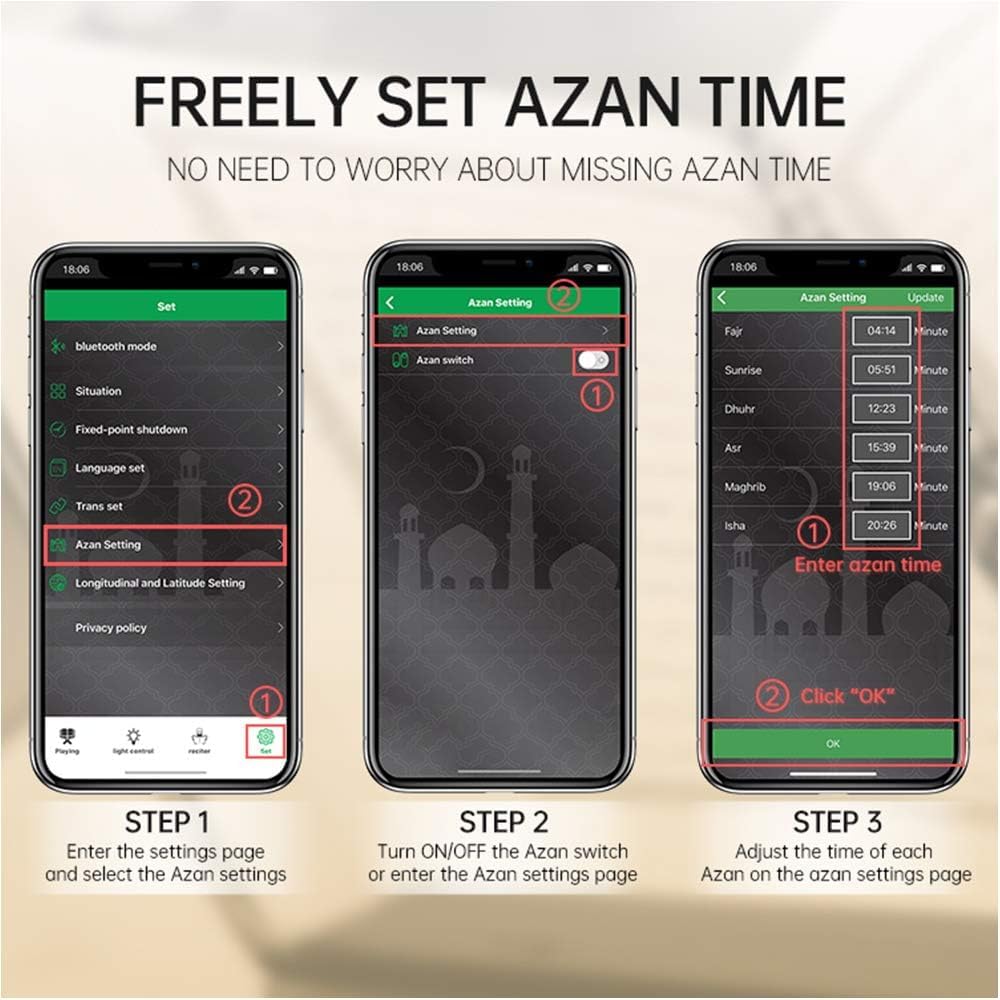
Figure 6.3: Freely Set Azan Time
- Lengkah 1: From the app's settings page, select 'Azan Setting'.
- Lengkah 2: Turn ON/OFF the Azan switch or enter the Azan settings page.
- Lengkah 3: Adjust the time for each Azan (Fajr, Sunrise, Dhuhr, Asr, Maghrib, Isha) on the Azan settings page and click 'OK' to save.
7. Pangropéa
- beberesih: Ngusap alat ku kaén anu lemes sareng garing. Ulah make cleaners abrasive atawa pangleyur.
- Perawatan batré: Pikeun manjangkeun umur batre, ulah miceun batre pinuh. Ngeusi batre alat sacara rutin, sanajan henteu dianggo kanggo waktos anu lami.
- Panyimpenan: Simpen alat dina tempat anu tiis sareng garing upami henteu dianggo.
8. Cara ngungkulan
| Masalah | Mungkin Cukang lantaranana | Solusi |
|---|---|---|
| Alat teu hurung. | Battery is low or depleted. Power switch is off. | Charge the device. Ensure the ON/OFF switch is in the 'ON' position. |
| Taya sora tina speaker. | Volume is too low. Device is in the wrong mode. Bluetooth not connected. | Increase volume. Press Mode Switch to select correct mode (Quran, Bluetooth, AUX). Re-pair Bluetooth device. |
| Papasangan Bluetooth gagal. | Device is not in pairing mode. Bluetooth on source device is off. Too far from source device. | Ensure speaker is in Bluetooth mode. Turn on Bluetooth on your source device. Move devices closer. |
| Light not changing colors. | Light mode is set to a single color. | Touch the top panel to cycle through light modes. Ensure the device is not in a fixed color mode. |
| Azan not playing. | Azan feature is disabled in the app. Incorrect Azan times set. | Check the 'Azan Setting' in the app to ensure it is enabled and times are correctly configured for your location. |
| Kadali jauh teu jalan. | Battery in remote is depleted. Obstruction between remote and speaker. | Replace the remote control battery. Ensure a clear line of sight to the speaker. |
9. Spésifikasi
| Fitur | Rincian |
|---|---|
| Nomer modél | SQ122 |
| merek | Generik |
| Speaker Maksimum Kaluaran Power | 5 Watt |
| Téhnologi konektipitas | Bluetooth |
| Mode Kaluaran Audio | Stereo |
| Tipe Pamasangan | Tabletop Gunung |
| Bahan Kandang | palastik |
| Fitur tambahan | Bluetooth Speaker, Night Light, Alarm Clock, Remote Control, Color Changing, Quran Recitations, App Control |
| Warna | Bodas |
| Métode kontrol | Aplikasi, Jauh, Toél |
| Ukuran Speaker | 3.94 inci |
| Pamuter MP3 | Sumuhun |
| Batré Rata Kahirupan | 10 Jam |
| Kapasitas batré | 1800 Miliamp Jam-jaman |
| Sumber Daya | Batré Powered |
| Ukuran barang (D x W x H) | 3.94 "D x 3.94" W x 5.94" H |
| Item Beurat | 10.88 ons |
| Produsén | Wonderful Electronic Tech |
10. Émbaran jaminan
This Generic SQ122 Quran Speaker comes with a 1-taun jaminan kawates from the date of purchase. This warranty covers manufacturing defects and workmanship under normal use. It does not cover damage caused by misuse, accidents, unauthorized modifications, or improper maintenance. Please retain your proof of purchase for warranty claims.
11. Rojongan
If you encounter any issues or have questions regarding your Generic SQ122 Quran Speaker that are not addressed in this manual, please contact the seller or manufacturer for assistance. Provide your model number (SQ122) and a detailed description of the issue when seeking support.