
1. Bubuka
This manual provides detailed instructions for the installation, operation, and maintenance of your Junsun 11.5-inch Touch Screen Car Radio Stereo. This unit is designed to enhance your in-car entertainment and navigation experience with features such as wireless CarPlay, Android Auto, GPS, and Bluetooth connectivity. Please read this manual thoroughly before installation and use to ensure proper function and safety.
Applicable Car Models:
- Jeep Wrangler: 2007-2018
- Jeep Compass: 2009-2016
- Jeep Patriot: 2009-2016
- Jeep Grand Cherokee: 2005-2011
- Jeep Liberty: 2008-2011
- Jeep Commander: 2008-2011
- Chrysler Sebring: 2007-2010
- Chrysler Town&Country: 2007-2010
- Dodge Grand Caravan: 2011-2014
- Dodge Charger: 2008-2010
- Dodge Ram Pickup 1500/2500/3500: 2009-2012

Image 1.1: The Junsun 11.5-inch Touch Screen Car Radio Stereo installed in a vehicle dashboard.
2. Émbaran Kasalametan
- Always operate the device responsibly. Distracted driving can lead to accidents.
- Ensure all wiring is correctly connected to prevent electrical shorts or damage.
- Ulah nyobian ngabongkar atanapi ngarobih unitna. Ieu tiasa ngabatalkeun garansi sareng nyababkeun karusakan.
- Jaga layar tetep bersih sareng bébas tina halangan supados tetep katingali jelas.
- Taroskeun ka profésional pikeun pamasangan upami anjeun henteu yakin kana léngkah-léngkah naon waé.
3. Eusi Paket
Pariksa yén sadaya komponén aya dina bungkusan sateuacan ngamimitian pamasangan:
- 11.5-inch Car Radio Stereo Unit
- Mikropon
- Modul GPS
- Kabel USB (x2)
- 4G Antenna (for 4G-Model, if applicable)
- Can Bus Box
- Power Cable (Plug and Play harness)
- Set Kabel RCA
- Reversing Line (for optional backup camera)
- Obeng
- Crowbar (for trim removal)
- Kabel adaptor anteneu
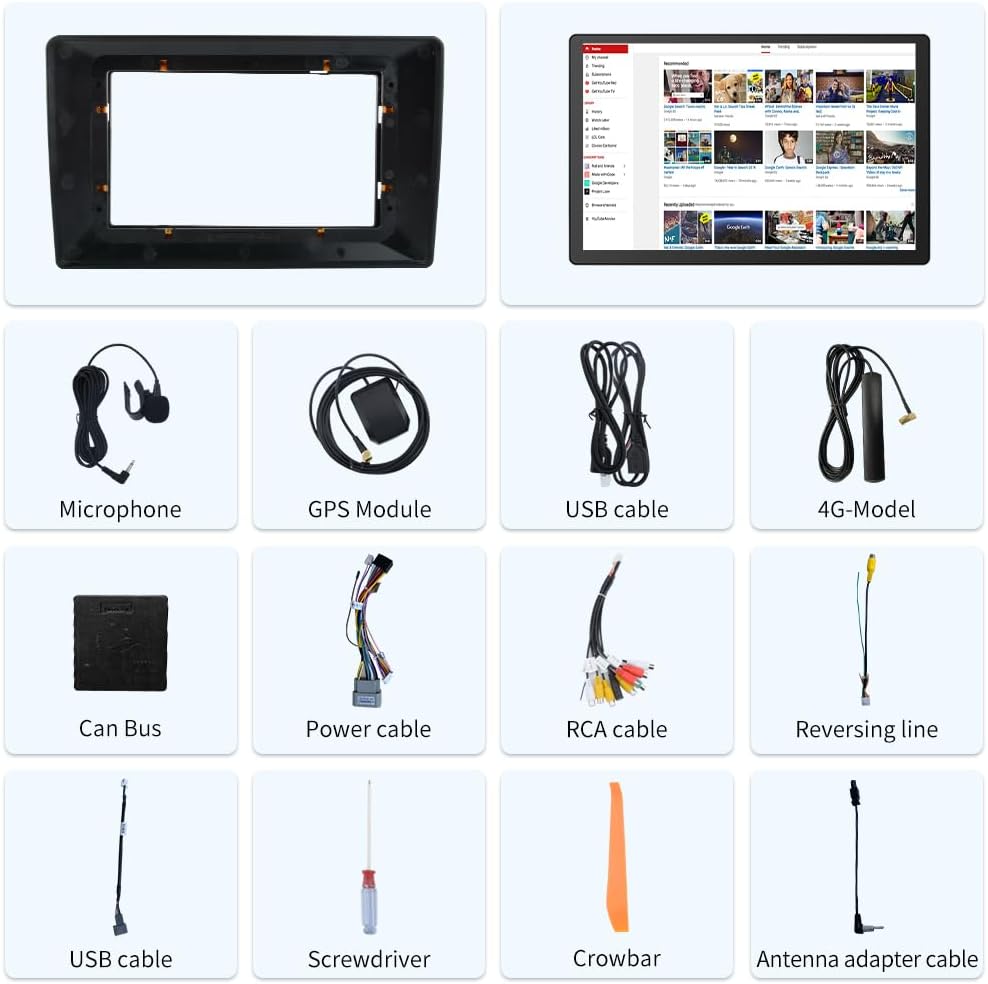
Image 3.1: Included components of the Junsun 11.5-inch Car Radio Stereo package.
4. Setup jeung Instalasi
The Junsun car radio stereo is designed for dashboard mounting and features a plug-and-play power harness for simplified installation. It supports existing steering wheel controls and factory backup cameras in compatible vehicles.
4.1 Sambungan Wiring
Refer to the wiring diagram below for proper connection of all cables. Ensure all connections are secure before powering on the unit.
- Kakuatan Harness: Connect the plug-and-play power harness to your vehicle's wiring.
- Modul GPS: Connect the GPS module and position it in a location with a clear view langit pikeun panarimaan sinyal optimal.
- Kabel USB: Connect the provided USB cables for external device connectivity.
- Kabel RCA: Use the RCA cable set for audio/video input/output connections, including front camera input, video output, auxiliary input, and subwoofer output.
- Mikropon: Sambungkeun mikropon éksternal pikeun kualitas telepon sareng paréntah sora anu langkung saé.
- Anteneu adaptor: Connect your vehicle's radio antenna using the provided adapter.
- Can Bus Box: Connect the Can Bus box to enable integration with vehicle features like steering wheel controls.

Image 4.1: Wiring diagram for the Junsun 11.5-inch Car Radio Stereo.
4.2 Daya Awal Hurung sareng Konfigurasi
After installation, turn on your vehicle's ignition. The unit should power on automatically. Follow the on-screen prompts for initial setup, including language selection and time zone settings.
5. Parentah Operasi
5.1 Tampilan jeung Interface
The unit features an 11.5-inch touch screen with a resolution of 2000*1200 pixels, providing a clear and responsive interface.

Image 5.1: Display resolution comparison for the 11.5-inch screen.
5.2 CarPlay Nirkabel sareng Android Auto
Connect your smartphone wirelessly via Bluetooth to access CarPlay or Android Auto. This allows for voice control and integration of phone functions such as music, navigation, calls, and messages directly on the car stereo display.
- papasangan: Enable Bluetooth on your smartphone and the car stereo. Select your phone from the stereo's Bluetooth menu to pair.
- Aktipkeun: Once paired, CarPlay or Android Auto should automatically launch or be selectable from the main menu.

Image 5.2: CarPlay and Android Auto interfaces.
5.3 Napigasi GPS
The unit includes a built-in GPS module that supports both online and offline navigation applications from the Google Play app market. Ensure the GPS antenna is properly installed for accurate positioning.
- Navigasi Online: Requires a Wi-Fi connection or mobile hotspot for real-time traffic data and map updates.
- Navigasi Offline: Unduh peta kanggo dianggo offline pikeun navigasi tanpa sambungan internét.

Image 5.3: GPS Navigation interface.
5.4 Konektipitas Bluetooth
Utilize Bluetooth for hands-free calling and audio streaming. The built-in microphone allows for clear communication during calls.
- Telepon Hand-Free: Pair your phone to make and receive calls directly from the stereo.
- Musik Bluetooth: Stream audio from your paired device to the car stereo.

Image 5.4: Bluetooth phone and music interface.
5.5 Control kabayang steering
The unit supports integration with your vehicle's existing steering wheel controls, allowing you to manage audio and calls without taking your hands off the wheel. Configuration may be required in the settings menu.

Image 5.5: Steering wheel control functionality.
5.6 Radio FM
Access local radio stations with the built-in FM tuner. Scan for stations and save your favorites for quick access.

Image 5.6: FM Radio interface.
5.7 Fungsi Layar Pamisah
Fitur layar pamisah ngamungkinkeun anjeun ngajalankeun dua aplikasi sacara babarengan dina tampilan, sapertos navigasi sareng pamuteran musik.

Image 5.7: Split Screen mode.
5.8 Audio Equalizer (DSP)
Adjust audio settings using the built-in Digital Sound Processor (DSP) and equalizer to customize your sound experience.

Image 5.8: Built-in DSP and Equalizer interface.
6. Pangropéa
- Ngabersihan layar: Anggo lawon anu lemes sareng henteu ngaganggu pikeun ngabersihkeun layar rampa. Pikeun noda anu bandel, usap sakedikampen lawon jeung cai atawa cleaner aman layar. Hindarkeun bahan abrasive atanapi bahan kimia kasar.
- beberesih umum: Keep the unit and surrounding dashboard area free from dust and debris.
- Apdet parangkat lunak: Periodically check for available software updates to ensure optimal performance and access to new features. Updates can typically be found through the unit's settings menu or the manufacturer's websitus.
7. Cara ngungkulan
If you encounter issues with your Junsun car radio stereo, refer to the following common troubleshooting steps:
| Masalah | Mungkin Cukang lantaranana | Solusi |
|---|---|---|
| Unit teu hurung. | Incorrect wiring, blown fuse, vehicle ignition off. | Check power cable connections. Verify vehicle ignition is on. Inspect vehicle fuses. |
| Taya sora. | Volume teuing leutik, bisu diaktipkeun, kabel speaker salah. | Naékkeun volume. Pariksa naha bisu aktip. Pariksa sambungan spiker. |
| Sinyal GPS leungit atanapi teu akurat. | Antena GPS teu dipasang kalawan bener atawa teu nyambung. | Pastikeun anteneu GPS boga jelas view langit sareng nyambung kalayan aman. |
| Sambungan Bluetooth teu stabil. | Interference, phone too far, software glitch. | Ensure phone is close to the unit. Re-pair the Bluetooth device. Restart both devices. |
| Kadali setir teu jalan. | Can Bus box not connected, incorrect configuration. | Verify Can Bus box connection. Check steering wheel control settings in the unit's menu. Some vehicles may require specific configuration. |
| CarPlay / Android Auto teu nyambung. | Bluetooth issue, phone compatibility, software glitch. | Ensure Bluetooth is active and paired. Restart phone and stereo. Check phone compatibility with CarPlay/Android Auto. |
8. Spésifikasi
| Fitur | Rincian |
|---|---|
| Ukuran tampilan | 11.5 inci |
| Resolusi layar | 2000*1200 |
| Sistem operasi | Android |
| Téhnologi konektipitas | Bluetooth |
| Fitur husus | Layar cabak |
| Tipe Pamasangan | Dasbor Gunung |
| Mode Kaluaran Audio | Stereo |
| Paréntah sora | Mikropon, Layar rampa |
| Tipe Peta | Amérika Kalér |
| Item Beurat | 4.69 pon |
| Ukuran Paket | 13.58 x 11.42 x 6.57 inci |
9. Garansi jeung Rojongan
9.1 Émbaran jaminan
This Junsun car radio stereo comes with a garansi 1 taun from the date of purchase. Please retain your proof of purchase for warranty claims. The warranty covers manufacturing defects but does not cover damage caused by improper installation, misuse, accidents, or unauthorized modifications.
9.2 Rojongan Téknis
For technical assistance, installation questions, or troubleshooting beyond what is covered in this manual, please contact Junsun Car Electronics directly. You can typically find contact information on the seller's page where you purchased the product or through the official Junsun websitus.

Image 9.1: How to contact Junsun Car Electronics for support.