
1. Bubuka
The IDUINO PC1080 is a high-performance dual-channel 6S LiPo charger specifically designed for industrial application drones. It offers reliable, safe, and user-friendly operation with a comprehensive set of functionalities. These include a battery voltage meter, internal resistance meter, LiHV charging mode, and a time-saving synchronization mode. Its robust design ensures stable performance in various environments.
2. Eusi Paket
Punten parios yén sadaya barang anu didaptarkeun di handap aya dina pakét anjeun:
- 1 x PC1080 Dual Channel LiPo Charger
- 1 x Kabel Daya AC
- 1 x Synchronous data connectors
- 1 x Manual Basa Inggris (dokumen ieu)
3. Fitur konci
The IDUINO PC1080 charger incorporates several advanced features for efficient and safe battery management:
- High-Frequency Capacitor: Utilizes high-specification large capacitors to ensure prolonged and stable operation.
- PFC aktif: Features Active Power Factor Correction circuitry for optimal power draw, achieving high efficiency (93%) and reducing interference to the power grid.
- Switched-mode Power Supply: Designed to accept power from mains supplies globally.
- Lapisan Conformal: Electronic components are protected with a conformal coating, enhancing resistance to moisture, dust, chemicals, corrosion, and temperature extremes, ensuring stable field performance.
- Automatic Sequential Charging: When paired with G630 charging hubs, the PC1080 can automatically charge up to 12 LiPo battery packs in sequence, prioritizing batteries with the highest remaining capacity.
- Mimitian Hiji-Konci: Simplifies the charging process with a single button press (default 20A current).
- Unique Synchronization Function: Allows one charger to control multiple other chargers for streamlined operation.
- Pangimeutan Status Batré: Provides real-time battery voltage and internal resistance detection.
- Perlindungan Komprehensif: Includes short circuit maintenance, reverse polarity protection, over-temperature protection, and a built-in anti-fire protection circuit to prevent sparking during battery connection.
4. Spésifikasi
| Parameter | Nilai |
|---|---|
| merek | IDUINO |
| Produsén | SKYRC |
| Modél | SKYRC PC1080 |
| Masukan Voltage | 100-240V AC |
| Daya Kaluaran | 1080W (540W x 2) |
| Discharge Power | 100W (50W x 2) |
| Muatan Ayeuna | 1.0-20.0 A x 2 |
| Kasaimbangan Ayeuna | 1.2 A |
| Jenis Batré | LiPo/LiHV |
| Jumlah sél batré | 6S x 2 |
| Modeu Ngecas | Balance Charge Mode / Storage Mode / Charge Mode |
| Dimensi produk | 5 x 3 x 4 cm |
| Item Beurat | 1 kg |
| Negara asal | Cina |
5. Produk Langkungview
5.1 Hareup View
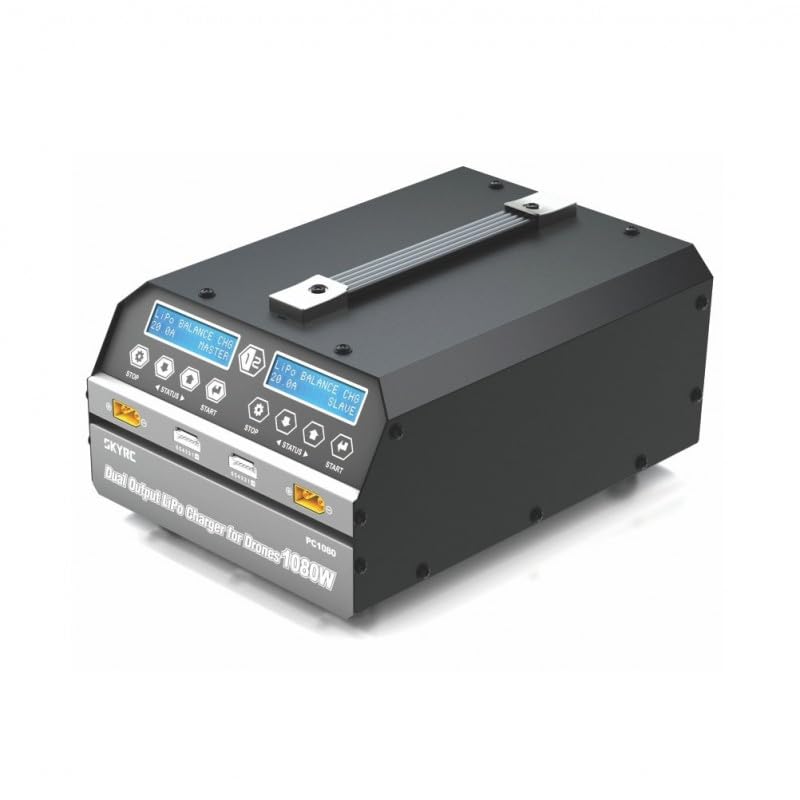
This image displays the front of the IDUINO PC1080 charger, highlighting its dual charging channels, each with its own display screen, control buttons (STOP, STATUS, START), and battery connection ports. The robust handle for portability is also visible.
5.2 Tukangeun View
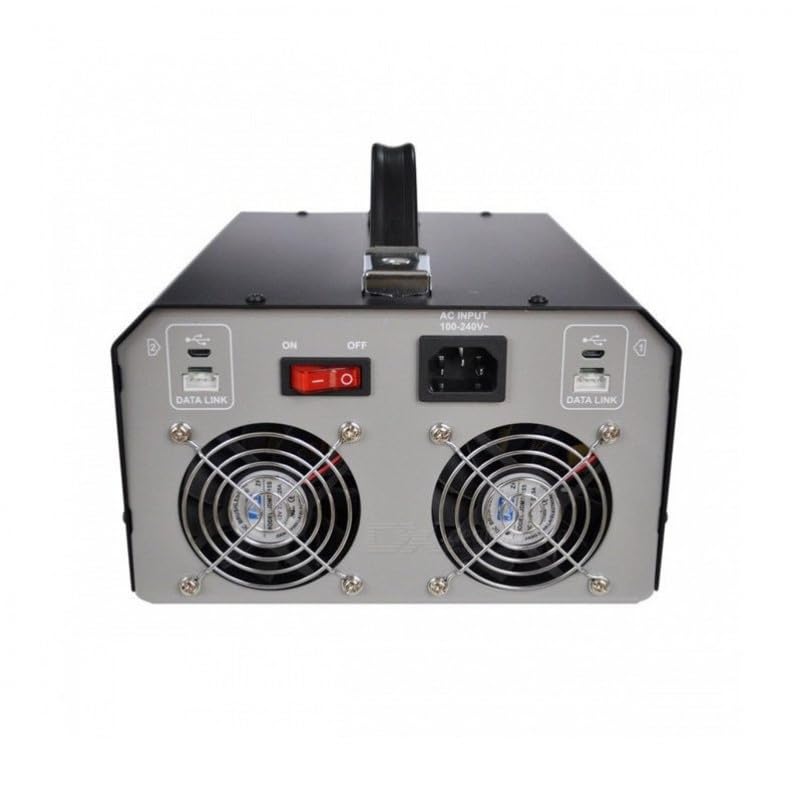
The rear panel of the charger features the AC input port (100-240V), the main ON/OFF power switch, and two cooling fans to dissipate heat during operation. Data Link ports are also present for synchronization with other units.
5.3 Charger in Operation
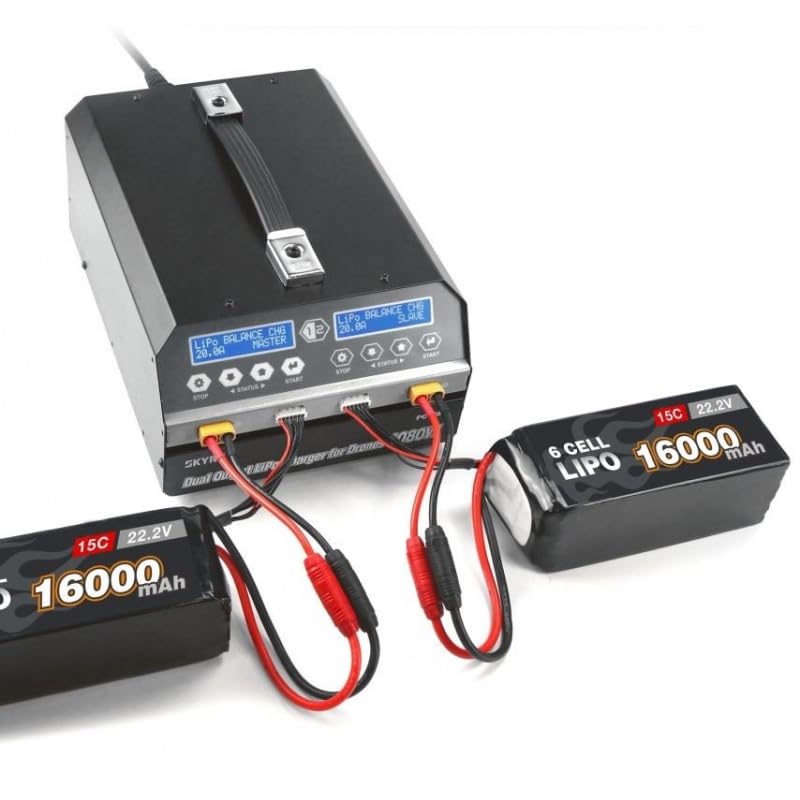
This image shows the IDUINO PC1080 charger actively charging two 6S 16000mAh LiPo batteries. The display screens indicate the charging status, demonstrating the dual-channel capability of the device.
6. Setélan
Follow these steps for initial setup of your PC1080 charger:
- Buka bungkus carjer: Taliti cabut carjer sareng sadaya asesoris tina bungkusan.
- Nyambungkeun Daya AC: Plug the supplied AC power cord into the AC input port on the rear of the charger. Connect the other end to a suitable 100-240V AC power outlet.
- Daya Hurung: Flip the main ON/OFF switch on the rear panel to the 'ON' position. The display screens on the front will illuminate.
- Nyiapkeun batré: Ensure your LiPo/LiHV batteries are in good condition and within their safe operating temperature range.
- Sambungkeun Batré: Connect your battery's main discharge lead to the corresponding output port on one of the charger channels. Then, connect the battery's balance lead to the balance port. Ensure correct polarity for all connections.
7. Parentah Operasi
7.1 Ngecas Dasar
To initiate a basic charge cycle:
- Pilih Saluran: Identify the channel (Master or Slave) you wish to use.
- Sambungkeun Batré: As described in the Setup section, connect your battery to the chosen channel.
- Mimitian Hiji-Konci: Press the 'START' button on the desired channel. The charger will automatically begin charging with a default current of 20A.
- Monitor kamajuan: The display screen will show real-time charging parameters such as voltage, current, and charged capacity.
- Eureun Ngecas: To stop charging at any time, press the 'STOP' button on the active channel.
7.2 Advanced Charging Modes
The PC1080 supports various charging modes:
- Balance Charge Mode: Recommended for LiPo/LiHV batteries to ensure all cells are charged to the same voltage, prolonging battery life.
- Modeu Panyimpenan: Charges or discharges the battery to a specific voltage level suitable for long-term storage, preventing degradation.
- Mode ngecas: Standard charging without balancing. Use with caution and only when balancing is not required.
To select a specific mode, navigate through the menu using the 'STATUS' button before pressing 'START'.
7.3 Fungsi singkronisasi
The unique synchronization function allows you to control multiple PC1080 chargers from a single master unit. Connect the synchronous data connectors between the chargers as per the diagram in the full manual (not provided here). Once connected, operations initiated on the master charger will be replicated on the slave chargers.
7.4 Battery Status Monitoring
During charging or when a battery is connected, you can press the 'STATUS' button to cycle through various battery parameters displayed on the screen, including:
- Total batré voltage
- Sél individu voltages
- Internal resistance of each cell
- Charging current and capacity
8. Pangropéa
Proper maintenance ensures the longevity and safe operation of your charger:
- beberesih: Regularly wipe the charger's exterior with a soft, dry cloth. Do not use solvents or abrasive cleaners. Ensure ventilation openings are free from dust and debris.
- Panyimpenan: Store the charger in a cool, dry place away from direct sunlight, moisture, and extreme temperatures.
- Pamariksaan kabel: Periodically inspect all cables and connectors for signs of wear, damage, or corrosion. Replace damaged cables immediately.
- Ventilasi: Ensure adequate airflow around the charger during operation. Do not block the cooling fans.
9. Cara ngungkulan
If you encounter issues with your PC1080 charger, refer to the table below for common problems and their solutions:
| Masalah | Mungkin Cukang lantaranana | Solusi |
|---|---|---|
| Charger teu hurung | No AC power; Power switch off; Faulty power cord | Check AC outlet; Ensure power switch is ON; Try a different power cord |
| Ngecas teu ngamimitian | Battery not connected properly; Incorrect battery type selected; Safety error triggered | Reconnect battery (main and balance leads); Verify battery type and cell count; Check display for error messages (e.g., 'Connection Break', 'Cell Error') |
| Charger displays 'Over Temperature' | Poor ventilation; Ambient temperature too high; Internal fault | Ensure clear ventilation around charger; Move to a cooler environment; If problem persists, contact support |
| Battery not balancing correctly | Balance lead not connected; Damaged balance lead; Faulty battery cell | Ensure balance lead is fully inserted; Inspect balance lead for damage; Test battery with another device if possible |
| Synchronization not working | Data link cables not connected; Incorrect master/slave setup | Verify data link cable connections; Ensure one unit is set as master and others as slaves |
Lamun masalah persists sanggeus nyobian solusi ieu, mangga ngahubungan rojongan customer.
10. Émbaran Kasalametan
Always observe the following safety precautions when operating the IDUINO PC1080 charger:
- Never leave the charger unattended while in operation, especially when charging LiPo/LiHV batteries.
- Always charge batteries on a non-flammable surface, away from flammable materials.
- Pastikeun ventilasi ditangtoskeun pikeun nyegah overheating.
- Ulah nyobian ngecas batré anu ruksak, bareuh, atanapi bocor.
- Always connect the battery to the charger before connecting the charger to AC power. Disconnect AC power before disconnecting the battery.
- Keep the charger away from water, moisture, and high humidity.
- Ulah ngabongkar atanapi ngarobih carjer. Serahkan sadaya servis ka tanaga anu mumpuni.
- Jauhkeun tina jangkauan barudak.
11. Garansi jeung Rojongan
The IDUINO PC1080 Dual Channel LiPo Battery Charger comes with a standard manufacturer's warranty. For specific warranty terms and conditions, please refer to the warranty card included with your product or visit the official IDUINO website. For technical support, troubleshooting assistance, or warranty claims, please contact IDUINO customer service through the contact information provided on their official websitus atanapi resi pameseran anjeun.