
1. Bubuka
The Phomemo LT12 Label Maker Machine is a portable, rechargeable label printer designed for various organizational needs in home, office, and school environments. It features a QWERTY keyboard for direct input and Bluetooth connectivity for enhanced customization via the Printmaster application. This manual provides comprehensive instructions for setting up, operating, and maintaining your LT12 label maker.
2. Eusi Paket
Punten parios yén sadaya barang anu didaptarkeun di handap kalebet kana pakét anjeun:
- 1 x LT12 Label Maker
- 1 x Kabel Ngecas Tipe-C
- 1 x 12mm x 4m Black on White Label Tape
- 1 x Manual Pamaké

Image: The Phomemo LT12 label maker, a Type-C charging cable, a roll of 12mm x 4m black on white label tape, and the user manual, laid out as included in the package.
3. Produk Langkungview jeung Fitur
The Phomemo LT12 is designed for ease of use and versatility. Key features include:
- Batré anu tiasa dicas deui: Equipped with a 1200mAh lithium battery, providing 2-3 hours of continuous printing on a full charge. Charges via a Type-C cable. Features an automatic shut-off after 5 minutes of inactivity to conserve battery life.
- Métode Input Ganda: Features a familiar QWERTY keyboard for direct, one-touch printing and Bluetooth connectivity for advanced editing via the Printmaster APP.
- Printmaster APP: Offers extensive customization with over 1600 icon symbols, 163 fonts, 30+ languages, and 287+ border styles. Supports saving templates and viewing print history.
- Pelabelan anu Éfisién: Supports label widths from 9mm to 12mm, allowing for multiple lines of text. Includes a built-in cutter and supports horizontal or vertical printing.
- Label awét: Labels are waterproof, BPA-free, heat resistant, and designed to tear off without residue. They are fade-resistant, maintaining clarity even in humid or harsh conditions.
- Layar LCD Backlit: A backlit LCD display ensures optimal visibility and readability of labels, even in low-light environments.
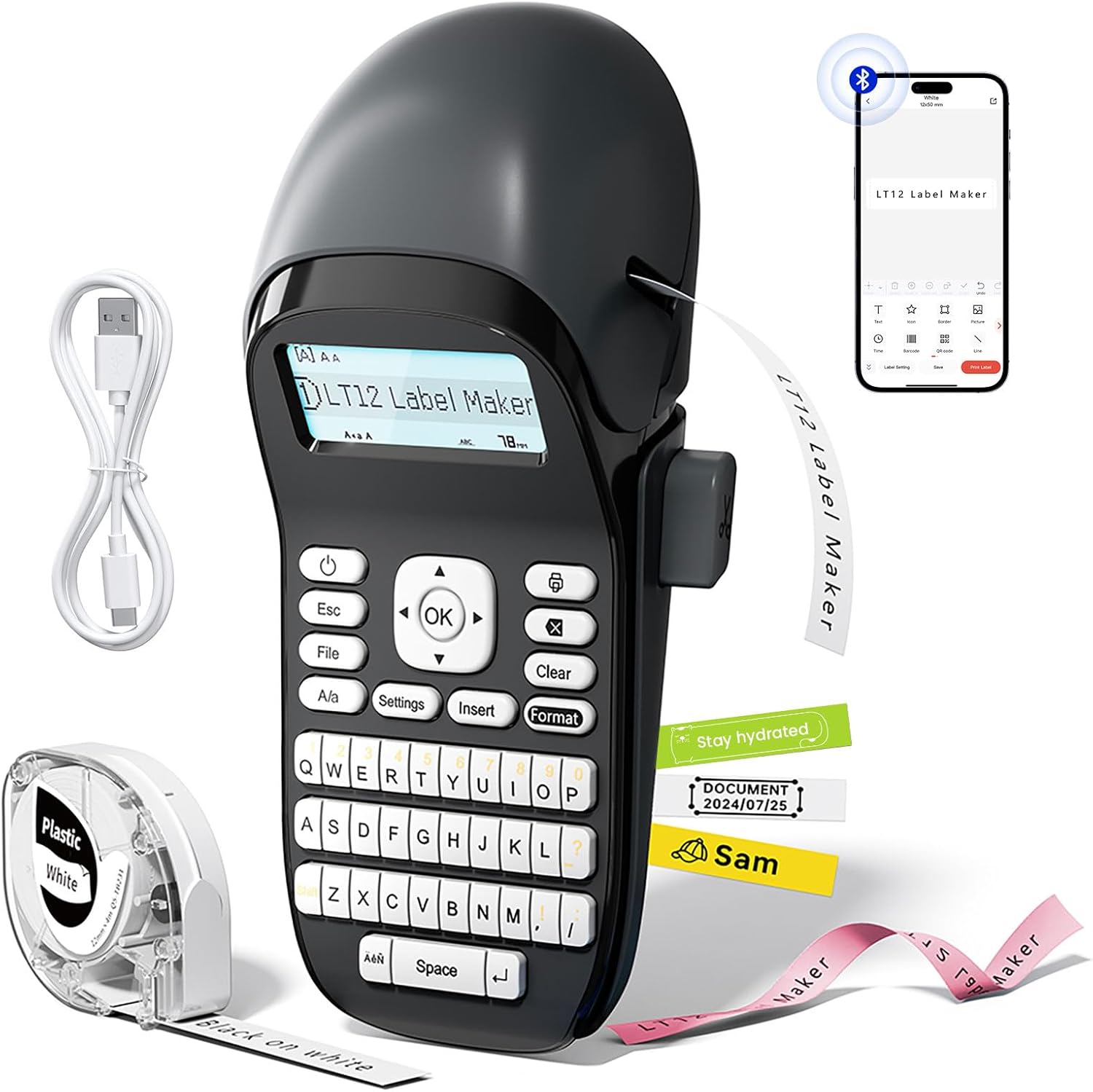
Image: The Phomemo LT12 Label Maker, showcasing its QWERTY keyboard, LCD screen, and a smartphone connected via Bluetooth, alongside label tape and a charging cable.

Image: A visual comparison highlighting the LT12's integrated 1200mAh rechargeable battery against other label makers that require 6 AA batteries.

Image: The Phomemo LT12 label maker with its LCD backlit screen illuminated, demonstrating clear visibility in a dimly lit setting.
4. Setélan
4.1 Ngecas Alat
Before first use, fully charge the LT12 label maker. Connect the provided Type-C charging cable to the device and a compatible USB power source. The charging indicator will show the charging status.
4.2 Loading Label Tape
- Open the tape compartment cover on the side of the label maker.
- Insert the label tape cassette with the tape end facing the print head. Ensure the tape is properly aligned.
- Tutupkeun panutup kompartemen pita kalayan pageuh.
4.3 Pamasangan Aplikasi sareng Sambungan Bluetooth
To utilize advanced features and customization, connect your LT12 label maker to the Printmaster app:
- Unduh Printmaster aplikasi ti toko aplikasi smartphone anjeun (sayogi pikeun Android sareng iOS).
- Turn on Bluetooth on your smartphone and power on the LT12 label maker.
- Open the Printmaster app and search for available Bluetooth devices.
- Select "LT12 Label Maker" from the list to establish a connection.

Image: A visual guide showing four steps to connect the Phomemo LT12 label maker to a smartphone via the Printmaster app: download app, enable Bluetooth, search for device, and select LT12.
5. Parentah Operasi
5.1 Basic Label Creation (Using Keyboard)
- Power on the label maker.
- Anggo kibor QWERTY pikeun ngetik téks anu dipikahoyong. Téksna bakal muncul dina layar LCD.
- Utilize the function keys for basic editing:
- Esc: Exit current menu or cancel action.
- File: Access saved labels or save current label (supports up to 9 files).
- A/a: Toggle between uppercase and lowercase letters.
- Setélan: Adjust device settings (e.g., language, print density).
- Lebetkeun: Add symbols, dates, or other special characters.
- formatna: Change font styles, sizes, or add borders.
- Hapus: Delete characters or clear the entire text.
- OKÉ: Confirm selections or initiate printing.
- Pencét éta OK button to print the label.

Gambar: A lengkep view of the Phomemo LT12 label maker's QWERTY keyboard and its LCD screen, showing text input.
5.2 Advanced Label Creation (Using Printmaster App)
- Ensure your LT12 label maker is connected to the Printmaster app via Bluetooth.
- Dina aplikasi éta, anjeun tiasa:
- Type text and adjust font, size, and style.
- Access a library of over 1600 icons and symbols.
- Choose from 163 fonts and 287 border styles.
- Create and save custom templates for frequent use.
- Review your print history.
- Once your label design is complete in the app, tap the print icon to send it to the label maker.

Image: A series of smartphone screenshots illustrating the Printmaster app's interface for text editing, symbol insertion, and label customization.
6. Pangropéa
6.1 beberesih
Beberesih rutin mastikeun kinerja anu optimal:
- Pareuman alat sateuacan beberesih.
- Anggo lawon anu lemes sareng garing pikeun ngusap bagian luar mesin labél.
- Gently clean the print head with a cotton swab moistened with rubbing alcohol if print quality degrades. Allow to dry completely before use.
6.2 Perawatan Batré
- To prolong battery life, avoid completely discharging the battery frequently.
- Ngeusi batre alat sacara rutin, sanajan henteu sering dianggo.
- If storing for an extended period, charge the battery to approximately 50% and recharge every 3-6 months.
6.3 Panyimpenan
Store the label maker in a cool, dry place away from direct sunlight and extreme temperatures. Remove the label tape cassette if storing for a very long period.
7. Cara ngungkulan
| Masalah | Mungkin Cukang lantaranana | Solusi |
|---|---|---|
| Device does not power on or charge. | Low battery; faulty charging cable or adapter; device malfunction. | Ensure the device is charged using the provided Type-C cable and a working power adapter. Try a different cable or adapter. If the issue persists, contact support. |
| Teu aya citak atanapi citak samar. | Label tape incorrectly installed; print head dirty; low battery. | Reinstall the label tape correctly. Clean the print head as described in Section 6.1. Charge the device fully. |
| Sambungan Bluetooth gagal. | Bluetooth not enabled; app issue; device not discoverable. | Ensure Bluetooth is enabled on both the label maker and your smartphone. Restart the app and the label maker. Try pairing again. |
| Labels are not cutting properly. | Cutter blade dull or obstructed. | Ensure no tape residue is obstructing the cutter. If the issue persists, contact support. |
| Labels peel off easily. | Surface not clean; label type unsuitable for surface. | Ensure the surface is clean, dry, and smooth before applying the label. Use appropriate label types for specific environments (e.g., waterproof for humid areas). |
8. Spésifikasi
| Fitur | Rincian |
|---|---|
| Ngaran modél | LT12 |
| merek | Phomemo |
| Téhnologi konektipitas | Bluetooth |
| Téhnologi percetakan | Termal |
| Ukuran Média Maksimum | 12mm x 4m |
| Maksimum Hideung Bodas Resolusi Print | 203 dpi |
| Laju Cetak Maks (Monokrom) | 30 ppm |
| Batré | 1200mAh Lithium Ion (kaasup) |
| Pangecas Interface | USB Tipe-C |
| Dimensi produk | 8.85 "D x 4.29" W x 3.07" H |
| Item Beurat | 10.3 ons (291 gram) |
| Alat nu cocog | Smartphone, Tablet (Android, ios) |
| Tinta Printer Tipe | No Ink (Thermal Printing) |
9. Émbaran jaminan
The Phomemo LT12 Label Maker Machine comes with a Limited Warranty. For specific details regarding warranty coverage, duration, and terms, please refer to the warranty card included in your product packaging or visit the official Phomemo websitus kanggo inpormasi paling anyar.
10. Rojongan
For further assistance, technical support, or inquiries about your Phomemo LT12 Label Maker Machine, please contact Phomemo customer service through their official websitus atanapi inpormasi kontak anu disayogikeun dina dokuméntasi produk anjeun.
You can also find additional resources, FAQs, and product updates on the official Phomemo websitus: Toko Phomemo