
1. Bubuka
This manual provides detailed instructions for the safe and effective use of your POWRUI 6-Outlet Extender with 3 USB Charging Ports (1 USB-C) and Night Light, Model AHR-508. Please read this manual thoroughly before installation and operation, and retain it for future reference.
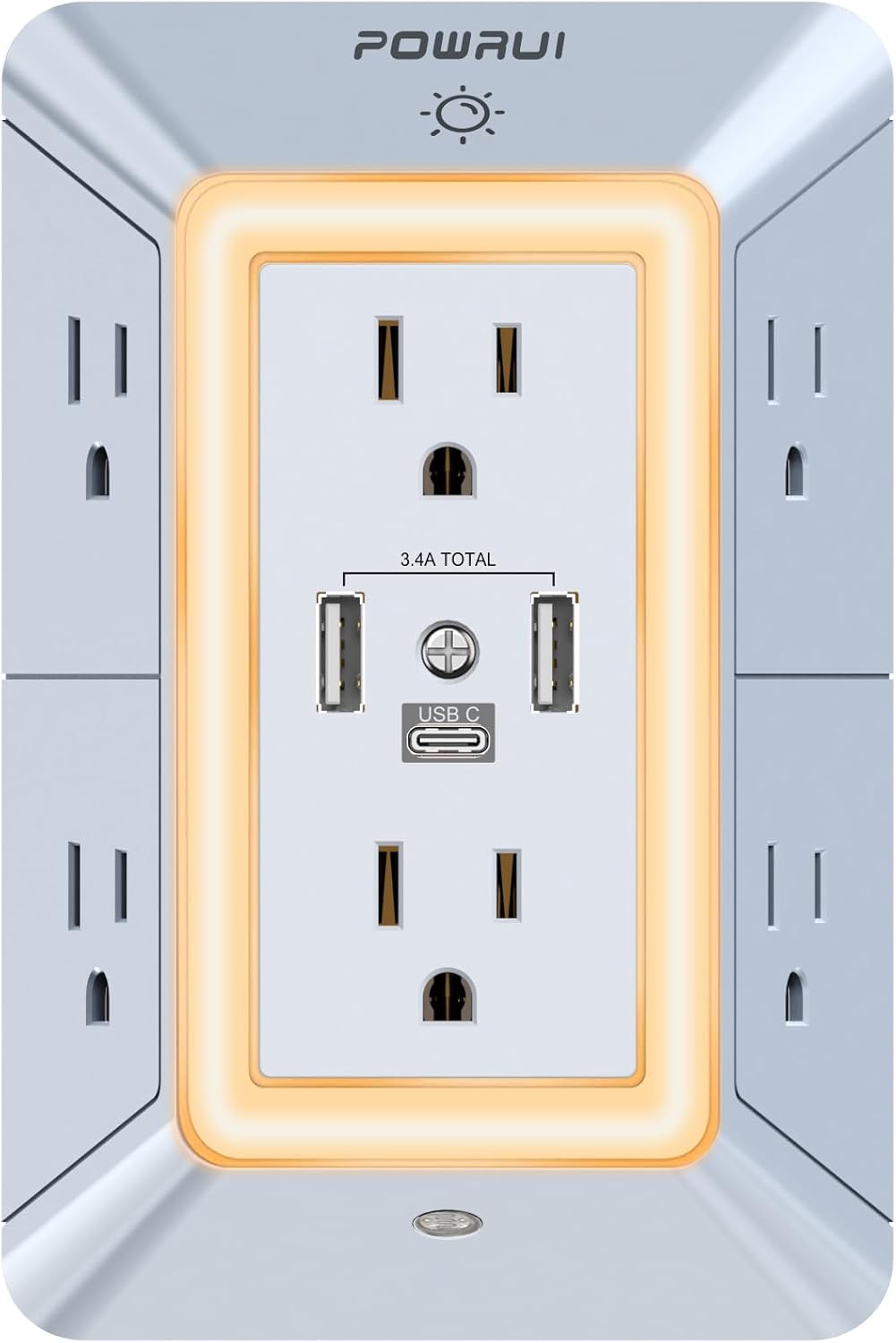
Gambar 1.1: Hareupeun view of the POWRUI 6-Outlet Extender, showing 6 AC outlets, 2 USB-A ports, and 1 USB-C port, surrounded by an illuminated night light ring.
2. Parentah Kasalametan
Pikeun ngurangan résiko shock listrik, seuneu, atawa tatu, salawasna turutan pancegahan kaamanan dasar ieu:
- This product is for indoor use only. Do not use in wet or damp lokasi.
- Do not exceed the maximum power rating of 1875W or current of 15A.
- Pastikeun stop kontak dina témbok geus dihubungkeun ka ground kalawan bener.
- Ulah ngabongkar atawa ngaropéa alat. Rujuk sadayana jasa ka tanaga anu mumpuni.
- Jauhkeun barudak tina alat.
- Avoid plugging in appliances with damaged cords or plugs.
- Port USB-C teu ngarojong alat merlukeun 14-22V ngecas voltage.
3. Fitur Produk
The POWRUI AHR-508 offers multiple functionalities for your power needs:
- 6 stop kontak AC: Provides six standard AC outlets (15A, 1875W total) with wide spacing for larger adapters.
- 3 Port Ngecas USB: Includes two USB-A ports and one USB-C port, with a total output of 5V/3.4A for fast charging compatible devices.
- 1680 Joules Surge Protection: Ngajagi alat anu disambungkeun tina lonjakan kakuatan sareng paku.
- Smart Night Light: Features a dusk-to-dawn sensor for automatic activation and a touch sensor for three levels of adjustable brightness.
- Fireproof Shell: Constructed with a safe, fireproof shell for enhanced safety.
- Desain Hemat Spasi: 3-sided design allows for efficient use of space.

Image 3.1: Diagram illustrating the key features of the POWRUI 6-Outlet Extender, including 6 AC outlets, 2 USB-A and 1 USB-C port, 1680J surge protection, light sensor, and 3-level brightness touch sensor.
4. Eusi Paket
Pastikeun yén sadaya item aya dina pakét anjeun:
- 1 x POWRUI Multi-Outlet Extender with USB Ports (Model AHR-508)
- 1 x Manual Instruksi
5. Setup jeung Instalasi
The POWRUI AHR-508 is designed for easy installation into a standard duplex wall receptacle.
- Tangtukeun Outlet anu Cocog: Locate a standard 3-prong duplex wall outlet. Ensure there is sufficient space around the outlet for the extender's dimensions (5.5 x 3.8 x 1.7 inches).
- Pariksa kasaluyuan: This product is compatible with standard duplex and decor outlets. It is not suitable for USB receptacles or GFCI outlets due to the design of the back plastic post. The wall outlet must have at least 1 inch of space between the two parallel sockets.
- Colokkeun: Align the prongs of the POWRUI extender with the slots of your wall outlet. Push firmly until the extender is flush against the wall. The groove on the back ensures a snug fit.
- Aman (Opsional): If your wall outlet has a center screw, you may use it to further secure the extender.

Gambar 5.1: Balik view of the POWRUI 6-Outlet Extender, highlighting the design for flush wall mounting and compatibility with duplex receptacles.

Image 5.2: Visual guide showing compatibility with standard duplex and decor outlets, and incompatibility with USB receptacles and GFCI outlets.
6. Parentah Operasi
6.1 outlet AC
Plug your devices directly into any of the six AC outlets. The wide spacing between outlets accommodates larger power adapters without blocking adjacent ports.
6.2 Palabuhan Ngecas USB
Connect your USB-powered devices to the two USB-A ports or the single USB-C port. The total output for all USB ports is 3.4A. Note that the USB-C port is not designed for devices requiring 14-22V charging voltage.
6.3 Smart Peuting Lampu
The integrated night light features both a dusk-to-dawn sensor and a touch sensor for manual control and brightness adjustment.
- Automatic Mode (Dusk-to-Dawn Sensor): The night light will automatically turn on when ambient light is insufficient and turn off when the area becomes bright. This mode is active by default.
- Manual Control & Brightness Adjustment:
- Touch the sensor area (usually indicated by a small dot or icon on the front) to cycle through brightness levels: Off → 1st Level → 2nd Level → 3rd Level → Off.
- This allows you to manually override the dusk-to-dawn sensor or set a preferred brightness.

Image 6.1: Illustration demonstrating the dusk-to-dawn sensor functionality (day/night modes) and the three adjustable brightness levels of the night light via touch control.
7. Spésifikasi
| Nomer modél | AHR-508 |
| Masukan Voltage | 125VAC; 60Hz |
| Max. ayeuna | 15A |
| Max. Peunteun Kakuatan | 1875W |
| USB Jumlah Kaluaran | 5V / 3.4A |
| Peunteun Protection Surge | 1680 Joule |
| Dimensi produk | 5.5 x 3.8 x 1.7 inci |
| Item Beurat | 9.1 ons |
| Sertifikasi | ETL Didaptarkeun |
8. Cara ngungkulan
If you encounter issues with your POWRUI 6-Outlet Extender, refer to the following common problems and solutions:
- No Power to Outlets/USB Ports:
- Ensure the extender is fully plugged into a functional wall outlet.
- Check if the wall outlet itself is receiving power (e.g., by plugging in another device).
- If the surge protector has been tripped, unplug all devices, wait a few minutes, and then plug them back in.
- Verify that the total power draw of connected devices does not exceed 1875W.
- Night Light Not Working Automatically:
- Ensure the ambient light sensor is not obstructed.
- Test the night light manually by touching the sensor to cycle through brightness levels. If it works manually, the automatic sensor might be detecting too much ambient light.
- USB-C Port Not Charging:
- Confirm your device is compatible with 5V charging and does not require 14-22V.
- Coba kabel USB-C anu béda.
9. Garansi jeung Rojongan
POWRUI provides a 30-day return policy and a 12-month warranty for this product. For any questions or support needs, please contact POWRUI customer service. Our team aims to respond within 24 hours.
For further assistance, please visit the official POWRUI store or contact their customer support channels.