
AFK BT528
AFK Portable Bluetooth Wireless Speaker User Manual
Modél: BT528
1. Bubuka
Hatur nuhun pikeun meuliasing the AFK Portable Bluetooth Wireless Speaker. This manual provides detailed instructions on how to set up, operate, and maintain your speaker to ensure optimal performance and longevity. Please read this manual thoroughly before using the product.

Image: The AFK Portable Bluetooth Wireless Speaker, showcasing its sleek black cylindrical design and top-mounted control panel.
2. Produk Langkungview
2.1 Eusi pakét
Mangga parios eusi pakét nalika unboxing:
- AFK Portable Bluetooth Wireless Speaker (Model: BT528) with built-in microphone
- Kabel Ngecas USB-C
- Manual pangguna (dokumén ieu)
2.2 Fitur konci
- Audio anu kuat: Dual speaker drivers and a powerful amplifier module deliver up to 15W room-filling sound with punchy bass, strong midranges, and crisp highs.
- Konektipitas Bluetooth 5.3: Offers fast and stable wireless connections up to 100 feet (30 meters).
- Cahaya dinamis: Features 5 colorful light colors and 6 light modes, including mixed color flashes that sync with the beat, creating an immersive audio-visual experience.
- Dipanjangkeun Playtime: Enjoy up to 18 hours of non-stop playback at 50% volume, or up to 4 hours at 100% volume. Lights can be turned off to conserve battery.
- Sababaraha Pilihan Playback: Supports wireless playback via Bluetooth, TF card, or USB.
- Mikropon internal: Allows for clear hands-free calls within the Bluetooth range.
- Desain portabel: Lightweight and easy to carry for indoor and outdoor use.
- USB-C ngecas: Port USB-C anu merenah sareng modéren pikeun ngecas.
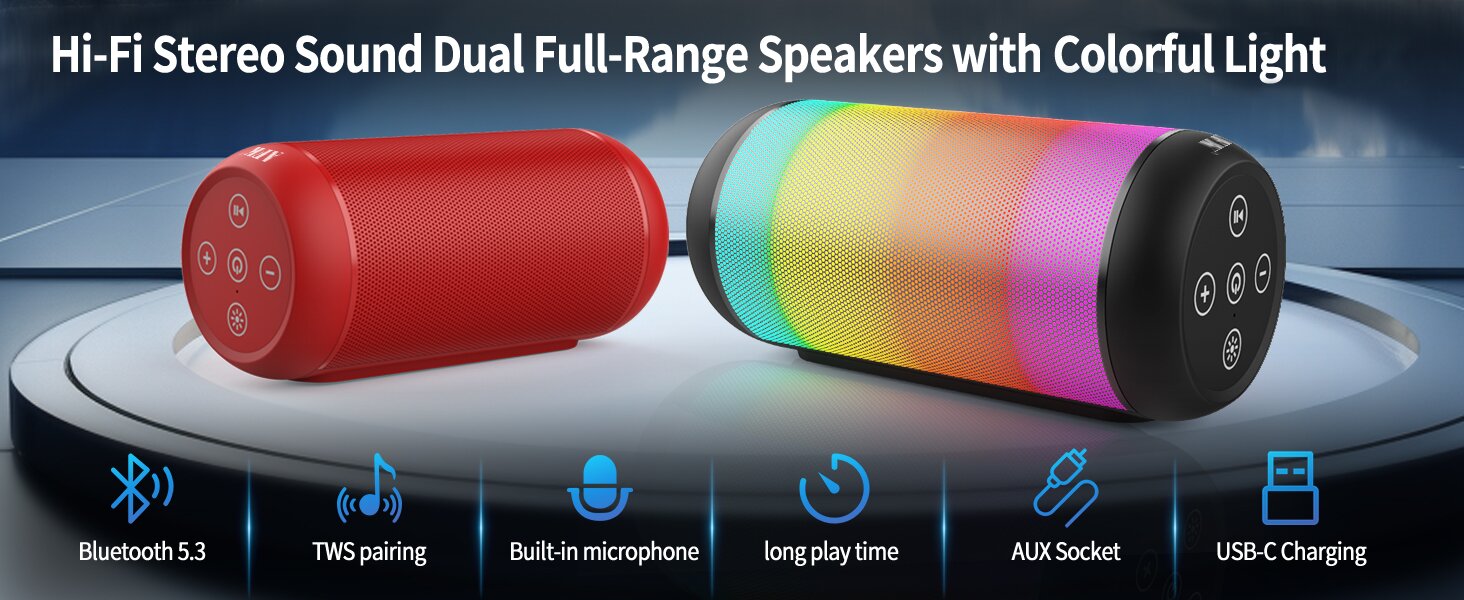
Image: An illustration highlighting key features such as Bluetooth 5.3, TWS pairing, built-in microphone, long playtime, AUX socket, and USB-C charging.

Gambar: A cutaway view illustrating the dual speaker drivers responsible for deep bass stereo sound.

Image: The speaker positioned on a table, demonstrating its 360-degree stereo surround sound capability.
3. Setélan
3.1 Ngecas Speaker
Before first use, fully charge the speaker. Connect the provided USB-C charging cable to the speaker's USB-C port and the other end to a compatible USB power adapter (not included) or a computer's USB port. The charging indicator light will show the charging status and turn off when fully charged.
3.2 Powering on / Pareum
- Pikeun ngahurungkeun: Pencét jeung tahan tombol Daya (⏻) for a few seconds until you hear an audible prompt and the indicator lights turn on.
- Pikeun mareuman: Pencét jeung tahan tombol Daya (⏻) again for a few seconds until you hear an audible prompt and the indicator lights turn off.
4. Parentah Operasi
4.1 Nyapasangkeun Bluetooth
Pikeun nyambungkeun speaker anjeun ka alat nu diaktipkeun Bluetooth:
- Ensure the speaker is powered on and in Bluetooth pairing mode (indicated by a flashing blue light, or similar).
- Dina alat anjeun (smartphone, tablet, komputer), aktipkeun Bluetooth sareng milarian alat anu sayogi.
- Select "AFK Speaker" (or similar name) from the list of found devices.
- Once paired, the speaker will indicate a successful connection (e.g., a solid blue light or an audible prompt).
The speaker will automatically attempt to reconnect to the last paired device when powered on, if the device is within range and Bluetooth is enabled.

Image: The speaker in an outdoor setting, demonstrating its stable Bluetooth connection range of up to 100 feet.
4.2 Puterkeun Musik
- Mode Bluetooth: Once paired, play music from your connected device. Use the speaker's control buttons or your device to control playback (play/pause, next/previous track, volume).
- Modeu Kartu TF/USB: Insert a TF card or USB drive containing audio files into the respective port on the speaker. The speaker will automatically switch to the corresponding mode and begin playback. Use the speaker's control buttons for navigation.
4.3 Controlling Lights
The speaker features dynamic lighting modes. Press the Light button (💡) to cycle through the available light modes:
- Tarry Sky Light
- engapan
- Ngamalir
- Luncat Gancang
- Rhythm Jump
- Lampu Pareum

Gambar: Hiji leuwihview of the six dynamic light modes available on the speaker, including options to turn the lights off.
4.4 Télépon nanganan
With the built-in microphone, you can manage calls when connected via Bluetooth:
- Ngajawab / mungkas Telepon: Pencét tombol Puter / Jeda (⏸) sakali.
- Nolak Telepon: Pencét terus tahan tombol Puter/Pause (⏸) salila 2 detik.

Image: The speaker being used for a hands-free call, demonstrating the functionality of its built-in microphone.
5. Pangropéa
5.1 beberesih
To clean your speaker, use a soft, dry, lint-free cloth. Do not use abrasive cleaners, alcohol, or chemical solvents, as these may damage the surface or internal components. Avoid getting moisture into any openings.
5.2 Panyimpenan
Store the speaker in a cool, dry place away from direct sunlight, extreme temperatures, and humidity. If storing for an extended period, charge the battery periodically (e.g., every 3 months) to maintain battery health.
6. Cara ngungkulan
If you encounter issues with your AFK Portable Bluetooth Wireless Speaker, please refer to the following common problems and solutions:
| Masalah | Mungkin Cukang lantaranana | Solusi |
|---|---|---|
| Speaker teu hurung. | batré lemah; Tombol daya teu dipencet leres. | Ngecas spéker pinuh. Pencét jeung tahan tombol Daya pikeun sababaraha detik. |
| Taya sora. | Volume low teuing; Alat teu nyambung; Modeu input salah. | Increase speaker and device volume. Ensure Bluetooth is connected or TF/USB is inserted correctly. |
| Teu bisa masangkeun via Bluetooth. | Spiker teu dina modeu pasangan; Bluetooth Alat pareum; Jauh teuing ti spiker; Gangguan. | Ensure speaker is in pairing mode. Turn device Bluetooth off/on. Move device closer to speaker. Avoid strong electromagnetic interference. |
| hirup batré pondok. | High volume usage; Lights constantly on; Battery degradation. | Reduce volume. Turn off lights when not needed. Battery life naturally decreases over time. |
7. Spésifikasi
| Fitur | Rincian |
|---|---|
| Ngaran modél | BT528-BLK-US |
| Tipe Speaker | Speaker Dual |
| Téhnologi konektipitas | Bluetooth 5.3 |
| Téknologi Komunikasi Nirkabel | Bluetooth |
| Rentang maksimum | 30 Méter (100 suku) |
| Speaker Maksimum Kaluaran Power | 11 Watts (RMS) / 15 Watts (Peak) |
| Réspon Frékuénsi | 20 KHz (Note: This is likely the upper limit, typical range is 20Hz-20kHz) |
| Mode Kaluaran Audio | Stereo |
| Konfigurasi Saluran Sakuliling Sora | 2.0 |
| Fitur husus | Built-in Microphone, Dynamic LED Lights |
| Dianjurkeun Mangpaat | Indoor/Outdoor, Sport, Outdoor Events, Parties, Camping, Hiking |
| Alat nu cocog | Desktop, Smartphone, Tablet, Television |
| Sumber Daya | Batré Powered (1 batré Litium Ion kaasup) |
| Métode kontrol | Toél Tombol |
| Warna | Hideung |
| Dimensi produk | 2.6 "D x 6.1" W x 2.6" H (6.6cm D x 15.5cm W x 6.6cm H) |
| Item Beurat | 1.26 pon (0.57 Kilogram) |
| Nyaéta Waterproof | PALSU |
8. Garansi jeung Rojongan
8.1 Garansi kawates
This AFK Portable Bluetooth Wireless Speaker comes with a limited warranty. Please refer to the warranty card included in your package or contact AFK customer support for specific terms and conditions. The warranty typically covers manufacturing defects and malfunctions under normal use.
8.2 Rojongan Palanggan
For further assistance, technical support, or warranty claims, please contact AFK customer service. Contact information can usually be found on the product packaging, the official AFK websitus, atawa ngaliwatan saluran rojongan pangecér anjeun.
Ask a question about this manual
Ask about setup, troubleshooting, compatibility, parts, safety, or missing instructions. Manuals+ will review the question and use this page’s manual context to help answer it.