
1. Bubuka
This manual provides detailed instructions for the installation, operation, and maintenance of your GreenYi 95760-B8650 OE Backup Camera. This camera is designed as a direct replacement for Hyundai Santa Fe models from 2017 to 2019, replacing OE part numbers 95760-B8650, 95760-B8641, and 95760-B8640. Please read this manual thoroughly before installation and use to ensure proper function and safety.
2. Fitur Produk
- Panggantian OE Langsung: Engineered for seamless integration with Hyundai Santa Fe 2017-2019 models, supporting coding with original features.
- Star Night Vision: Provides superior visual clarity in low-light conditions for enhanced safety.
- Peunteun tahan cai IP68: Built with a robust metal housing to withstand diverse weather conditions, including heavy rain and car washes.
- Lensa Sudut Lebar: Features a 130-degree real angle of view pikeun panutup tukang anu lengkep.
- Pamasangan Plug-and-Play: Simplifies the installation process without complex wiring.

Image: Comparison showing enhanced clarity of GreenYi's Starlight Full Color Night Vision compared to standard night vision.

Image: The backup camera shown under water, demonstrating its IP68 waterproof capability, suitable for various weather conditions.
3. Eusi Paket
- GreenYi 95760-B8650 Rear View Kaméra Nyadangkeun
- Thanks Card (Informational)
4. Pitunjuk Instalasi
4.1 Cék Pra-Pamasangan
Before beginning installation, ensure your vehicle is turned off and the parking brake is engaged. Verify that the camera is the correct model for your Hyundai Santa Fe (2017-2019) and matches the OE part numbers 95760-B8650, 95760-B8641, or 95760-B8640.
4.2 Léngkah-léngkah Instalasi
- Locate Original Camera: Identify the location of the existing backup camera on your Hyundai Santa Fe. This is typically near the license plate or tailgate handle.
- Remove Original Camera: Carefully disconnect the wiring harness and unmount the original camera. Refer to your vehicle's service manual or online resources for specific removal procedures.
- Install New Camera: Position the GreenYi backup camera in the original mounting location. Ensure it is securely fastened.
- Sambungkeun Wiring: Connect the camera's wiring harness to the vehicle's existing connector. This is a plug-and-play connection, requiring no complex wiring modifications.
- Fungsi Uji: After installation, turn on your vehicle and engage reverse gear to test the camera's display on your infotainment screen.
- Coding (if necessary): The camera is designed to support coding with original features. If the camera does not function immediately or displays an error, consult a qualified automotive technician for coding or system integration.
For visual guidance, numerous step-by-step installation videos for Hyundai Santa Fe backup cameras are available on platforms like YouTube. Milarian pikeun your specific vehicle model and year.

Image: The GreenYi backup camera, showing its integrated design and connector for direct replacement.

Gambar: Detil views of the camera from various angles, highlighting its compact design and connector.
5. Parentah Operasi
Once installed and properly connected, the GreenYi backup camera operates automatically when the vehicle is shifted into reverse gear. The camera feed will display on your vehicle's infotainment screen, providing a clear view wewengkon tukangeun wahana Anjeun.
- Aktip otomatis: The camera activates automatically when reverse gear is selected.
- tampilan: The video feed will appear on your vehicle's central display screen.
- Visi Peuting: The Starlight Full Color Night Vision feature enhances visibility in low-light conditions, providing a clearer image than standard cameras.
- Pituduh parkir: The camera is designed to integrate with the vehicle's original features, which may include dynamic or static parking guidelines on the display.

Image: A wide-angle view from the backup camera displayed on a car's screen, including parking guidelines.
6. Pangropéa
The GreenYi backup camera is designed for durability and minimal maintenance. Its IP68 waterproof rating ensures protection against dust and water ingress.
- beberesih: Périodik ngabersihan lénsa kaméra ku lemes, damp cloth to remove dirt, dust, or debris that may obstruct the view. Ngahindarkeun cleaners abrasive.
- Pamariksaan: Regularly inspect the camera and its wiring for any signs of damage or loose connections.
- Résistansi Cuaca: The IP68 rating means the camera is protected against immersion in water up to 1.5 meters for 30 minutes. It is designed to withstand car washes and heavy rain without compromise.
7. Cara ngungkulan
If you encounter issues with your GreenYi backup camera, refer to the following troubleshooting steps:
| Masalah | Mungkin Cukang lantaranana | Solusi |
|---|---|---|
| No Image on Display | Loose connection, power issue, incorrect coding. | Check all connections. Ensure vehicle is in reverse. If problem persists, consult a technician for coding verification. |
| Image is Reversed/Backwards | Incorrect camera orientation or internal camera setting (less common for OE replacements). | Verify the camera is installed in the correct orientation. If the issue persists, contact GreenYi support or a qualified technician, as this may indicate a faulty unit or specific vehicle coding requirement. |
| No Parking Guidelines | Vehicle system not recognizing guidelines, or camera not designed to output them independently. | Ensure your vehicle's infotainment system is configured to display parking guidelines. If the original camera had guidelines and this replacement does not, consult a technician for system coding or contact GreenYi support. |
| Kualitas Gambar Miskin | Dirty lens, damaged camera, or display issue. | Clean the camera lens. Check for physical damage to the camera. Test with another display if possible to rule out vehicle display issues. |
8. Spésifikasi
| Fitur | Rincian |
|---|---|
| Nomer modél | GreenYi-318 |
| Kandaraan Cocog | Hyundai Santa Fe 2017, 2018, 2019 |
| Replaces OE Part Numbers | 95760-B8650, 95760B8650, 95760-B8641, 95760B8641, 95760-B8640, 95760B8640 |
| Dimensi produk | 2.05 "L x 1.18" W x 1.18" H (5.2cm L x 3.0cm W x 3.0cm H) |
| Item Beurat | 1.12 ons (31.75 gram) |
| Tipe Pamasangan | Original Mounting, Plug and Play |
| Voltage | 12 Volt (DC) |
| Téhnologi sénsor optik | CMOS |
| Tipe Lénsa | Sudut lega |
| Sudut nyata tina View | 130 darajat |
| Tipe Panyambung | Original Connector Compatible with Vehicle |
| Ukuran Sénsor Optik | 1/3 inci |
| Peunteun waterproof | IP68 |
| Warna | Hideung |
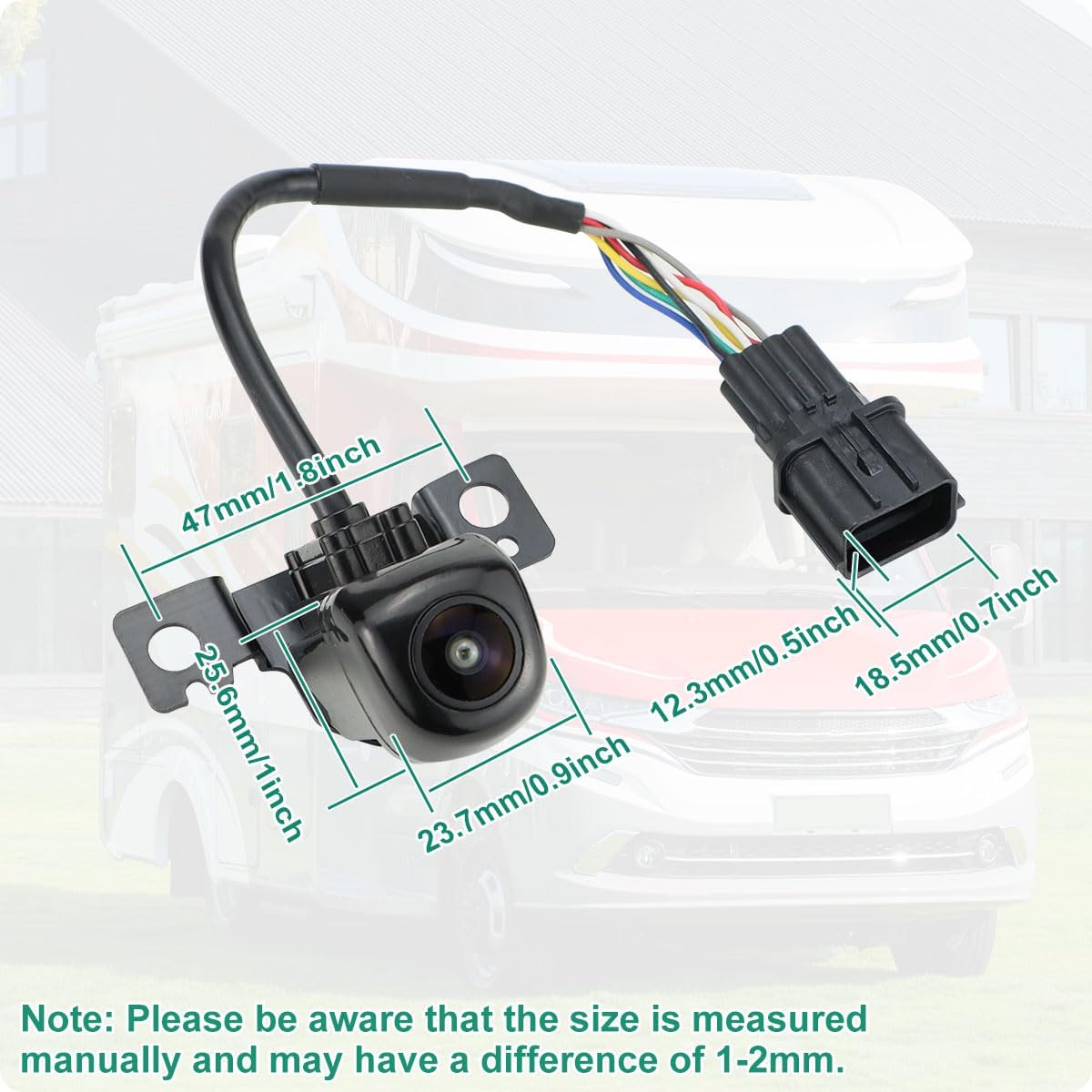
Image: Dimensional drawing of the camera, indicating measurements in both millimeters and inches.
9. Garansi jeung Rojongan
For warranty information or technical support, please contact GreenYi customer service. Refer to the contact information provided with your product packaging or visit the official GreenYi websitus.
Pabrikan: GreenYi