
1. Produk Langkungview
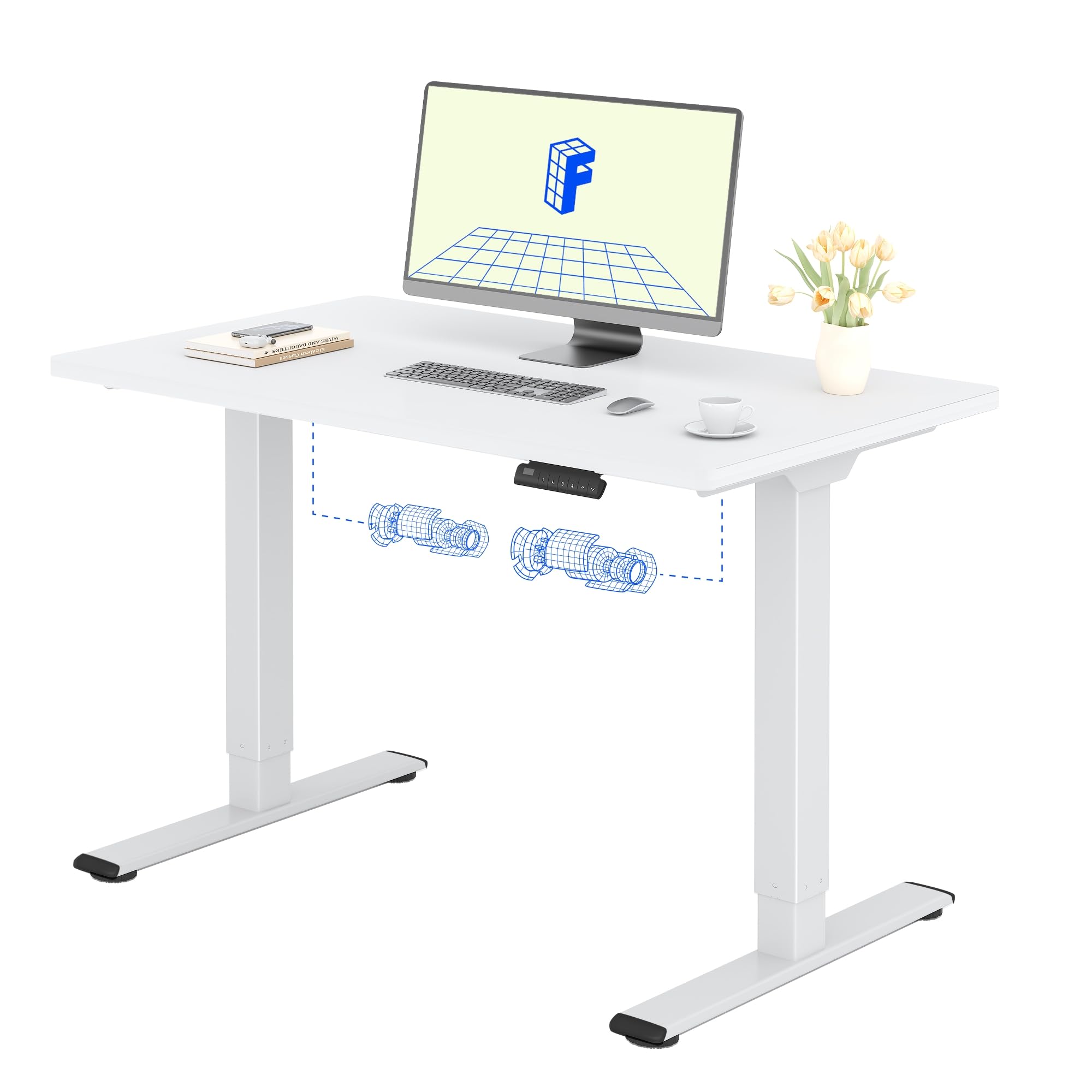
The FLEXISPOT Electric Standing Desk QB2 SET is designed to provide a stable and efficient workspace with adjustable height capabilities. This desk features a robust dual-motor system and an intelligent control panel for ease of use.
Fitur konci:
- Motor Ganda anu Kuat: Ensures greater stability and efficiency, with a maximum speed of up to 25 mm/s.
- Rojongan Stabil: Static load capacity of 120 kg and dynamic load capacity of 100 kg, providing secure support for various office equipment.
- Panel Kontrol Smart: Features four memory functions for easy height adjustment and an anti-collision system for safety.
- Jangkungna adjustable: The desk height can be adjusted from 70 cm to 119 cm to suit different user requirements and work preferences.
- One-Piece Tabletop: A seamless 120x60cm tabletop for a clean and modern aesthetic.

2. Émbaran Kasalametan
Mangga baca tur ngartos sagala parentah kaamanan saméméh assembly sarta pamakéan pikeun nyegah tatu atawa ruksakna produk.
- Do not exceed the maximum allowed weight of 70 kg (moving) or 100 kg (statik)Kaleuwihan beban tiasa nyababkeun ketidakstabilan sareng karusakan.
- Pay close attention to stability when adjusting the height. Ensure the desk is level and all items are securely placed.
- Be cautious of obstacles in the vicinity that could cause a collision during height adjustment. The desk is equipped with an anti-collision system, but manual vigilance is always recommended.
- Jauhkeun barudak sareng piaraan tina méja salami operasi pikeun nyegah kacilakaan.
- Ensure all cables are properly managed and secured to avoid entanglement or damage during movement.

3. Setup jeung Majelis
The FLEXISPOT Electric Standing Desk is designed for straightforward assembly. An instruction manual is included with your purchase. It is recommended that dua jalma assemble the desk to ensure safety and ease.
Tips Majelis:
- Baca Manual: Taliti deuiview the included assembly instructions before starting.
- Pakakas: All necessary tools are typically included. A small electric screwdriver can speed up the process, but is not essential. You may need a pencil and a wood drill bit for minor pilot holes.
- Ngabongkar bungkusan: The desk is shipped in two separate packages for maximum protection: one for the desktop and one for the frame. Ensure both packages have arrived before beginning assembly.
- Waktos: Assembly typically takes around 1 hour for one person, taking their time.


4. Parentah Operasi
The FLEXISPOT Electric Standing Desk offers intuitive controls for adjusting its height and saving preferred positions.
Fungsi Panel Kontrol:
- Tombol Naék / Turun: Use the up (▲) and down (▼) arrows to manually adjust the desk height.
- Preset Mémori (1, 2, 3, 4): The control panel allows you to save up to four preferred height settings. To save a height: adjust the desk to your desired height, then press and hold one of the memory buttons (1-4) until you hear a beep or see the display flash, indicating the height is saved.
- Témbong LED: Némbongkeun jangkungna méja ayeuna dina séntiméter.
- Sistem Anti Tabrakan: This safety feature automatically stops and slightly reverses the desk's movement if it encounters an obstacle during height adjustment.
Rentang adjustment jangkungna:
Meja tiasa disaluyukeun tina jangkungna minimum 70 cm nepi ka jangkungna maksimum 119 cm.


5. Pangropéa
Proper maintenance ensures the longevity and optimal performance of your FLEXISPOT Electric Standing Desk.
beberesih:
- The desk surface and frame are easy to clean. Use a dry or damp lawon to wipe away dust and spills.
- Ulah make bahan kimia kasar atawa cleaners abrasive, sabab ieu bisa ngaruksak finish.
Perawatan Umum:
- Regularly check all screws and fasteners to ensure they are tight. Retighten if necessary.
- Keep the area around the desk clear to allow for smooth height adjustments and to prevent the anti-collision system from being triggered unnecessarily.
- Do not place excessively heavy objects on the desk, especially when moving, to avoid straining the motors.
6. Cara ngungkulan
If you encounter any issues with your FLEXISPOT Electric Standing Desk, refer to the following common troubleshooting steps.
Masalah umum sareng Solusi:
- Desk Not Moving / No Power:
- Pariksa naha kabel daya parantos dipasang pageuh kana méja sareng stop kontak dina témbok.
- Ensure the wall outlet is functional by plugging in another device.
- Desk Wobbles at High Height:
- Pastikeun sadaya sekrup rakitan parantos kenceng.
- Verify that the desk is on a level surface. Adjust the leveling feet if necessary.
- Sebarkeun beurat sacara rata dina méja.
- Kode kasalahan dina tampilan:
- Refer to the detailed troubleshooting section in the included physical manual for specific error codes and their solutions.
- Often, a simple reset can resolve minor errors. To perform a reset, unplug the desk for 10-15 seconds, then plug it back in.
- Sistem Anti-Tabrakan Sering Dipicu:
- Ensure there are no obstructions under or above the desk during movement.
- Check if any cables are interfering with the desk's movement.
Upami léngkah-léngkah ieu henteu ngarengsekeun masalahna, mangga ngahubungi dukungan palanggan FLEXISPOT kanggo bantosan salajengna.
7. Spésifikasi produk
| Fitur | Rincian |
|---|---|
| merek | FLEXISPOT |
| Nomer modél | QB2 SET |
| GTIN/UPC | 840460406635 |
| Desain méja | Méja nangtung |
| Wangun | Sagi opat |
| Ukuran produk (D x W x H) | 60P x 120l x 73H cm (60D x 120W x 73H cm) |
| Ukuran Tabletop | 120 x 60 cm |
| Ketebalan Tabletop | 1.5 cm |
| Warna | Pigura Bodas + Atasan Bodas |
| Gaya | Modern |
| Bahan Dasar | Alloy Steel |
| Tipe Bahan Top | Kai |
| Tipe rengse | Laser, Powder Coated |
| Fitur husus | Ergonomic, Height Adjustable, Memory Presets, Anti-collision |
| Item Beurat | 30 kg |
| Jangkungna Minimum | 70 cm |
| Jangkungna maksimum | 119 cm |
| Mékanisme Angkat | Electric (Dual Motor) |
| Recommended Load Capacity | 100 kg |
| Disarankeun Majelis Jalma | 2 |
| Parentah Majelis | Kaasup |
| Komponén Kaasup | Height adjustment mechanism, keyboard drawer (if applicable) |
| Tipe Kamar | Kantor |
| Dianjurkeun Mangpaat | Work, Home, Office, Gaming |

8. Émbaran jaminan
FLEXISPOT provides a limited warranty for the Electric Standing Desk QB2 SET.
- Garansi 5 Taun: Covers the frame, motors, and other mechanical components.
- Garansi 2 Taun: Ngawengku komponén kontroler, saklar, sareng éléktronik.
For detailed warranty terms and conditions, please refer to the warranty card included with your product or visit the official FLEXISPOT websitus.
9. Rojongan Palanggan
Should you require assistance with your FLEXISPOT Electric Standing Desk, please utilize the following resources:
- Toko Online: Visit the official FLEXISPOT store on Amazon for product information and FAQs: Toko Amazon FLEXISPOT
- Kontak Layanan Pelanggan: For technical support, warranty claims, or any other inquiries, please contact FLEXISPOT customer service directly. Contact details can typically be found on the official FLEXISPOT websitus atanapi dina dokuméntasi produk Anjeun.
- Wangsul: If you are not satisfied with your purchase, you may be eligible for a return within 30 days. Please refer to the return policy of your retailer or contact customer service for details.