
1. Produk Langkungview
The ErGear Height Adjustable Desk is an electric standing desk designed for computer workplaces, offering excellent stability and ergonomic flexibility. It features a sturdy steel frame with aviation lifting column connections, ensuring a firm foundation even at full height. The desk includes a memory function for convenient height adjustments and comes with a practical storage bag.

Image 1.1: The ErGear Height Adjustable Desk in a typical office setup, showcasing its sleek design and ample workspace for multiple monitors and accessories.
2. Émbaran Kasalametan
Perhatosan Kasalametan Penting: Pikeun mastikeun operasi anu aman sareng nyegah karusakan, mangga turutan pedoman ieu:
- Ulah ngaleuwihan kapasitas beurat maksimum tina 80 kg (176 lbs) on the desk surface. Overloading can lead to instability and potential damage to the lifting mechanism.
- Jauhkeun barudak sareng piaraan tina méja salami operasi pikeun nyegah kacilakaan.
- Ensure there are no obstructions in the desk's path when adjusting height. Check for cables, chairs, or other objects that could be pinched or damaged.
- Ulah diuk atawa nangtung dina meja.
- Cabut colokan méja tina stop kontak sateuacan beberesih atanapi ngalakukeun pangropéa naon waé.
- If the desk malfunctions or makes unusual noises, discontinue use immediately and consult the troubleshooting section or contact customer support.

Image 2.1: Illustration demonstrating the desk's robust 80KG load capacity, emphasizing the importance of not exceeding this limit for safe and reliable performance.
3. Eusi Paket
Before assembly, please verify that all components listed below are present and undamaged. If any parts are missing or damaged, contact customer support.
- Desktop Surface (1)
- Lifting Columns/Legs (2)
- Feet/Bases (2)
- Panel Kontrol (1)
- Kotak Kontrol (1)
- Power Adapter & Cable (1)
- Kantong Panyimpenan (1)
- Hardware Kit (Screws, Allen wrenches, Cable ties)
- Pitunjuk Pitunjuk (Dokumén ieu)
4. Setup jeung Majelis
Assembly typically requires two people. Follow these general steps. Refer to the included assembly diagram for detailed instructions specific to your model.
- Nyiapkeun Workspace: Clear a large, flat area for assembly. Lay down a blanket or cardboard to protect the desktop surface from scratches.
- Attach Lifting Columns to Desktop: Carefully place the desktop upside down. Attach the lifting columns to the pre-drilled holes on the underside of the desktop using the provided screws.
- Gantelkeun Kaki kana Kolom Ngangkat: Secure the feet/bases to the bottom of the lifting columns.
- Pasang Kotak Kontrol sareng Panel Kontrol: Mount the control box to the designated area under the desktop. Connect the control panel to the control box, and then connect the lifting columns to the control box. Ensure all cables are securely connected and routed neatly.
- Install Storage Bag: Attach the storage bag to the side of the desk as desired, typically using hooks or clips provided.
- Sambungkeun Kakuatan: Colokkeun adaptor daya kana kotak kontrol teras kana stop kontak témbok.
- Kalibrasi Awal (upami diperyogikeun): Some models may require an initial calibration. Refer to the specific assembly diagram for your model for details on how to perform this. Typically, this involves pressing and holding the "Down" button until the desk reaches its lowest point and slightly retracts.

Gambar 4.1: Deukeut view of the desk's side storage pockets, demonstrating their capacity for organizing various office supplies and documents. These pockets are typically attached during assembly.
5. Parentah Operasi
5.1. adjustment jangkungna
The ErGear Height Adjustable Desk features an electric lifting system for smooth and precise height adjustments.
- Pikeun Ngangkat Meja: Pencét jeung tahan tombol "Naék" arrow button (▲) on the control panel. The desk will move upwards. Release the button when the desired height is reached.
- Pikeun Nurunkeun Méja: Pencét jeung tahan tombol "Turun" arrow button (▼) on the control panel. The desk will move downwards. Release the button when the desired height is reached.
5.2. Fungsi Mémori
The desk's memory function allows you to save and recall preferred sitting and standing heights.
- To Save a Height Setting:
- Atur méja kana jangkungna anu dipikahoyong nganggo tombol Luhur/Turun.
- Pencét éta "M" (Memory) button. The display may flash or show "S-".
- Within a few seconds, press one of the numbered preset buttons (1, 2, 3, atawa 4) to save the current height to that position. The display will confirm the save (e.g., "S-1").
- Pikeun Nginget Jangkung anu Disimpen:
- Kantun pencét tombol preset anu dinomeran anu saluyu (1, 2, 3, atawa 4). Méja bakal otomatis pindah ka jangkungna anu disimpen.

Image 5.1: Visual representation of the desk's adjustable height range, illustrating movement from a minimum of 71cm to a maximum of 119cm, allowing users to set ideal sit or stand positions.
6. Pangropéa
Regular maintenance helps ensure the longevity and smooth operation of your ErGear desk.
- beberesih: Wipe the desktop surface and legs with a soft, damp lawon. Hindarkeun bahan kimia anu kasar atanapi pembersih abrasive anu tiasa ngaruksak finish.
- Manajemén Kabel: Periodically check and organize cables to prevent tangling or interference with the lifting mechanism. Use the provided cable ties if necessary.
- Pamariksaan: Regularly inspect all screws and connections to ensure they are tight. Retighten if necessary.
- Distribusi beurat: Distribute weight evenly on the desktop to prevent strain on the lifting mechanism.
7. Cara ngungkulan
If you encounter issues with your ErGear desk, refer to the following common troubleshooting steps:
| Masalah | Mungkin Cukang lantaranana | Solusi |
|---|---|---|
| Méja teu obah. | Power cable disconnected; Overload; Motor protection activated. | Check power connections. Reduce weight on desk. Unplug for 20 minutes, then plug back in. |
| Méja obah teu rata atawa ngaluarkeun sora anu teu biasa. | Sambungan leupas; Halangan; Sebaran beurat teu rata. | Pariksa sadaya sekrup sareng sambunganna. Cabut sagala halangan. Sebarkeun deui beurat sacara rata. |
| Kodeu kasalahan dipintonkeun (contona, E01, E02). | gangguan husus atawa masalah sensor. | Refer to the specific error code in your detailed assembly manual or contact customer support. Often, a power cycle (unplug, wait 20s, plug in) can resolve temporary errors. |
| Fungsi mémori teu jalan. | Prosedur nyimpen salah. | Ensure you press "M" then the preset number within the specified time. Repeat the saving process. |
If the problem persists after trying these solutions, please contact ErGear customer support.
8. Spésifikasi
| Fitur | Rincian |
|---|---|
| merek | ErGear |
| Nomer modél | 7B-N1-UK |
| Dimensi produk | 120 cm (Lebar) x 60 cm (Jerona) x 70-119 cm (Jangkung) |
| Beurat | 17.86 kg |
| Bahan | Tempered Glass, Alloy Steel |
| Warna | Hideung |
| Max Beban Kamampuh | 80 kg (176 lbs) |
| Fitur husus | Adjustable height, Memory function |
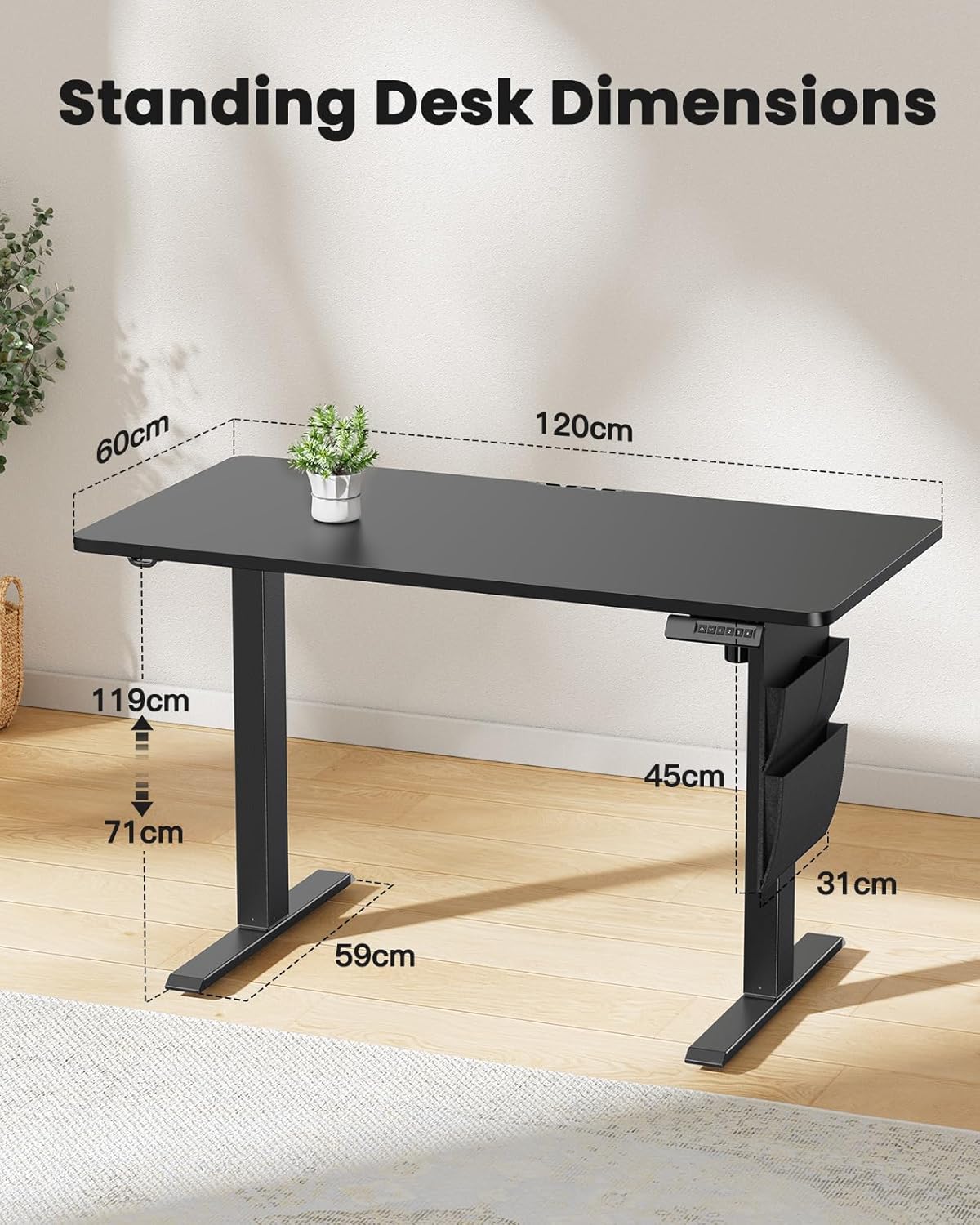
Image 8.1: Detailed diagram illustrating the key dimensions of the ErGear standing desk, including desktop width (120cm), depth (60cm), and height range (71cm to 119cm).
9. Garansi jeung Rojongan
ErGear products are designed for durability and performance. For any questions, technical assistance, or warranty claims, please contact ErGear customer support.
- Kabijakan pamulangan: This product is eligible for a refund or replacement within 30 days of purchase, as per standard policy.
- Inpormasi kontak: Please refer to the contact details provided on the ErGear official websitus wéb atanapi dokuméntasi pameseran anjeun pikeun saluran dukungan anu pangénggalna.