
Bubuka
This manual provides essential information for the safe and effective use of your DOSS Extreme Boom Pro D100 Bluetooth Speaker. Please read it thoroughly before operating the device and retain it for future reference.
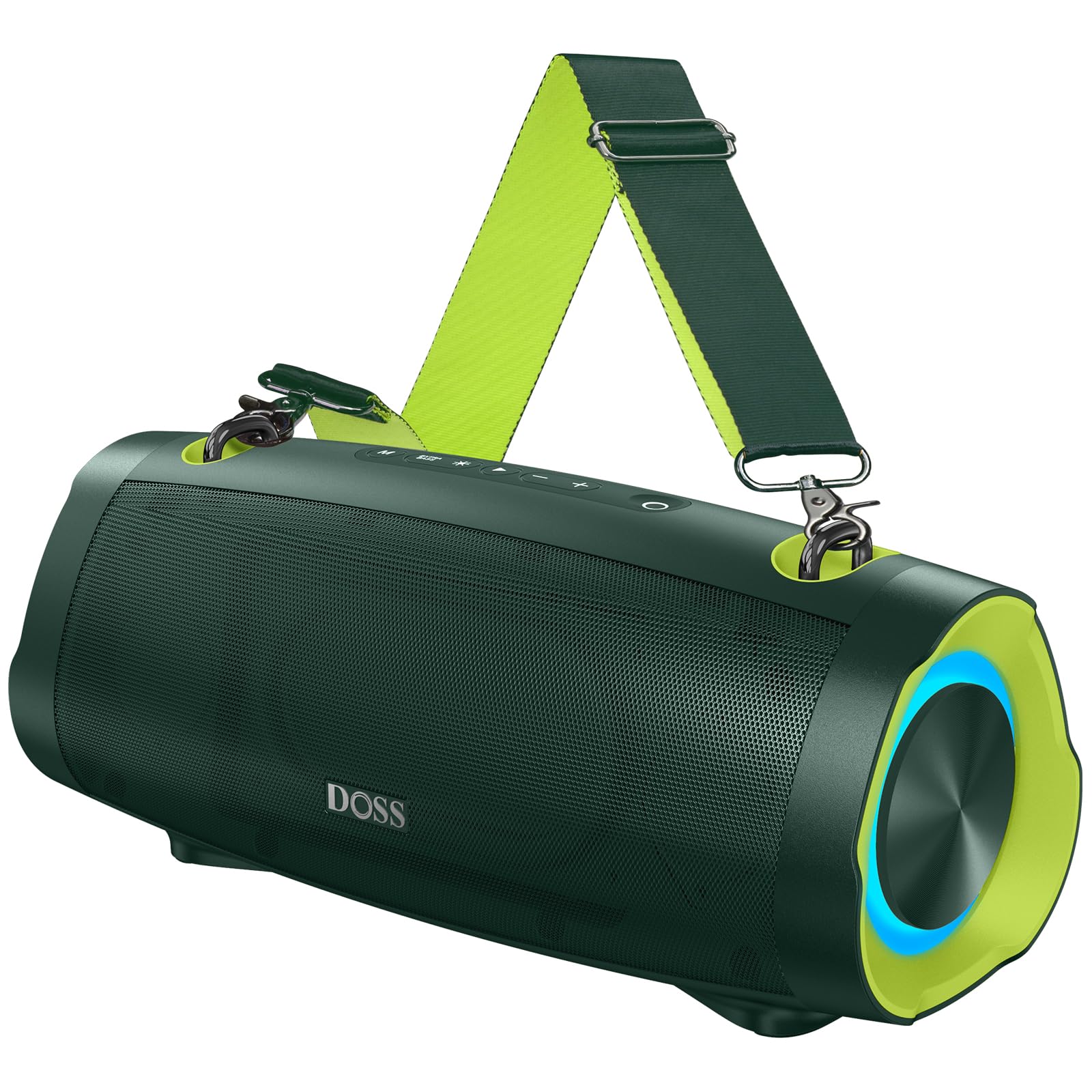
Image: The DOSS Extreme Boom Pro D100 Bluetooth Speaker, showcasing desainna anu kuat.
Fitur produk
- Audio anu kuat: Experience 70W of bold sound (140W Peak) with a 40W full-range driver and two 15W tweeters, enhanced by three advanced DSP technologies.
- Bass ditingkatkeun: Dual passive radiators provide deeper bass with a dedicated Extra Bass button.
- Desain portabel: Features a durable, adjustable, and detachable shoulder strap for easy transport.
- Stereo Nirkabel Sejati (TWS): Connect two speakers wirelessly for an immersive stereo sound experience.
- Dipanjangkeun Playtime: Nepi ka 24 jam umur batre.
- Diwangun-di Power Bank: Charge your devices directly from the speaker.
- IPX6 waterproof: Designed to withstand water splashes and jets.
- Tembongkeun Lampu Dinamis: Integrated lights synchronize with music rhythm.
Naon dina Box
Mangga parios eusi pakét anjeun:
- DOSS Extreme Boom Pro D100 Bluetooth Speaker
- Kabel Ngecas USB-C
- Kabel Auxiliary Audio
- Tali taktak anu tiasa dicabut
- Manual pamaké
Produk Leuwihview
Biasakeun diri anjeun sareng kontrol sareng port speaker.

Image: Top panel controls including Power, Volume, Play/Pause, Mode, Extra Bass, and Light buttons.

Gambar: Hiji ngabeledug view illustrating the internal speaker components, including the full-range driver and tweeters.
Setup jeung Operasi
1. Daya Hurung / Pareum
Pencét jeung tahan tombol Daya (O) for 2 seconds to turn the speaker on or off.
2. Papasangan Bluetooth
To connect your DOSS Extreme Boom Pro D100 to a Bluetooth device:
- Hurungkeun speaker. Spiker bakal otomatis asup kana modeu pasangan Bluetooth, dituduhkeun ku LED biru anu kedip-kedip.
- Dina alat anjeun (smartphone, tablet, jsb.), aktipkeun Bluetooth sareng milarian alat anu sayogi.
- Select "Extreme Boom Pro D100" from the list. A confirmation sound indicates successful pairing.
Video: Demonstrates how to power on the speaker and connect it via Bluetooth to a mobile device.
3. Leres Wireless Stereo (TWS) papasangan
For an enhanced stereo experience, you can pair two DOSS Extreme Boom Pro D100 speakers:
- Pastikeun duanana spiker dihurungkeun sareng henteu nyambung ka alat Bluetooth mana waé.
- On one speaker (this will be your main speaker), press and hold the 'Extra Bass' button until you hear a prompt. The LED on the main speaker will flash slowly.
- On the second speaker, press and hold the 'Extra Bass' button. The LED on the second speaker will flash quickly.
- The speakers will automatically connect to each other. A confirmation sound will indicate successful TWS pairing. The main speaker's LED will flash slowly, and the second speaker's LED will be solid.
- Connect your device to the main speaker via Bluetooth as described in the Bluetooth Pairing section.
Video: Illustrates the steps for pairing two DOSS Extreme Boom Pro D100 speakers for True Wireless Stereo sound.

Image: Two DOSS Extreme Boom Pro D100 speakers positioned for a True Wireless Stereo setup.
4. Volume Control
Pencét tombol '+' pikeun ningkatkeun volume sareng tombol '-' pikeun ngirangan volume.
5. Extra Bass Function
Press the 'Extra Bass' button to activate or deactivate the enhanced bass mode.
Video: Shows how to activate the Extra Bass feature on the speaker.
6. Pertunjukan Cahaya Dinamis
Pencét tombol Lampu (※) to cycle through different light modes or turn the lights off.
Video: Demonstrates how to change the dynamic light modes on the speaker.

Image: The speaker displaying its dynamic light show in an outdoor setting.
7. Auto-Power Off Function
The speaker has an auto-power off feature to conserve battery. You can activate or deactivate this function:
- Press and hold the 'M' (Mode) button and the 'Power' button simultaneously.
- If the LED flashes red, auto-power off is removed (deactivated).
- If the LED flashes green, auto-power off is activated.
Video: Explains how to remove or activate the auto-power off feature on the speaker.
8. Reset Fungsi
If you encounter issues, you can reset the speaker:
- Press and hold the 'Power' button and the 'Volume Down (-)' button simultaneously.
- A confirmation sound will indicate a successful reset.
Video: Demonstrates the process of resetting the speaker.
Ngecas jeung Power Bank Fungsi
The DOSS Extreme Boom Pro D100 features a built-in power bank to charge your external devices.
- Ngecas Speaker: Connect the provided USB-C cable to the speaker's charging port and a suitable USB power adapter (not included). The charging indicator will show the charging status.
- Ngagunakeun salaku Power Bank: Connect your device's charging cable to the speaker's USB-A output port. The speaker will begin charging your device.

Image: The speaker being used to charge a smartphone in an outdoor setting, highlighting its power bank capability.
spésifikasi
| merek | DOSS |
| Nomer modél | Ekstrim Boom Pro D100 |
| Speaker Maksimum Kaluaran Power | 140 Watt (Puncak) / 70 Watt (RMS) |
| Téhnologi konektipitas | Bluetooth |
| Mode Kaluaran Audio | Stereo |
| Tipe Speaker | Luar |
| Fitur tambahan | Bass Boost, Dynamic Light Show, Power Bank |
| Warna | Green (variant shown in product images) |
| Batré Rata Kahirupan | 24 Jam |
| Peunteun waterproof | IPX6 |
| Métode kontrol | Toél |
| Ukuran barang (D x W x H) | 12.17 "D x 5.39" W x 5.43" H |
| Item Beurat | 2 kg |
| Alat nu cocog | Laptop, MP3 Player, Projector, Smartphone, Tablet, Television |
| Kapasitas batré | 10400 Miliamp Jam-jaman |
| Waktu Ngeusi batre | 5 Jam |
Pamérésan masalah
Upami anjeun ngalaman masalah sareng speaker anjeun, mangga tingali solusi umum ieu:
- Henteu aya kakuatan: Pastikeun spiker tos dicas pinuh. Sambungkeun kana sumber listrik teras antepkeun ngecas sahenteuna 30 menit sateuacan dihurungkeun.
- Masalah Sambungan Bluetooth:
- Pastikeun spiker aya dina mode papasangan (kedip-kedip LED biru).
- Pastikeun Bluetooth alat anjeun diaktipkeun sareng dina jangkauan (nepi ka 33 kaki / 10 meter).
- Forget the speaker from your device's Bluetooth list and attempt to re-pair.
- Try resetting the speaker as described in the Setup and Operation section.
- Henteu aya sora:
- Pariksa tingkat polumeu dina speaker sareng alat Anjeun nu disambungkeun.
- Ensure the speaker is correctly paired via Bluetooth or connected via the auxiliary cable.
- Kagagalan Pasangan TWS: Ensure both speakers are not connected to any other Bluetooth device before attempting TWS pairing. Follow the TWS pairing steps carefully.
- Paparan cai: While the speaker is IPX6 waterproof, prolonged submersion is not recommended. If exposed to water, ensure all ports are dry before charging.
Pikeun masalah pengkuh, mangga ngahubungan rojongan customer.
Pangropéa
To ensure the longevity and optimal performance of your DOSS Extreme Boom Pro D100 speaker:
- beberesih: Anggo kaén anu garing sareng lemes pikeun ngabersihan bagian luar spéker. Ulah make cleaners abrasive atawa pangleyur.
- Panyimpenan: Simpen spéker dina tempat anu tiis sareng garing jauh tina sinar panonpoé langsung sareng suhu anu ekstrim.
- Perawatan batré: To maintain battery health, charge the speaker fully at least once every three months if not in regular use.
- Perlindungan cai: Always ensure the charging port cover is securely closed when near water to maintain IPX6 water resistance.
Garansi sareng Rojongan
Your DOSS Extreme Boom Pro D100 Bluetooth Speaker comes with a 1-Taun Garansi Produsén, covering quality-related concerns from the date of purchase.
For any product issues or support inquiries, please contact us:

Image: A customer support representative with contact details.
Telepon: 1-833-275-3677
Surélék: support@dossav.com
We are committed to providing 24-hour prompt assistance and support.