
1. Bubuka
This manual provides essential instructions for the safe and efficient operation, setup, and maintenance of your Displays2go Pedestal Display with Digital Sign (Model DF037NLB). Please read this manual thoroughly before using the product and retain it for future reference.
The DF037NLB is a versatile pedestal display featuring a 37-inch stretch LCD advertising screen, designed for indoor use. It includes a rear locking storage compartment for added functionality.
2. Émbaran Kasalametan
- Produk ieu dimaksudkeun pikeun pamakéan indoor wungkul. Do not expose to moisture, rain, or extreme temperatures.
- Pastikeun unit disimpen dina permukaan datar anu stabil pikeun nyegah tipping.
- Entong meungpeung lawang angin.
- Paké ngan adaptor kakuatan disadiakeun.
- Pegatkeun sambungan kakuatan saméméh meresihan atawa ngalakukeun sagala pangropéa.
- Produk ieu tiasa ngandung bahan kimia anu dipikanyaho ku Nagara Bagian California tiasa nyababkeun kanker sareng cacad lahir atanapi gangguan réproduktif anu sanés (peringatan Proposisi 65).
3. Eusi Paket
Pastikeun yén sadaya komponén aya dina bungkusan:
- Pedestal Display Unit (DF037NLB)
- Kabel Daya
- Kadali jauh
- Set of Keys (for storage compartment)
- Manual pangguna (dokumén ieu)
4. Setélan
4.1 Ngabongkar sareng Nempatkeun
- Carefully remove the pedestal display from its packaging.
- Place the unit on a flat, stable surface in your desired indoor location. Ensure adequate space around the unit for ventilation.
4.2 Sambungan Daya
- Locate the power input port on the rear of the unit.
- Connect the provided power cable to the unit and then to a standard electrical outlet.
- The unit is now ready for initial power-on.
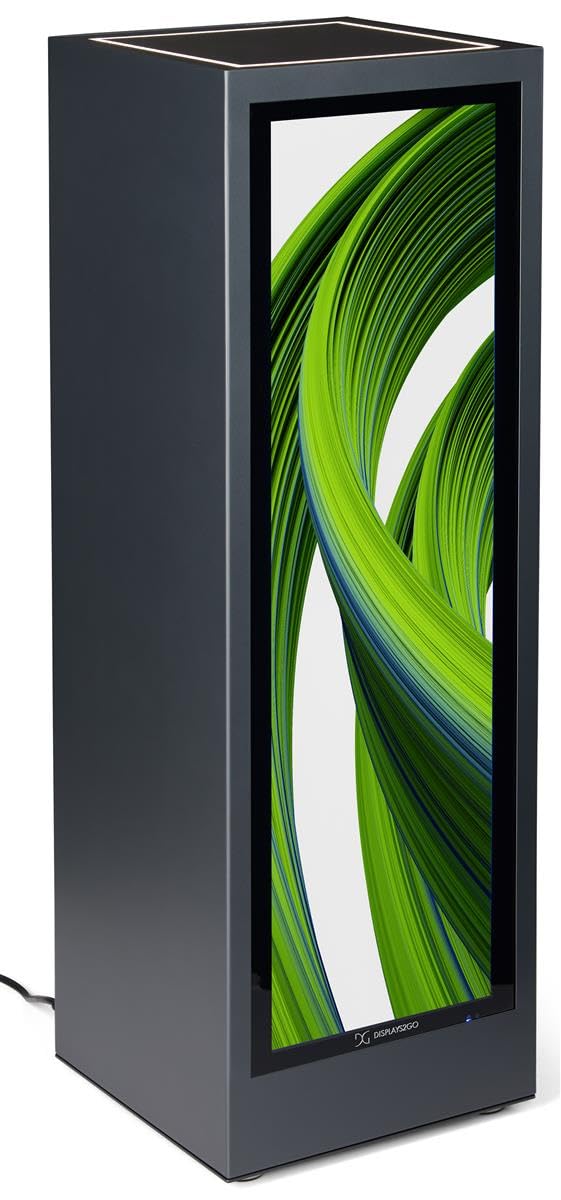
Gambar 4.1: Hareupeun view of the Displays2go Pedestal Display with Digital Sign.
5. Parentah Operasi
5.1 Digital Signage Operation
The pedestal display features a 37-inch stretch LCD screen for displaying various media content.
- Content Formatting: For optimal display, format your marketing materials to a resolution of 720 piksel lebar x 2520 piksel luhur.
- USB Content Transfer: Use the USB ports located on the rear of the unit to transfer images, videos, and other content to the display's internal storage.
- Konektipitas: The unit supports WiFi and Bluetooth connectivity. This allows for network access, content updates, and connection to external Bluetooth speakers or peripherals like a mouse and keyboard.
- Aksés Google Play: Access the Google Play app store to download and install business applications directly onto the display.
- Audio: The display includes two built-in speakers for audio playback.

Image 5.1: The digital display showcasing product advertisements for watches.

Image 5.2: The digital display showcasing product advertisements for headphones.

Image 5.3: The 37-inch diagonal measurement of the stretch LCD screen.
5.2 Rear Locking Storage Compartment
The unit features a rear-accessible storage compartment for securing personal items or product backstock.
- To open the compartment, insert one of the provided keys into the lock and turn.
- To lock, close the door, insert the key, and turn to secure. Remove the key to prevent unauthorized access.
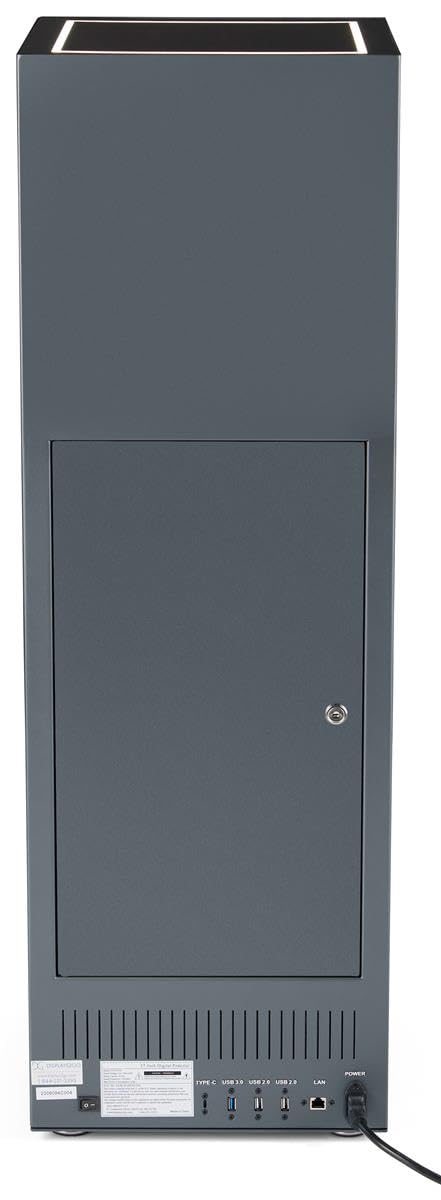
Gambar 5.4: Tukangeun view of the pedestal display showing the closed locking storage compartment and connectivity ports.

Gambar 5.5: Tukangeun view of the pedestal display with the locking storage compartment open, revealing interior space.
5.3 Lampu LED
The mirrored top surface of the pedestal features LED illumination to highlight products placed on top. This feature is integrated with the main power supply and activates when the unit is powered on.
6. Pangropéa
6.1 beberesih
- Salawasna pegatkeun kabel daya sateuacan diberesihan.
- Use a soft, dry, lint-free cloth to clean the exterior surfaces of the pedestal.
- Pikeun layar, paké solusi beberesih khusus layar sareng lawon microfiber. Ulah nyemprot cairan langsung kana layar.
- Avoid abrasive cleaners or solvents, as they may damage the finish.
6.2 Apdet parangkat lunak
Periodically check for software updates through the unit's operating system settings to ensure optimal performance and access to the latest features. Refer to the on-screen instructions for update procedures.
7. Cara ngungkulan
If you encounter issues with your pedestal display, refer to the following common problems and solutions:
| Masalah | Mungkin Cukang lantaranana | Solusi |
|---|---|---|
| Pintonan teu hurung | Taya sambungan kakuatan | Ensure power cable is securely connected to the unit and a working outlet. |
| Henteu aya gambar dina layar | Incorrect input source or no content loaded | Check display settings for input source. Ensure content is properly loaded via USB or network. |
| Teu aya sora ti panyatur | Volume handap teuing atawa diredam | Adjust volume using the remote control or on-screen settings. Check if external Bluetooth speakers are connected and overriding internal speakers. |
| Teu bisa nyambung ka Wi-Fi/Bluetooth | Network issues or incorrect settings | Verify Wi-Fi network is active and password is correct. Ensure Bluetooth device is in pairing mode and within range. |
8. Spésifikasi
| Fitur | Rincian |
|---|---|
| Nomer modél | DF037NLB |
| Diménsi Produk (W x D x H) | 14 x 14 x 43 inci |
| Ukuran layar | 37 inci (diagonal) |
| Recommended Content Resolution | 720px (width) x 2520px (height) |
| Konektipitas | WiFi, Bluetooth, USB ports (Type-C, USB 3.0, USB 2.0), LAN |
| Audio | Diwangun-di spiker |
| Panyimpenan | Rear locking compartment |
| Sistem operasi | Access to Google Play App Store |
| Lingkungan Pamakéan | Paké Indoor Ngan |
9. Garansi jeung Rojongan
For warranty information, technical support, or service inquiries, please contact Displays2go customer service. Refer to your purchase documentation or the Displays2go official websitus pikeun detil kontak.