
Rraycom C366
Rraycom C366 Solar Security Camera System User Manual
Model: C366 | Brand: Rraycom
Bubuka
This manual provides comprehensive instructions for the Rraycom C366 Solar Security Camera System. This wireless outdoor camera system features 2.5K resolution, solar/battery power, PIR motion detection, two-way audio, color night vision, and IP66 waterproofing. It supports both 2.4GHz and 5GHz WiFi bands for stable connectivity and offers flexible local and cloud storage options.
Naon dina Box
- 4x Wireless Solar Security Camera Outdoor
- 4x Adjustable 2W Solar Panels (with Screw Pack)
- 4x 3M Type-C USB Charge Cable for Solar Panel

Image: Rraycom C366 Solar Security Camera with its solar panel, illustrating the main components. The camera is white with a black front, and the solar panel is black with a white frame.
Video: An unboxing video for the C366 security camera, showing all included components such as the camera, solar panel, power cable, pin, and screw package.
Setup sareng Instalasi
The Rraycom C366 camera is designed for easy, 100% wire-free installation. No complex wiring or professional technicians are required. Simply drill three holes and mount the camera and solar panel in your desired location.
Pasang Kaméra sareng Panel Surya
- Pilih Lokasi: Select an outdoor area with good WiFi coverage and sufficient direct sunlight for the solar panel. Ensure the camera has a clear view wewengkon nu Anjeun hoyong monitor.
- liang bor: Use the provided screw package to mark and drill three holes for mounting the camera bracket and solar panel bracket.
- Pamasangan Aman: Attach the camera and solar panel brackets securely to the wall using the provided screws.
- Sambungkeun Panel Surya: Connect the 3M Type-C USB charge cable from the solar panel to the camera's charging port.
- Saluyukeun Sudut: Adjust the angle of both the camera and the solar panel to optimize sunlight absorption and camera viewsudut ing.

Image: A man in work attire installing the Rraycom C366 camera on an exterior wall, demonstrating the ease of DIY quick installation.
Initial Setup and App Connection
Download the free "Tuya" app to your smartphone (iOS or Android) to connect and configure your camera. The camera supports both 2.4GHz and 5GHz WiFi bands for flexible and stable connectivity.
- Unduh App: Milarian pikeun "Tuya" in your device's app store and install it.
- Ngadamel akun: Open the app and follow the prompts to create a new account or log in.
- Tambahkeun Alat: Tap the "+" icon to add a new device. Select "Security Camera" or similar option.
- Hurungkeun Kaméra: Pastikeun kaméra diaktipkeun.
- Nyambung ka WiFi: Follow the in-app instructions to connect the camera to your home WiFi network. This typically involves scanning a QR code displayed on your phone with the camera.
- Setup lengkep: Once connected, name your camera and complete the initial setup process within the app.

Image: A smartphone displaying the Tuya app interface, showing a live feed from the Rraycom camera, demonstrating remote access and monitoring capabilities.
Parentah Operasi
Hirup View jeung Rékam
Aksés live footage from your camera anytime, anywhere through the Tuya app. The camera records automatically when motion is detected.
- Hirup View: Open the Tuya app and select your camera to view eupan hirup.
- Playback: Review recorded events from the app's playback section. Recordings are stored on the inserted TF card (up to 128GB, not included) or in optional cloud storage.
- 2.5K Clarity & 6x Zoom: The camera provides 2.5K FHD resolution. Use the digital zoom feature in the app to magnify distant objects and view rinci.

Image: A side-by-side comparison showing the superior clarity of 2K QHD resolution versus 1080P, highlighting the detailed image quality of the Rraycom C366 camera.
Deteksi gerak sareng Tanda
The camera features advanced AI motion detection to distinguish between people and animals, reducing false alarms. When motion is detected, you receive instant alerts.
- Bewara instan: Receive email and push notifications on your smartphone when motion is detected.
- Spotlight and Siren: The powerful spotlight and siren can be activated automatically upon detection to deter intruders.
- Zona Detéksi anu Disesuaikeun: Nangtukeun wewengkon husus dina kaméra urang view to focus motion detection, minimizing alerts from non-critical zones.

Image: An illustration of the camera's smart AI detection capabilities, showing it can differentiate between persons, pets, vehicles, and packages to reduce false alarms.
Audio Dua Arah
Communicate directly through the camera using the built-in microphone and speaker.
- Nyarios: Use the microphone icon in the app to speak through the camera.
- Dengekeun: The camera's speaker allows you to hear audio from the monitored area.
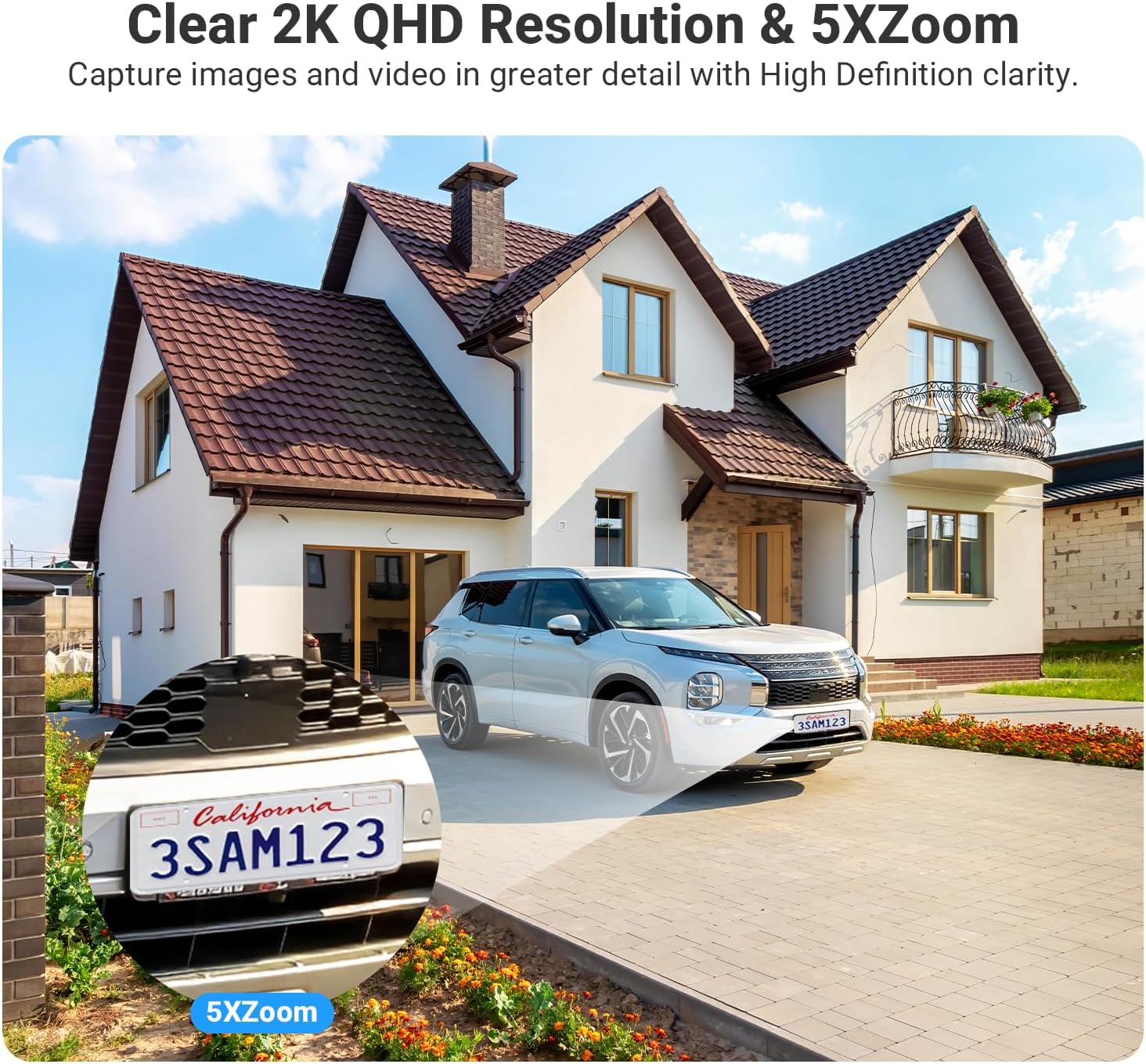
Image: A visual representation of the two-way audio feature, showing a delivery person speaking to a homeowner through the camera, and the homeowner responding via their smartphone app.
Smart Home Integration (Alexa)
The Rraycom C366 camera is compatible with Amazon Alexa, allowing for voice control.
- Nyambung ka Alexa: Follow the instructions in the Tuya app or Alexa app to link your Rraycom account.
- Paréntah sora: Use commands like "Alexa, show me the backyard" to view hirup footage on compatible devices such as Echo Show.

Image: An image showing the "Works with Google Assistant" and "Works with Alexa" logos, indicating compatibility. Below, an Echo Show device displays a live camera feed, demonstrating hands-free control.
Pangropéa
Ngecas Solar
The integrated solar panel provides continuous power to the built-in 9600mAh lithium battery. For optimal performance, ensure the solar panel receives adequate direct sunlight daily.
- Panempatan Panel: Position the solar panel in an area that receives at least 1.5 hours of direct sunlight per day.
- Kabersihan: Periodically clean the surface of the solar panel to remove dust, dirt, or debris that may obstruct sunlight absorption.

Image: The Rraycom C366 camera and its solar panel mounted on an outdoor wall, illustrating the 100% wire-free and continuous power supply feature with a 9000mAh battery.
Résistansi Cuaca
The camera has an IP66 waterproof rating, designed to withstand various outdoor weather conditions.
- Perlindungan: The IP66 rating ensures protection against heavy rain, snow, dust, and splashes.
- Suhu operasi: The camera is designed to operate in temperatures ranging from -20°C (-4°F) to 50°C (122°F).

Image: The Rraycom C366 camera with its solar panel shown in two different weather conditions: heavy rain with lightning and a snowy winter landscape, demonstrating its IP66 waterproof and all-weather readiness.
Pamérésan masalah
| Masalah | Mungkin Cukang lantaranana | Solusi |
|---|---|---|
| Kaméra teu hurung | Low battery; Solar panel not charging; Power cable issue. | Ensure solar panel is in direct sunlight. Check cable connection. Fully charge the camera using the USB cable if needed. |
| Teu tiasa nyambung kana WiFi | Incorrect WiFi password; Camera too far from router; Router band incompatibility. | Verify WiFi password. Move camera closer to router. Ensure your router supports 2.4GHz or 5GHz and select the appropriate band in the app. |
| Alarm palsu sering | Motion detection sensitivity too high; Unoptimized detection zones. | Adjust motion detection sensitivity in the app. Configure custom detection zones to exclude busy areas. |
| Poor video quality at night | Cahaya sabudeureun teu cekap pikeun paningal peuting anu warna. | Ensure the camera's spotlight is enabled for color night vision. Clear any obstructions blocking the camera's view. |
| Audio dua arah teu jalan | Mikropon/spiker dibisukeun dina aplikasi; Masalah jaringan. | Check audio settings in the Tuya app. Ensure stable network connection. |
spésifikasi
| Fitur | Rincian |
|---|---|
| Ngaran modél | C366-SP |
| Pamakéan jero rohangan / outdoor | Luar, jero rohangan |
| Sumber Daya | Solar Powered, Battery Powered (9600mAh Lithium Ion) |
| Téhnologi konektipitas | Nirkabel (Wi-Fi 2.4GHz & 5GHz) |
| Resolusi Capture Video | 2.5K HD (1920p) |
| Visi Peuting | Color Night Vision, 100 Feet Range |
| Tipe Zum | Ngazum Digital (6x) |
| Deteksi gerak | AI Motion Detection (People, Animals, Vehicles, Packages), Instant Alerts, Spotlight, Siren |
| Audio | Audio Dua Arah |
| Panyimpenan | Micro SD (up to 128GB, not included), Optional Cloud Storage |
| Tingkat Résistansi Cai | IP66 Waterproof |
| Suhu Operasi | -20°C (-4°F) nepi ka 50°C (122°F) |
| Alat nu cocog | Smartphone (iOS, Android), Desktop, Tablet, Amazon Alexa, Google Assistant |
| Viewdina Angle | 130 darajat |
| Bahan | Acrylonitrile Butadiene Styrene (ABS) |
| Dimensi produk | 10.35 x 3.35 x 12.4 inci |
| Item Beurat | 1.35 pon |
| Jumlah Item | 4 |
| Dianjurkeun Mangpaat | Kaamanan jero rohangan, Kaamanan luar |
| Fitur husus | 2.4/5 Ghz WiFi, 2.5K HD Resolution, Micro SD Local Recording(Optional), Cloud Storage(Optional), 100% Wireless, Solar/Battery Powered, Remote Access, 2 Way Audio, Motion Sensor, Zone Detection, Motion Triggered Recording, IP66 Waterproof, Work with Alexa, Color Night Vision |
Garansi sareng Rojongan
Rraycom is committed to providing high-quality security camera products and excellent customer service. Every camera undergoes rigorous testing and inspection before shipment.
For any product inquiries, technical support, or warranty claims, please contact our customer service team:
- Surélék: aftersale@rraycom.com
- Pabrikan: Rraycom

Image: An illustration depicting a customer service representative at a desk with a computer and phone, symbolizing available customer support for the product.
Ask a question about this manual
Ask about setup, troubleshooting, compatibility, parts, safety, or missing instructions. Manuals+ will review the question and use this page’s manual context to help answer it.