
Bubuka
This manual provides detailed instructions for the GOBOULT Mirage Smart Watch. Please read this guide thoroughly to ensure proper setup, operation, and maintenance of your device. This smartwatch features a 1.39-inch HD display, Bluetooth calling, comprehensive health monitoring, and various sports modes.
Naon dina Box
- GOBOULT Mirage Smart Watch
- Kabel Ngecas
- Manual pamaké
- Kartu Garansi
Disetél
1. Ngecas Alat
Before initial use, fully charge your GOBOULT Mirage Smart Watch. Connect the provided charging cable to the charging port on the back of the watch and to a standard USB power adapter (not included). The watch typically charges within 120 minutes.

Image: GOBOULT Mirage Smart Watch displaying its features, including charging capability.
2. Masangkeun jeung smartphone Anjeun
- Download the official GOBOULT companion app from your smartphone's app store (available for iOS and Android).
- Pastikeun Bluetooth diaktipkeun dina smartphone Anjeun.
- Open the app and follow the on-screen instructions to search for and connect to your GOBOULT Mirage Smart Watch.
- Konfirmasi pamundut papasangan dina jam tangan sareng smartphone anjeun.
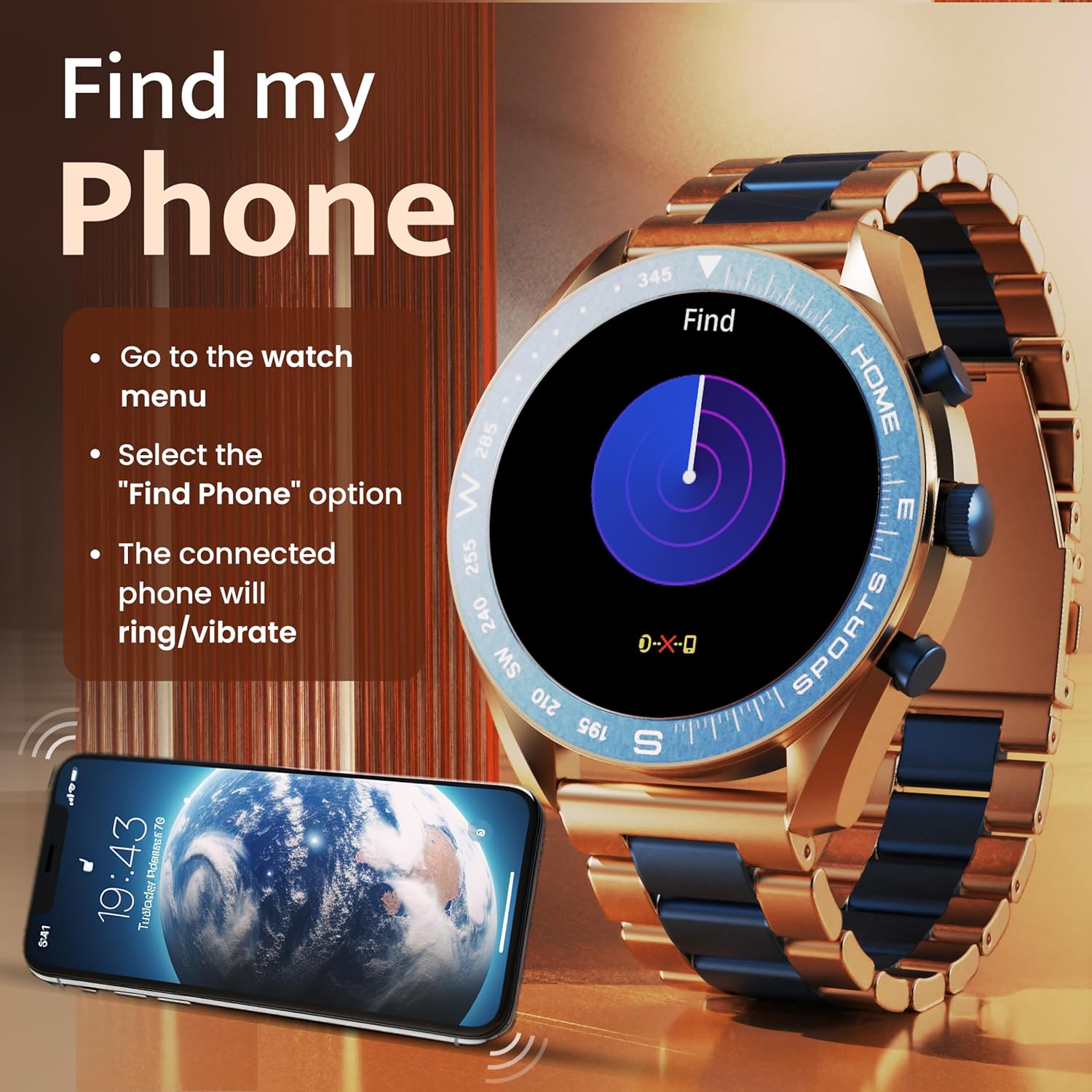
Image: The GOBOULT Mirage Smart Watch connected to a smartphone, illustrating connectivity.
Parentah Operasi
1. Tampilan jeung Napigasi
The GOBOULT Mirage features a 1.39-inch HD display with 360x360 pixels resolution and 500 nits peak brightness for clear visibility. Navigate the watch interface using touch gestures and the digital crown.
- Mahkota Digital: Press to power on/off, switch UIs, and navigate menus. Rotate to scroll through options.
- Kancing samping: Use for quick access to specific functions, such as launching sports modes.

Image: GOBOULT Mirage Smart Watch highlighting the digital crown and its various functions.
2. Telepon Bluetooth
With the built-in speaker and microphone, you can make and receive calls directly from your wrist once paired with your smartphone via Bluetooth 5.3.
- To answer a call, tap the green icon on the watch screen.
- To reject a call, tap the red icon.
- To make a call, access the dial pad or contacts through the watch menu.
Image: GOBOULT Mirage Smart Watch showing an incoming call notification.
3. Pangimeutan Kaséhatan
The GOBOULT Mirage provides comprehensive health tracking features:
- SpO2 Blood Oxygen Monitor: Ukur tingkat oksigén getih.
- Monitor Detak Jantung: 24/7 heart rate tracking.
- Monitor Saré: Ngalacak pola sareng kualitas bobo.
- Breath Training Mode: Pituduh anjeun ngaliwatan latihan engapan.
- Panginget cai nginum: Ngajurung anjeun tetep caian.
- Panginget Sedentary: Alerts you after periods of inactivity.
- Nyukcruk kagiatan: Rékam léngkah, jarak, sareng kalori anu diduruk.
- Nyukcruk siklus menstruasi: Helps monitor menstrual cycles.

Image: GOBOULT Mirage Smart Watch showcasing its complete health suite on the display.
4. Olahraga Mode
Track your performance across over 120 sports modes. Access these modes quickly using the shortcut buttons.
- Examples include Running, Cycling, Yoga, Cricket, Badminton, and Basketball.

Image: GOBOULT Mirage Smart Watch showing the selection of over 120 sports modes.
5. Watch Faces
Personalize your watch with over 300 cloud-based watch faces. You can also customize the dial to match your style.

Image: GOBOULT Mirage Smart Watch illustrating the variety of 300+ cloud watch faces.
6. Bewara Pinter
Receive SMS and other smart notifications directly on your watch. Ensure your watch is connected to your phone via Bluetooth for this feature to function.

Image: GOBOULT Mirage Smart Watch showing a push notification from a messaging app.
7. Asisten Sora AI
Access an intelligent AI voice assistant for hands-free control. Long press the designated button or use the voice assistant icon on the screen to activate.
8. Teangan Telepon Abdi
If you misplace your connected smartphone, use the 'Find My Phone' feature on your watch:
- Go to the watch menu.
- Select the "Find Phone" option.
- The connected phone will ring or vibrate, helping you locate it.
Image: GOBOULT Mirage Smart Watch showing the 'Find My Phone' interface.
9. Tahan cai
The GOBOULT Mirage Smart Watch is IP67 water-resistant, offering protection against dust and temporary immersion in water. It is suitable for daily wear and activities like hand washing or light rain.

Image: GOBOULT Mirage Smart Watch demonstrating its IP67 water resistance.
10. Mini Games
The watch includes several mini-games for entertainment during leisure time.
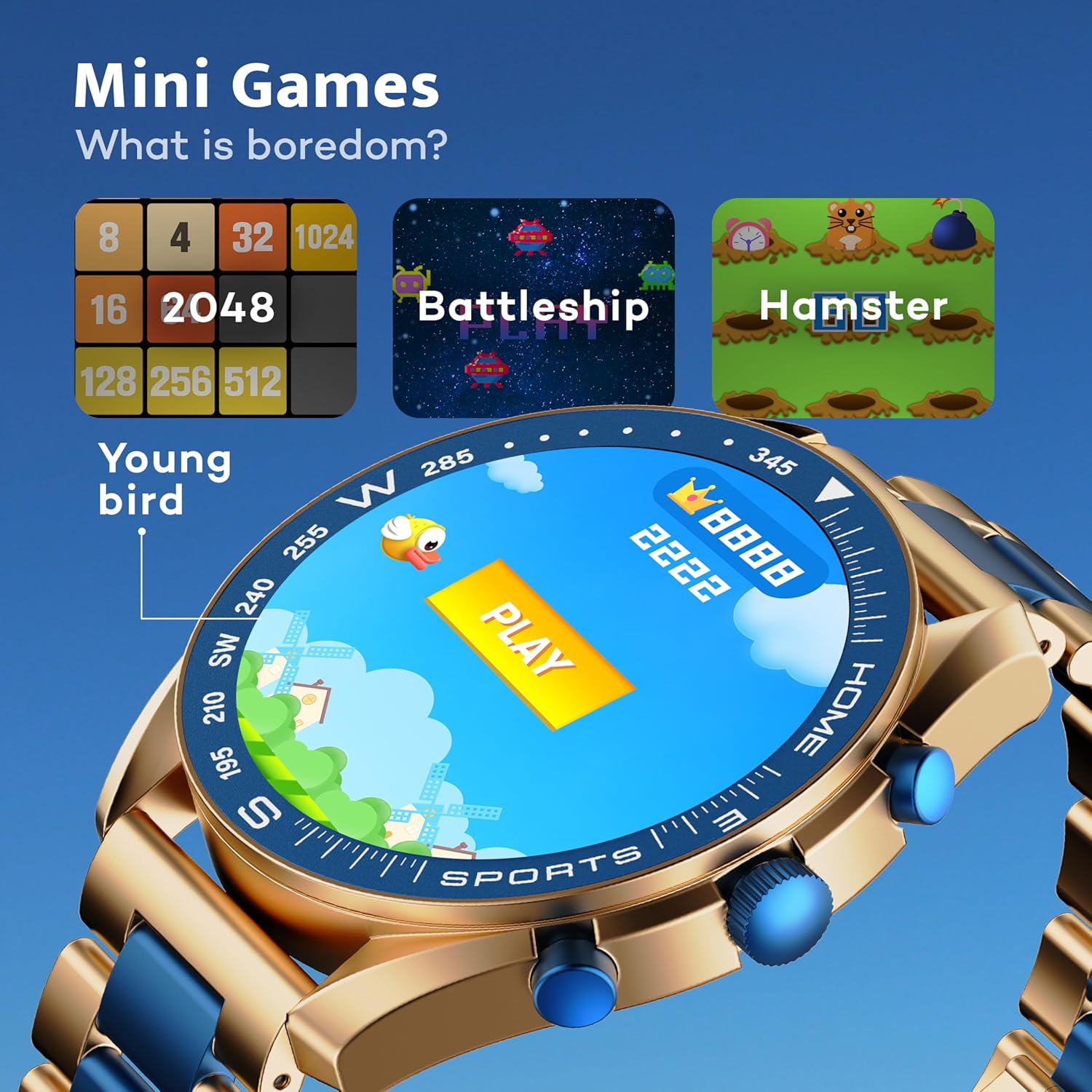
Image: GOBOULT Mirage Smart Watch showing the selection of mini-games.
Pangropéa
1. beberesih
- Wipe the watch screen and body with a soft, dry cloth.
- Pikeun kokotor nekad, make rada damp cloth and immediately dry the watch.
- Ulah make bahan kimia kasar atawa bahan abrasive, sabab ieu bisa ngaruksak finish.
2. Pedoman Tahan Cai
- The IP67 rating means the watch is protected from dust and can withstand immersion in water up to 1 meter for 30 minutes.
- Ulah dianggo jam tangan ieu kanggo ngojay, mandi ku cai panas, atanapi nyilem.
- Avoid exposing the watch to high-pressure water or steam.
- If the watch gets wet, dry it thoroughly before charging or using any buttons.
Pamérésan masalah
- Lalajo teu hurung: Pastikeun arloji dicas pinuh. Sambungkeun ka carjer sahenteuna 30 menit.
- Teu tiasa dipasangkeun sareng telepon: Pastikeun Bluetooth diaktipkeun dina telepon anjeun sareng jam tangan aya dina jangkauan. Pareuman heula kadua alat teras cobian pasangkeun deui.
- Data kaséhatan teu akurat: Pastikeun arloji dipaké pas dina pigeulang anjeun, teu ketang teuing atawa longgar teuing. Ngabersihan sénsor sacara teratur.
- hirup batré pondok: Ngurangan kacaangan layar, nganonaktipkeun bewara nu teu perlu, jeung ngawatesan pangimeutan denyut jantung kontinyu lamun teu diperlukeun.
- Masalah tampilan: Restart the watch. If the problem persists, contact customer support.
spésifikasi
| Fitur | Rincian |
|---|---|
| merek | GOBOULT |
| Nomer modél | 8906133853464 |
| Ukuran tampilan | 1.39 inci |
| Caang | 500 niis |
| Bahan Pigura | Séng Alloy |
| Tipe Wireless | Bluetooth 5.3 |
| Sistem operasi | ios, Android |
| Tahan cai | IP67 |
| Waktu Ngeusi batre | 120 Menit |
| Jenis Batré | Litium Polimér |
| Item Beurat | 106 g |
Garansi sareng Rojongan
Your GOBOULT Mirage Smart Watch comes with a warranty card included in the box. Please refer to this card for details regarding warranty coverage and terms.
For technical support, troubleshooting assistance, or warranty claims, please contact GOBOULT customer service through their official websitus atawa informasi kontak disadiakeun dina kartu jaminan Anjeun.