
1. Bubuka
Welcome to the user manual for your Emerson CKSS7071 Sunrise Smartset Alarm Clock Radio. This device is designed to enhance your daily routine with its unique features, including a sunrise simulation, soothing sound options, Bluetooth connectivity, and an 8-color dimmable LED display. Please read this manual thoroughly to understand the full functionality and ensure proper use and care of your new alarm clock radio.
Klip 1: Leuwihview of the Emerson CKSS7071 Sunrise Smartset Alarm Clock Radio. This video demonstrates the key features and design of the product.
2. Émbaran Kasalametan penting
- Baca sadaya pitunjuk sateuacan ngaoperasikeun alat.
- Tetep parentah ieu pikeun rujukan hareup.
- Entong nganggo alat ieu caket cai.
- Ngabersihan ngan ku kaén garing.
- Ulah meungpeuk sagala bukaan ventilasi. Pasang saluyu sareng parentah produsén.
- Entong dipasang di deukeut sumber panas sapertos radiator, register panas, kompor, atanapi aparat sanésna (kalebet ampLiifiers) anu ngahasilkeun panas.
- Nangtayungan kabel listrik tina leumpang atawa diciwit, utamana dina colokan, wadah merenah, jeung titik dimana aranjeunna kaluar tina aparat.
- Ngan anggo kantétan/aksésori anu ditunjuk ku produsén.
- Cabut colokan alat ieu nalika badai kilat atanapi nalika henteu dianggo kanggo waktos anu lami.
- Rujuk sadayana jasa ka tanaga jasa anu mumpuni. Diperlukeun ngalayanan nalika aparatur ruksak ku cara naon waé, sapertos kabel catu daya atanapi colokan rusak, cairan tumpah atanapi barang murag kana aparatur, aparatur parantos kakeunaan hujan atanapi lembab, henteu beroperasi normal. , atawa geus turun.
3. Eusi Paket
Pastikeun yén sadaya barang aya nalika muka bungkusan:
- Emerson CKSS7071 Sunrise Smartset Alarm Clock Radio
- Adaptor Daya AC
- Manual pamaké
4. Produk Langkungview
4.1 Hareup View

Gambar 1: Hareupeun view of the alarm clock, featuring the digital time display and the sunrise simulation light panel.
The front of the unit features the main 1.2-inch LED time display and the large circular light panel for sunrise simulation and ambient lighting. Indicators for AM/PM, Alarm 1/2, and Bluetooth status are also visible.
4.2 Samping View (Kadali)
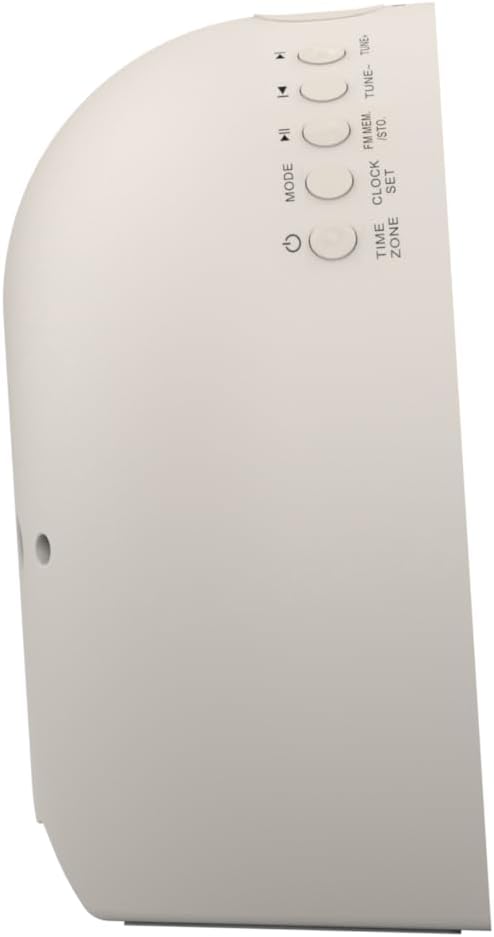
Gambar 2: Samping view of the alarm clock, highlighting the control buttons for various functions.
The side panel houses the primary control buttons, including Power, Mode, Clock Set, Time Zone, Tune/Skip, and Volume controls. These buttons are used for setting time, alarms, and navigating audio functions.
4.3 Tukangeun View

Gambar 3: Tukangeun view of the alarm clock, showing the speaker grille and power connection port.
The rear of the unit features the main speaker grille and the power input port for connecting the AC adapter.
5. Setélan
5.1 Sambungan Daya
- Plug the AC power adapter into the DC IN jack located on the back of the unit.
- Plug the other end of the adapter into a standard wall outlet (AC 100-240V, 50/60Hz).
- Unit bakal hurung sacara otomatis.
5.2 SmartSet Automatic Time Setting
The SmartSet system automatically sets the correct time and date as soon as you plug in the unit. It also maintains time and alarm settings during power disruptions or outages, provided the button cell battery is installed.
5.3 Pamasangan Cadangan Batré
A button cell battery (CR2032, included) is required for battery backup. This ensures that time and alarm settings are retained during a power outage.
- Tangtukeun lokasi kompartemen batré dina handapeun unit.
- Buka panutup kompartemen batré.
- Lebetkeun hiji batré sél kancing CR2032, pastikeun polaritasna (+/-) bener.
- Tutup panutup kompartemen batré aman.
6. Parentah Operasi
6.1 Setting the Clock Manually
- Pencét jeung tahan tombol SETET kancing. Angka jam bakal hurung.
- Ngagunakeun éta TÉHÉ -/+ tombol pikeun nyaluyukeun jam. Pencét SETET pikeun mastikeun.
- Angka menit bakal kedip-kedip. Anggo TÉHÉ -/+ tombol pikeun nyaluyukeun menit. Pencét SETET pikeun mastikeun.
- Teraskeun prosés ieu pikeun nyetél taun, bulan, sareng dinten.
- Pencét SETET deui pikeun kaluar ti modeu setelan waktu.
6.2 Nyetél Alarm (Alarm 1 & Alarm 2)
The unit features dual alarms. Follow these steps for each alarm:
- Pencét jeung tahan tombol ALARMA 1 or ALARMA 2 tombol. Angka jam alarm bakal kedip-kedip.
- Ngagunakeun éta TÉHÉ -/+ tombol pikeun nyaluyukeun jam alarm. Pencét masing-masing alarem tombol pikeun mastikeun.
- The alarm minute digits will flash. Use the TÉHÉ -/+ buttons to adjust the alarm minutes. Press the respective alarem tombol pikeun mastikeun.
- Select the alarm source (Buzzer, FM Radio, or Soothing Sound). Press the respective alarem tombol pikeun mastikeun.
- Atur volume alarm nganggo VOL - / + buttons. Press the respective alarem tombol pikeun mastikeun.
- The alarm is now set. The alarm indicator (AL1 or AL2) will appear on the display.
6.3 Sunrise Simulation
The sunrise simulation feature gradually brightens the light panel before your set alarm time, mimicking a natural sunrise to gently wake you.
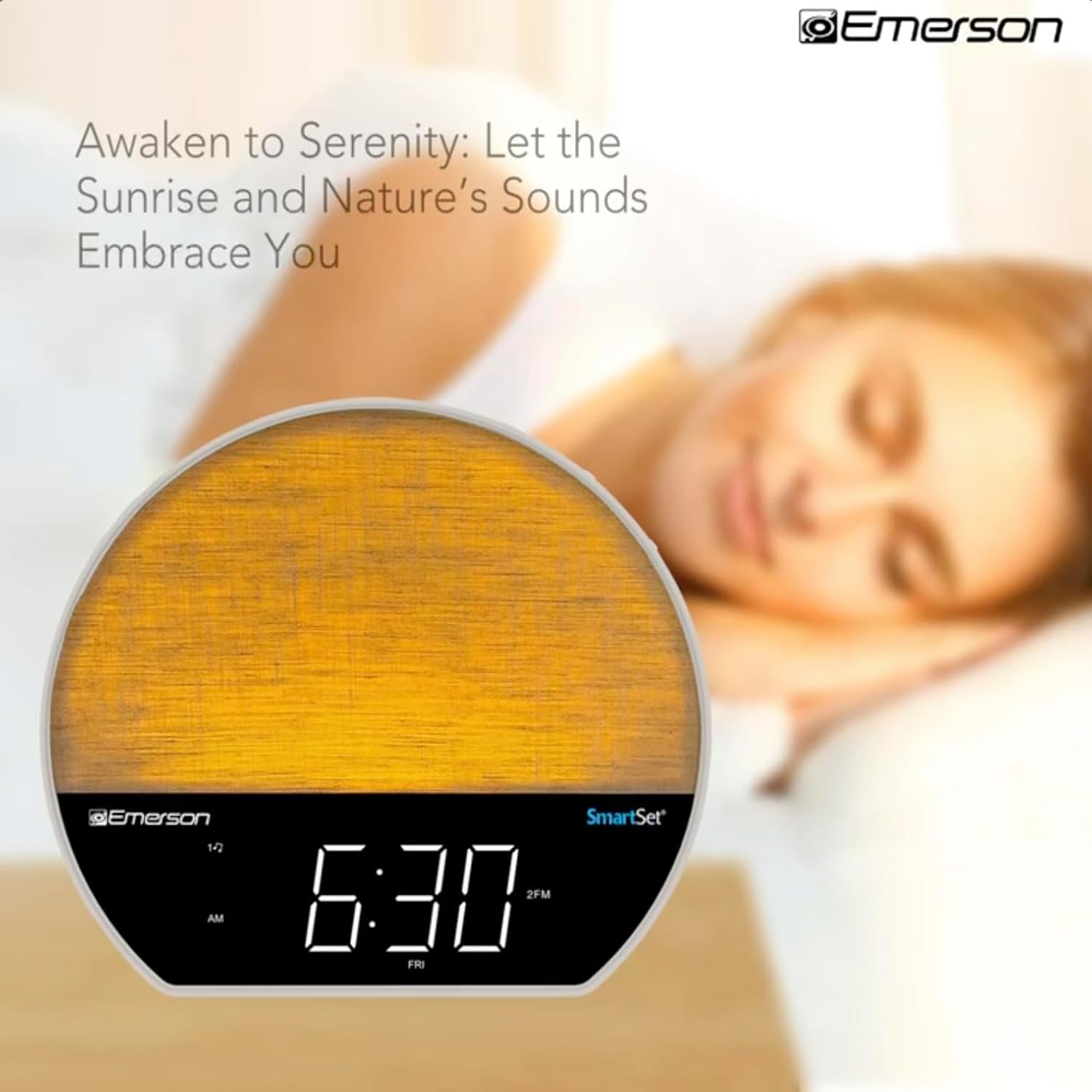
Gambar 4: The alarm clock simulating a sunrise with a warm, increasininténsitas cahaya g.
To activate, ensure the sunrise option is selected during alarm setup. The light will begin to brighten 30 minutes before the alarm sounds.
6.4 Soothing Sounds and White Noise
The unit includes 6 soothing sounds and white noise to help with relaxation or waking up.
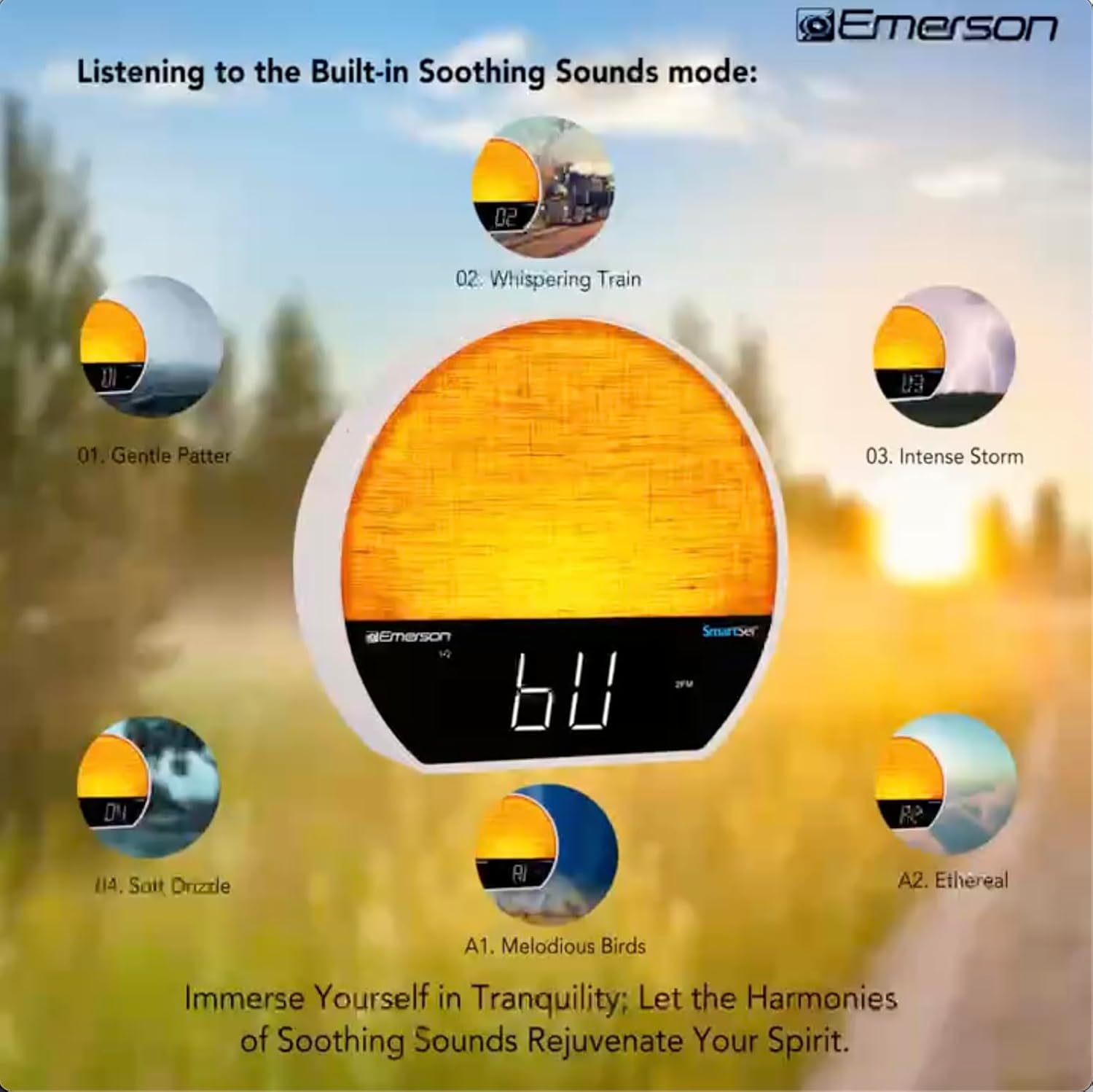
Gambar 5: Visual representation of the six soothing sound modes available on the alarm clock.
- Pencét éta MODÉ button repeatedly until the Soothing Sound mode is selected.
- Ngagunakeun éta TÉHÉ -/+ buttons to cycle through the available sounds (e.g., Gentle Patter, Whispering Train, Intense Storm, Soft Drizzle, Melodious Birds, Ethereal, White Noise).
- Saluyukeun polumeu nganggo VOL - / + kancing.
6.5 Fungsi Speaker Bluetooth
Sambungkeun smartphone Anjeun atawa alat Bluetooth-diaktipkeun séjén pikeun ngalirkeun data audio sacara nirkabel.

Gambar 6: The alarm clock in Bluetooth mode, paired with a mobile device for audio streaming.
- Pencét éta MODÉ button until 'BT' appears on the display, indicating Bluetooth mode.
- On your device, enable Bluetooth and search for 'Emerson CKSS7071'.
- Select the device to pair. A confirmation tone will sound upon successful pairing.
- You can now play audio from your device through the alarm clock's speaker.
6.6 Operasi Radio FM
Toel kana stasiun radio FM karesep anjeun.
- Pencét éta MODÉ pencét tombol 'FM' nepi ka muncul dina layar.
- Pencét éta TÉHÉ -/+ buttons briefly to manually tune to a station.
- Pencét jeung tahan tombol TÉHÉ -/+ tombol pikeun otomatis nyeken stasiun sadia salajengna.
- Pikeun nyimpen hiji stasiun, pencét jeung tahan tombol FM MEM tombol nepi ka angka prasetél hurung. Paké TÉHÉ -/+ pikeun milih nomer prasetél, teras pencét FM MEM deui pikeun ngahémat.
6.7 LED Decor and Dimmer Control
Customize the ambient light with 8 different colors and adjust the brightness.

Gambar 7: The alarm clock demonstrating its 8-color dimmable LED decor options.
- Pencét éta CAHAYA button to cycle through the 8 available colors or turn the light off.
- To adjust the brightness of the LED decor light, press and hold the CAHAYA button. The brightness will cycle through 5 levels. Release the button at your desired brightness.
6.8 Display Dimmer Control
Adjust the brightness of the 1.2-inch LED time display.

Gambar 8: The alarm clock illustrating the five distinct levels of display luminescence.
Pencét éta DIMMER button (often combined with another function, refer to button labels) to cycle through 4 levels of display brightness (Bright, Moderate, Dim, Faint).
6.9 Timer Saré
Set a timer for the audio to automatically turn off after a specified duration.

Gambar 9: The alarm clock set for a sunset sleep timer, providing a harmonious end to the day.
- While audio is playing (FM or Soothing Sound), press the SARE kancing.
- Pencét sababaraha kali SARE button to cycle through available sleep timer durations (e.g., 15, 30, 60, 90 minutes, or OFF).
- The audio will automatically turn off after the selected time.
6.10 Fungsi Tunda
Sawaktos alarm disada, pencét tombol SNOOZE button (usually a large button on top) to temporarily silence the alarm for a few minutes. The alarm will sound again after the snooze period.
7. Pangropéa
7.1 beberesih
- Salawasna cabut unit tina stop kontak sateuacan beberesih.
- Anggo kaén anu lembut sareng garing pikeun ngabersihan permukaan luar.
- Do not use liquid cleaners, abrasive cleaners, or chemical sprays, as these may damage the finish.
7.2 Ngagantian batré
Upami setelan waktos sareng alarm teu disimpen salami kakuatan outage, the button cell backup battery may need to be replaced. Follow the instructions in section 5.3 to replace the CR2032 battery.
8. Cara ngungkulan
| Masalah | Mungkin Cukang lantaranana | Solusi |
|---|---|---|
| Unit teu hurung. | Adaptor listrik teu nyambung atanapi lepat. | Pastikeun adaptor AC dipasang pageuh kana unit sareng kana stop kontak témbok anu tiasa dianggo. |
| Setélan waktos / Alarm leungit sanggeus kakuatan outage. | Batré cadangan paéh atanapi teu acan dipasang. | Install or replace the CR2032 button cell battery (see section 5.3). |
| Alarm teu disada. | Alarm teu diaktipkeun atawa volume na leutik teuing. | Ensure the alarm is set and activated (AL1/AL2 indicator on). Increase alarm volume. |
| Alat Bluetooth teu tiasa dipasangkeun. | Unit not in Bluetooth mode or device too far. | Ensure the unit is in Bluetooth mode ('BT' displayed). Move your device closer to the unit. Try unpairing and re-pairing. |
| panarimaan radio FM goréng. | Antena teu manjang atanapi aya gangguan. | Extend the FM wire antenna fully and reposition it for better reception. Avoid placing near other electronic devices. |
| Pintonan caang teuing / taram. | Display dimmer setting needs adjustment. | Pencét éta DIMMER button to cycle through brightness levels (see section 6.8). |
9. Spésifikasi
| Fitur | Rincian |
|---|---|
| Nomer modél | CKSS7071 |
| Sumber Daya | AC 100-240V, 50/60Hz (via AC adapter) |
| Nyadangkeun batré | 1 x CR2032 Button Cell Battery (included) |
| Tipe tampilan | 1.2-inch LED Display |
| Vérsi Bluetooth | V5.4 |
| Sora-sora Ngareuah-reuah | 6 Nature Sounds + White Noise |
| LED Decor Colors | 8 Dimmable Colors |
| Diménsi Produk (W x D x H) | 7.09" x 3.15" x 6.37" |
| Beurat | Henteu ditangtoskeun |
10. Émbaran jaminan
Emerson products are manufactured to the highest quality standards. This product is covered by a limited warranty against defects in materials and workmanship for a period of one (1) year from the original date of purchase. This warranty does not cover damage caused by misuse, accident, unauthorized modification, or normal wear and tear. Proof of purchase is required for all warranty claims. Please retain your receipt.
11. Rojongan Palanggan
If you have any questions, require assistance, or experience issues with your Emerson CKSS7071 Sunrise Smartset Alarm Clock Radio, please contact our customer support team.
- Websitus: Visit the official Emerson websitus pikeun FAQs jeung sumber rojongan.
- Surélék: Tingali kana bungkusan produk anjeun atanapi resmi websitus pikeun kontak email layanan palanggan.
- Telepon: Tingali kana bungkusan produk anjeun atanapi resmi websitus pikeun nomer telepon layanan palanggan.
Please have your model number (CKSS7071) and proof of purchase ready when contacting support.