
Bubuka
This manual provides detailed instructions for the KZZI Z98 Wireless Mechanical Keyboard. It covers setup, operation, maintenance, and troubleshooting to ensure optimal performance and user experience. Please read this manual thoroughly before using your keyboard.
Naon dina Box
- Z98 Wireless Mechanical Keyboard
- Keycap Puller
- Replacement Switch (4 pieces)
- Kabel USB
- Panutup lebu
Produk Leuwihview
The KZZI Z98 keyboard features a 90% layout, smart display, multi-mode connectivity, and hot-swappable switches for a customizable and efficient typing experience.
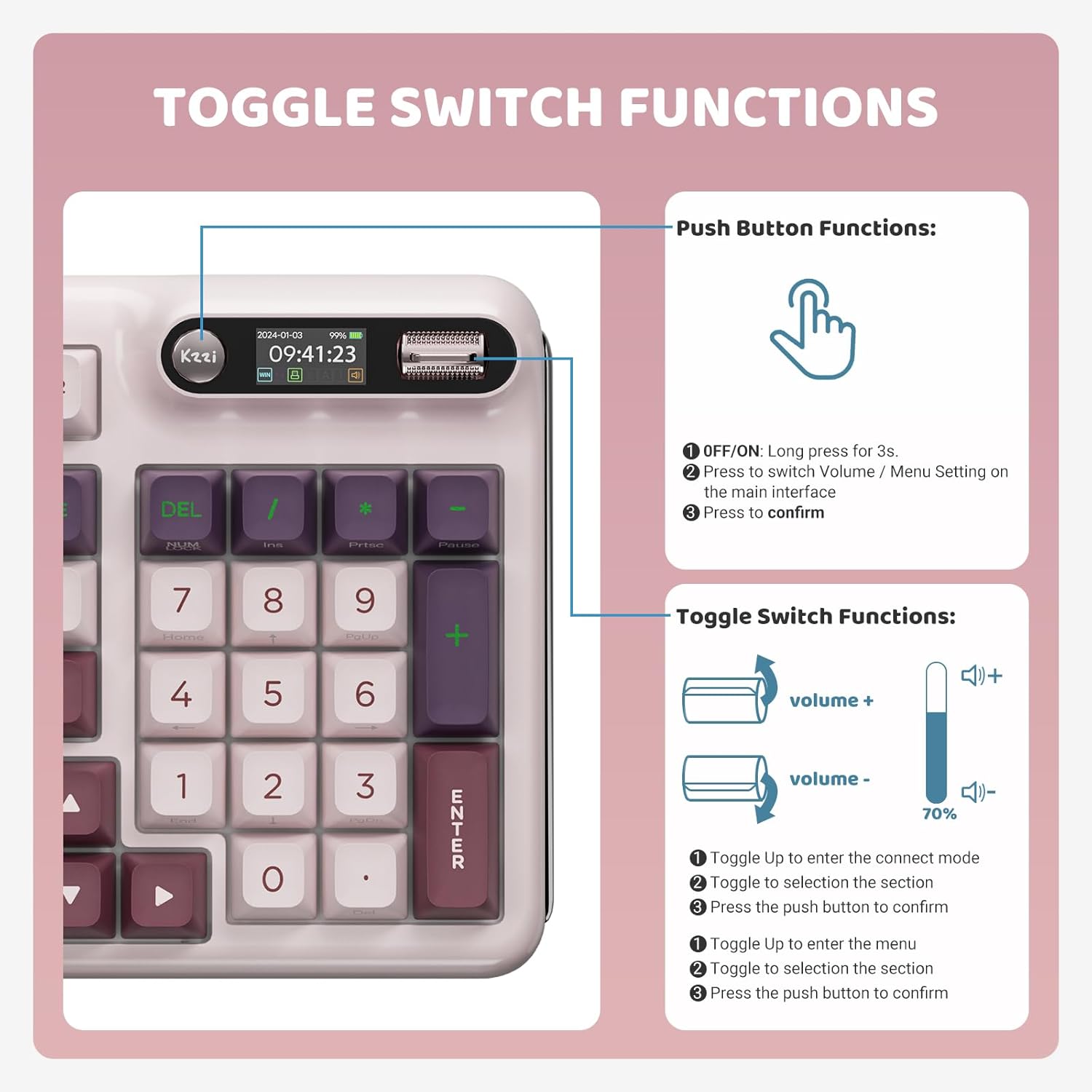
Image: KZZI Z98 Wireless Mechanical Keyboard showcasing perenah pinuh na jeung cahaya RGB.
Parentah Setup
1. Sambungan Kabel (USB-C)
- Panggihan port USB-C dina kibor.
- Connect the provided USB-C cable to the keyboard and the other end to your computer's USB port.
- The keyboard will automatically be recognized by your system.
2. 2.4GHz Wireless Connection
- Remove the 2.4GHz USB receiver from its storage slot on the keyboard.
- Colokkeun panarima USB ka port USB nu sadia dina komputer Anjeun.
- On the keyboard's smart display, use the knob to navigate to the connection settings and select the 2.4GHz mode. The display will show "2.4G Linking" and then "2.4G Success!" upon successful connection.

Image: The KZZI Z98 keyboard highlighting its three connection modes: Bluetooth 5.0, 2.4GHz wireless, and USB-C wired.
3. Sambungan Bluetooth 5.0
- On the keyboard's smart display, use the knob to navigate to the connection settings and select one of the Bluetooth channels (BT1, BT2, or BT3). The display will show "BT Linking".
- On your device (PC, laptop, tablet, smartphone), enable Bluetooth and search for new devices.
- Select "Kzzi-Z98" from the list of available devices to pair. The keyboard display will show "BT Success!" once paired.
- The keyboard can store up to three different Bluetooth devices, allowing for seamless switching.
Video: Demonstrates the triple-mode connection process for the KZZI Z98 keyboard, including wired, 2.4GHz, and Bluetooth setup.
Parentah Operasi
1. Smart Display & Knob Functions
The integrated smart display and three-way knob provide quick access to keyboard settings and system information.
- Fungsi Tombol Pencét:
- Press for 3 seconds to turn the keyboard ON/OFF.
- Press to switch between Volume control and Menu settings on the main interface.
- Press to confirm a selection within the menu.
- Fungsi Toggle Switch:
- Toggle up/down to adjust volume or navigate through menu options.
- Toggle up to enter the connect mode, then toggle to select a section, and press the push button to confirm.
- Toggle up to enter the menu, then toggle to select a section, and press the push button to confirm.

Image: Detailed diagram illustrating the functions of the toggle switch and push button on the KZZI Z98 keyboard's smart display.

Image: The smart digital screen of the KZZI Z98 keyboard showing different display options including Home, GIF image display, System Connection, RGB Mode & Color, RGB Brightness/Speed, and Volume.
2. Kustomisasi Lampu RGB
The keyboard features 16.8 million RGB backlit keys with various effects.
- Use the smart display and knob to navigate to the RGB settings.
- Adjust brightness, speed, and select from 18 default lighting effects.
- Utilize the software for advanced customization, including 'Music Syncing' mode.

Image: The KZZI Z98 keyboard illuminated with 16.8 million RGB backlighting, demonstrating various color possibilities.
3. Kustomisasi Parangkat Lunak
Advanced customization options are available through the dedicated software.
- Download the KZZI Z98 software from the official KZZI websitus.
- Anggo parangkat lunak ieu pikeun:
- Customize GIFs for the smart display.
- Program complex keyboard macros.
- Fine-tune RGB lighting effects.
- Enable 'Music Syncing' mode for dynamic lighting.

Image: A computer screen displaying the KZZI keyboard software, illustrating options for 18 RGB lighting effects, music audio visualizer effects, and macro recording and editing.
4. Saklar Panas-Swappable
The KZZI Z98 supports hot-swappable 3-pin/5-pin switches, allowing for easy customization without soldering.
- Anggo penarik keycap anu disayogikeun pikeun nyabut keycap anu dipikahoyong sacara ati-ati.
- Use the switch puller (not included, but commonly available) to gently remove the switch from the PCB.
- Sejajarkeun pin saklar anyar jeung liang dina PCB terus pencét pageuh nepi ka ngaklik kana tempatna. Pastikeun pin henteu bengkok.
- Pasang deui tutup konci na.

Gambar: A close-up view of the KZZI Z98 keyboard's hot-swappable slotted PCB, demonstrating how switches can be easily removed and replaced.
Video: Leuwihview of the KZZI Z98 Wireless Mechanical Keyboard, demonstrating features such as the smart display, connection modes, hot-swappable switches, and RGB lighting effects.
Pangropéa
Proper maintenance ensures the longevity and performance of your KZZI Z98 keyboard.
- beberesih: Use a soft, dry cloth to wipe the keyboard surface. For deeper cleaning, remove keycaps with the provided puller and use compressed air to clear debris from between switches.
- Perawatan batré: To maximize battery life, avoid fully discharging the keyboard frequently. Charge the 3750mAh battery when the low battery indicator appears on the smart display.
- Panyimpenan: When not in use, store the keyboard in a cool, dry place, ideally covered with the provided dust cover to prevent dust accumulation.

Gambar: Hiji internal view of the KZZI Z98 keyboard, highlighting its massive 3750mAh battery for ultra-long lasting life.
Pamérésan masalah
If you encounter issues with your KZZI Z98 keyboard, refer to the following common solutions:
- Keyboard Teu Ngabales:
- Pastikeun kibor dihurungkeun.
- Check the battery level on the smart display and charge if necessary.
- Verify the connection mode (wired, 2.4GHz, or Bluetooth) is correctly selected and established.
- Pikeun 2.4GHz, pastikeun panarima USB parantos dipasang kalayan pageuh.
- For Bluetooth, ensure your device's Bluetooth is enabled and the keyboard is paired.
- Lampu RGB Teu Jalan/Salah:
- Check RGB settings via the smart display or software.
- Ensure the keyboard is not in a low-power mode that disables RGB.
- Konci Teu Kadaptar:
- Remove the keycap and switch to check for any obstructions or bent pins. Re-seat or replace the switch if needed.
- Pastikeun firmware kibor parantos mutahir.
- Smart Display Not Functioning:
- Balikan deui kibor.
- Pastikeun kiborna gaduh daya anu cekap.
spésifikasi
| Fitur | Rincian |
|---|---|
| Nomer modél | Z98 |
| Téhnologi konektipitas | Bluetooth 5.0, 2.4GHz RF, USB-C Wired |
| Tata perenah | 90% (94 konci) |
| Saklar | Hot-Swappable Linear Switches (3-pin/5-pin support) |
| Kancing konci | Double-Shot PBT, DSA-height |
| Lampu tukang | 16.8 Million RGB, Customizable |
| Kapasitas batré | 3750 mah |
| Kahirupan batré (approx.) | 20 days (non-RGB), 5 days (with RGB, 6 hours daily use) |
| Fitur husus | Smart Display & Knob, Gasket Mount, Sound-absorbing layers, Software Customization (GIFs, Macros, Music Syncing) |
| Alat nu cocog | PC, Laptop, Gaming Console, Smart TV, Tablet |
| Item Beurat | 3 pon |
| Ukuran Paket | 17.13 x 8.03 x 2.05 inci |
Garansi sareng Rojongan
The KZZI Z98 Wireless Mechanical Keyboard comes with a standard manufacturer's warranty. Please refer to the warranty card included with your product for specific terms and conditions. For technical support, troubleshooting assistance, or warranty claims, please contact KZZI customer service through their official websitus atanapi inpormasi kontak anu disayogikeun dina bungkusan produk anjeun.