
Bubuka
This user manual provides essential information for the proper setup, operation, and maintenance of your SMART Board MX275-V5 Pro Series interactive display. Please read this manual thoroughly before using the product to ensure optimal performance and longevity. The SMART Board MX Pro series is designed to facilitate productive meetings and collaborative work with its advanced digital ink technology and seamless integration with Microsoft and Google environments.
Disetél
1. Unboxing jeung Inspection
Carefully remove the interactive display from its packaging. Inspect the unit for any signs of damage that may have occurred during transit. Retain all packaging materials for future transport or service needs.
2. Masang Layar
The SMART Board MX275-V5 Pro Series interactive display can be mounted on a wall or a mobile stand. Refer to the separate mounting guide provided with your chosen mounting solution for detailed instructions. Ensure the mounting hardware is appropriate for the display's weight and the wall structure.
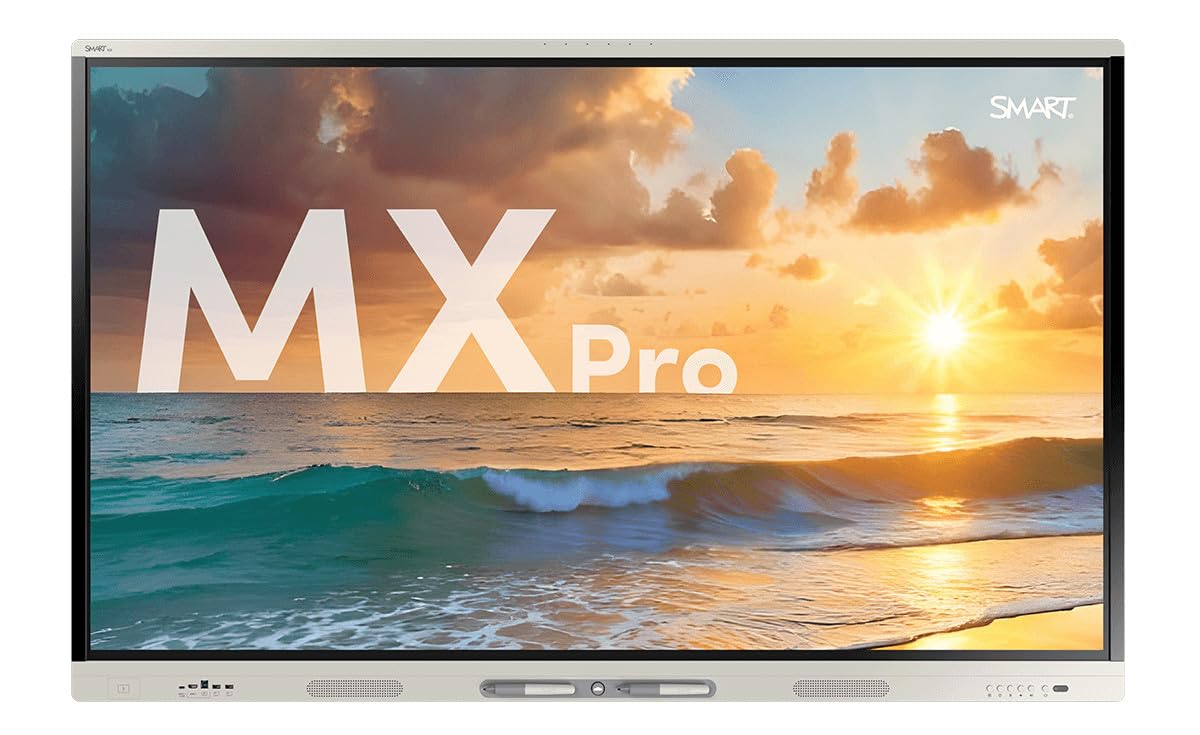
This image displays the SMART Board MX275-V5 Pro Series interactive display, featuring a large screen with a high-resolution image of an ocean sunset. The display's sleek design and integrated pen tray are visible at the bottom.
3. Nyambungkeun périferal
Connect necessary cables to the display's ports. Common connections include:
- Kakuatan Kabel: Connect to a grounded power outlet.
- HDMI/Port Layar: For video input from a computer or other source.
- Kabel USB: For touch functionality and connecting external devices. The display features 1 total USB port.
- Network Cable (Ethernet): For wired internet connection (optional).
4. Daya Awal Hurung
Once all connections are secure, press the power button located on the display. Follow the on-screen prompts for initial setup, including language selection and network configuration.
Ngoperasikeun Tampilan
1. Basic Interaction
The SMART Board MX275-V5 Pro Series is a multi-touch interactive display. Use your fingers or the included pens to interact with the screen. Common gestures include:
- Ketok: Sarua jeung hiji klik mouse.
- Séréd: Move objects or scroll content.
- Ciwit / Sumebarna: Ngazum gede atawa leutik.
- Gesek: Navigate through pages or menus.
2. Digital Ink Technology
The display features advanced digital ink capabilities. Use the provided pens to write, draw, and annotate directly on the screen, over applications, or within dedicated whiteboarding software. The system automatically differentiates between pen, finger, and eraser input.
3. Integrated Audio System
The display includes integrated speakers and a linear six-microphone array. The 75-inch model features two integrated 20W speakers. The microphone array supports onboard acoustic echo cancellation for clear audio during video conferences and presentations.
4. Software Environment Integration
The SMART Board MX275-V5 Pro Series is designed for seamless integration with both Microsoft and Google environments, allowing users to leverage familiar tools and applications directly on the interactive display.
Pangropéa
1. Ngabersihan Tampilan
To clean the screen, power off the display and gently wipe it with a soft, lint-free cloth. For stubborn marks, use a screen cleaner specifically designed for electronic displays. Avoid abrasive cleaners or solvents. Clean the casing kalawan garing atawa rada garingamp lawon.
2. Apdet parangkat lunak
Regularly check for and install software and firmware updates. Updates often include performance improvements, new features, and security enhancements. Refer to the display's settings menu for update options or visit the official SMART support websitus.
Pamérésan masalah
Bagian ieu ngabahas masalah umum anu anjeun tingali. Pikeun masalah nu leuwih kompleks, kontak rojongan customer.
- Henteu aya kakuatan:
Ensure the power cable is securely connected to both the display and a working power outlet. Check the power button and any circuit breakers. - Henteu aya tampilan/layar hideung:
Verify that the video input cable (HDMI/DisplayPort) is correctly connected to both the display and the source device. Ensure the source device is powered on and outputting a signal. Try selecting the correct input source on the display. - Touch Functionality Not Responding:
Check that the USB cable for touch is connected between the display and the computer. Restart both the display and the connected computer. Ensure no obstructions are on the screen surface. - Henteu aya Audio:
Check the volume settings on both the display and the connected source device. Ensure audio cables are properly connected if using external speakers. Verify that the correct audio output is selected on the source device.
spésifikasi
The following table outlines the key technical specifications for the SMART Board MX275-V5 Pro Series interactive display (75-inch model):
| Fitur | Spésifikasi |
|---|---|
| Nomer modél | MX275-V5-PW |
| Ukuran layar (diagonal) | 75 inci |
| Resolusi tampilan maksimum | 4K UHD (3840 x 2160) |
| Rasio Aspék | 16:9 |
| Refresh Laju | 60 Hz |
| Lampu tukang | LED |
| Panyatur | 2 integrated 20 W speakers |
| Mikropon | Integrated linear six-microphone array with acoustic echo cancellation |
| Total palabuhan USB | 1 |
| Ukuran produk (L x W x H) | 3.5 x 68.39 x 41.77 inci |
| Item Beurat | 158.4 pon |
| Pedaran Permukaan layar | Glossy, Matte |
Garansi sareng Rojongan
For warranty information, please refer to the documentation provided at the time of purchase or visit the official SMART website. If you require technical assistance, have questions about your product, or need to report an issue, please contact SMART customer support through their official channels.