
Bubuka
Thank you for choosing the AOLON Curve Smart Watch. This device is designed to enhance your daily life with advanced health monitoring, fitness tracking, and smart communication features. This manual provides essential information for setting up, operating, and maintaining your new smart watch.

Image: The AOLON Curve Smart Watch in Rose Gold, showcasing desain sleek sarta tampilan vibrant.
Naon dina Box
Upon opening your AOLON Curve Smart Watch package, you should find the following items:
- AOLON Curve Smart Watch (with Watch Band attached)
- Kabel Ngecas
- Manual pangguna (dokumén ieu)

Image: A visual representation of the product packaging contents, showing the watch, charging cable, and user manual.
Disetél
1. Ngecas Awal
Before first use, fully charge your smart watch. A full charge typically takes approximately 2.5 hours. The watch offers up to 7 days of normal use and over 20 days in power-saving mode on a single charge.
- Sambungkeun kabel ngecas magnét kana titik ngecas di tukang jam tangan.
- Colokkeun tungtung USB kabel kana adaptor kakuatan USB standar (teu kaasup) atawa port USB komputer.
- Pintonan arloji bakal nunjukkeun status ngecas.

Image: The smart watch connected to its magnetic charging cable, illustrating the charging process and battery icon.
2. Ngundeur Aplikasi sareng Masangkeun
To unlock the full potential of your AOLON Curve Smart Watch, download the companion app and pair it with your smartphone.
- Scan the QR code in your physical manual or search for "GloryFit" in the Apple App Store (for iOS) or Google Play Store (for Android).
- Pasang éta Gloryfit aplikasi dina smartphone Anjeun.
- Pastikeun Bluetooth diaktipkeun dina smartphone Anjeun.
- Open the GloryFit app, navigate to the "Device" section, and tap "Add Device".
- Select "Aolon Curve2" from the list of available devices to pair.
- Turutan ajakan dina layar pikeun ngarengsekeun prosés papasangan.

Image: A step-by-step guide illustrating how to download the GloryFit app and connect the AOLON Curve Smart Watch to a smartphone.
Ngoperasikeun Smart Watch Anjeun
1. Napigasi Dasar
The AOLON Curve Smart Watch features a 1.83-inch HD full-view curved display with a responsive touchscreen and an optical rotary button for intuitive navigation.
- Gesek ka luhur/handap: Gulung ka ménu sareng béwara.
- Gesek Kénca/Katuhu: Aksés fungsi gancang atanapi rupa-rupa tampilan jam.
- Ketok: Pilih hiji item atawa mastikeun hiji aksi.
- Pencét Tombol Sisi: Balik deui ka layar utama atawa hurungkeun/pareuman.
- Puterkeun Tombol Samping: Gulung dina ménu atanapi saluyukeun setélan.

Gambar: A lengkep view of the smart watch's 1.83-inch HD display with 3D curved glass, highlighting its visual clarity.
2. Ngaropea Watch Faces
Personalize your watch with over 120 customizable watch faces available through the GloryFit app. You can also set your own photos as watch faces.
- From the watch home screen, long-press the display to quickly change watch faces.
- For more options, open the GloryFit app and navigate to the watch face selection menu.

Image: Various digital and analog watch faces shown on the smart watch, demonstrating customization options.
3. Telepon Bluetooth
With its built-in microphone and speaker, the smart watch allows you to make and receive calls directly from your wrist when connected to your phone via Bluetooth.
- To make a call, access the dial pad or contact list on your watch.
- To answer an incoming call, tap the green phone icon on the watch screen.
- To reject a call, tap the red phone icon.

Image: A user interacting with the smart watch to manage calls while driving, highlighting the Bluetooth calling feature.
4. Bewara Pinter
Receive real-time notifications for messages, alarms, and other app alerts directly on your watch. Note that message reply is not supported directly from the watch.
- Ensure notification permissions are granted to the GloryFit app on your smartphone.
- Gesek ka handap dina beungeut arloji pikeun view bewara panganyarna.

Image: The smart watch displaying various app notifications, indicating its intelligent notification reminder feature.
5. Pangimeutan Kaséhatan
The AOLON Curve Smart Watch provides continuous monitoring of key health metrics.
- Laju Jantung: Continuous heart rate tracking with alerts for abnormal rates.
- Oksigén getih (SpO2): Ngawas tingkat oksigén getih anjeun.
- Pangimeutan Saré: Tracks sleep duration, quality, and stages (deep, light, REM, awake).
- Pangimeutan Stress: Nyadiakeun wawasan ngeunaan tingkat setrés anjeun.
- Women's Cycle Tracking: Supports tracking of menstrual cycles.
- Panginget Sedentary: Alerts you to move after prolonged periods of inactivity.
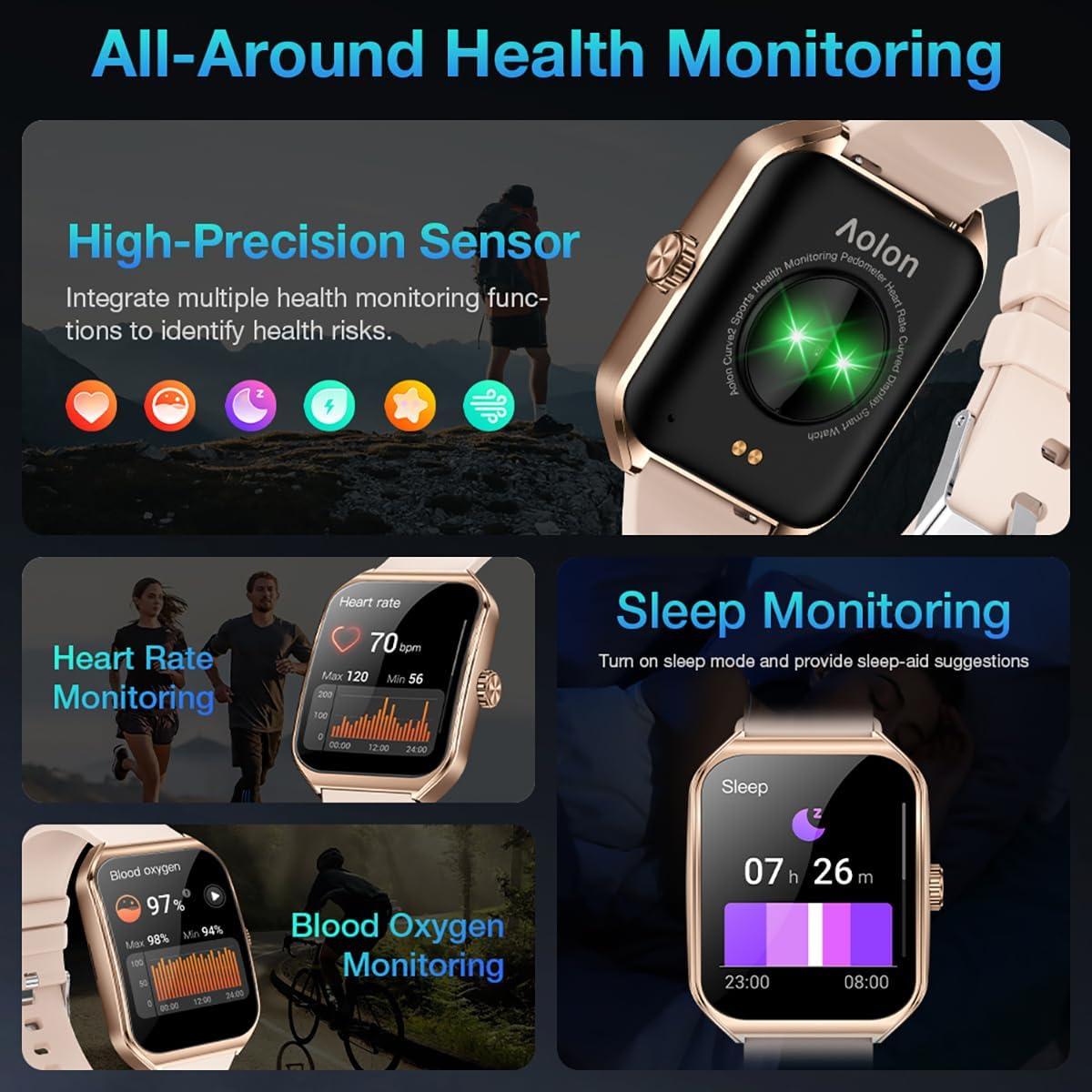
Image: A collage showing the smart watch monitoring heart rate, blood oxygen, and sleep, emphasizing its comprehensive health tracking capabilities.
Video: Demonstrates the 24/7 health monitoring features of the AOLON Smart Watch, including heart rate and SpO2 tracking.
6. Modeu Olahraga sarta Tracking Kagiatan
The watch supports over 60 sports modes, allowing you to accurately monitor heart rate, calorie consumption, and exercise duration.
- Select your desired sports mode from the watch menu (e.g., outdoor run, indoor run, outdoor walk, ball games, dance, gymnastics).
- When connected to your phone, the watch can record and track your exercise routes using your phone's GPS.
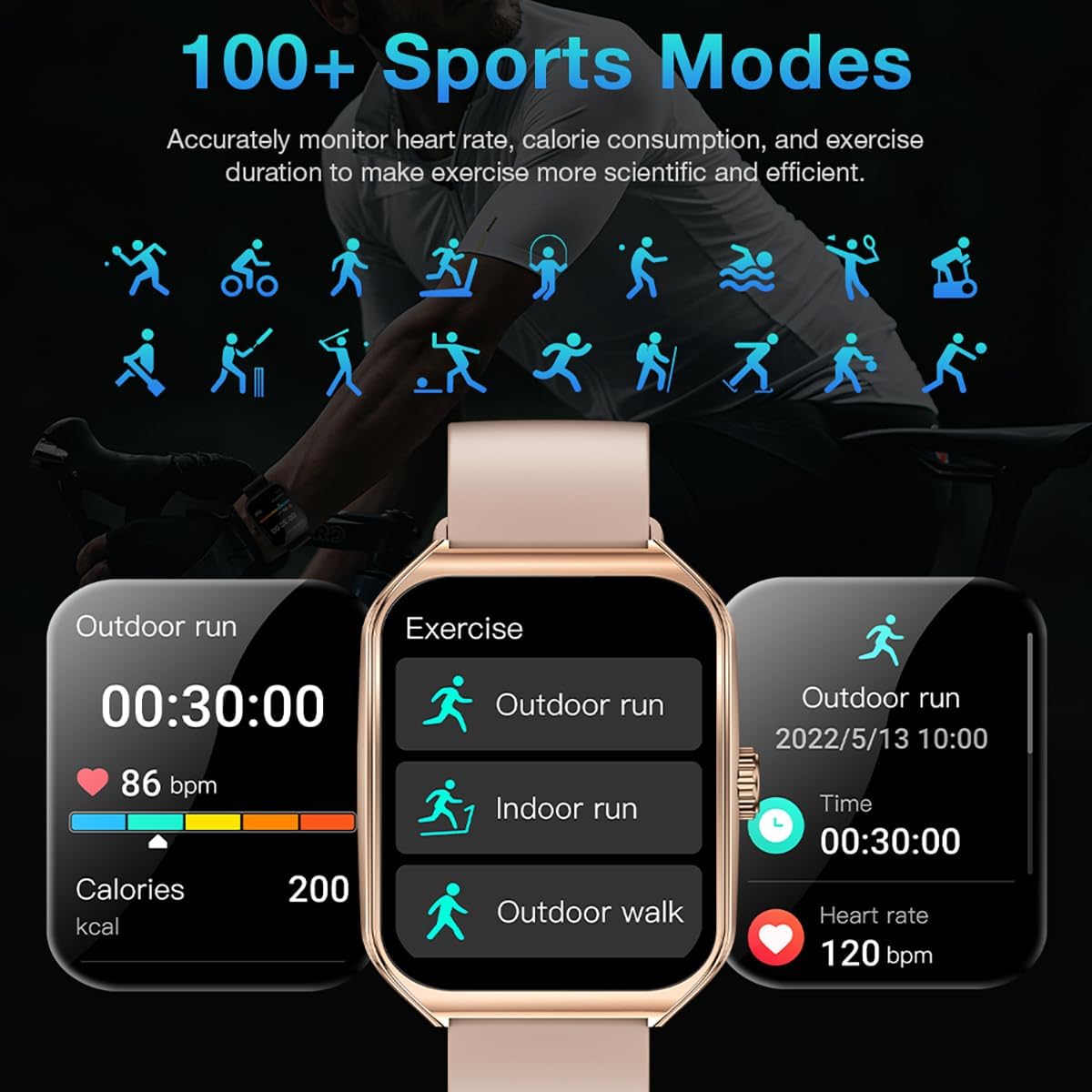
Image: The smart watch interface showing different sports modes and real-time exercise data like heart rate, calories, and distance.
7. Fitur Smart séjén
The AOLON Curve Smart Watch integrates several convenient features for daily use:
- Asisten Sora AI: Quickly activate your voice assistant for tasks like making calls, checking weather, or setting alarms.
- Ramalan Cuaca: Kéngingkeun apdet cuaca sacara real-time.
- Kontrol Musik: Kontrol playback musik dina smartphone Anjeun.
- Jam alarem: Setel sareng atur alarm.
- Stopwatch & Timer: Fungsi timing penting.
- Milarian Telepon anjeun: Panggihan smartphone anjeun dipasangkeun.
- Senter: A simple flashlight function.
- Kalkulator: Itungan dasar dina pigeulang anjeun.
- Fungsi SOS: Pikeun kaayaan darurat.
Video: Hiji leuwihview of the Curve2 Smart Watch features, including fitness tracking, notifications, and various smart functions.
Pangropéa
1. Ngabersihan Arloji Anjeun
Regular cleaning helps maintain the appearance and functionality of your smart watch.
- Ngusap layar jeung awak ku hipu, damp lawon.
- The silicone strap is washable. You can gently clean it with mild soap and water.
- Hindarkeun ngagunakeun bahan kimia anu kasar atanapi bahan abrasive.
2. Tahan cai (IP67)
The AOLON Curve Smart Watch is IP67 waterproof, meaning it is resistant to dust and can withstand immersion in water up to 1 meter for 30 minutes. It is suitable for daily use and light water activities like hand washing or rain exposure.
- Do not use the watch for diving, hot showers, or prolonged submersion in water.
- Avoid exposing the watch to high-pressure water or steam.

Image: The smart watch partially submerged in water, illustrating its IP67 water resistance feature.
Pamérésan masalah
If you encounter issues with your AOLON Curve Smart Watch, please refer to the following common solutions:
- Lalajo teu hurung: Pastikeun arloji dicas pinuh. Sambungkeun kana kabel ngecas tur ngidinan pikeun ngecas salila sahenteuna 30 menit samemeh nyoba hurungkeun eta.
- Teu tiasa dipasangkeun sareng telepon:
- Pastikeun Bluetooth diaktipkeun dina telepon anjeun sareng arlojina aya dina jangkauan.
- Balikan deui telepon anjeun sareng jam tangan.
- Check if the GloryFit app has necessary permissions (location, Bluetooth, notifications).
- If previously paired, try unpairing and re-pairing the device through the GloryFit app.
- Data kaséhatan teu akurat:
- Pastikeun yén arloji dipaké pas dina pigeulang anjeun, henteu ketat teuing atanapi longgar teuing.
- Ngabersihan sénsor dina tonggong arloji.
- Environmental factors or skin conditions can sometimes affect sensor accuracy.
- Bewara teu muncul:
- Verify that notification permissions are enabled for the GloryFit app in your phone's settings.
- Pastikeun arloji disambungkeun ka telepon Anjeun liwat Bluetooth.
- Check the notification settings within the GloryFit app to ensure specific app notifications are enabled.
spésifikasi
| Ukuran tampilan | 1.83 inci |
| Tipe tampilan | HD Curved Display with 3D Curved Glass |
| Konektipitas | Bluetooth 5.0 |
| Kapasitas batré | 245 Miliamp Jam-jaman |
| Kahirupan Batré (Paké Biasa) | Nepi ka 7 dinten |
| Daya Tahan Batré (Modeu Hemat Daya) | Langkung ti 20 dinten |
| Waktu Ngecas | Kira-kira. 2.5 jam |
| Tahan cai | IP67 |
| Pangimeutan Kaséhatan | Heart Rate, SpO2, Sleep, Stress, Women's Cycle |
| Modeu Olahraga | 60+ modeu |
| Kasaluyuan | Android & ios |
| Beurat | 40g (watch body only) |
| Nomer modél | 5d738664-f1e0-4256-942f-d938b44e5e53 |
Garansi sareng Rojongan
AOLON provides a 12-garansi sasih for your smart watch. If you encounter any issues or require assistance, please contact our customer service team.
- Palayanan palanggan: Available 24 hours a day. Please contact us through Amazon Customer Service for prompt assistance.