
1. Bubuka
This manual provides detailed instructions for the installation, operation, and maintenance of your ANNKE AU-DT81DX200-V1 4K 8-Channel Digital Video Recorder (DVR). This DVR is designed for security surveillance systems, offering 4K (8MP) high-definition live viewing and recording capabilities. It features advanced H.265+ video compression, AI human/vehicle detection, and supports various camera types for flexible integration.

Image 1.1: The ANNKE 4K 8CH DVR connected to a display, illustrating its 4K Ultra HD video capability.
2. Eusi Paket
Verify that all items listed below are included in your package. If any items are missing or damaged, contact ANNKE customer support.
- 1x ANNKE 4K 8CH DVR with 2TB Hard Drive
- 1x Kabel HDMI 5.9 kaki/1.8 m
- 1x Kabel Ethernet 3.2 kaki/1 m
- 1 x adaptor kakuatan
- 1x USB Mouse
- 1x Manual Pamaké (dokumén ieu)
- 1x Stiker Dinding

Image 2.1: Visual representation of all components included in the ANNKE 4K 8CH DVR package.
3. Sistim Leuwihview
The ANNKE AU-DT81DX200-V1 DVR is a hybrid 5-in-1 system, supporting various camera technologies. It can operate in two primary modes:
- Modeu DVR: Supports up to 8 BNC (TVI/AHD/CVI/CVBS) cameras and an additional 4 IP cameras.
- NVR Mode: Can be configured to support up to 12 IP cameras exclusively.
This flexibility allows for integration with existing analog systems while providing options for future IP camera expansion.
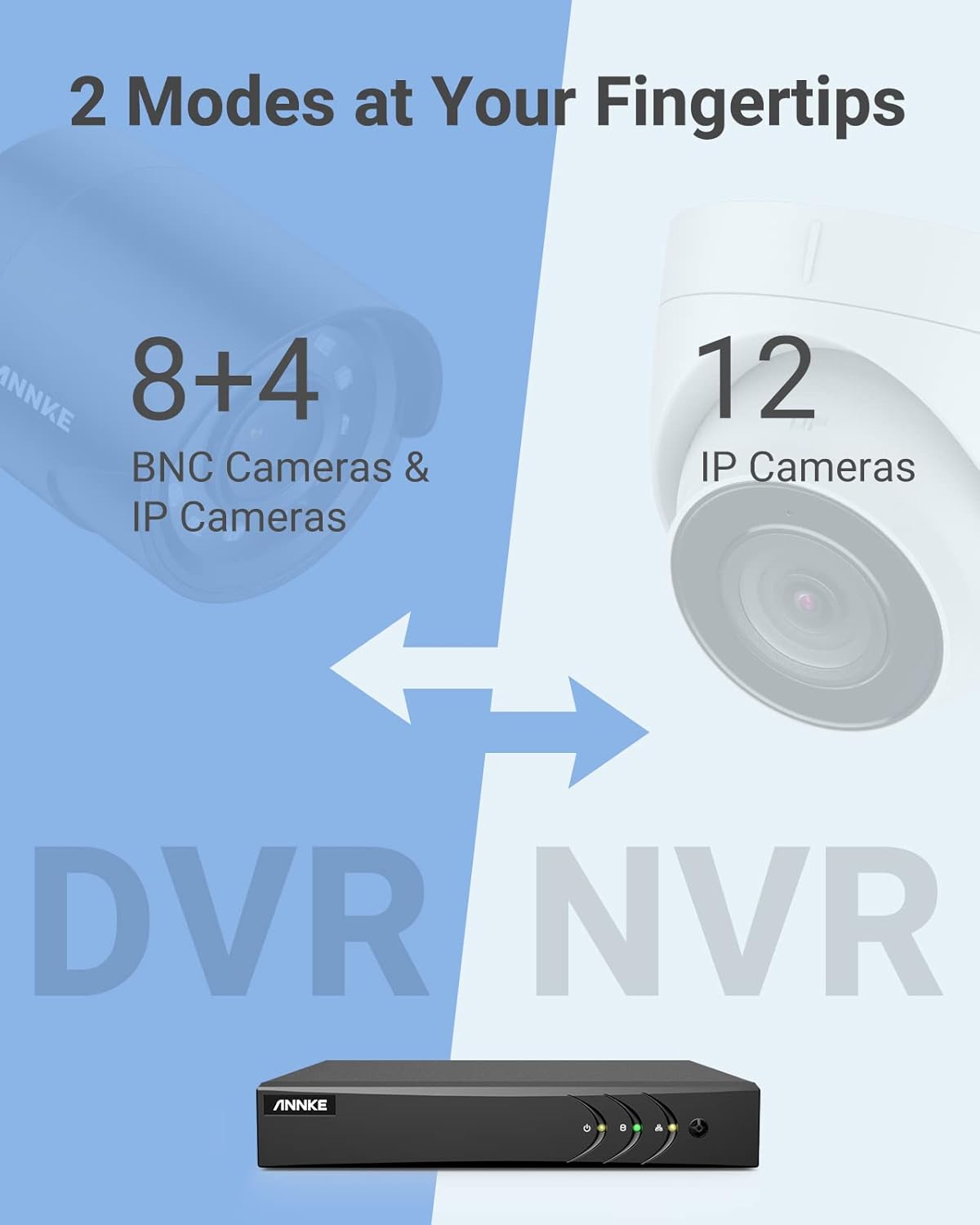
Image 3.1: Illustration of the DVR's dual operational modes, supporting both BNC and IP cameras or IP cameras exclusively.
4. Pitunjuk Instalasi
4.1 Setélan fisik
- Sambungkeun kaméra: Connect your security cameras to the BNC video input ports on the back of the DVR. For IP cameras, connect them to your network switch/router, and ensure the DVR is also connected to the same network via the Ethernet cable.
- Sambungkeun Monitor: Sambungkeun monitor ka port kaluaran HDMI atanapi VGA DVR nganggo kabel HDMI atanapi kabel VGA anu disayogikeun (henteu kalebet).
- Sambungkeun Beurit USB: Colokkeun beurit USB kana salah sahiji port USB dina DVR.
- Sambungkeun Kakuatan: Sambungkeun adaptor daya kana input daya DVR teras colokkeun kana stop kontak. DVR bakal otomatis hurung.
4.2 Konfigurasi Awal
Saatos boot munggaran, DVR bakal nungtun anjeun ngalangkungan wizard pangaturan awal. Turutan pituduh dina layar pikeun:
- Jieun kecap akses anu kuat pikeun akun administrator.
- Konpigurasikeun setélan jaringan (DHCP disarankeun pikeun kaseueuran pangguna).
- Setel tanggal sareng waktos.
- Scan and add IP cameras if applicable.
5. Ngoperasikeun DVR
5.1 Hirup View
Saatos setelan awal, DVR bakal nampilkeun siaran langsung view from connected cameras. Use the USB mouse to navigate the interface. Right-click to access the main menu.
5.2 Ngarékam
The DVR is pre-configured for continuous recording. You can customize recording schedules, motion-triggered recording, or alarm-triggered recording via the main menu under Rékam > Jadwal.
5.3 Playback
Pikeun ulangview dirékam footage:
- Ti live view,-klik katuhu jeung pilih Playback.
- Pilih kaméra sareng tanggal anu dipikahoyong.
- Use the timeline to navigate through recordings. Events (like motion detection) are often marked on the timeline for quick access.

Image 5.1: The DVR's playback interface, demonstrating how to locate and review recorded events on a timeline.
6. Fitur canggih
6.1 Deteksi Manusa/Kendaraan AI
The DVR incorporates deep learning-based motion detection 2.0, which can differentiate between human and vehicle movements. This significantly reduces false alarms caused by environmental factors such as leaves or light changes.
- Konfigurasi: Enable and configure AI detection for each analog channel via the main menu under AI > Motion Detection 2.0.
- Smart Events: Supports line crossing and intrusion detection for specific areas.
- Panggeuing: Configure the DVR to send app push notifications, email alerts, or trigger a buzzer when human or vehicle motion is detected.
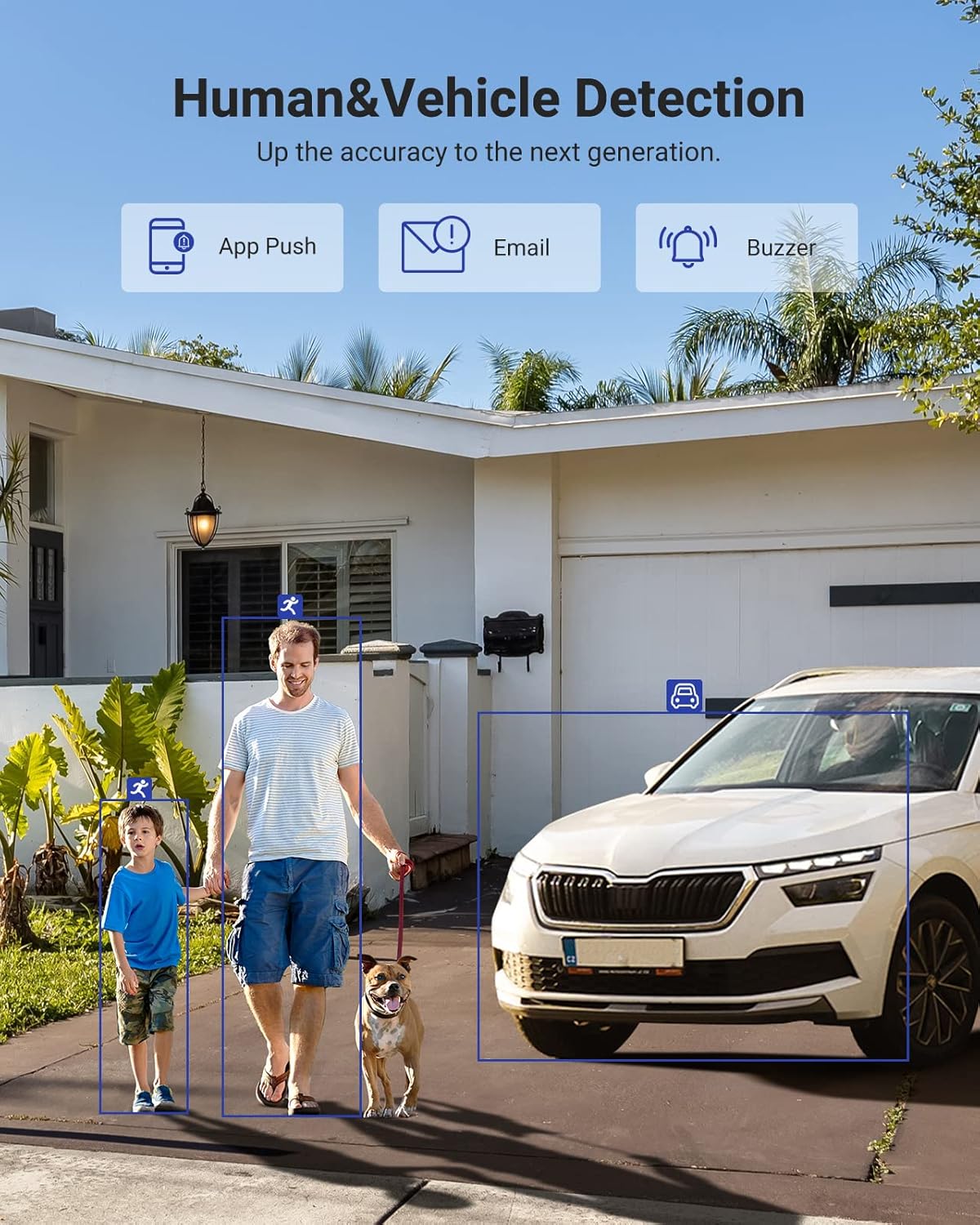
Image 6.1: Visual demonstration of the AI human and vehicle detection capability, showing how the system identifies and distinguishes between people and vehicles.
6.2 Aksés Jauh
Access your DVR remotely from anywhere using the ANNKE Vision App or a web browser.
- ANNKE Vision App: Download the app from the App Store (iOS) or Google Play Store (Android). Register an account and add your DVR by scanning the QR code or entering its serial number.
- Web Browser: Access the DVR's web panganteur ku cara nuliskeun alamat IP na di a web browser dina komputer Anjeun.
- Kasaluyuan: The system is compatible with various devices including smartphones, tablets, laptops, and personal computers. It also supports integration with Alexa for voice control.

Image 6.2: Remote access via the ANNKE Vision App, showing compatibility with mobile devices and Alexa.
7. Video Management
Komprési Pidéo 7.1 H.265+
The DVR utilizes advanced H.265+ video compression technology. This technology significantly reduces file sizes, saving up to 80% of storage space compared to H.264 compression, while maintaining video quality. This allows for longer recording durations on the same 2TB hard drive.

Image 7.1: Comparison illustrating the storage efficiency of H.265+ compression versus H.264.
8. Kasaluyuan
The ANNKE AU-DT81DX200-V1 is a versatile 5-in-1 hybrid DVR, designed to be compatible with a wide range of security cameras:
- HD TVI Input: Supports 8 MP@15 fps, 5 MP@20 fps, 3K@20 fps, 4 MP@30 fps.
- AHD Input: Supports 5 MP@20 fps, 4 MP@30 fps, 1080p@25 fps, 1080p@30 fps.
- HD CVI Input: Supports 4 MP@30 fps, 4 MP@25 fps, 1080p@25 fps, 1080p@30 fps.
- Input CVBS: Supports PAL/NTSC standards.
- IPC Input: Supports up to 8MP IP cameras.
This broad compatibility ensures that the DVR can integrate with both older analog cameras and modern IP cameras, providing a flexible upgrade path for existing surveillance systems.

Image 8.1: The DVR's compatibility with various camera technologies, including TVI, CVI, AHD, and IP cameras.
9. Spésifikasi
| Fitur | Spésifikasi |
|---|---|
| merek | ANJEUN |
| Nomer modél | AU-DT81DX200-V1 |
| Téhnologi konektipitas | Dikabel |
| Resolusi Capture Video | 4K (8MP) |
| Jumlah Saluran | 8 (Analog) + 4 (IP) or 12 (IP) |
| Komprési Video | H.265 Pro+/H.265 Pro/H.265/H.264+/H.264 |
| Jenis Kaméra anu Dirojong | TVI, AHD, CVI, CVBS, IPC |
| Fitur AI | Human Detection, Vehicle Detection, Line Crossing, Intrusion Detection |
| Kapasitas Panyimpenan Mémori | 2 TB HDD (Up to 10 TB supported) |
| Aksés Jauh | ANNKE Vision App, Web Pangotektak |
| Alat nu cocog | Kaméra, Laptop, Komputer Pribadi, Smartphone, Tablet |
| Sumber Daya | Kabel Listrik |
| Warna | Hideung |
| Item Dimensi | 17.13 x 12.4 x 3.86 inci |
10. Pangropéa
Pangropéa rutin mastikeun kinerja optimal sareng umur panjang sistem DVR anjeun.
- beberesih: Keep the DVR free from dust. Use a soft, dry cloth to clean the exterior. Do not use liquid cleaners.
- Ventilasi: Pastikeun DVR disimpen di tempat anu ventilasina saé pikeun nyegah panas teuing. Ulah ngahalangan liang ventilasi.
- Pembaruan firmware: Pariksa sacara berkala petugas ANNKE website for firmware updates. Keeping your DVR's firmware updated can improve performance, add new features, and enhance security.
- Cadangan Data: Rutin nyadangkeun video foo pentingtage ka alat panyimpenan éksternal.
- Kaséhatan Hard Drive: The DVR's menu may offer options to check the health status of the installed hard drive. Monitor this periodically.
11. Cara ngungkulan
Bagian ieu alamat masalah umum Anjeun bisa sapatemon jeung DVR Anjeun.
- Taya Kaluaran Video:
- Pariksa sambungan kabel HDMI/VGA ka DVR sareng monitor.
- Pastikeun monitor disetel ka sumber input nu bener.
- Verify the DVR is powered on (power indicator light should be active).
- Teu Aya Tampilan Kaméra:
- Check camera power supply and video cable connections.
- For IP cameras, ensure they are on the same network as the DVR and properly added in the DVR's camera management settings.
- Verify camera compatibility with the DVR (refer to Section 8).
- Aksés Jauh Teu Gawé:
- Pastikeun DVR nyambung ka internét.
- Check network settings on the DVR (e.g., DHCP enabled, correct IP address).
- Pariksa yén Aplikasi ANNKE Vision parantos diénggalan kana vérsi pangénggalna.
- Ensure the DVR is properly added to your ANNKE Vision account.
- Alarm Gerakan Palsu:
- Adjust the sensitivity of motion detection in the DVR settings.
- Utilize the AI Human/Vehicle Detection feature (Section 6.1) to filter out irrelevant movements.
- Define specific detection zones to exclude areas with frequent non-threatening movement.
If you continue to experience issues, please contact ANNKE customer support.
12. Garansi jeung Rojongan
ANNKE products typically come with a limited warranty. Please refer to the warranty card included in your package or visit the official ANNKE websitus pikeun istilah jaminan lengkep jeung kaayaan husus pikeun wewengkon Anjeun.
Kanggo dukungan téknis, patarosan produk, atanapi klaim garansi, mangga ngahubungi layanan palanggan ANNKE ngalangkungan layanan resmi na. website or the contact information provided in your product documentation. Have your model number (AU-DT81DX200-V1) and purchase details ready when contacting support.
Resmi ANNKE Websitus: www.annke.com