
Produk Leuwihview
The GOBOULT Y1 Pro Wireless Earbuds are designed to provide a high-quality audio experience with features like extended playtime, clear calling, and low-latency gaming. This manual provides detailed instructions for setting up, operating, and maintaining your earbuds.

Gambar: Témbongkeun kolasecasing key features of the GOBOULT Y1 Pro Earbuds, including 60 hours playtime, Zen Quad Mic ENC, 45ms low latency gaming, 13mm bass drivers, Type-C fast charging, and Bluetooth 5.3.
Eusi pakét
- GOBOULT Y1 Pro Wireless Earbuds
- Ngecas Case
- Kabel Ngecas USB Tipe-C
- Bantalan Ceuli (rupa-rupa ukuran)
- Eartips (rupa-rupa ukuran)
- Kartu Garansi
Disetél
1. Ngecas Earbuds jeung Case
Before initial use, ensure both the earbuds and the charging case are fully charged. This optimizes battery life and performance.
- Connect the provided USB Type-C charging cable to the charging port on the case and to a compatible USB power adapter (not included).
- The LED indicator on the charging case will illuminate to show charging status.
- A full charge typically takes a few hours. A quick 10-minute charge can provide approximately 120 minutes of playtime.

Image: The GOBOULT Y1 Pro earbuds and charging case, illustrating the Type-C fast charging capability, where 10 minutes of charge provides 120 minutes of playtime.
2. Papasangan awal
Turutan léngkah-léngkah ieu pikeun masangkeun earbud anjeun sareng alat anjeun pikeun anu mimiti:
- Remove any protective film from the charging contacts on the earbuds.
- Place both earbuds into the charging case and close the lid for a few seconds.
- Open the charging case lid. The earbuds will automatically power on and enter pairing mode, indicated by flashing LED lights.
- Dina telepon pinter anjeun atanapi alat Bluetooth anu sanés, buka setélan Bluetooth.
- Milarian pikeun alat anu sayogi teras pilih "GOBOULT Y1 Pro"tina daptar.
- Sakali disambungkeun, ajakan sora bakal mastikeun papasangan suksés.

Image: A diagram illustrating the initial setup steps, including removing protective film and opening the case, along with a detailed guide to the touch controls for both left and right earbuds.
3. Koneksi Ulang Otomatis
Saatos dipasangkeun awal, earbud bakal otomatis nyambung ka alat anu terakhir dipasangkeun nalika dicabut tina wadah ngecas sareng Bluetooth diaktipkeun dina alat éta.

Image: GOBOULT Y1 Pro earbuds and charging case, demonstrating Bluetooth 5.3 for stable, efficient, and fast pairing with a connected smartphone.
Parentah Operasi
Daya Hurung/Pareuman
- Daya Hurung: Open the charging case lid. The earbuds will power on automatically. Alternatively, if outside the case, long press the touch area on both earbuds for 3 seconds.
- Pareum listrik: Place both earbuds back into the charging case and close the lid. They will power off automatically. Alternatively, long press the touch area on both earbuds for 5 seconds.
Toél Kontrol
The GOBOULT Y1 Pro earbuds feature intuitive touch controls for managing music, calls, and other functions. Refer to the diagram below and the following list for specific actions:
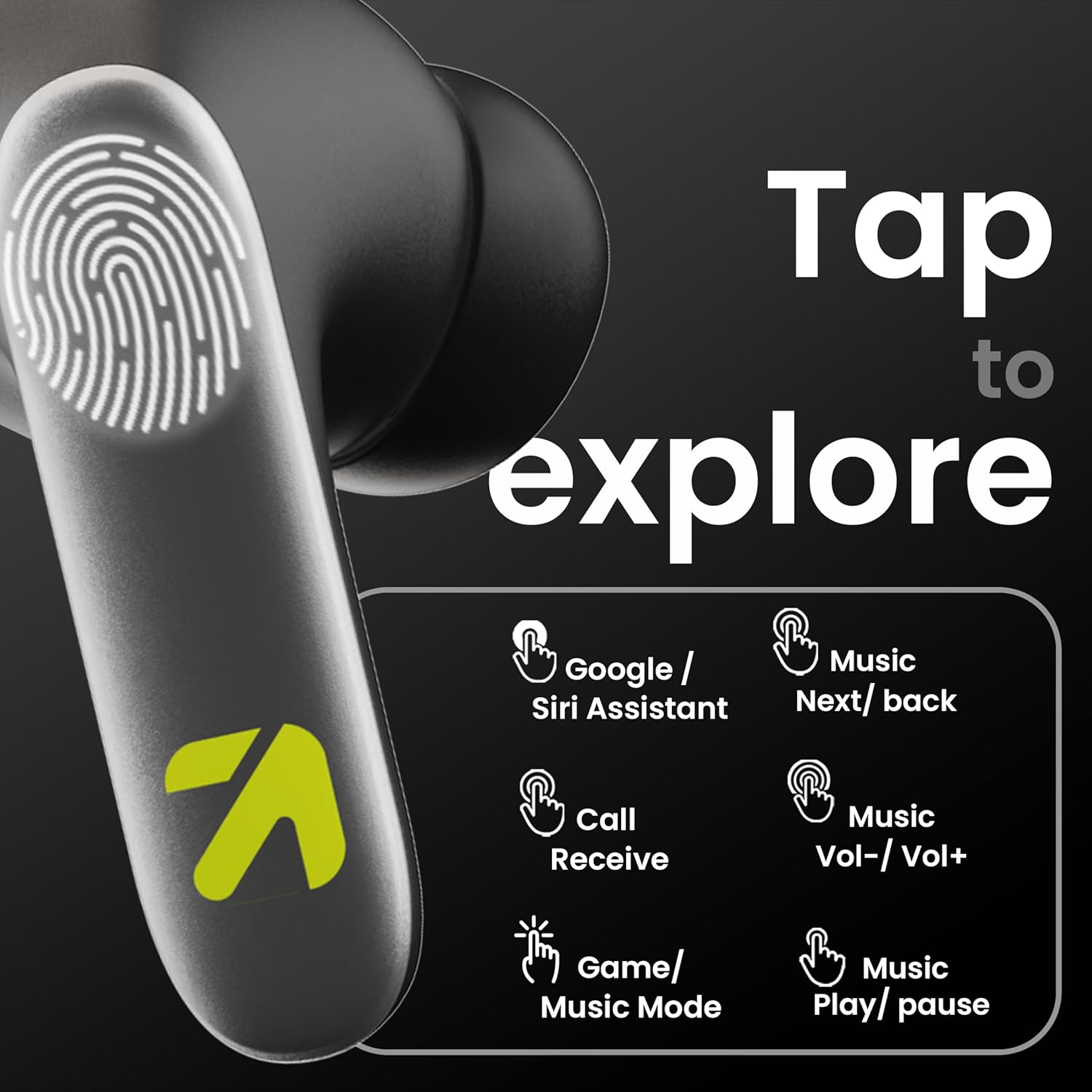
Image: A visual guide to the touch controls on the GOBOULT Y1 Pro earbuds, detailing actions for Google/Siri Assistant, music navigation, call management, volume control, and game/music mode switching.
- Single Tap (Left/Right): Puter/Reureuh musik, Jawab/Tungtung telepon.
- Ketok dua kali (Earbud Kénca): Lagu sateuacanna.
- Ketok dua kali (Earbud Katuhu): Lagu salajengna.
- Ketok Tilu Kali (Earbud Kénca): Volume Turun.
- Ketok Tilu Kali (Earbud Katuhu): Volume Up.
- Long Press (2 seconds, Left/Right): Reject incoming call, Activate Voice Assistant (Google/Siri).
- Four Taps (Left/Right): Activate/Deactivate Gaming Mode.
Modeu kaulinan
For an enhanced gaming experience, activate the ultra-low latency Gaming Mode:
- Aktipkeun: Tap the touch area four times on either earbud.
- Nonaktipkeun: Tap the touch area four times again.

Image: GOBOULT Y1 Pro earbuds and charging case, highlighting the 45ms low latency gaming mode for real-time audio synchronization, activated by four taps.
Asisten sora
Quickly access your device's voice assistant (Siri or Google Assistant) for hands-free control:
- Aktipkeun: Perform a long tap on the touch area of either earbud.

Image: Illustration showing how to access Siri or Google Assistant with a long tap on the earbud's touch sensor.
Pembatalan Noise Lingkungan (ENC)
The GOBOULT Y1 Pro features Zen Quad Mic ENC technology, ensuring crystal-clear calls by effectively filtering out ambient noise from your surroundings.

Image: A diagram explaining how Environmental Noise Cancellation (ENC) works by isolating your voice from environmental noise, ensuring clear communication during calls.
Pangropéa
beberesih
- Rutin ngabersihkeun earbuds sareng wadah ngecas ku lawon anu lemes, garing, teu aya lint.
- Ensure the charging contacts on both the earbuds and inside the case are free from dust and debris to maintain proper charging.
- Do not use abrasive cleaners, solvents, or harsh chemicals, as these may damage the product.
Tahan cai
The GOBOULT Y1 Pro earbuds are rated IPX5 water-resistant. This means they are protected against low-pressure water jets from any direction, making them suitable for workouts and light splashes.
- Ulah beuleum earbuds dina cai.
- Avoid exposing them to heavy rain or extreme moisture.
- Pastikeun yén earbuds garing sateuacan nempatkeun deui kana wadah ngecas pikeun nyegah karusakan.

Image: GOBOULT Y1 Pro earbuds with water droplets, illustrating their IPX5 water resistance, providing protection against sweat and splashes.
Pamérésan masalah
If you encounter any issues with your GOBOULT Y1 Pro earbuds, refer to the following common troubleshooting steps:
Earbuds henteu dipasangkeun atanapi nyambungkeun
- Ensure both earbuds and the charging case have sufficient battery.
- Turn off Bluetooth on your device, wait 5 seconds, then turn it back on.
- On your device, "Forget" or "Unpair" "GOBOULT Y1 Pro" from the Bluetooth list, then attempt the pairing process again.
- Place both earbuds back into the charging case, close the lid, wait 10 seconds, then open the lid to re-enter pairing mode.
Ngan hiji earbud jalan
- Pastikeun kadua earbuds dicas.
- Teundeun kadua earbuds deui kana wadah ngecas, tutup tutupna, teras buka deui. Ieu sering nyingkronkeun deui aranjeunna.
- If the issue persists, try resetting the earbuds (refer to the manufacturer's websitus kanggo parentah reset khusus upami teu dijelaskeun di dieu).
Poor sound quality or low volume
- Ensure the earbuds are properly seated in your ears to create a good seal. Try different sized eartips.
- Bersihkeun kokotor naon waé tina kisi-kisi earbud.
- Check the audio source device's volume and sound settings.
- Pindah ngadeukeutan ka alat Anjeun nu disambungkeun pikeun nyegah gangguan sinyal.
Masalah ngecas
- Pastikeun kabel ngecas disambungkeun aman ka duanana wadahna jeung sumber kakuatan.
- Try a different USB Type-C charging cable or power adapter.
- Bersihkeun kontak anu ngecas boh dina earbuds sareng di jero wadahna nganggo swab katun garing.
spésifikasi
| Fitur | Rincian |
|---|---|
| merek | GOBOULT |
| Ngaran modél | AirBass |
| Vérsi Bluetooth | 5.3 |
| Panempatan Ceuli | Dina Ceuli |
| Kontrol bising | Pembatalan Noise Lingkungan (ENC) |
| Ukuran Supir Audio | 13 Milimeter |
| Total Playtime | Nepi ka 60 Jam (kalayan wadah ngecas) |
| Latency Lemah | 45ms (Modeu Kaulinan) |
| Tipe Ngecas | Ngecas Gancang Tipe-C |
| Tahan cai | IPX5 |
| Métode kontrol | Toél |
| Alat nu cocog | Smartphone, Tablet, Laptop, Desktop, Spiker Pinter |
| Item Beurat | 50 gram |
| Negara asal | Cina |
Émbaran jaminan
The GOBOULT Y1 Pro Wireless Earbuds are covered by a 1 Taun Garansi Produsén ti tanggal beuli.
This warranty covers manufacturing defects. Please retain your proof of purchase for any warranty claims. The warranty does not cover damage caused by misuse, accidents, unauthorized modifications, or normal wear and tear.
Ngarojong
Kanggo bantosan salajengna, dukungan téknis, atanapi patarosan garansi, mangga ngahubungi:
- Pabrikan: Exotic Mile Private Limited, B-67 Wazirpur Industrial Area, New Delhi 110052
- Importir: Exotic Mile Pvt. Ltd. , B67 Wazirpur Industrial Area , New Delhi 110052
- For customer service contact details, please refer to the GOBOULT official websitus atanapi platform dimana anjeun mésér produk.