
HTC TWS6
HTC Wireless Earbuds TWS6 5.3 User Manual
Modél: TWS6
Bubuka
Welcome and thank you for choosing the HTC Wireless Earbuds TWS6 5.3. This manual provides detailed instructions to help you set up, operate, and maintain your earbuds for optimal performance. Please read this manual thoroughly before using your device.
Eusi pakét
Punten parios yén sadaya barang aya dina pakét anjeun:
- 2 x HTC Earbuds
- 1 x Kabel Ngecas USB-C
- 1 x Kasus Ngecas
- 2 Pairs x Rubber Eartips (S/L)
- 1 x Quick Start Guide (physical document)

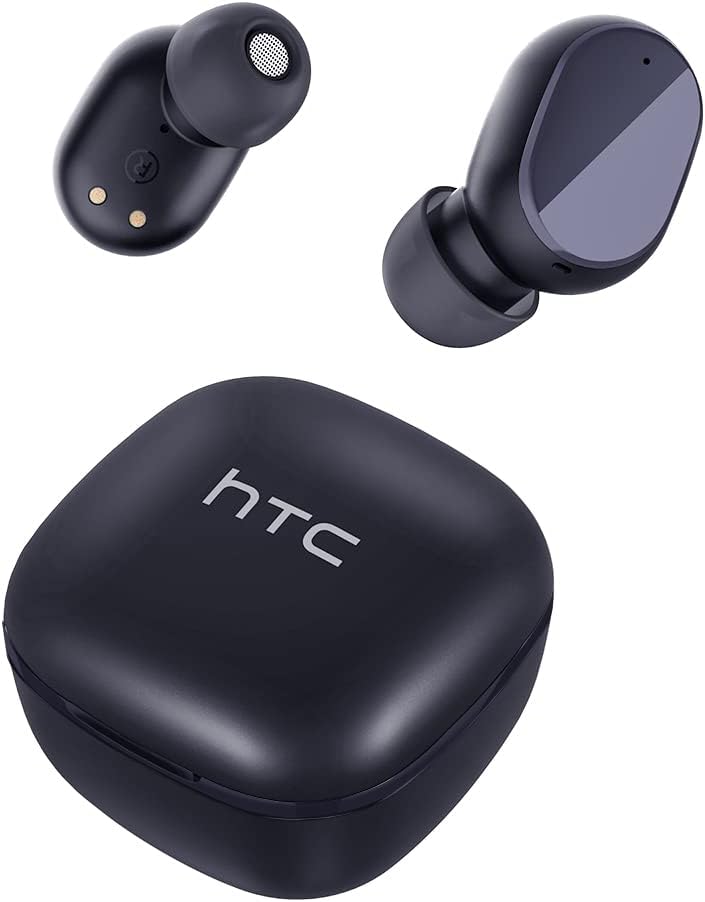
Produk Leuwihview
Familiarize yourself with the components of your HTC TWS6 earbuds.

Disetél
Ngecas Earbuds sareng Case
Saméméh dipaké munggaran, eusian pinuh ku earbuds jeung wadah ngecas.
- Teundeun earbuds kana wadah ngecas.
- Sambungkeun kabel USB-C kana port ngecas dina casing sareng kana sumber daya.
- Lampu indikator dina kasus bakal nunjukkeun status ngecas.
- A full charge provides approximately 5 hours of playback for earbuds and up to 22 hours with the charging case.

Papasangan Bluetooth
Turutan léngkah-léngkah ieu pikeun nyambungkeun earbud anjeun sareng alat anjeun:
- Buka wadah ngecas. Earbuds bakal otomatis asup kana mode papasangan.
- Dina alat Anjeun (smartphone, tablet, jsb), aktipkeun Bluetooth.
- Milarian pikeun "HTC TWS6" in the list of available Bluetooth devices.
- Select "HTC TWS6" to connect. A voice prompt will confirm successful pairing.

Ngagem Earbuds
For optimal sound quality and comfort, choose the correct eartip size and wear the earbuds properly.
- Select the eartips (S, M, L) that best fit your ears.
- Lembut selapkeun unggal earbud kana saluran ceuli anjeun.
- Rotate slightly to ensure a secure and comfortable fit.
Parentah Operasi
Smart Touch Controls
The HTC TWS6 earbuds feature intuitive touch controls:
- Puter/Reureuh Musik: Ketok tunggal dina boh earbud.
- Lagu salajengna: Ketok dua kali dina earbud katuhu.
- Lagu Sateuacanna: Ketok dua kali dina earbud kénca.
- Volume Up: Ketok tilu kali dina earbud katuhu.
- Volume Turun: Ketok tilu kali dina earbud kénca.
- Ngajawab / mungkas Telepon: Ketok tunggal dina boh earbud.
- Nolak Telepon: Pencét jeung tahan boh earbud salila 2 detik.
- Aktipkeun Asisten Sora: Pencét jeung tahan boh earbud salila 3 detik.

Daya Hurung/Pareuman
The earbuds automatically power on when removed from the charging case and power off when placed back into the case and the lid is closed.
To manually power on, press and hold the touch area for 3 seconds. To manually power off, press and hold the touch area for 5 seconds.
Pangropéa sareng Perawatan
beberesih
Bersihkeun earbud sareng wadah ngecas anjeun sacara rutin pikeun mastikeun kinerja sareng kabersihan anu optimal.
- Anggo lawon anu lembut, garing, henteu lint pikeun ngusap earbuds sareng wadah ngecas.
- Cabut eartips sareng bersihkeun ku sabun sareng cai anu hampang, teras garing sacara saksama sateuacan dipasang deui.
- Ulah make cleaners abrasive atawa pangleyur.
Tahan cai (IPX5)
The HTC TWS6 earbuds are IPX5 sweatproof, meaning they are resistant to splashes and sweat.
Catetan: They are not designed for submersion in water. Avoid exposing them to heavy rain, showering, or swimming. Ensure the charging port is dry before charging.

Panyimpenan
Nalika henteu dianggo, simpen earbuds dina wadah ngecasna pikeun ngajagi sareng tetep dicas.
Nyimpen dina tiis, tempat garing jauh ti suhu ekstrim.
Pamérésan masalah
| Masalah | Solusi |
|---|---|
| Earbuds teu dipasangkeun | Ensure earbuds are charged. Turn off and on Bluetooth on your device. Forget "HTC TWS6" from your device's Bluetooth list and re-pair. |
| Ngan hiji earbud jalan | Lebetkeun deui dua earbud kana wadah ngecas, tutup tutupna, teras buka deui. Pastikeun dua earbud parantos dicas. |
| Volume lemah atawa kualitas sora goréng | Adjust volume on your device. Clean eartips and earbud mesh. Try different eartip sizes for a better seal. |
| Masalah ngecas | Check USB-C cable and power adapter. Ensure charging contacts on earbuds and case are clean and dry. |
| Earbuds sering megatkeun sambungan | Ensure your device is within the Bluetooth range (approx. 10 meters/33 feet) and there are no significant obstructions. |
Upami masalah masih aya, mangga ngahubungi dukungan palanggan.
spésifikasi
| Fitur | Rincian |
|---|---|
| Ngaran modél | TWS6 |
| Vérsi Bluetooth | 5.3 |
| Téhnologi konektipitas | Nirkabel |
| Téknologi Komunikasi Nirkabel | Bluetooth |
| Kahirupan Batré (Earbuds) | 5 Jam |
| Total Playtime (kalawan Case) | 22 Jam |
| Waktu Ngecas (Kasus) | Kurang leuwih 5 Jam |
| Tingkat Résistansi Cai | IPX5 (Tahan Késang) |
| Métode kontrol | Toél |
| Mikropon | Yes (with ENC) |
| Alat nu cocog | Android and iOS Smartphones, Gaming Devices |
| Bahan | palastik |
| Item Beurat | 3.17 ons |
| UPC | 734257974554 |
| Kontrol bising | Pembatalan Noise adaptif |
| Tipe Supir Audio | Supir dinamis |
| Impedansi | 199.99 ohm |
Garansi sareng Rojongan
HTC provides a 360-day warranty extension for this product, as detailed in the product information.
For technical assistance, warranty claims, or any inquiries, please contact HTC customer support.
Rojongan Palanggan: Refer to the contact information provided in your product packaging or visit the official HTC websitus pikeun pilihan dukungan anu pangénggalna.
Ask a question about this manual
Ask about setup, troubleshooting, compatibility, parts, safety, or missing instructions. Manuals+ will review the question and use this page’s manual context to help answer it.