
Bubuka
Hatur nuhun pikeun meuliasing the Sigma 50mm F2 DG Contemporary lens. This manual provides essential information for the safe and effective use of your new lens. Please read it thoroughly before using the product and keep it for future reference.
Precautions Kasalametan
- Do not look at the sun or other strong light sources through the lens, as this can cause permanent vision damage.
- Keep the lens away from direct sunlight when not in use to prevent fire hazards.
- Avoid exposing the lens to extreme temperatures, humidity, or dust.
- Do not attempt to disassemble or modify the lens. Repairs should only be performed by authorized service personnel.
- Jauhkeun tina jangkauan barudak.
Eusi pakét
Pastikeun yén sadaya item aya dina pakét anjeun:
- Sigma 50mm F2 DG Contemporary Lens
- Lens Hood (LH633-02S)
- Cap Lénsa Hareup
- Tutup Lénsa Rear
- Manual Pitunjuk (dokumén ieu)
Bagian tina Lénsa
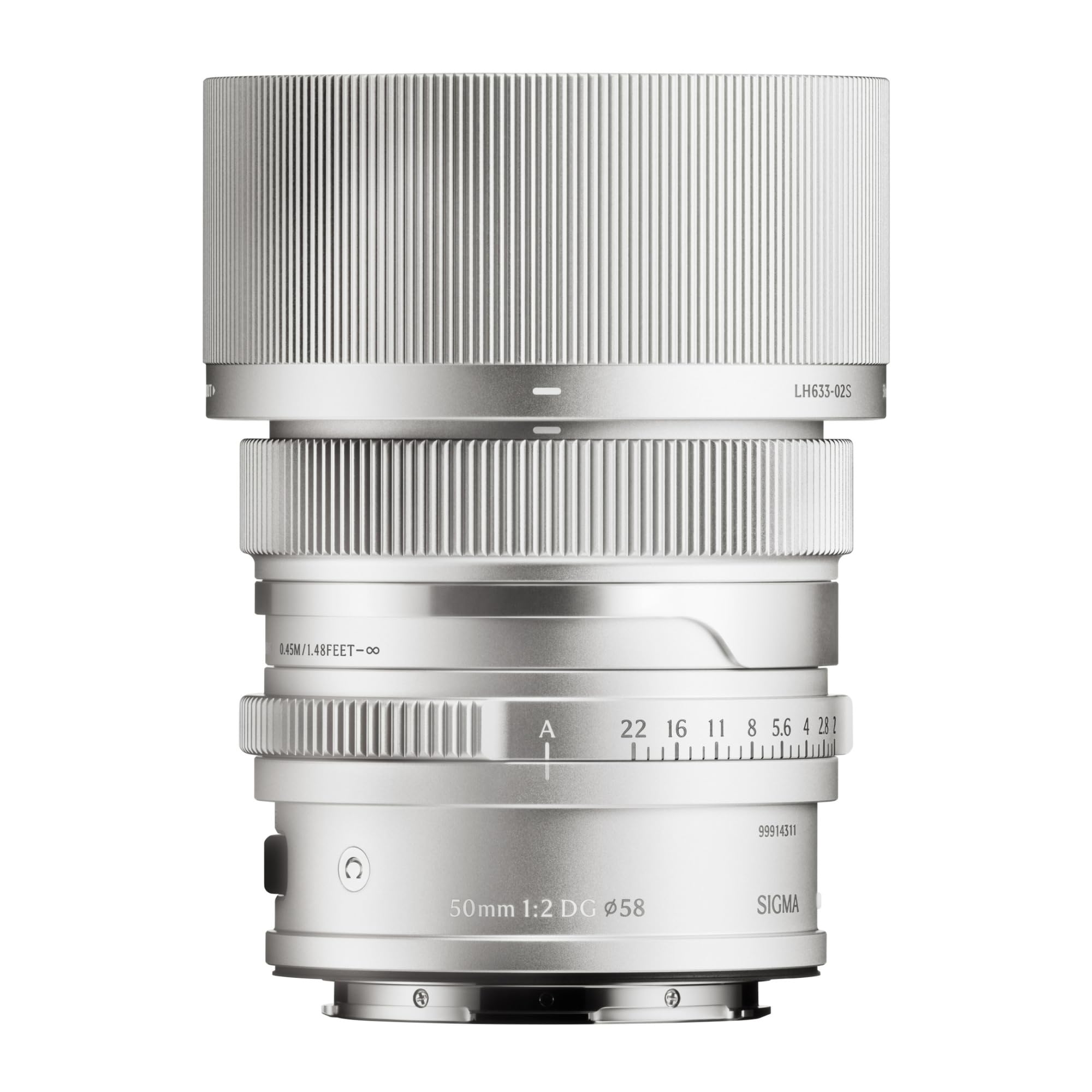
This image displays the Sigma 50mm F2 DG Contemporary lens, a prime lens designed for L-mount cameras. It features a sleek silver finish and a compact design, suitable for various photographic applications.
The Sigma 50mm F2 DG Contemporary lens features several key components:
- Ring Fokus: Dipaké pikeun fokus manual.
- Cincin aperture: Allows direct control over the lens aperture.
- Pasang lensa: Connects the lens to the camera body (L-Mount).
- Lens Hood Attachment Point: Where the dedicated lens hood is secured.

The image shows the LH633-02S lens hood, a cylindrical accessory with a ribbed exterior, designed to attach to the Sigma 50mm F2 DG Contemporary lens. It helps to prevent stray light from entering the lens, reducing flare and ghosting, and offers protection to the front element.
Disetél
Ngalampirkeun Lensa
- Pastikeun kaméra sareng lensa dipareuman.
- Cabut tutup lensa pungkur tina lensa sareng tutup awak tina kaméra.
- Align the mounting index on the lens with the mounting index on the camera body.
- Selapkeun lensa kana dudukan kaméra sareng puterkeun saarah jarum jam dugi ka ngaklik kana tempatna. Ulah maksakeun lensa.
Attaching the Lens Hood (LH633-02S)
- Sejajarkeun titik beureum dina sungkup lénsa sareng titik beureum di payun lénsa.
- Rotate the lens hood clockwise until it locks securely into position.
- To remove, press the release button on the lens hood and rotate counter-clockwise.
Ngoperasikeun
Fokus
This lens supports both autofocus (AF) and manual focus (MF).
- Pokus otomatis: Set your camera's focus mode to AF. The lens will automatically focus when the shutter button is half-pressed.
- Fokus Manual: Set your camera's focus mode to MF. Rotate the focus ring on the lens to adjust focus manually. Use your camera's focus peaking or magnification features for precise focusing.
Kontrol aperture
The lens features an aperture ring for direct control over the aperture setting. You can also control the aperture through your camera body, depending on your camera's settings and mode.
Kaméra anu cocog
This lens is designed for L-Mount cameras, including models such as Leica SL, Leica TL2, and Leica CL.
Pangropéa
Ngabersihan Lensa
- Anggo sikat blower pikeun miceun lebu tina permukaan lénsa.
- Pikeun noda atanapi sidik jari, anggo lawon microfiber anu bersih sareng lemes anu khusus dirancang pikeun lensa optik. Oleskeun sakedik larutan pembersih lensa kana lawon, sanés langsung kana lensa.
- Never use abrasive materials, solvents, or harsh chemicals to clean the lens.
Panyimpenan
- Nalika henteu dianggo, pasangkeun tutup lénsa payun sareng pungkur.
- Simpen lénsa di tempat anu tiis sareng garing, jauh tina sinar panonpoé langsung sareng kalembaban anu luhur.
- Lamun nyimpen pikeun période nambahan, mertimbangkeun ngagunakeun desiccant pikeun nyegah tumuwuhna kapang.
Pamérésan masalah
- Lensa teu dipikawanoh ku kaméra: Ensure the lens is securely attached to the camera body. Power off and restart the camera. Check for any firmware updates for both the lens and camera.
- Pokus otomatis teu jalan: Verify the camera's focus mode is set to AF. Ensure there is sufficient light and contrast in the scene for the autofocus system to operate effectively.
- Gambar kabur: Check that the lens is properly focused. Ensure the shutter speed is fast enough to prevent camera shake, especially in low light. Clean the lens elements if smudges are present.
- Lens hood difficult to attach/remove: Ensure proper alignment of the red dots. Do not force the hood; it should click into place smoothly.
spésifikasi
| Ngaran modél | 31S969 |
| Panjang fokus | 50 mm |
| Aperture maksimum | F2 |
| Aperture Minimum | F2 |
| Tipe Lénsa | Lensa Perdana |
| Mountings cocog | Leica L |
| Tipe Fokus | Pokus Otomatis |
| Stabilisasi Gambar | No image stabilization |
| Tingkat Résistansi Cai | Henteu Tahan Cai |
| Item Beurat | 2 pon |
Garansi sareng Rojongan
Émbaran jaminan
Produk ieu hadir kalawan a garansi 9 taun. Please retain your proof of purchase for warranty claims. The warranty covers manufacturing defects under normal use. It does not cover damage caused by misuse, accidents, unauthorized repairs, or normal wear and tear.
Rojongan Palanggan
For technical assistance, service, or warranty inquiries, please contact Sigma customer support through their official website or the retailer where you purchased the product. Have your model number (31S969) and proof of purchase ready when contacting support.