
1. Bubuka
Thank you for choosing the PGST WiFi Home Security Alarm System. This comprehensive kit is designed to provide reliable and customizable security for your home, villa, or apartment. With easy DIY installation, real-time alerts via the Tuya and Smart Life apps, and no subscription fees, you can enjoy peace of mind knowing your property is protected. This manual will guide you through the setup, operation, and maintenance of your new security system.
2. Eusi Paket
Punten parios yén sadaya barang anu didaptarkeun di handap kalebet kana pakét anjeun:
- 1 x PGST108 Home Alarm System (Main Panel)
- Door/Window Sensors (Quantity varies by kit, 8 PIECES KIT includes multiple)
- Motion Sensors (Quantity varies by kit, 8 PIECES KIT includes multiple)
- Remote Controls (Quantity varies by kit)
- RFID Tags (Quantity varies by kit)
- Adaptor kakuatan
- Mounting Hardware (Screws, anchors)
- Manual Pamaké (Dokumén ieu)
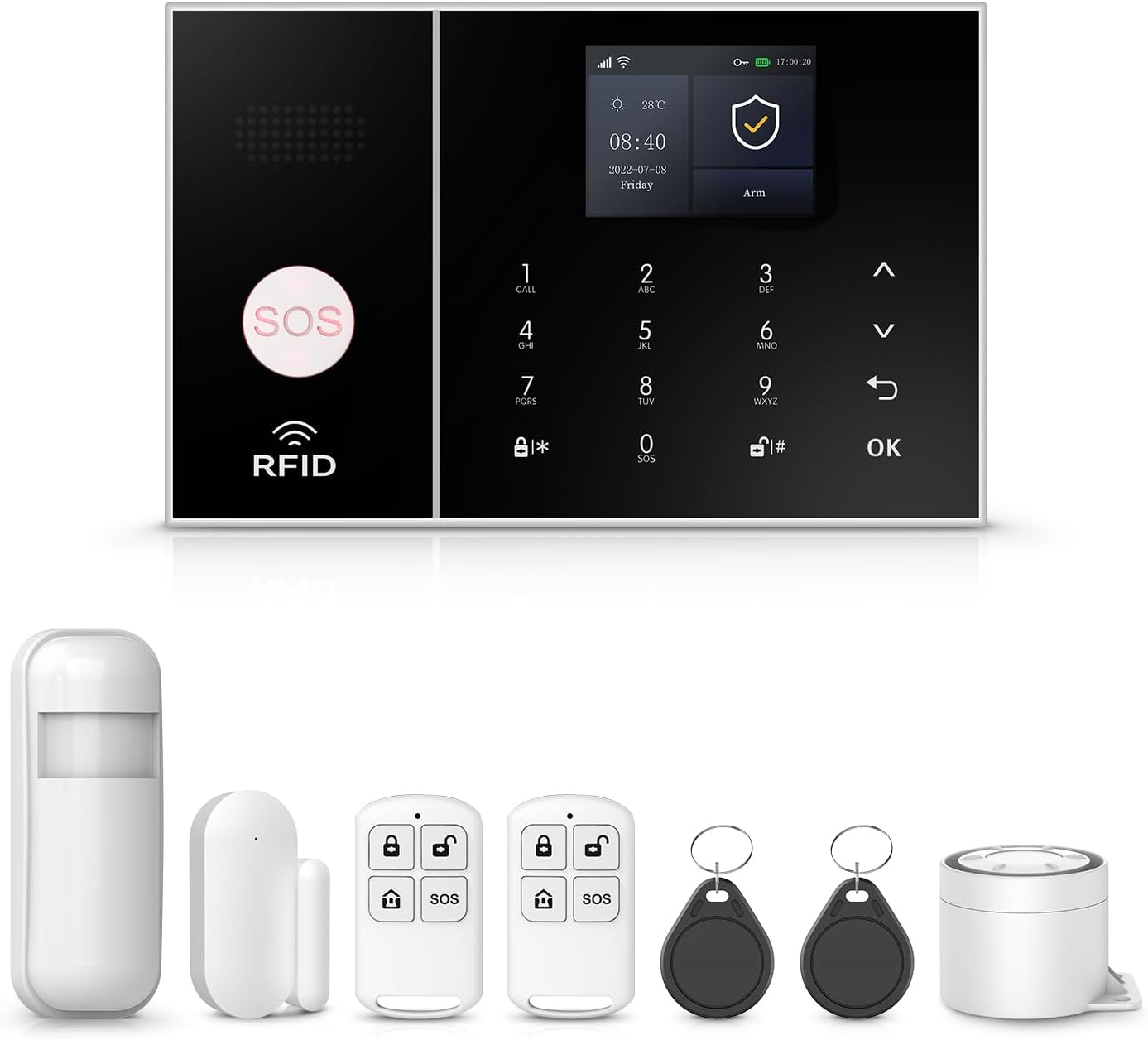
Gambar: Leuwihview of the PGST WiFi Home Security Alarm System 8-piece kit, showing the main panel, motion sensor, door/window sensor, remote controls, and RFID tags.
3. Fitur Produk
- Instant Alerts and No Contract Fee: Receive real-time notifications directly to your smartphone via Tuya and Smart Life App whenever motion is detected or sensors are triggered. Stay connected even when you are away. No hidden costs or recurring charges.
- Customizable and Expandable: The system is highly customizable, allowing you to choose which areas of your home to protect. You can add more sensors, cameras, or other security devices from our store in the future.
- One-Click SOS Function: Once the SOS button is activated, the security alarm system immediately sends out a distress signal to pre-designated emergency contacts or authorities.
- Easy DIY Installation and Use: Requiring no complex installation steps, it can be easily installed in key areas of your home. It is simple to operate, allowing both the elderly and children to quickly get the hang of it.
- 4.3-inch TFT Colorful Display Screen: The main panel features a vibrant display for easy navigation and status updates.
- Support for Alexa and Google Assistant: Integrate with your smart home ecosystem for convenient voice control.
- Rojongan Multi-Basa: The system supports 11 languages, allowing for free switching of menu display, voice operation, and alarm SMS settings.

Image: A woman interacting with the 4.3-inch TFT colorful display screen of the alarm system, highlighting its multi-functionality.

Image: A diagram illustrating how the alarm system links with other smart home products like outdoor cameras, door sensors, and motion detectors, controlled via the Tuya Smart and Smart Life apps.

Image: A visual representation of the alarm system's ability to dial up to 5 preset alarm calls, ensuring no alarm information is missed.

Image: A woman and her dog in a living room, demonstrating the alarm system's support for Alexa voice control, with a speech bubble showing "Alexa, Disarm my home!"

Image: The alarm system's display showcasing its support for 11 languages, including Chinese, English, German, Russian, Spanish, Polish, Italian, French, Portuguese, Greek, and Romanian.
4. Setélan
4.1 Initial Setup of the Main Panel
- Unpack the main alarm panel and connect it to a power source using the provided adapter.
- The panel will power on automatically. Follow the on-screen prompts to select your preferred language.
- Konfigurasi jaringan: The system supports 2.4GHz WiFi (5GHz WiFi is not supported).
There are two primary methods to configure the network:
- Métode 1 (Konfigurasi AP Lemes):
Operasi host: ménu → Wifi → Lemes AP Konpigurasikeun → Pilarian Otomatis
Phone operation: Wi-Fi (2.4GHz) → Bluetooth → APP hirup pinter → Tambahkeun alat - Métode 2 (Konfigurasi Tautan Udara):
Operasi host: ménu → Wifi → Air Link Konpigurasikeun
Phone operation: Wi-Fi (2.4GHz) → APP hirup pinter → Tambahkeun alat → Sénsor → Alarem → Wifi → Kedip-kedip Gancang

Image: A diagram illustrating the two methods for configuring the network connection for the alarm system, involving both host panel and smartphone app operations.
4.2 Pamasangan Sensor
Install the door/window sensors and motion sensors in strategic locations to maximize coverage.
- Sénsor Panto/Jandela: Pasang dua bagian sensor dina pigura panto/jandéla sareng panto/jandéla éta sorangan, pastikeun duanana sajajar sareng dina jarak 1 cm silih tutup.
- Sénsor gerak: Install motion sensors in corners or areas with high traffic, ensuring a clear line of sight for detection. Avoid placing them near heat sources or direct sunlight.

Gambar: A close-up view of a door window sensor installed on a window frame, demonstrating its magnetic field technology for detecting opening and closing.

Image: A PIR motion detector installed in a room, illustrating its ability to precisely detect an intruder's movement within its wide-angle detection range.
4.3 App Setup (Tuya / Smart Life)
- Unduh aplikasi Tuya Smart atanapi Smart Life tina toko aplikasi smartphone anjeun.
- Ngadaptarkeun akun atanapi log in upami anjeun parantos gaduh.
- Follow the in-app instructions to add your PGST alarm system. Ensure your phone is connected to the same 2.4GHz WiFi network as the alarm panel during setup.
- Once connected, you can manage sensors, arm/disarm the system, and receive alerts directly from the app.
5. Parentah Operasi
5.1 Arming jeung Disarming
The system can be armed and disarmed via the main panel, remote control, or the mobile app.
- Panangan (Mode Jauh): Ngaktipkeun sadaya sénsor. Cocog nalika teu aya sasaha di bumi.
- Tetep Leungeun (Modeu Imah): Ngaktipkeun sensor perimeter (contona, sensor panto/jandéla) bari ngamungkinkeun gerakan bébas di jero.
- Ngarampas pakarang: Nonaktipkeun sadaya sénsor.
You can also set regular arm/disarm schedules through the app for convenience.

Image: Four panels illustrating how the system can be set to arm and disarm regularly, saving time and effort. Examples include automatically disarming upon waking up, automatic arming when leaving out, automatically disarming upon returning home, and automatic arming when sleeping.
5.2 Fungsi SOS
In case of an emergency, press the SOS button on the main panel or remote control. The system will immediately send a distress signal and notify your preset emergency contacts.

Image: An elderly woman and a man, with an SOS button prominently displayed, highlighting the system's friendly design for the elderly and its ability to send reminders when the SOS button is pressed.
5.3 App Control and Notifications
The Tuya Smart or Smart Life app provides full control over your alarm system from anywhere. You will receive instant push notifications for any detected activity, such as sensor triggers or low battery alerts.

Image: A smartphone screen displaying app alert messages, indicating that when someone tries to enter the house and a door sensor or PIR detector is activated, the user will receive phone messages, calls, and app push alerts.

Image: A woman looking at her phone, with icons representing five family members, illustrating the feature to preset five alarm calls to ensure every alert is received and home safety is maintained.
6. Pangropéa
6.1 Ngagantian batré
The wireless sensors are battery-powered. The system will notify you via the app when a sensor's battery is low.
- When a low battery alert is received, replace the batteries in the affected sensor promptly.
- Refer to the specific sensor's compartment for battery type (e.g., Alkaline).

Image: A diagram illustrating the wireless sensor low battery alarm process, where a door magnet or infrared sensor sends low voltage signals to the host, which then pushes information to the user through the app.
6.2 beberesih
Wipe the main panel and sensors with a soft, dry cloth. Avoid using abrasive cleaners or solvents that could damage the surfaces.
7. Cara ngungkulan
This section addresses common issues you might encounter with your PGST alarm system.
| Masalah | Mungkin Cukang lantaranana | Solusi |
|---|---|---|
| Sistem teu nyambung ka WiFi | Incorrect WiFi band (5GHz), wrong password, weak signal. | Ensure your router is broadcasting a 2.4GHz network. Double-check the WiFi password. Move the panel closer to the router or use a WiFi extender. |
| Sénsor henteu micu alarm | Low battery, improper installation, sensor out of range. | Check sensor batteries and replace if needed. Verify sensor alignment (door/window) or clear line of sight (motion). Ensure sensors are within the main panel's wireless range. |
| Taya bewara aplikasi | App permissions not granted, phone's notification settings, app not running in background. | Check your phone's app settings to ensure notifications are enabled for Tuya Smart/Smart Life. Ensure the app is allowed to run in the background. |
| Alarm palsu | Improper sensor placement, pets, environmental factors. | Adjust motion sensor sensitivity or reposition to avoid pets. Ensure door/window sensors are securely mounted and not affected by drafts. |
| Anti-demolition alarm triggered | Main panel moved or tampdibarengan ku. | This is a security feature. If the main panel is detached from its mounting, it will trigger an alarm and send a notification. Re-secure the panel properly. |

Image: A close-up of the main alarm panel's back, illustrating the anti-demolition alarm function. If the detachable device at the back is removed, the host will beep and send a call or text message.
8. Spésifikasi
| Fitur | Rincian |
|---|---|
| merek | PGST |
| Nomer modél | PGST A108F |
| Sumber Daya | Didukung ku batré (pikeun sénsor), Didukung ku AC (pikeun panel utama) |
| Alat nu cocog | Smartphone, Tablet |
| Dimensions (Main Panel) | 8.6 x 5.9 x 3.9 inci |
| Téhnologi konektipitas | Wireless (2.4GHz WiFi) |
| Tipe Pamasangan | Screw-In |
| Tipe Siaga | Audio & Motion, App Push, Call, SMS |
| Métode kontrol | App, Touch Screen, Remote Control |
| Komposisi sél batré | Alkali (pikeun sénsor) |
| Téknologi Sénsor | Motion Sensor, Door/Window Magnetic Sensor |
| UPC | 704444502396 |
| Item Beurat | 1 pon (total kit) |
9. Jaminan & Dukungan
9.1 Émbaran jaminan
The PGST WiFi Home Security Alarm System comes with a 1-Taun Garansi ti tanggal dibeuli. Garansi ieu nyertakeun cacad manufaktur sareng gangguan dina panggunaan normal. Punten tahan bukti pameseran anjeun pikeun klaim garansi.
9.2 Rojongan Palanggan
If you have any questions, require assistance with setup, or encounter any issues not covered in this manual, please do not hesitate to contact PGST customer support. We are committed to providing prompt and helpful service.
For more information and additional products, please visit the official PGST Store: Toko PGST di Amazon
- Patarosan umum:
- Q: What network does this home security system support?
A: It only supports 2.4GHz WiFi (not for 5G WiFi) and 4G GSM card. You can receive a Tuya app alert push, while a 4G card can call you or send you a message if an emergency happens. - Q: What should I do if I don't know how to set it up after receiving it?
A: We can provide additional operation videos if necessary. - Q: Does this device support adding more sensors and accessories?
A: Yes, you can add more sensors and accessories, like sirens and cameras, from our store.