
1. Bubuka
This manual provides detailed instructions for the installation, operation, and maintenance of your PGST Home Security Alarm System, Model PGST A01F. This smart system is designed to enhance the safety of your home, villa, or any property, offering features like door/motion sensors, GSM 4G/Tuya APP alerts, and compatibility with smart assistants like Alexa and Google Assistant. Please read this manual thoroughly before using the product to ensure proper functionality and safety.

Gambar 1: Leuwihview of the PGST Home Security Alarm System components.
2. Parentah Setup
2.1 Unboxing sareng Inspeksi Awal
Carefully unpack all components and verify that all items listed in the package contents are present and undamaged. The system includes a main control panel, door/window sensors, motion sensors, and remote controls.
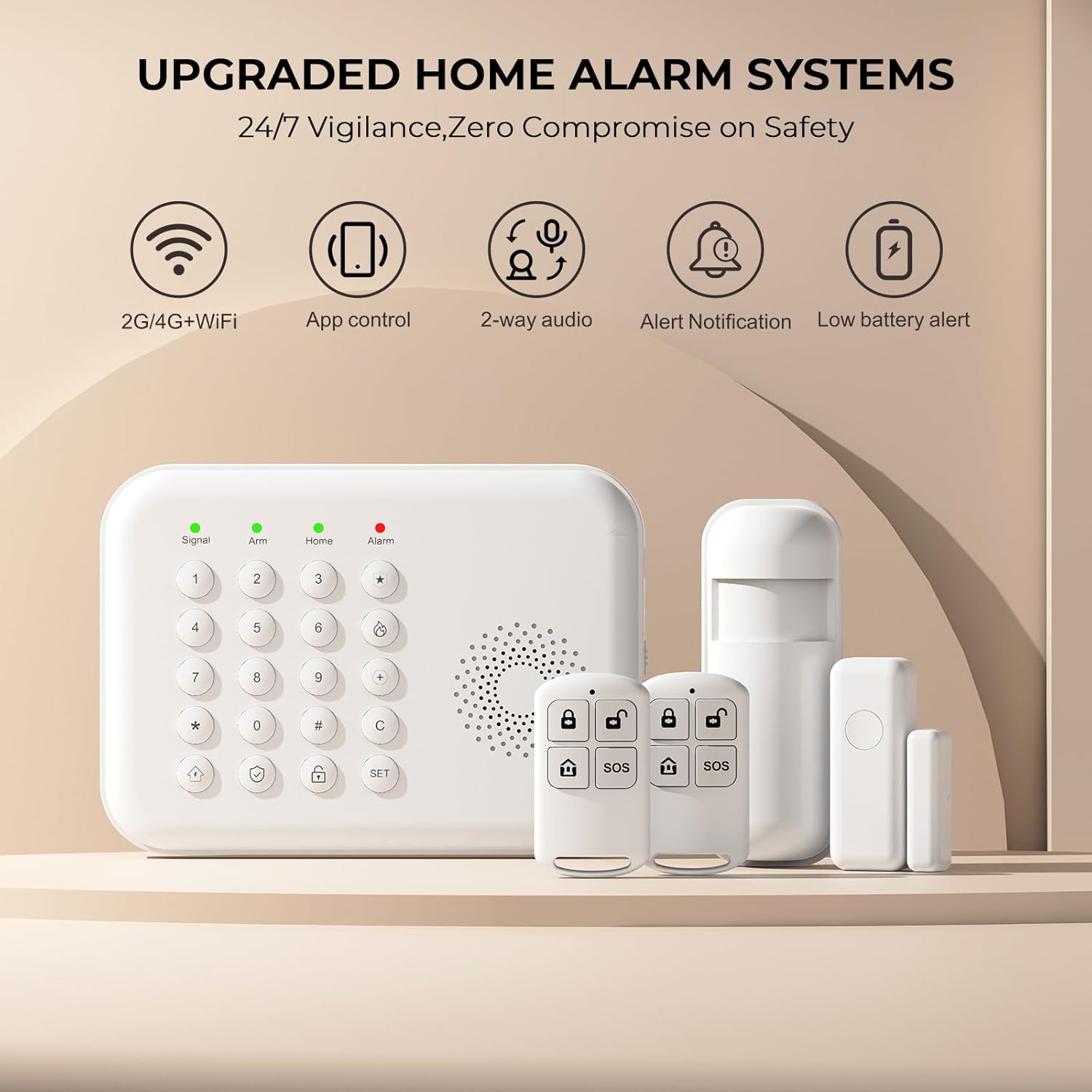
Figure 2: Main control panel, motion sensor, door sensor, and remote controls.
2.2 Main Control Panel Overview
The main control panel features a keypad for arming/disarming, setting up the system, and accessing various functions. It also includes indicator lights for signal, arm status, home mode, and alarm status, along with an integrated speaker for voice commands and alerts.

Figure 3: Detailed diagram of the main control panel's buttons and ports.
2.3 Pamasangan Sensor
The system is designed for easy DIY installation without complex steps. Sensors can be installed in key areas of your home using self-adhesive backing or screws.
- Sénsor Panto/Jandela: These magnetic contact sensors detect when a door or window is opened. Install one part on the door/window frame and the other on the moving part, ensuring they are aligned and close to each other when closed.
- Sénsor gerak: Utilize infrared technology to sense movement. Install these in hallways, living rooms, or other open spaces to detect intruders. Ensure they are placed at an appropriate height and angle to cover the desired area without false alarms from pets (if applicable).

Gambar 4: Kelample installation of door and motion sensors.
2.4 Connecting to Wi-Fi and Adding Accessories
The system connects directly to 2.4GHz Wi-Fi (5G Wi-Fi is not supported). You can also use a 4G GSM card for alerts. Use the Tuya or Smart Life mobile application for setup and control.
- Setup Wi-Fi:
- On the host panel: Press SET → 6666 → # → 00 → #
- On your phone app (Tuya/Smart Life): Navigate to WIFI (2.4GHz) → APP hirup pinter → Tambahkeun alat → Sénsor → Alarem → WIFI → Kedip-kedip Gancang
- Setting Alarm Numbers:
- On the host panel: Press SET → 6666 → # → 51-56 → Jumlah → # (to add up to 5 family numbers for alerts).
- Adding Accessories (Sensors, Remote Controls):
- Kadali jauh: Pencét SET → 6666 → # → 21 → 1-10 #
- Sensor panto: Pencét SET → 6666 → # → 23 → 1-240 #
- Sénsor gerak: Pencét SET → 6666 → # → 23 → 1-240 #

Figure 5: Wi-Fi and alarm number setup guide.

Figure 6: Guide for adding various accessories.
3. Parentah Operasi
3.1 Ngarojong sareng Ngalumpuhkeun Sistem
The system can be armed or disarmed using the main control panel, remote controls, or the mobile application. You can also customize arm/disarm times to fit your daily routine.

Gambar 7: Kelample of customized arm/disarm schedules.
3.2 Pangimeutan sareng Kontrol Jauh
Through the Tuya or Smart Life mobile applications, you can monitor and control your system from any location. This includes arming or disarming the alarm, checking sensor statuses, and receiving real-time alerts on your smartphone. The system supports both Wi-Fi (2.4GHz) and 4G GSM card for reliable connectivity and alerts.

Figure 8: App alerts via Wi-Fi and 4G GSM calling.
3.3 Pamaduan Control Sora
The PGST Home Security Alarm System is compatible with Alexa and Google Assistant, allowing for convenient voice control. You can arm or disarm the system using simple voice commands.

Figure 9: Voice control with Alexa.
3.4 Enhanced Safety Features
The system includes features designed for the safety of all family members. For instance, alerts can be set for when children open exterior doors. An SOS button is also available for elderly users to request help in emergencies, sending immediate notifications to pre-set contacts.

Figure 10: SOS button for emergency assistance.
4. Pangropéa
4.1 Manajemén batré
The main control panel is equipped with a high-capacity lithium polymer battery, ensuring continued operation during power outages. The system will provide a low battery alert when charging is required. Sensors are also battery-powered and should be checked periodically for optimal performance.

Figure 11: Built-in battery and low battery alert indicators.
4.2 Beberesih sareng Perawatan
Wipe the main unit and sensors with a soft, dry cloth. Avoid using abrasive cleaners or solvents that could damage the devices.
5. Cara ngungkulan
- Sensors Not Connecting/Staying Paired:
Ensure the sensors are within range of the main control panel and have fresh batteries. Re-attempt the pairing process as described in Section 2.4. If issues persist, try resetting the sensor and the main panel before re-pairing. Refer to the detailed user manual for specific reset procedures.
- No App Alerts:
Verify that the main control panel is connected to a stable 2.4GHz Wi-Fi network. Check your smartphone's notification settings for the Tuya or Smart Life app to ensure alerts are enabled. Confirm that the 4G GSM card (if used) has an active plan and good signal strength.
- Alarm palsu:
Review the placement of motion sensors to ensure they are not triggered by pets, curtains, or direct sunlight. Adjust sensitivity settings if available in the app or through the main panel. Ensure door/window sensors are securely attached and properly aligned.
- System Not Responding to Remote Control:
Check the battery in the remote control. Ensure you are within the effective range of the main control panel. Re-pair the remote control if necessary (refer to Section 2.4).
For further assistance, please refer to the full user manual or contact PGST customer support.
6. Spésifikasi
| merek | PGST |
| Nomer modél | PGST A01F |
| Sumber Daya | Battery Powered (Lithium Polymer battery included) |
| Alat nu cocog | Smartphone, Tablet (via Tuya/Smart Life App), Alexa, Google Assistant |
| Téhnologi konektipitas | Wireless (2.4GHz Wi-Fi, 4G GSM) |
| Tipe Pamasangan | Self-Napel |
| Métode kontrol | App, Keypad, Remote Control, Voice |
| Ukuran barang (L x W x H) | 8 x 6 x 4 inci |
| Item Beurat | 2.31 pon |
| Komponén Kaasup | 1 X PGST A01F Home Alarm System (20 PIECE KITS variant includes main panel, door/window sensors, motion sensors, remote controls) |
| UPC | 735083581350 |
7. Jaminan & Dukungan
7.1 No Monthly Fees
The PGST Home Security Alarm System is a one-time purchase, providing comprehensive home security without requiring ongoing monthly fees or contracts.

Figure 12: No contract fees for PGST security.
7.2 Expandability
The system is highly customizable and expandable. You can add more sensors, cameras, or other security devices from the PGST store as your needs evolve, ensuring your home's security grows with you.

Figure 13: Customizable and expandable system coverage.
7.3 Rojongan Palanggan
PGST prioritizes quality and customer satisfaction. If you encounter any issues or require further operational guidance, additional operation videos can be provided upon request. For support, please refer to the contact information provided with your product packaging or visit the official PGST websitus.