
Bubuka
Thank you for choosing the FLEXISPOT 71x32 Inch Dual Motor Electric Standing Desk. This manual provides essential information for the safe and efficient assembly, operation, and maintenance of your new standing desk. Please read all instructions carefully before use and retain this manual for future reference.
This electric standing desk is designed to provide a versatile and ergonomic workspace, allowing seamless transitions between sitting and standing positions. Its dual-motor system ensures stable and quiet height adjustments, supporting a heavy-duty capacity suitable for various professional and creative setups.
Pedoman Kasalametan
- Salawasna turutan parentah assembly taliti.
- Ensure the desk is properly anchored to the floor to prevent tipping, especially when fully extended.
- Do not exceed the maximum weight capacity of 198 pounds (90 kg) to maintain stability and safety.
- Keep the work surface clear of items that could fall or cause obstruction during height adjustment.
- Jauhkeun barudak sareng piaraan tina méja nalika dianggo.
- Hindarkeun nempatkeun cairan langsung dina panel kontrol atanapi caket komponén listrik.
- Do not attempt to disassemble or repair the motor or control system yourself. Contact qualified service personnel if issues arise.
Warning: Anti-Collision System
The desk is equipped with an anti-collision system. If the desk encounters an obstacle during height adjustment, it will stop and reverse slightly to prevent damage. Ensure the area around the desk is clear before operation.

This image illustrates the desk's quiet operation (less than 50dB) and anti-collision system, showing the desk stopping and reversing when an obstacle (a pet) is detected.
Setup sareng Majelis
The FLEXISPOT 71x32 Inch Dual Motor Electric Standing Desk requires assembly. While some tools may be included, an electric drill can expedite the process. It is recommended to have two people for assembly due to the size and weight of the components.
Ngabongkar sareng Persiapan:
- Carefully unpack all components and verify against the parts list in your included manual.
- Place the desktop upside down on a soft, clean surface (e.g., carpet or packaging foam) to prevent scratches.
- Ensure all cables and electrical components are free from damage before proceeding.
Léngkah-léngkah Majelis (General Overview):
- Attach the lifting columns to the desktop using the provided screws.
- Connect the foot supports to the lifting columns.
- Install the control box and connect all motor and control panel cables. Ensure cables are neatly managed to avoid interference with desk movement.
- Taliti flip meja nangtung.
- Colokkeun kabel listrik kana stop kontak.
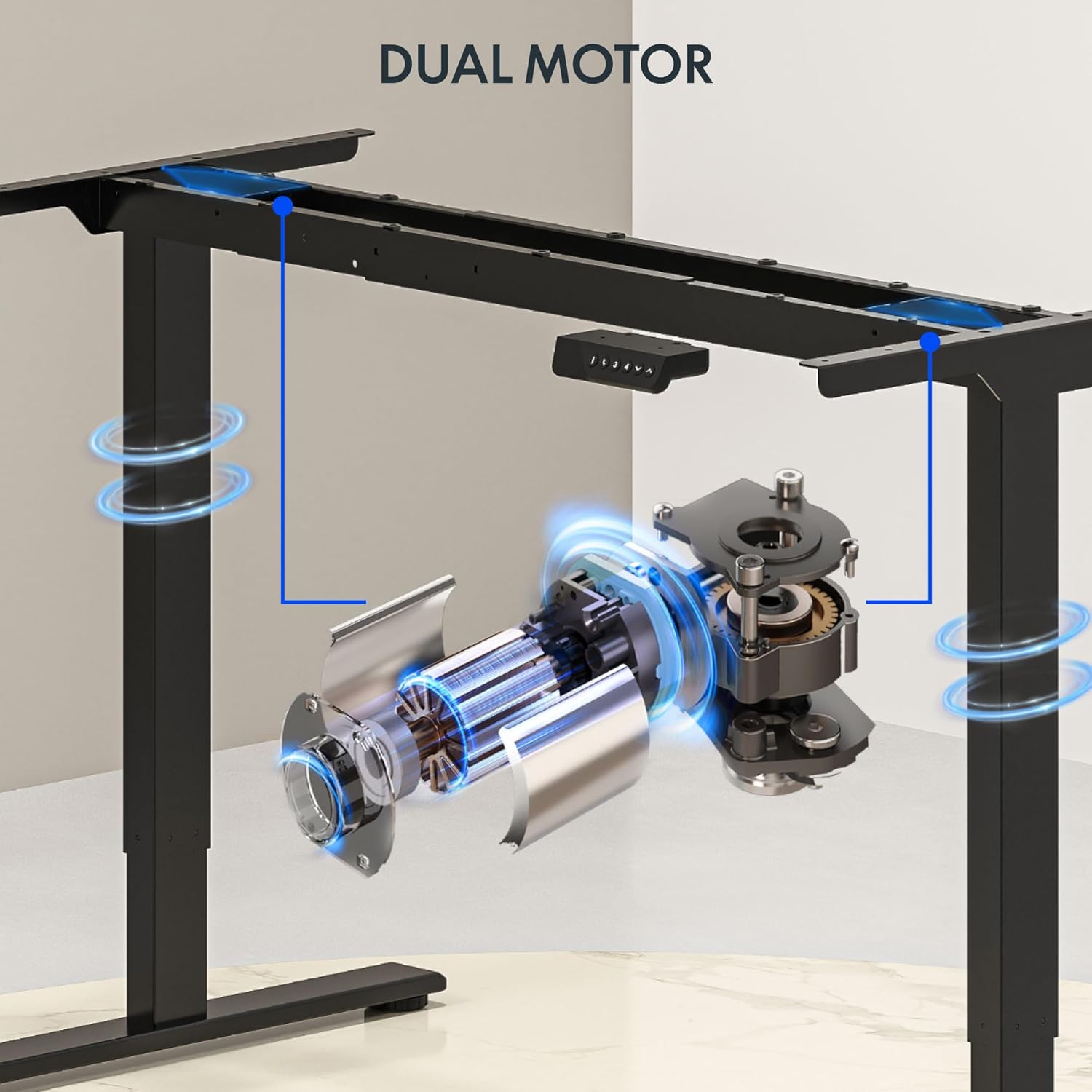
This image illustrates the dual motor system integrated into the desk frame, highlighting its robust design for stable lifting.
Tip:
Consider using cable management accessories (not included) to keep wires organized and prevent them from snagging during height adjustments.
Parentah Operasi
The FLEXISPOT standing desk features an intuitive control panel for easy height adjustment and memory presets.
Kontrol Panel Langkungview:

This image displays the desk's control panel, featuring an LED display, up/down arrows, and four programmable memory preset buttons.
- Panah luhur/handap (▲ / ▼): Pencét terus tahan pikeun nyaluyukeun jangkungna méja sacara manual. Leupaskeun pikeun eureun dina jangkungna anu dipikahoyong.
- Témbong LED: Némbongkeun jangkungna méja ayeuna dina inci.
- Preset Mémori (1, 2, 3, 4): Simpen sareng émut deui jangkungna calik sareng nangtung anu anjeun pikaresep.
- 'i' Button: Information or settings button (refer to detailed manual for specific functions).
Nyetél Preset Mémori:
- Saluyukeun meja ka jangkungna nu Anjeun hoyongkeun maké panah luhur/handap.
- Press the 'i' button (or 'M' button if present) once. The display may flash.
- Within 3 seconds, press one of the number buttons (1, 2, 3, or 4) to save the current height to that preset. The display will confirm the setting.
Ngingetkeun mémori prasetél:
- Kantun pencét tombol angka anu dipikahoyong (1, 2, 3, atanapi 4). Méja bakal otomatis ngalih ka jangkungna anu disimpen.
Video: FLEXISPOT Dual-Motor Strength. More Space to Create.
This video demonstrates the smooth and stable operation of the FLEXISPOT dual-motor system, highlighting its capacity and the ample workspace it provides for various setups.
Pangropéa
- beberesih: Lap méja sareng pigura nganggo kaén anu lemes,amp lawon. Hindarkeun bahan kimia anu kasar atanapi pembersih abrasive.
- Manajemén Kabel: Periodically check and reorganize cables to ensure they do not interfere with the desk's movement or become pinched.
- Pengikat: Pariksa sakali-kali sadaya sekrup sareng baut pikeun mastikeun éta pageuh. Kencengkeun deui upami diperyogikeun.
- Inspeksi Motor: Listen for any unusual noises during operation. If you hear grinding or straining, discontinue use and contact support.
Pamérésan masalah
| Masalah | Mungkin Cukang lantaranana | Solusi |
|---|---|---|
| Meja teu gerak | Power cord unplugged; circuit breaker tripped; control panel not connected. | Check power connection; reset circuit breaker; ensure all cables are securely connected. |
| Desk moves unevenly or makes noise | Overload; loose fasteners; obstruction. | Reduce weight on desk (ensure it's below 198 lbs); check and tighten all fasteners; remove any obstructions. |
| Anti-collision system frequently activates | Sensitivity too high; frequent obstructions. | Ensure clear path for desk movement; consult the full manual for adjusting anti-collision sensitivity if available. |
| Preset mémori teu jalan | Presets not properly saved. | Re-save your desired heights following the 'Setting Memory Presets' instructions. |
Upami anjeun mendakan masalah anu teu didaptarkeun di dieu atanapi upami solusi henteu ngabéréskeun masalahna, mangga ngahubungi dukungan palanggan FLEXISPOT.
spésifikasi
- merek: FLEXISPOT
- model: 71x32 (Black Top + Black Frame)
- Diménsi Desktop: 71"L x 32"D (180.34 cm x 81.28 cm)
- Rentang jangkungna: 28.3" nepi ka 47.6" (71.9 cm nepi ka 120.9 cm)
- Kapasitas beurat maksimum: 198 lbs (90 kg)
- Tipe Motor: Motor Ganda
- Laju Angkat: Up to 1 inch per second (2.54 cm/s)
- Panél kontrol: Memory Controller with 4 programmable presets, LED display, Up/Down arrows.
- Bahan pigura: Alloy Steel
- Bahan Top: Wood (Painted Wood Finish)
- Fitur husus: Dual Motor, Heavy-Duty Capacity, Memory Controller, Anti-Collision System.
- Majelis: Required (Assembly tools not fully included, electric drill recommended).

This image provides a visual representation of the desk's key dimensions and performance specifications, including its adjustable height range, maximum speed, and load capacity.
Émbaran jaminan
The FLEXISPOT 71x32 Inch Dual Motor Electric Standing Desk comes with a limited warranty:
- Rangka sareng Motor: 5-taun jaminan kawates.
- Éléktronik: 2-taun jaminan kawates.
Please retain your proof of purchase for warranty claims. For detailed terms and conditions, refer to the official FLEXISPOT websitus atanapi ngahubungan rojongan customer.
Rojongan Palanggan
For any questions, technical assistance, or warranty claims regarding your FLEXISPOT standing desk, please visit the official FLEXISPOT websitus atanapi ngahubungan departemén layanan palanggan maranéhna. Inpormasi kontak biasana tiasa dipendakan dina bungkusan produk atanapi resmi merek websitus.
Sumberdaya Online: www.flexispot.com