
1. Bubuka
Thank you for choosing the GRIFEMA GA2006 Digital Luggage Scale. This portable and accurate scale is designed to help you measure the weight of your luggage, preventing unexpected excess baggage fees. Please read this manual carefully before use to ensure proper operation and to maximize the lifespan of your device.
2. Émbaran Kasalametan
- Ulah neuleumkeun skala dina cai atawa cairan séjén.
- Ulah nepi ka ngalungkeun timbangan atawa ngagebugan beurat.
- Jauhkeun tina jangkauan barudak.
- Do not attempt to disassemble or repair the scale yourself. Contact customer support if issues arise.
- Ensure the battery compartment is securely closed after battery installation.
3. Eusi Paket
The GRIFEMA GA2006 Digital Luggage Scale package includes:
- 1 x GRIFEMA GA2006 Digital Luggage Scale
- 1 x CR2032 Battery (pre-installed or included separately)
4. Produk Langkungview
Familiarize yourself with the components of your digital luggage scale:

Gambar: Hareupeun view of the GRIFEMA GA2006 Digital Luggage Scale, highlighting the LCD screen, power/tare button, and unit selection button.
- Layar LCD: Shows weight readings and unit indicators.
- Power/Tare Button (⏸/T/A): Press to power on/off, or to activate the tare function.
- Unit Button (U/SET/▼): Press to switch between measurement units (kg/lb).
- Strap and Hook: For attaching luggage to be weighed.
5. Setélan
5.1 Pamasangan batré
The scale uses one CR2032 lithium battery. If the battery is not pre-installed or needs replacement, follow these steps:
- Teang kompartemen batré dina tonggong skala.
- Anggo obeng leutik pikeun muka panutup batréna.
- Selapkeun batré CR2032 kalayan sisi positif (+) nyanghareup ka luhur.
- Ganti panutup batré jeung amankeun ku screw nu.
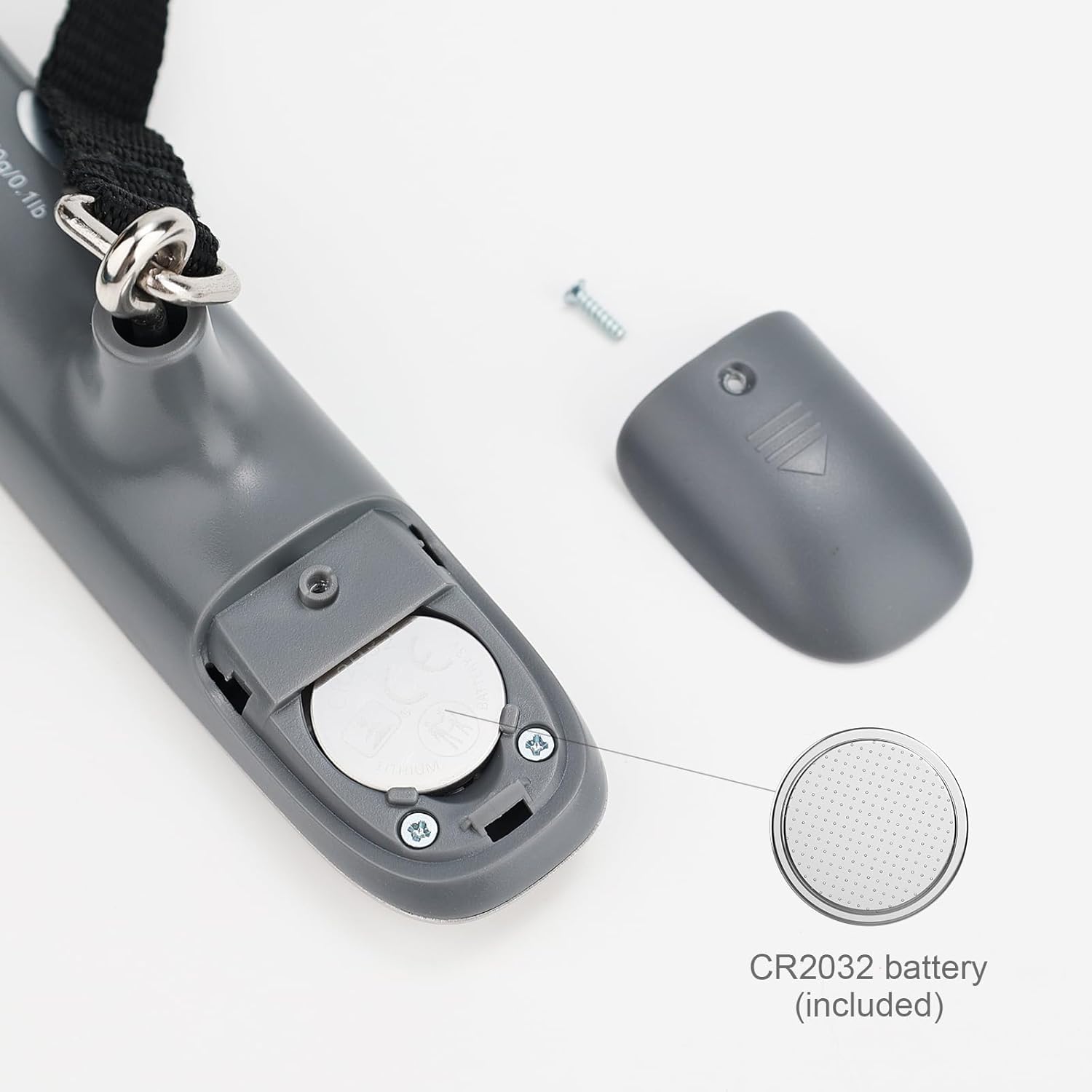
Gambar: Detil view of the battery compartment, showing the CR2032 battery and how to open the cover.
6. Parentah Operasi
6.1 Daya Hurung/Pareuman
- To power on, press the Power/Tare button (⏸/T/A). The display will show "8888" then "0.00 kg" or "0.0 lb".
- To power off, press and hold the Power/Tare button (⏸/T/A) for 3 seconds. The scale will also automatically shut off after 60 seconds of inactivity to conserve battery.
6.2 Unit Conversion (kg/lb)
While the scale is powered on and displaying "0.00", press the Unit button (U/SET/▼) to switch between kilograms (kg) and pounds (lb). The selected unit will be displayed on the LCD screen.
6.3 Weighing Luggage
- Ensure the scale is powered on and displaying "0.00".
- Attach the luggage strap to the handle of your luggage.
- Lift the scale by its body, holding it steady, so the luggage hangs freely from the strap and hook.
- Wait for the display to stabilize. The weight will flash three times and then lock, indicating the final measurement.
- Lower the luggage. The display will show the locked weight for a few seconds before returning to "0.00" or powering off automatically.

Image: A person demonstrating how to weigh a suitcase using the digital luggage scale, showing the scale held above the luggage.
6.4 Fungsi Tare
The tare function allows you to subtract the weight of a container or additional items to get the net weight of the contents.
- With the scale powered on and displaying "0.00", attach the empty container or item you wish to tare.
- Once the weight stabilizes, press the Power/Tare button (⏸/T/A). The display will reset to "0.00" and show a "T" indicator, meaning the tare weight has been subtracted.
- Now, add the items you want to weigh into the container. The display will show only the weight of the added items.
7. Pangropéa
7.1 beberesih
Ngusap timbangan ku hipu, damp lawon. Ulah nganggo pembersih anu abrasif atanapi ngalelepkeun timbangan kana cai.
7.2 Panyimpenan
Store the scale in a cool, dry place. If not used for an extended period, it is recommended to remove the battery to prevent leakage.
7.3 Ngagantian batré
When the display shows a "Lo" indicator, it's time to replace the battery. Refer to section 5.1 for battery installation instructions.
8. Cara ngungkulan
| Masalah | Mungkin Cukang lantaranana | Solusi |
|---|---|---|
| Skala teu hurung. | Batré pareum atawa salah dipasang. | Check battery installation or replace the CR2032 battery. |
| Display shows "Lo". | Daya batre lemah. | Ganti batré CR2032. |
| Display shows "Err" or "O-Ld". | Overload. The weight exceeds the maximum capacity. | Remove some weight. The maximum capacity is 50 kg (110 lb). |
| Bacaan teu akurat. | Scale not held steadily, or external interference. | Ensure the scale is held steady and the luggage hangs freely. Avoid strong air currents or vibrations during weighing. |
9. Spésifikasi
Detailed specifications for the GRIFEMA GA2006 Digital Luggage Scale:

Image: Technical drawing illustrating the dimensions of the GRIFEMA GA2006 Digital Luggage Scale.
- model: GA2006
- Kapasitas beurat maksimum: 50 kg / 110 lb
- Precision pangukuran: 50 g / 0.1 lb (+/- 0.5%)
- Unit: Kilogram (kg), Pon (lb)
- tampilan: LCD backlit
- Bahan: stainless steel, plastik
- Jenis Batré: 1 x CR2032 Alkaline (included)
- Otomatis Pareum: 60 detik teu aktip
- ukuran: 14.5 cm x 3.2 cm x 3.5 cm (approximate, main body)
- Beurat bersih: 85 g
10. Émbaran jaminan
GRIFEMA products are manufactured to high-quality standards. This product is covered by a standard warranty against manufacturing defects. Please retain your proof of purchase for any warranty claims. For specific warranty terms and conditions, refer to the documentation provided at the time of purchase or contact customer support.
Additionally, a 30-day free return policy may apply, as per retailer terms.
11. Rojongan Palanggan
If you have any questions, concerns, or require assistance with your GRIFEMA GA2006 Digital Luggage Scale, please contact your retailer or the manufacturer's customer service. Please have your product model number (GA2006) and purchase details ready when contacting support.