
1. Bubuka
The ALIGATOR AZA930B is a mobile phone designed with ease of use in mind, particularly for seniors. It features a large keypad, a clear 2.8-inch color display, and essential safety functions such as an SOS button and SOS locator. This manual provides detailed instructions on how to set up, operate, maintain, and troubleshoot your device to ensure optimal performance and safety.
2. Émbaran Kasalametan
Mangga baca bagian ieu kalawan saksama sateuacan nganggo telepon anjeun pikeun mastikeun operasi anu aman sareng leres.
- Kasalametan batré: Use only ALIGATOR approved batteries and chargers. Do not short-circuit, puncture, or expose the battery to extreme temperatures. Dispose of batteries properly.
- Ngecas: The phone does not include a charger. Use a compatible USB-C charger (recommended model ALIGATOR CHA0047) with a power output of 2.5-3W. Avoid charging in damp kaayaan.
- Perlindungan dédéngéan: Hindarkeun dengekeun berkepanjangan dina tingkat polumeu luhur pikeun nyegah karuksakan dédéngéan.
- Kasalametan nyetir: Always prioritize driving safety. Use hands-free accessories and obey all local laws and regulations regarding mobile phone use while driving.
- Alat médis: Maintain a safe distance between the phone and medical devices such as pacemakers. Consult your physician and the medical device manufacturer for specific guidelines.
- Tahan cai: Telepon ieu henteu tahan cai. Hindarkeun kakeunaan cairan.
3. Eusi Paket
Pastikeun yén sadaya item aya dina pakét produk anjeun:
- ALIGATOR AZA930B Mobile Phone
- Ngecas Dock
- Manual pangguna (dokumén ieu)
- Note: Charger is not included and must be purchased separately.
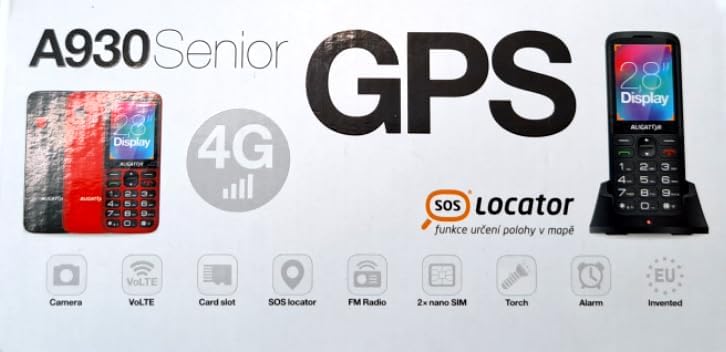
Figure 3.1: Product packaging illustrating the phone, charging dock, and various features such as 4G connectivity, GPS, SOS Locator, camera, VoLTE, card slot, FM radio, torch, and alarm. The box also indicates the 2.8-inch display.
4. Setélan
4.1. Nyelapkeun Kartu SIM
The ALIGATOR AZA930B supports Dual SIM (2 x Nano SIM) functionality. To insert SIM cards:
- Pareuman telepon.
- Cabut panutup tukang sareng batre.
- Locate the SIM card slots. Insert your Nano SIM cards into the designated slots, ensuring the gold contacts face down and the cut corner aligns correctly.
- Ganti batré sareng panutup tukang.
4.2. Inserting a Micro SD Card
The phone supports a Micro SD memory card up to 256 GB for additional storage.
- Follow steps 1 and 2 from "4.1. Inserting SIM Cards".
- Locate the Micro SD card slot. Insert the Micro SD card with the gold contacts facing down until it clicks into place.
- Ganti batré sareng panutup tukang.
4.3. Ngecas Awal
Before first use, fully charge the phone's 1700 mAh Li-ion battery.
- Connect the USB-C cable (not included) to the phone's USB-C port or place the phone in the charging dock.
- Connect the other end of the cable to a compatible charger (e.g., ALIGATOR CHA0047, 2.5-3W) or a powered USB port.
- The charging indicator will illuminate. A full charge may take several hours.

Figure 4.1: The ALIGATOR AZA930B phone placed in its dedicated charging dock. The phone's screen shows the current time and network signal indicators.

Figure 4.2: Detail from the product box, explicitly showing an icon indicating that a charger is not included and specifying a recommended charger power of 2.5-3W.
5. Parentah Operasi
5.1. Daya Hurung / Pareum
- Pikeun Ngahurungkeun: Pencét terus tahan tombol Daya/Tutup Telepon (tombol beureum) nepi ka layar hurung.
- Pikeun mareuman: Press and hold the Power/End Call button until the power off options appear, then select "Power off".
5.2. Fungsi Telepon Dasar
- Nelepon: Enter the phone number using the large keypad and press the Call button (green button).
- Ngajawab Telepon: When the phone rings, press the Call button (green button).
- Nutup Telepon: Press the Power/End Call button (red button).
- Hand-Free: During a call, activate hands-free mode via the on-screen option or a dedicated button if available.
5.3. SOS Button and SOS Locator
The SOS button is a critical safety feature, allowing quick contact in emergencies.
- Tombol SOS: Located on the back of the phone (often red). Press and hold this button to activate the emergency sequence.
- SOS Presets: You can set up to 5 preset emergency contacts. When the SOS button is pressed, the phone will automatically call these numbers in sequence and send an emergency SMS.
- SOS Locator: This function sends the phone's location via SMS to the emergency contacts after the SOS button is pressed. The recipient can then view the location on a map via a web link provided in the SMS. This feature utilizes both GSM and GPS for location accuracy.

Gambar 5.1: Tukangeun view of the ALIGATOR AZA930B, showing the prominent red SOS button and the speaker grille for clear audio.

Gambar 5.2: Angled pungkur view of the ALIGATOR AZA930B, demonstrating the activated flashlight feature.
5.4. "Zachranka" Rescue Application
The "Zachranka" application is a mobile emergency call application pre-installed on the device.
- It provides quick contact with emergency medical services or mountain rescue.
- The application is valid in Austria, Hungary, the Czech Republic, and in the territories of the Slovak mountains.
- For more information, refer to the "Zachranka" app's official resources.

Gambar 5.3: Hareup jeung tukang views of the ALIGATOR AZA930B, accompanied by the "Zachranka" rescue application logo, indicating its integration with the device.
5.5. Fitur séjén
- Buku telepon: Store up to 500 contacts.
- Olahtalatah: Send and receive SMS messages (memory for 100 SMS). Supports sending photos via MMS.
- Multimédia:
- Radio FM: Dengekeun stasiun radio FM.
- Pamuter Média: Maénkeun audio sareng pidéo files stored on the phone or Micro SD card.
- Rékam sora: Rékam mémo sora.
- Senter: Aktipkeun senter anu dipasang pikeun nyaangan.
- Pakakas: Includes Alarm, Calculator, and SIM toolkit support.
- Bluetooth: Sambungkeun ka headset Bluetooth atanapi alat anu sanés.
- Alarm geter: Set the phone to vibrate for incoming calls or notifications.
- Melodi: Choose from 10+1 pre-installed melodies.
- Pangaturan Waktos Otomatis: The phone can automatically adjust its time.

Gambar 5.4: Hareupeun view of the ALIGATOR AZA930B, highlighting its user-friendly large keypad and vibrant color display.
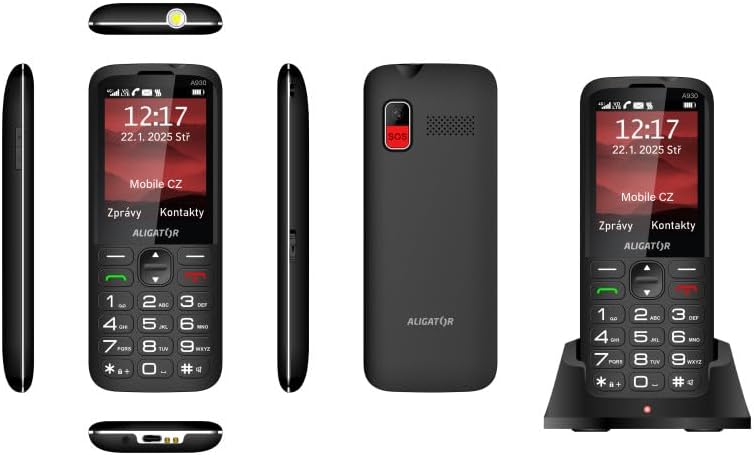
Gambar 5.5: Komprehensif views of the ALIGATOR AZA930B, illustrating its design from the top, sides, front, back, and when seated in its charging dock.
6. Pangropéa
- beberesih: Anggo lawon anu lemes sareng garing pikeun ngabersihkeun permukaan telepon. Hindarkeun nganggo bahan kimia anu keras atanapi bahan anu kasar.
- Perawatan batré: To prolong battery life, avoid fully discharging the battery frequently. Store the phone in a cool, dry place if not used for extended periods.
- Panyimpenan: Keep the phone away from extreme temperatures, direct sunlight, and dusty environments.
7. Cara ngungkulan
| Masalah | Mungkin Cukang lantaranana | Solusi |
|---|---|---|
| Telepon teu hurung. | Batréna béak atanapi teu dipasang kalayan leres. | Cas batréna. Pastikeun batréna dipasang kalayan leres. |
| Taya sinyal jaringan. | SIM card not inserted correctly or out of network coverage. | Reinsert SIM card. Move to an area with better network coverage. |
| Teu tiasa nelepon atanapi nampi telepon. | No credit, SIM card issue, or network problem. | Check your account balance. Verify SIM card insertion. Contact your network provider. |
| Tombol SOS teu jalan. | Nomer SOS teu disetel atanapi lepat. | Ensure SOS numbers are correctly configured in settings. Check network signal. |
| Batré gancang boros. | High usage, background apps, or aging battery. | Reduce screen brightness. Close unnecessary applications. Consider replacing the battery if it's old. |
8. Spésifikasi
| Fitur | Rincian |
|---|---|
| Nomer modél | AZA930B |
| tampilan | 2.8 inci TFT Warna Témbongkeun |
| Slot Kartu SIM | Dual SIM (2 x Nano SIM) |
| Rojongan Kartu Mémori | Micro SD nepi ka 256 GB |
| Batré | 1700 mAh Li-ion |
| Waktu Ngobrol | Nepi ka 480 menit |
| Waktu sayaga | Nepi ka 10 dinten |
| Kaméra | 1.9 MP |
| Konektipitas | 4G/LTE/VoLTE, Bluetooth |
| Port ngecas | USB-C |
| Jack headphone | 3.5 mm |
| Diménsi | 14.3 x 5.8 x 1.36 cm |
| Beurat | 95 g |
| Sistem operasi | Symbian 9.1 |
| Warna | Hideung |
Catetan: Spésifikasi tiasa robih tanpa aya bewara sateuacana.
9. Garansi jeung Rojongan
ALIGATOR products are designed and manufactured to the highest quality standards. For detailed warranty information, including terms, conditions, and duration, please refer to the warranty card included with your product or visit the official ALIGATOR websitus.
For technical support, service, or inquiries regarding your ALIGATOR AZA930B mobile phone, please contact ALIGATOR customer service or visit their official support channels. Keep your purchase receipt and product serial number (IMEI) handy when seeking support.
- IMEI 1: 357140835088496
- IMEI 2: 357140835088504
- Barcode/UPC: 8596426108267