
1. Bubuka
This manual provides essential information for the safe installation, operation, and maintenance of your TOMZN TOB9-VAP 63A 1P+N WiFi Smart Switch Energy Meter. This device is a miniature circuit breaker (MCB) with integrated energy metering (Kwh, Voltage, Ampera, Wattage), monitoring, and timer relay functions, compatible with TUYA Smartlife applications. It is designed to protect electrical circuits from overloads and short circuits while offering smart control and energy consumption insights.
2. Émbaran Kasalametan
PERHATOSAN: Résiko Setrum Listrik.
- Pamasangan sareng pangropéa kedah dilakukeun ku tanaga anu mumpuni wungkul.
- Salawasna pegatkeun daya dina pemutus sirkuit utama sateuacan masang atanapi ngalayanan alat.
- Pastikeun sadaya sambungan kabel aman sareng sasuai sareng kode listrik lokal.
- Entong jalankeun alat upami katingalina ruksak.
- This device is designed for indoor use in dry environments unless otherwise specified for specific outdoor enclosures.
- The device is rated for 1P+N (Single Phase + Neutral) systems. Ensure correct polarity during installation.
3. Produk Langkungview
The TOMZN TOB9-VAP is a versatile smart circuit breaker offering protection and advanced monitoring capabilities.
3.1. Fitur konci
- Protéksi Kaleuwihan Beban sareng Sirkuit Pendek: Prevents damage caused by excessive current.
- Energy Metering (Kwh, V, A, W): Monitors real-time and historical energy consumption.
- Konektipitas WiFi: Remote control and monitoring via smartphone app.
- Timer Relay Function: Schedule on/off times for connected loads.
- VA Protection: Adjustable Voltage jeung Amperage protection settings.
- TUYA Smartlife Compatible: Integrates with popular smart home platforms.
- Konstruksi awét: Made with high-quality insulating, flame-retardant, and UV-resistant materials.
- Sambungan Aman: Screw-type terminals for stable electrical connections.
3.2. Components and Indicators

Figure 1: TOMZN TOB9-VAP WiFi Smart Switch Energy Meter (Metering VA Protection, 1-63A Adjustable). This image shows the device with its input (Power) and output (Load) terminals, WiFi indicator, CE mark, signal light, and the main power button. The display indicates 'Metering VA protection In: 1-63A'.

Figure 2: TOMZN TOB9-63M WiFi Smart Switch Energy Meter (Metering). This variant includes energy metering capabilities (kW·h, W, V, A) but may not have the adjustable VA protection of the TOB9-VAP.
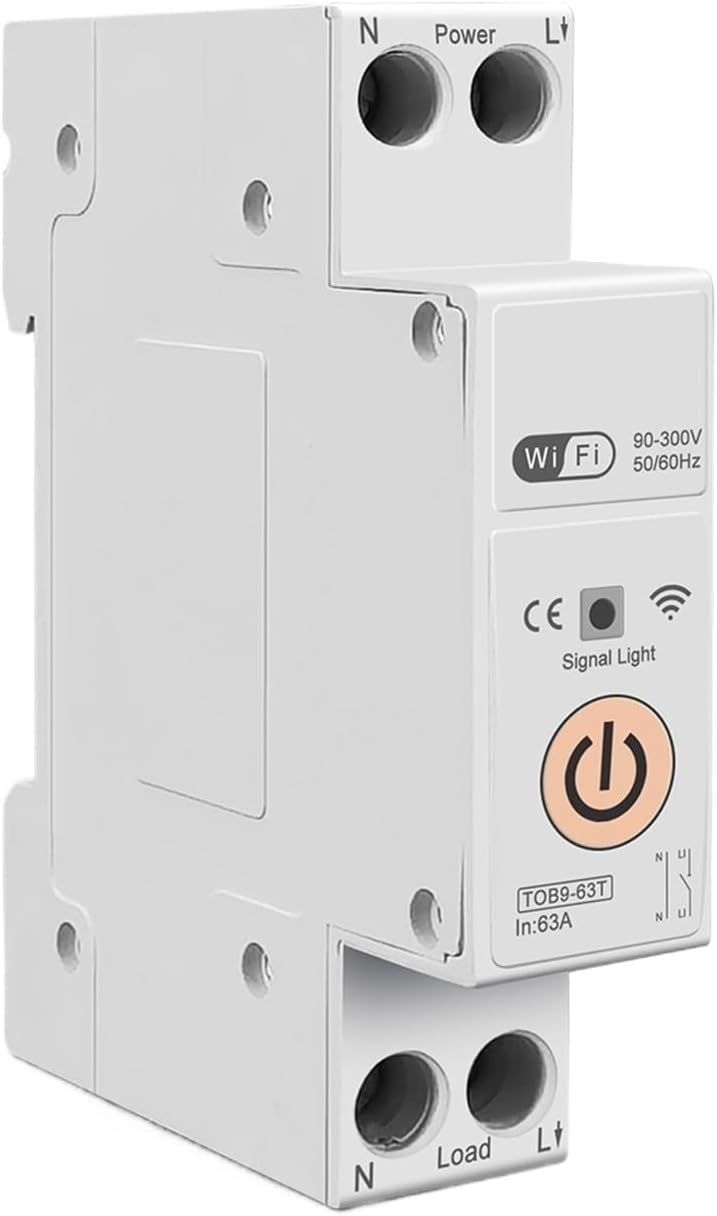
Figure 3: TOMZN TOB9-63T WiFi Smart Switch (No Metering). This basic variant provides WiFi control and circuit protection without energy metering functions.
- Power Terminals (N, L): Input connections for neutral and live wires.
- Load Terminals (N, L): Output connections for neutral and live wires to the load.
- Indikator WiFi: Némbongkeun status sambungan WiFi.
- Lampu sinyal: Nunjukkeun status alat.
- Tombol Daya Utama: Manual ON/OFF control for the circuit breaker.
- Display (TOB9-VAP/TOB9-63M): Shows real-time energy data (Kwh, W, V, A) and protection settings.
4. Setélan
4.1. Instalasi jeung Wiring
- Pegatkeun daya: Before starting, ensure the main power supply to the installation area is completely disconnected.
- Pamasangan: Mount the TOB9-VAP on a standard DIN rail within an appropriate electrical enclosure.
- Wiring Input: Connect the incoming neutral wire to the 'N' terminal under 'Power' and the incoming live wire to the 'L' terminal under 'Power'. Ensure secure screw-type connections.
- Wiring kaluaran: Connect the neutral wire to your load to the 'N' terminal under 'Load' and the live wire to your load to the 'L' terminal under 'Load'.
- Verifikasi: Ganda-pariksa sadaya sambungan pikeun tightness tur polaritasna bener.
- Mulangkeun Daya: Once installation is complete and verified, restore power to the main circuit.
4.2. App Pairing (TUYA Smartlife)
- Unduh App: Download the 'TUYA Smart' or 'Smart Life' app from your smartphone's app store.
- Ngadaptar/Log: Jieun akun atanapi log in kana akun anjeun anu tos aya.
- Tambahkeun Alat: In the app, tap '+' to add a new device. Select 'Electrical' > 'Circuit Breaker (Wi-Fi)'.
- Mode Papasangan: Ensure the TOB9-VAP's WiFi indicator is blinking rapidly. If not, press and hold the main power button for 5-10 seconds until it blinks rapidly to enter pairing mode.
- Nyambung ka WiFi: Follow the in-app instructions to connect the device to your 2.4GHz WiFi network. (5GHz networks are not supported).
- Ngaganti ngaran alat: Once paired, you can rename the device for easy identification in the app.
5. Parentah Operasi
5.1. Operasi Manual
- Hurungkeun/Pareuman: Press the main power button on the device to manually switch the circuit breaker ON or OFF.
5.2. App Control and Monitoring
- Jauh ON/OFF: Use the TUYA Smartlife app to remotely switch the circuit breaker ON or OFF.
- Ngawas énergi: View real-time and historical data for Kwh consumption, current (A), voltage (V), and power (W) directly in the app.
- Pangatur Waktu/Jadwal: Set up schedules or countdown timers for automatic ON/OFF operations.
- VA Protection Settings: Adjust the over-voltage, handapeun-voltage, over-current, and over-power protection thresholds within the app. The device will automatically trip if these thresholds are exceeded.
- Otomatisasi pamandangan: Integrate the device into smart scenes with other TUYA-compatible devices.
6. Pangropéa
- Inspeksi rutin: Periodically inspect the device and its wiring for any signs of damage, loose connections, or overheating.
- beberesih: Clean the exterior of the device with a dry, soft cloth. Do not use liquid cleaners or solvents.
- Pembaruan firmware: Check the TUYA Smartlife app for any available firmware updates to ensure optimal performance and security.
- Pariksa profésional: For any internal issues or complex repairs, consult a qualified electrician.
7. Cara ngungkulan
| Masalah | Mungkin Cukang lantaranana | Solusi |
|---|---|---|
| Alat teu hurung. | Teu aya catu daya; kabel kendur; gangguan internal. | Check main power supply. Verify all wiring connections. If problem persists, contact support. |
| WiFi indicator not blinking/connecting. | Incorrect pairing mode; weak WiFi signal; 5GHz network. | Ensure device is in rapid blinking pairing mode. Move device closer to router. Ensure router is 2.4GHz. |
| Alat sering teu jalan. | Overload/short circuit; incorrect VA protection settings. | Reduce load on the circuit. Check for short circuits. Adjust VA protection thresholds in the app if necessary. |
| Pamacaan énergi anu teu akurat. | Incorrect wiring; device malfunction. | Verify wiring connections. If problem persists, contact support. |
8. Spésifikasi
| Fitur | Rincian |
|---|---|
| Modél | TOB9-VAP |
| Dipeunteun Ayeuna | 1-63A (Saluyukeun) |
| Dipeunteun Voltage | AC 90-300V |
| Frékuénsi | 50/60Hz |
| Kutub | 1P+N |
| Konektipitas | WiFi (2.4GHz only) |
| Kasaluyuan Aplikasi | TUYA Pinter / Hirup Pinter |
| Fitur panyalindungan | Overload, Short Circuit, Over-Voltage, Dina-Voltage, Over-Current, Over-Power |
| Ukuran Paket | 0.39 x 0.39 x 0.39 inci |
| Item Beurat | 3.53 ons |
| Produsén | Generic (TOMZN) |
| Nomer Modél Item | JCZWUUZZB-DFE767306BB9FC909ED20C115B9 |
9. Garansi jeung Rojongan
Kanggo inpormasi garansi, dukungan téknis, atanapi patarosan layanan, mangga tingali dokuméntasi anu disayogikeun sareng pameseran anjeun atanapi hubungi langsung anu ngajual. Simpen resi pameseran anjeun salaku bukti pameseran.