
1. Bubuka
Thank you for choosing the Ctronics 4K Outdoor PTZ Security Camera (Model 550C-4K-Z30). This manual provides essential information for the proper installation, operation, and maintenance of your new security camera. Please read this manual thoroughly before using the product and retain it for future reference. This camera is designed to provide high-resolution surveillance with advanced features such as 30x optical zoom, AI-powered detection, and comprehensive night vision capabilities, ensuring robust security for your property.
2. Émbaran Kasalametan
- Sasayogian tanaga: Use only the provided power adapter. Ensure the power source meets the camera's voltagsarat e (12V).
- Pamasangan: Install the camera securely to prevent it from falling. Ensure all cables are properly routed and protected from damage.
- Tahan cai: The camera is IP66 weatherproof, suitable for outdoor use. However, avoid submerging it in water or exposing it to extreme conditions beyond its rating.
- Suhu operasi: Do not operate the camera outside its specified temperature range to prevent damage.
- beberesih: Cabut daya sateuacan dibersihkeun. Anggo lawon anu lemes sareng garing. Hindarkeun bahan kimia anu keras atanapi pembersih anu abrasif.
- Pembongkaran: Ulah nyobian ngabongkar atanapi ngarobih kaméra. Ieu bakal ngabatalkeun garansi sareng tiasa nyababkeun karusakan atanapi tatu.
- gangguan: Keep the camera away from strong electromagnetic fields that may interfere with its operation.
3. Eusi Paket
Mangga parios pakét kanggo barang-barang ieu:
- Ctronics 4K Outdoor PTZ Security Camera (Model 550C-4K-Z30)
- Pamasangan Stand
- Pamasangan screws
- Adaptor kakuatan
- Manual Pitunjuk (dokumén ieu)
- Security Sticker (for deterrence)
4. Produk Langkungview
The Ctronics 4K Outdoor PTZ Security Camera is a robust surveillance solution featuring a durable metal body and advanced imaging capabilities. It is designed for both wall and ceiling mounting, offering flexible installation options.
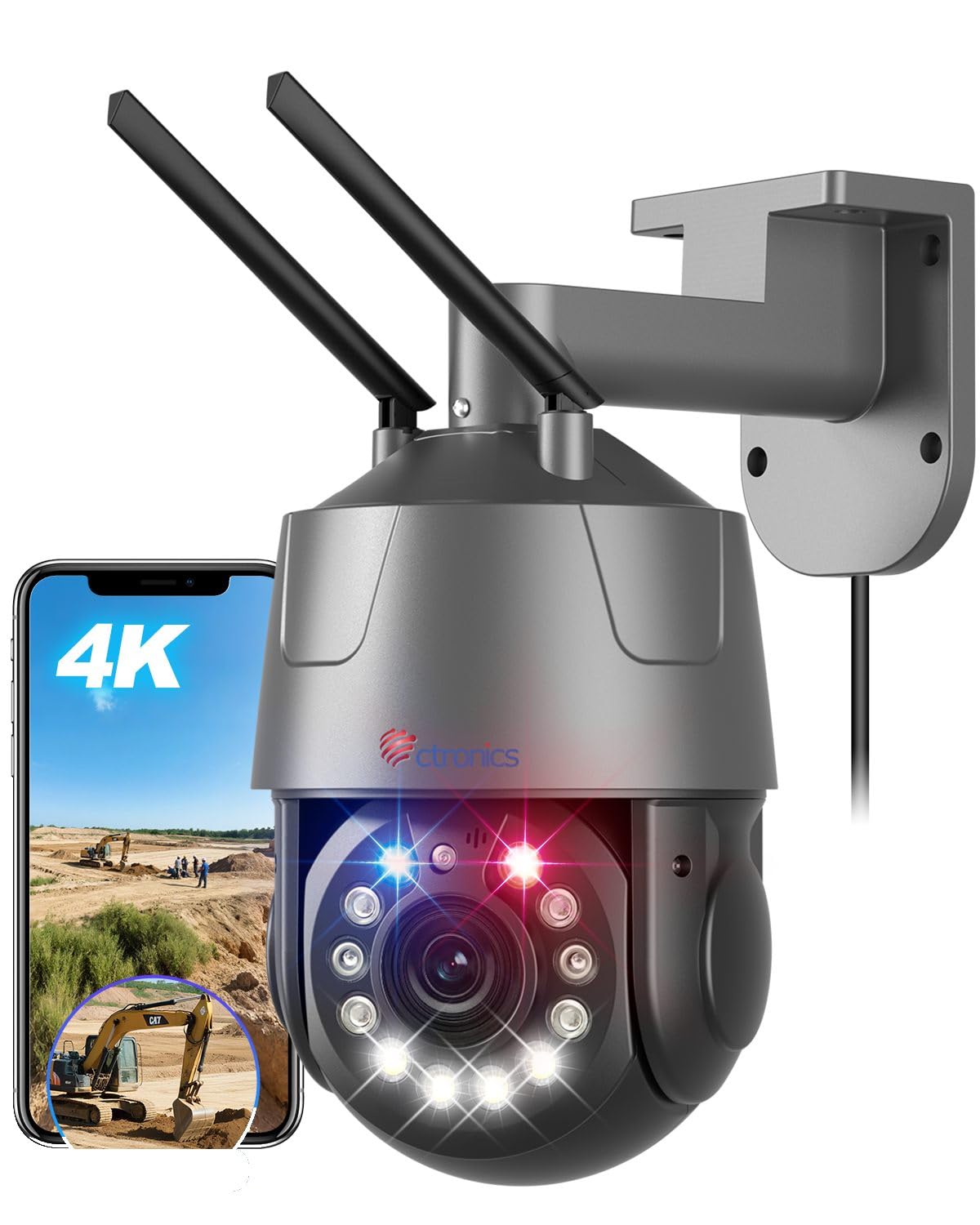
Figure 1: Ctronics 4K Outdoor PTZ Security Camera (Model 550C-4K-Z30)
Komponén konci:
- Lensa kaméra: High-resolution 4K (3840x2160) lens with 30x optical zoom.
- LEDs Infrabeureum: For black and white night vision up to 150m.
- LEDs bodas: For full-color night vision up to 50m and warning lights.
- Mikropon: For audio input during two-way communication.
- Speaker: For audio output during two-way communication and alarms.
- Anteneu: For 2.4GHz/5GHz Wi-Fi connectivity.
- Port Ethernet: For wired LAN connection.
- Input kakuatan: DC 12V power connection.
- Slot Kartu MicroSD: Ngarojong nepi ka 256GB pikeun neundeun lokal.
5. Setélan
5.1. Masang kaméra
Kaméra ieu tiasa dipasang dina témbok atanapi lalangit. Pilih lokasi anu nyayogikeun anu dipikahoyong viewing angle and is within range of your Wi-Fi network or Ethernet cable.
- Tandaan liang bor: Use the mounting stand as a template to mark the positions for drilling.
- liang bor: Bor liang dina posisi ditandaan. Selapkeun colokan témbok lamun dipasang dina masonry.
- Attach Mounting Stand: Secure the mounting stand to the wall or ceiling using the provided screws.
- Pasang kaméra: Mount the camera onto the secured stand. Adjust the angle as needed.

Figure 2: Flexible mounting options for wall or ceiling installation.
5.2. Sambungan Daya
Connect the provided power adapter to the camera's power input port and then plug it into a power outlet. The camera will power on and initiate its startup sequence.
5.3. Unduh Aplikasi sareng Setelan Awal
Download the 'Ctronics Pro' app from your smartphone's app store (iOS or Android). Follow the in-app instructions for initial setup. The camera supports one-click Bluetooth setup for easy pairing.
Video 1: QR Code Connection Guide. This video demonstrates the process of connecting the camera using a QR code via the mobile application.
5.4. Network Connection (Wi-Fi / LAN)
The camera supports both 2.4GHz and 5GHz Wi-Fi, as well as a wired LAN connection.
- Sambungan Wi-Fi: Follow the 'Ctronics Pro' app instructions to connect the camera to your Wi-Fi network. Ensure your phone is connected to the same Wi-Fi network during setup.
- Sambungan LAN: Connect an Ethernet cable from your router to the camera's Ethernet port. The camera will automatically establish a wired connection.

Figure 3: The camera supports both 2.4GHz and 5GHz Wi-Fi for stable and fast connections.
6. Parentah Operasi
6.1. Hirup View jeung Kontrol PTZ
Open the 'Ctronics Pro' app to access the live view. Use the on-screen controls to pan (355° horizontally) and tilt (90° vertically) the camera. Tap on the screen to activate the 3D zoom feature, which automatically focuses on the selected area.

Figure 4: Control the camera's pan and tilt movements and set up to 30 preset positions for quick viewing.
6.2. Fungsi zum
The camera features a powerful 30x optical zoom. Pinch to zoom in/out on the live view to see distant objects in detail without loss of clarity. The intelligent 3D zoom allows you to tap on an area to automatically zoom and center it.

Figure 5: Experience clear, detailed views with 30x optical zoom, allowing identification of distant objects like vehicle license plates.
6.3. Modeu Visi Peuting
The camera offers multiple night vision modes:
- Full-Color Night Vision: Utilizes high-brightness white LEDs to provide color images up to 50m in low-light conditions.
- Infrabeureum (IR) Night Vision: Uses enhanced IR lights for clear black and white images up to 150m in complete darkness.
- Smart Mode: Automatically switches between IR and full-color night vision based on detected motion or light conditions.

Figure 6: Comparison of IR night vision (top) and full-color night vision (bottom) in 4K resolution.
6.4. AI Detection and Auto Tracking
The camera's AI capabilities allow it to distinguish between humans, pets, and vehicles, reducing false alarms. When a target is detected, the camera can automatically track its movement and zoom in.

Figure 7: AI detection identifies humans, pets, and vehicles, sending accurate notifications.

Figure 8: The camera automatically tracks moving subjects and adjusts focus dynamically.
6.5. Fungsi Alarm
Configure alarm settings in the app. The camera features red and blue warning lights and a customizable sound alarm to deter intruders. You can define specific detection areas to minimize unwanted alerts.

Figure 9: The camera's red and blue warning lights and customizable sound alarm act as a strong deterrent against intruders.
6.6. Audio Dua Arah
Use the two-way audio feature via the app to communicate with visitors or deter unwanted guests. The built-in microphone and speaker provide clear audio transmission.
6.7. Ngarekam jeung Panyimpenan
Kaméra ieu ngadukung sababaraha pilihan rékaman:
- Kartu MicroSD: Insert a microSD card (up to 256GB, sold separately) into the camera's slot for local continuous or event-triggered recording.
- Panyimpenan awan: Subscribe to cloud storage services via the app for secure off-site recording.
- NVR/NAS/FTP: The camera supports ONVIF, RTSP, FTP, and NAS protocols for integration with compatible network video recorders or storage solutions.
7. Fitur konci
- Resolusi 4K UHD: Equipped with a SONY IMX415 sensor, delivering true 4K (3840x2160) resolution for crisp, clear images and videos.
- 30x Zoom Optik: Provides lossless 30x optical zoom for detailed viewing of distant objects, combined with intelligent 3D zoom technology for automatic focus and tracking.
- Canggih Peuting Visi: Features 50m full-color night vision and 150m infrared night vision, ensuring comprehensive surveillance day and night.
- Intelligent AI Detection: Accurately detects humans, pets, and vehicles, reducing false alarms and enabling precise auto-tracking.
- Alarm anu tiasa disaluyukeun: Includes high-brightness red and blue warning lights and a customizable sound alarm to deter intruders effectively.
- Dual-Band Wi-Fi & LAN: Supports both 2.4GHz and 5GHz Wi-Fi for flexible and stable network connectivity, along with a wired LAN option.
- Remote Access & Control: Monitor and control the camera from anywhere using the 'Ctronics Pro' mobile app or PC client.
- Audio Dua Arah: Diwangun-di mikropon jeung spiker ngamungkinkeun pikeun komunikasi real-time.
- Sababaraha Pilihan Panyimpenan: Supports up to 256GB microSD card, cloud storage, and integration with NVR/NAS/FTP via ONVIF/RTSP protocols.
- Awét & Tahan Cuaca: Constructed with a metal body and IP66 rating, ensuring reliable operation in various outdoor weather conditions.
8. Pangropéa
- beberesih: Regularly clean the camera lens with a soft, lint-free cloth to ensure optimal image clarity. Do not use abrasive materials or harsh chemicals.
- Pembaruan firmware: Check the 'Ctronics Pro' app periodically for available firmware updates. Keeping your camera's firmware up-to-date ensures optimal performance, new features, and security enhancements.
- Pamariksaan kabel: Periodically inspect all cables for any signs of wear, damage, or corrosion. Replace damaged cables immediately.
- Kaamanan dipasang: Pastikeun kaméra tetep dipasang pageuh. Kencengkeun sekrup upami diperyogikeun.
9. Cara ngungkulan
| Masalah | Mungkin Cukang lantaranana | Solusi |
|---|---|---|
| Kaméra teu hurung | No power, faulty adapter, loose connection | Check power outlet, ensure adapter is connected correctly, try a different outlet. |
| Teu bisa nyambung ka Wi-Fi | Incorrect Wi-Fi password, camera too far from router, router issues, incorrect band (2.4/5GHz) | Verify Wi-Fi password, move camera closer to router, restart router, ensure correct Wi-Fi band is selected during setup. |
| Kualitas gambar henteu saé | Dirty lens, low network bandwidth, incorrect resolution settings | Clean the lens, ensure stable internet connection, set video quality to 4K in app settings. |
| Alarm palsu sering | Sensitive detection settings, objects outside detection area triggering alerts | Adjust AI detection sensitivity, define specific detection zones to exclude irrelevant areas. |
| Audio dua arah teu jalan | Microphone/speaker disabled in app, low volume, network issues | Enable microphone/speaker in app, adjust volume, check network stability. |
10. Spésifikasi
| Fitur | Rincian |
|---|---|
| Ngaran modél | 550C-4K-Z30 |
| Dianjurkeun Paké | Kaamanan outdoor |
| Téhnologi konektipitas | Wired, Wireless (Bluetooth, Wi-Fi 2.4/5GHz) |
| Fitur husus | 4K UHD, PTZ Technology, Motion Sensor, Night Vision |
| Jero rohangan / pamakéan outdoor | Luar |
| Alat nu cocog | Smartphone, Tablet, Laptop |
| Sumber Daya | Kabel Listrik (12V, 12W) |
| Connection Protocols | Ethernet, ONVIF, RTSP, Wi-Fi |
| Tipe Pamasangan | Wall Mount (also Ceiling Mount supported) |
| Product Exterior Material | logam |
| Peunteun waterproof | IP66 |
| Jenis Alarm | Audio & Gerak |
| Resolusi Masih Éféktif | 8 MP |
| Resolusi Sénsor Gambar | 8 MP |
| Format Video Encoding | H.265 |
| Format Capture Video | MP4 |
| Wengi Sawangan Sawangan | 150 meters (IR), 50 meters (Color) |
| Jumlah IR LEDs | 4 |
| Dimensi produk | 30 x 15 x 31 cm |
| Resolusi Video Éféktif | 3840P |
| Laju pigura | 15 fps |
| widang View | 90 derajat |
| Optical Zoom Ratio | 30x |
| Fungsi Fokus | Pokus Otomatis |
| Max Flash Memory Support | 256 GB (microSD) |
11. Émbaran jaminan
Ctronics products typically come with a manufacturer's warranty. Please refer to the warranty card included in your package or visit the official Ctronics websitus pikeun istilah jeung kaayaan jaminan lengkep. Simpen resi pameseran anjeun salaku bukti pameseran pikeun klaim garansi.
12. Rojongan Palanggan
If you encounter any issues or have questions regarding your Ctronics 4K Outdoor PTZ Security Camera, please contact our customer support team:
- Surélék: support@ctronics.com (Kelample)
- Websitus: Visit the official Ctronics websitus pikeun FAQs, pituduh ngungkulan, jeung formulir kontak.
Please have your model number (550C-4K-Z30) and purchase details ready when contacting support.