
1. Bubuka
This manual provides essential information for the safe and efficient operation of your Aninerel ANJ-300AH-H 48V 300Ah LiFePO4 Battery Pack. This high-performance lithium iron phosphate battery is designed for various applications, including solar energy systems, RVs, and other off-grid setups, offering a long cycle life and robust safety features. Please read this manual thoroughly before installation and use.

Figure 1.1: Aninerel 48V 300Ah LiFePO4 Battery Pack. This image displays the front view of the battery unit, highlighting its compact design and integrated display screen.
2. Émbaran Kasalametan
Salawasna perhatikeun tindakan pencegahan kaamanan ieu pikeun nyegah tatu atanapi karusakan kana batré sareng alat anu nyambung:
- Ulah ngabongkar, ngarobih, atanapi nyobian ngalereskeun batréna.
- Jauhkeun batréna tina seuneu, sumber panas, sareng sinar panonpoé langsung.
- Ulah ngalelepkeun batréna kana cai atanapi ngantepkeun kalembaban anu kaleuleuwihi.
- Ensure proper ventilation around the battery during operation and charging.
- Anggo ngan ukur carjer sareng inverter anu cocog.
- Wear appropriate personal protective equipment (PPE), such as insulated gloves and eye protection, during installation and maintenance.
- Hindarkeun sirkuit pondok tina terminal batré.
- In case of fire, use a Class D fire extinguisher (for metal fires) or a large amount of water. Do not use CO2 or foam extinguishers.
3. Spésifikasi produk
The Aninerel ANJ-300AH-H LiFePO4 Battery Pack features advanced technology for reliable energy storage.
| Parameter | Nilai |
|---|---|
| Nominal Voltage | 51.2 V |
| Kapasitas nominal | 300 ahk |
| Kapasitas Énergi | 15 kWh |
| Efisiensi | ≥98% |
| Résistansi internal | ≤ 13 mΩ |
| Tipe sél | LiFePO4 |
| Muatan Voltage | 58.4 V |
| Bébas Charge Ayeuna | 40 A |
| Max Kontinyu Muatan Ayeuna | 100 A |
| Standar Ngaleupaskeun Ayeuna | 40 A |
| Kontinyu Ngalirénkeun Ayeuna | 100 A |
| Puncak Ngaleupaskeun Ayeuna | 300 A (3S) |
| Max ngurangan Voltage | 40 V |
| Rentang Suhu muatan | 0~45°C |
| Rentang Suhu ngurangan | -20°C nepi ka 55°C |
| Rentang Suhu Panyimpen | -5°C nepi ka 40°C |
| Kalembaban Panyimpenan | 65 ± 20% RH |
| Ukuran (L x W x H) | 600 x 407 x 154 mm (23.6 x 16.0 x 6.1 inci) |
| Beurat bersih | 130 kg (286.6 lbs) |
| Siklus Kahirupan | ≥12000 siklus |
| Listrik | 2% per bulan |
| Indikator SOC | LED light and LCD screen |
| Protokol Komunikasi | RS485 / CAN |
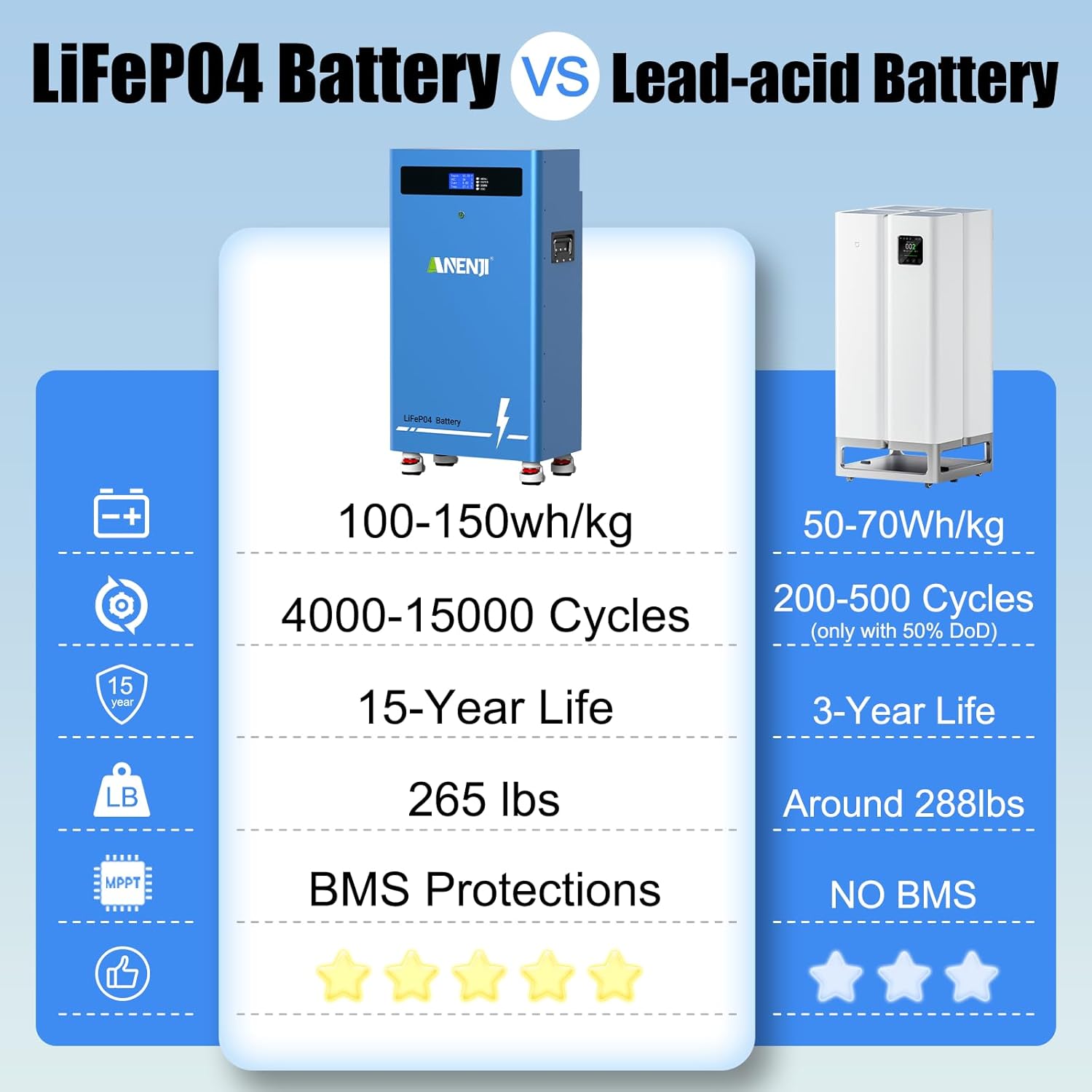
Figure 3.1: Comparison of LiFePO4 Battery vs. Lead-acid Battery. This image illustrates the superior energy density, cycle life, and integrated BMS protections of LiFePO4 technology compared to traditional lead-acid batteries.
4. Eusi Paket
Saatos ngabongkar, pastikeun sadaya barang-barang ieu parantos kalebet:
- Aninerel ANJ-300AH-H LiFePO4 Battery Pack
- Kabel USB
- Host Computer Cable
- Battery Parallel Cable
- Kabel Komunikasi BMS
- Battery Cable (Power Cables)
- Mounting Feet and Wall Mount Bracket
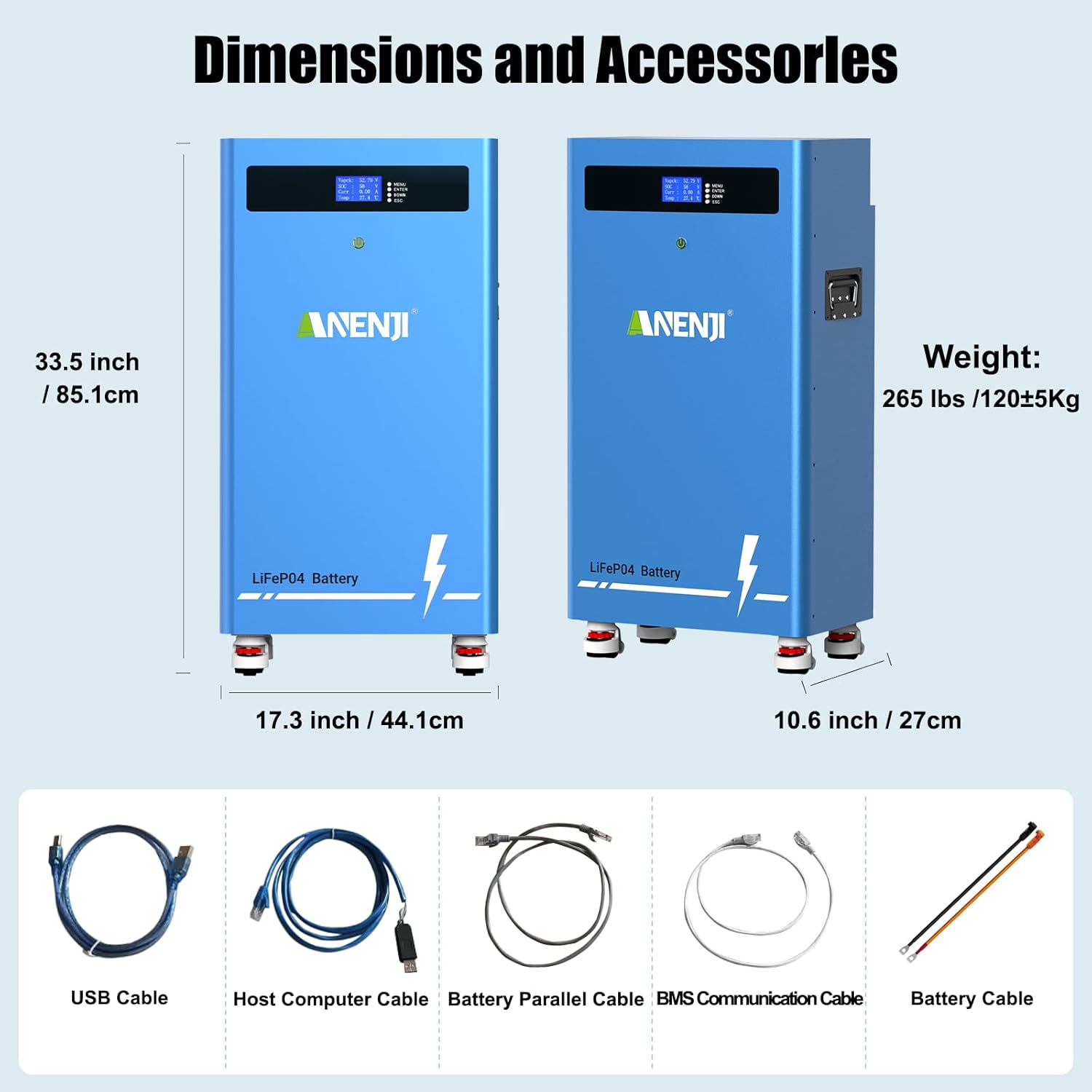
Figure 4.1: Battery Dimensions and Included Accessories. This image shows the physical dimensions of the battery unit and a visual representation of the various cables and accessories provided in the package.
5. Instalasi jeung Setup
5.1 Instalasi fisik
The battery can be installed on the floor using its feet or wall-mounted using the provided bracket. Ensure the installation location is dry, well-ventilated, and within the specified operating temperature range.
5.2 Antarmuka Leuwihview
Familiarize yourself with the battery's interfaces and controls:

Figure 5.1: Battery Interface Details. This image provides a detailed view of the battery's top panel and rear connections, including the CAN/RS485 communication ports, positive and negative terminals, status indicators, and the integrated display screen.
- Positive Interface: Red terminal for positive connection.
- Negative Interface: Black terminal for negative connection.
- CAN Communication Interface: For communication with compatible inverters.
- RS485 Communication Interface: For communication with compatible inverters and host computers.
- Battery Parallel Input/Output Interface: For connecting multiple batteries in parallel.
- Indikator Status: LED lights indicating battery status.
- Indikasi Awas: LED light for warnings or errors.
- Indikator kakuatan: Lampu LED nu nunjukkeun status daya.
- Layar tampilan: LCD for real-time data and operational conditions.
Caution: Never connect the inverter's BMS communication interface to the battery's parallel interface (RS485-1/RS485-2). Doing so may damage the battery or the BMS communication board.
5.3 Sambungan Listrik
Connect the battery to your solar inverter and home load using appropriate cables. Ensure all connections are secure and correctly polarized.
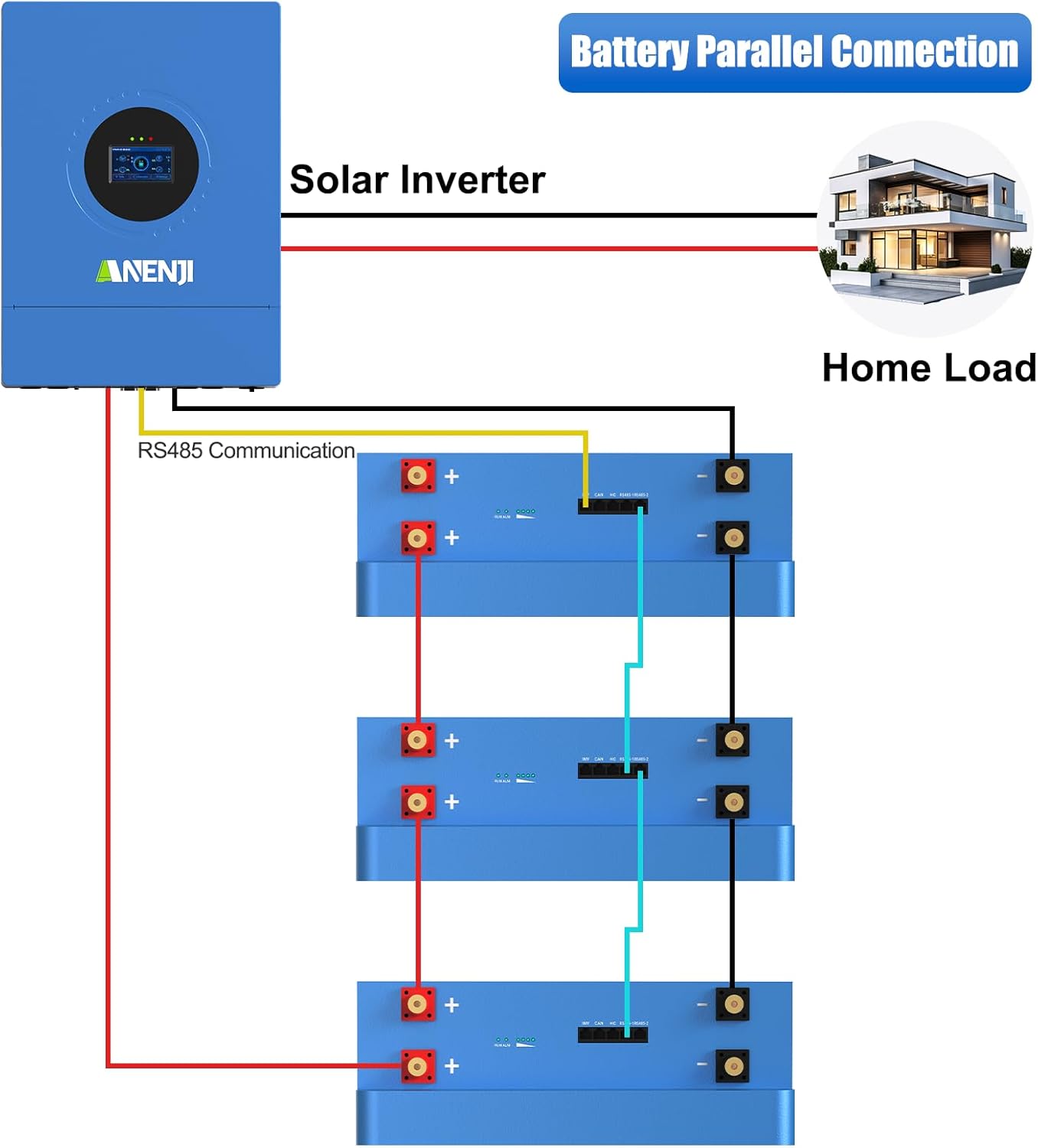
Figure 5.2: Battery Parallel Connection Diagram. This diagram illustrates how to connect multiple battery units in parallel to a solar inverter and home load, ensuring proper wiring for increased capacity.
The battery supports parallel connection of up to 16 units to meet high-capacity application requirements. It is compatible with various 48V solar inverters using CAN/RS485 dual communication protocols.

Figure 5.3: Parallel and Compatible Battery Setup. This image shows a typical installation with multiple battery units connected in parallel to an inverter, demonstrating the system's scalability and compatibility with mainstream BMS protocols.

Figure 5.4: CAN/RS485 Dual Communication Compatibility. This image highlights the battery's compatibility with various 48V solar inverters through its CAN/RS485 dual communication interfaces, supporting brands like ANENJI, SOFAR, GOODWE, MUST, Deye, Victron Energy, Growatt, Voltronic Power, MEGAREVO, PYLONTECH, LUXPOWERTEK, and SRNE.
6. Operasi
6.1 Powering on / Pareum
Refer to the specific instructions for your inverter and system setup for the correct power-on and power-off sequence. Generally, ensure all connections are secure before powering on the battery and inverter.
6.2 Ngawaskeun
The integrated LCD screen provides real-time data and operational conditions of the battery, including State of Charge (SOC), voltage, current, and temperature. The LED indicators also provide quick visual status updates.
6.3 Komunikasi
The RS485/CAN communication ports allow the battery to communicate with compatible inverters and monitoring systems, enabling advanced control and data logging.
7. Pangropéa
The Aninerel LiFePO4 battery is designed for minimal maintenance. However, regular checks are recommended:
- Periodically inspect all cable connections for tightness and corrosion.
- Keep the battery clean and free from dust and debris.
- Ensure adequate ventilation around the battery.
- Monitor the battery's performance via the LCD screen or connected monitoring system.
- Store the battery within the recommended temperature and humidity ranges if not in use for extended periods.
8. Cara ngungkulan
Upami anjeun ngalaman masalah sareng batré anjeun, pertimbangkeun léngkah-léngkah ngungkulan masalah umum ieu:
- Batré Teu Ngecas: Check all charging cable connections, ensure the charger/inverter is functioning correctly, and verify that the battery's temperature is within the charging range.
- Battery Not Discharging: Check discharge cable connections, ensure the load is connected properly, and verify the battery's State of Charge (SOC) is above the minimum threshold.
- Kasalahan Komunikasi: Verify that communication cables are correctly connected to the appropriate ports (RS485/CAN) and that the inverter/monitoring system settings are configured for the correct protocol.
- Warning Lights/Error Codes: Consult the battery's LCD screen for specific error codes or warning messages. Refer to the inverter's manual for any related system errors.
- Performance ngurangan: Ensure the battery is operating within its specified temperature range. Overloading the battery or operating it in extreme conditions can affect performance.
If problems persist after attempting these steps, contact customer support for assistance.
9. Garansi jeung Rojongan
The Aninerel ANJ-300AH-H LiFePO4 Battery Pack comes with long-term technical support. For warranty claims, technical assistance, or any product-related inquiries, please contact Aninerel customer service through your purchase channel or the official Aninerel websitus.