
1. Bubuka
The MiBOXER ML5 5-in-1 LED Controller is designed for versatile smart lighting applications, integrating Matter over WiFi and 2.4GHz wireless control. This controller supports five output modes: RGB, RGBW, RGB+CCT, CCT, and single color, offering flexibility for various LED strip configurations. It is compatible with the Matter protocol, enabling broad interoperability with smart home ecosystems such as Apple Home, Google Home, Amazon Alexa, and Samsung SmartThings. This manual provides essential information for the safe installation, operation, and maintenance of your ML5 controller.
2. Émbaran Kasalametan
- Pastikeun kakuatan dipegatkeun saméméh instalasi atawa perawatan pikeun nyegah shock listrik.
- Alat ieu dirarancang pikeun pamakéan jero rohangan wungkul. Hindarkeun paparan ka Uap atanapi suhu ekstrim.
- Ulah ngaleuwihan volume input dieusiantage (DC12V~48V).
- Taroskeun ka tukang listrik anu mumpuni upami anjeun teu yakin ngeunaan léngkah-léngkah pamasangan naon waé.
- Jauhkeun alat ti barudak.
3. Produk Langkungview
3.1 Fitur konci
- Certified Matter Over WiFi: Supports Matter standard protocol for multi-platform collaboration.
- Wide Compatibility: Works with products from different brands that comply with the Matter ecosystem.
- Simple Configuration: Easy pairing via QR code.
- 5-in-1 Functionality: Supports RGB, RGBW, RGB+CCT, CCT, and single color LED strips.
- 2.4G RF Wireless Control: Allows control via MiBOXER 2.4GHz remotes.
- Masukan Voltage: DC12V~48V.
3.2 Naon dina Box
- 1 x MiBOXER ML5 5-in-1 LED Controller
3.3 Komponén produk

Gambar 3.3.1: Puncak view of the MiBOXER ML5 controller, showing input terminals, output terminals, and control buttons (Link, Frequency, Mode).

Gambar 3.3.2: Angled view of the MiBOXER ML5 controller, highlighting its compact design and connection points.

Gambar 3.3.3: The MiBOXER ML5 controller alongside its retail packaging and a small instruction leaflet.
4. Spésifikasi
| Fitur | Rincian |
|---|---|
| merek | MiBOXER |
| Nomer modél | ML5 |
| Warna | Bodas |
| Pamakéan jero rohangan / outdoor | jero rohangan |
| Fitur husus | 2.4G RF wireless, Matter Over WiFi |
| Tipe Sumber Cahaya | LED |
| Sumber Daya | DC12V~48V (LED) |
| Bahan | palastik |
| Item Beurat | 2.72 ons |
| Item Panjang | 30 Meters (Control Distance) |

Gambar 4.1: Dimensional drawing of the ML5 controller (124mm x 38mm x 23mm) and its packaging (125mm x 39mm x 29mm), with a gross weight of 0.078 KGS.
5. Setup jeung Instalasi
5.1 Diagram Wiring
The ML5 controller supports various LED strip configurations. Ensure correct polarity and voltage matching for your LED strips. Connect the DC12V~48V power supply to the input terminals and the LED strip to the corresponding output terminals.

Gambar 5.1.1: Connection diagrams for Single Color (V+, W), Dual White (V+, CW, WW), and RGB (V+, R, G, B) LED strip configurations. An AC to DC power adapter is shown connecting to the controller's input.

Gambar 5.1.2: Connection diagrams for RGBW (V+, R, G, B, W) and RGB+CCT (V+, R, G, B, CW, WW) LED strip configurations. An AC to DC power adapter is shown connecting to the controller's input.
5.2 Pairing and Network Connection
The ML5 controller supports Matter over WiFi and 2.4GHz RF pairing.
- Matéri papasangan: Long press the "Link" button for 3 seconds to activate Matter pairing mode. Follow the instructions in your Matter-compatible smart home app (e.g., Apple Home, Google Home, Amazon Alexa, Samsung SmartThings) to scan the QR code on the device for easy pairing.
- 2.4GHz RF Remote Pairing: Short press the "Link" button 3 times to activate 2.4GHz remote pairing mode. Refer to your MiBOXER 2.4GHz remote's manual for specific pairing instructions.
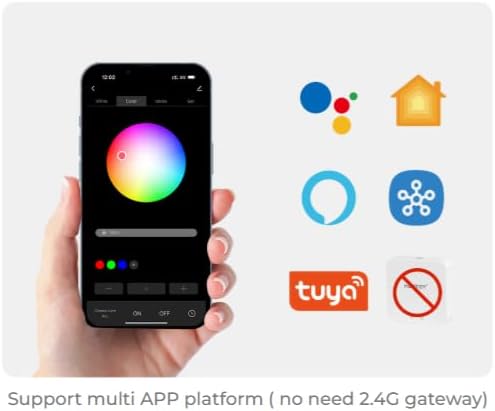
Gambar 5.2.1: Illustration of a smartphone app interface for controlling LED lighting, featuring a color wheel and compatibility logos for Google Home, Apple Home, Amazon Alexa, Samsung SmartThings, and Tuya.
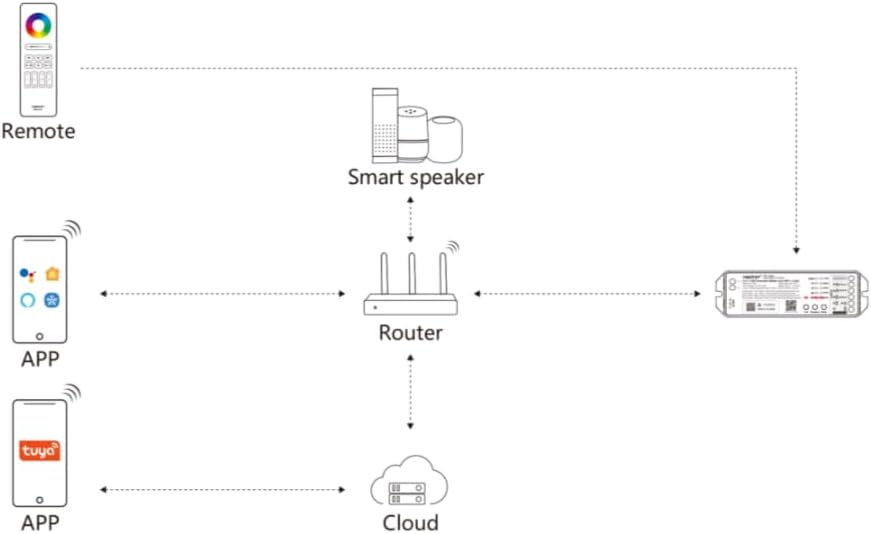
Gambar 5.2.2: Diagram illustrating the ML5 controller's connectivity: it connects to a router, which then allows control via mobile apps (Matter-compatible and Tuya) and smart speakers (e.g., Alexa, Google Assistant).
6. Parentah Operasi
6.1 Pamilihan Mode
- Ngalihkeun Modeu Kaluaran: Short press the "Mode" button to cycle through the five output modes (RGB, RGBW, RGB+CCT, CCT, Single Color). Ensure the connected LED strip matches the selected mode.
6.2 App Control
Once paired with your smart home ecosystem via Matter, you can control the ML5 controller using your preferred smart home app. Functions typically include:
- Turning lights On/Off.
- Nyaluyukeun kacaangan (dimming).
- Changing colors (for RGB, RGBW, RGB+CCT modes).
- Adjusting color temperature (for CCT, RGB+CCT modes).
- Nangtukeun adegan sareng jadwal.
6.3 2.4GHz RF Jauh Control
If paired with a MiBOXER 2.4GHz RF remote, you can control the controller directly. Refer to your specific remote's manual for detailed button functions, which typically include:
- Hurung/Pareuman.
- Pangaturan kacaangan.
- Color selection.
- Mode switching (e.g., dynamic effects).
7. Pangropéa
- Bersihkeun alat ku kaen anu lemes sareng garing. Ulah make bahan kimia kasar atawa cleaners abrasive.
- Pastikeun ventilasi anu pas di sakitar controller pikeun nyegah panas teuing.
- Regularly check all connections for security and integrity.
8. Cara ngungkulan
| Masalah | Mungkin Cukang lantaranana | Solusi |
|---|---|---|
| Strip LED henteu hurung. | No power, incorrect wiring, faulty LED strip. | Check power supply connection. Verify wiring matches the selected mode. Test LED strip with another power source if possible. |
| Cannot pair with Matter app. | Controller not in pairing mode, WiFi issue, incorrect QR code scan. | Long press "Link" button for 3 seconds. Ensure your smartphone is on the same 2.4GHz WiFi network. Rescan QR code. |
| 2.4GHz remote not working. | Remote teu dipasangkeun, batré remote lemah, gangguan. | Short press "Link" button 3 times to enter pairing mode, then pair with remote. Replace remote battery. Reduce interference sources. |
| Incorrect colors or modes. | Wrong output mode selected. | Short press "Mode" button to cycle to the correct output mode for your LED strip. |
9. Garansi jeung Rojongan
Produk MiBOXER dirancang pikeun reliabilitas sareng kinerja. Kanggo inpormasi garansi sareng dukungan téknis, mangga tingal MiBOXER resmi. websitus atanapi ngahubungan pangecér Anjeun. Simpen resi pameseran anjeun pikeun klaim jaminan.
Pikeun pitulung salajengna, anjeun tiasa nganjang ka Toko MiBOXER di Amazon.