
Bubuka
This manual provides detailed instructions for the installation, operation, and maintenance of your Ctronics 4K Hybrid Zoom WLAN Outdoor Security Camera, Model 930C-4K. Please read this manual thoroughly before using the product to ensure proper functionality and safety.
The Ctronics 4K Hybrid Zoom WLAN Outdoor Security Camera features a dual-lens system, 10x hybrid zoom (6x optical + 4x digital), automatic zoom tracking, human recognition, 4K full-color night vision, two-way audio, and IP66 weather resistance for reliable outdoor surveillance.

Figure 1: Ctronics 4K Hybrid Zoom WLAN Outdoor Security Camera (Model 930C-4K)
Eusi pakét
Pastikeun yén sadaya item aya dina bungkusan:
- Ctronics 4K Hybrid Zoom WLAN Outdoor Security Camera
- Adaptor kakuatan
- Pemasangan Screws sareng Colokan Tembok
- Pakakas Tahan Cai pikeun Kabel Jaringan
- Témplat Bor
- Manual pamaké
Precautions Kasalametan
- Ensure the power supply matches the camera's requirements (12V).
- Do not expose the camera to extreme temperatures or humidity beyond its operating range.
- Avoid direct exposure to strong light sources, which may affect image quality.
- Nanganan kaméra kalayan ati-ati pikeun nyegah karuksakan fisik.
- Consult a professional for installation if you are unsure about electrical wiring or mounting procedures.
Disetél
1. Instalasi fisik
The camera supports both wall and ceiling mounting. Choose a location that provides optimal coverage and a stable Wi-Fi signal.
- Pilih Lokasi Pasang: Identify a suitable outdoor location, ensuring it is within range of your Wi-Fi network and has access to a power outlet.
- Tandaan liang bor: Use the provided drill template to mark the positions for drilling on the wall or ceiling.
- liang bor: Bor liang dina posisi anu ditandaan teras pasangkeun colokan témbok.
- Gunung kaméra: Pasangkeun braket kaméra kana témbok atanapi lalangit nganggo sekrup anu disayogikeun.
- Sambungkeun Kakuatan: Connect the power adapter to the camera and plug it into a power outlet. Ensure the connection is waterproof using the provided kit if applicable.

Figure 2: Camera mounting options (wall-mounted and ceiling-mounted) demonstrating IP66 weather resistance.
2. Sambungan jaringan
The camera supports stable and fast dual-band Wi-Fi (2.4GHz and 5GHz).
- Unduh App: Download the "Ctronics Pro" app from your smartphone's app store (iOS or Android).
- Ngadaptar Akun: Buka aplikasi sareng ngadaptarkeun akun énggal atanapi lebet upami anjeun parantos gaduh.
- Tambahkeun kaméra: Turutan parentah dina aplikasi pikeun nambahkeun kaméra anjeun. Ieu biasana ngalibatkeun nyeken kode QR dina kaméra atanapi ngalebetkeun ID na sacara manual.
- Nyambung ka Wi-Fi: Select your Wi-Fi network (2.4GHz or 5GHz) and enter the password. The camera will connect to your network.
- Setup Awal: Complete any initial setup steps prompted by the app, such as setting a device password and time zone.

Figure 3: Ctronics Pro app interface for camera management.

Figure 4: Illustration of the camera's stable dual-band Wi-Fi connectivity (2.4GHz and 5GHz).
Ngoperasikeun kaméra
1. Hirup View jeung Kontrol PTZ
- Open the Ctronics Pro app and select your camera to access the live view.
- Use the on-screen controls to pan (355°) and tilt (90°) the camera to adjust its viewsudut ing.
- Utilize the 10x hybrid zoom feature (6x optical + 4x digital) to get a closer look at specific areas.

Figure 5: The camera's 10x hybrid zoom capability, showing a zoomed-in view of a child in a backyard.

Figure 6: Illustration of the dual-lens system providing both narrow (50° view, 8mm) and wide (90° view, 3.6mm) perspectives.
2. Motion Detection and Auto-Tracking
- Access the camera settings in the app to configure motion detection zones and sensitivity.
- Enable human recognition to filter out false alarms caused by animals or inanimate objects.
- Activate auto-tracking zoom, which allows the camera to automatically follow detected human movement and zoom in for clearer details.
- Set up preset points for quick navigation to frequently monitored areas.
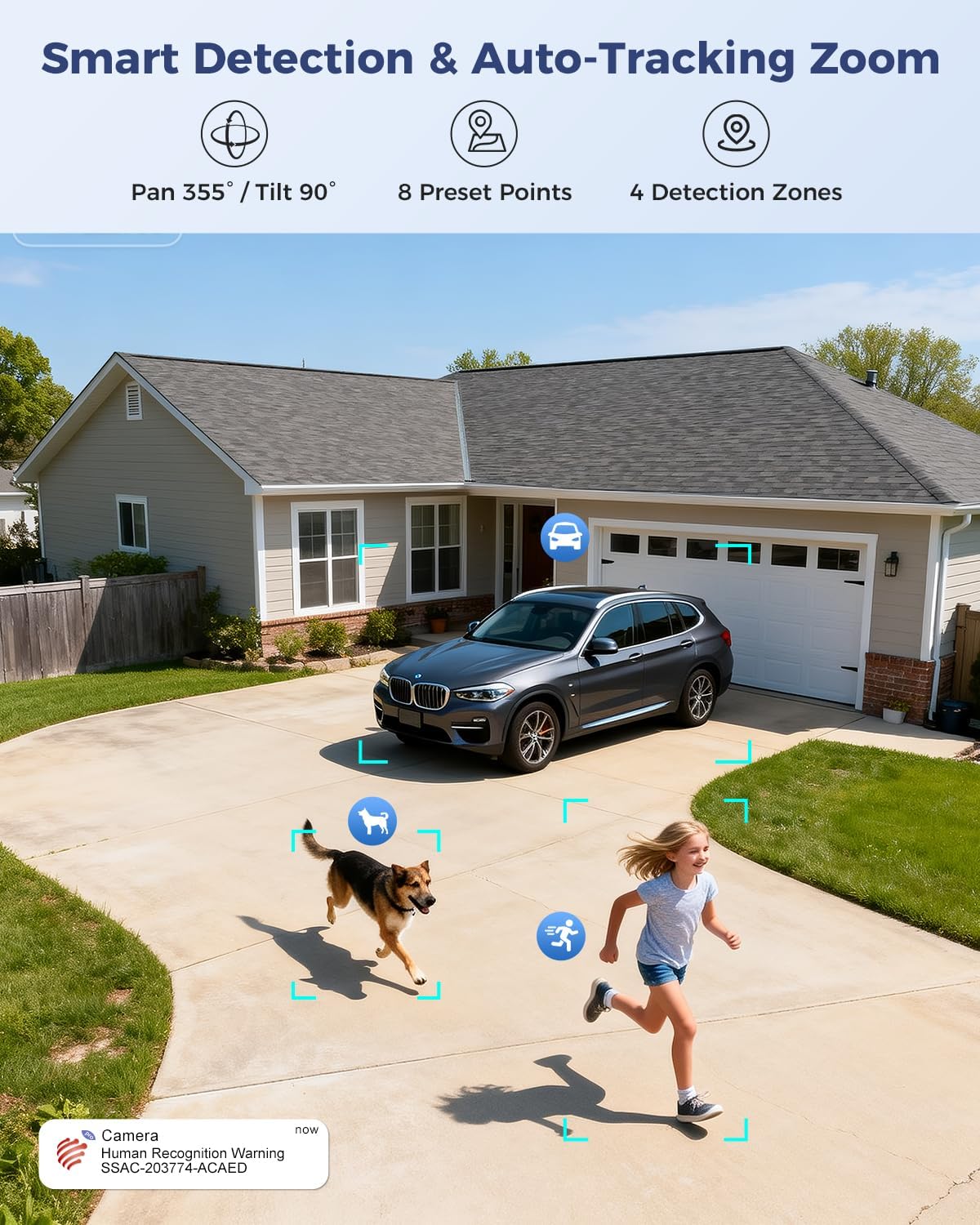
Figure 7: Visual representation of smart detection features including pan/tilt, preset points, detection zones, and human recognition with auto-tracking.
3. Wawasan Peuting
The camera features a starlight lens for 4K full-color night vision, providing clear images even in low-light conditions.
- The camera automatically switches to night vision mode when ambient light is insufficient.
- The starlight lens (F/1.6 aperture) enhances low-light performance, offering a night vision range of up to 30 meters.

Figure 8: Comparison of starlight lens night vision (top) providing full-color clarity versus a normal lens (bottom) in low light conditions.
4. Audio Dua Arah
Use the two-way audio feature to communicate with visitors or deter intruders.
- Dina hirup view, ketok ikon mikropon pikeun nyarios ngalangkungan spiker kaméra.
- The camera's built-in microphone allows you to hear audio from the camera's vicinity.
5. Ngarekam jeung Panyimpenan
The camera offers multiple storage options for recorded footage:
- Kartu MicroSD: Supports up to 256GB microSD card (not included) for local storage.
- Panyimpenan awan: Optional 30-day cloud storage service (subscription may be required).
- NVR: Supports Network Video Recorder (NVR) for 24/7 continuous recording.
- FTP: Supports FTP for uploading recordings to an FTP server.

Gambar 9: Leuwihview of the camera's four storage options: MicroSD card (up to 256GB), 30-day Cloud, NVR (7/24 Recording), and FTP support.
6. Kasaluyuan Alat
Access and manage your camera from various devices and platforms:
- Aplikasi Mobile: Ctronics Pro (iOS, Android)
- Klién PC: HiP2P Client (Windows, Mac OS)
- Web Browser: Aksés via web browser for live view jeung setélan.

Figure 10: The camera's broad device compatibility, showing access from smartphones, tablets, laptops, and desktop computers.
Pangropéa
- beberesih: Bersihkeun lénsa kaméra sacara rutin nganggo lawon anu lemes sareng garing pikeun mastikeun kualitas gambar anu jelas. Entong nganggo bahan kimia anu keras.
- Pembaruan firmware: Check the Ctronics Pro app periodically for available firmware updates. Keeping the firmware updated ensures optimal performance and security.
- Sasayogian tanaga: Pastikeun adaptor kakuatan sareng kabel bébas tina karusakan.
Pamérésan masalah
| Masalah | Mungkin Cukang lantaranana | Solusi |
|---|---|---|
| Kaméra offline | No power; Wi-Fi signal weak or disconnected; incorrect Wi-Fi password. | Check power connection; move camera closer to router or use a Wi-Fi extender; re-enter Wi-Fi password in app. |
| Kualitas gambar henteu saé | Dirty lens; insufficient lighting; network bandwidth issues. | Clean the lens; ensure adequate lighting for optimal night vision; check network speed. |
| Deteksi gerak teu jalan | Detection sensitivity too low; detection zones not configured; human recognition disabled. | Adjust sensitivity in app; configure detection zones; enable human recognition. |
| Masalah audio dua arah | Mikropon/spiker dibisukeun dina aplikasi; latensi jaringan. | Ensure audio is enabled in app; check network connection. |
spésifikasi
| Fitur | Rincian |
|---|---|
| Nomer modél | 930C-4K |
| Resolusi Video | 4K (3840 pixels) |
| Zum | 10x Hybrid Zoom (6x Optical + 4x Digital) |
| Pan / Dengdekkeun Range | Pan 355°, Dengdekkeun 90° |
| Tipe Lénsa | Dual Lens (Narrow 50°/8mm, Wide 90°/3.6mm) |
| Visi Peuting | 4K Full-Color Starlight Night Vision (F/1.6), up to 30 meters |
| Audio | Audio Dua Arah |
| Konektipitas | Dual-Band Wi-Fi (2.4GHz, 5GHz), Wired Ethernet |
| Pilihan Panyimpenan | MicroSD (up to 256GB), Cloud, NVR, FTP |
| Résistansi Cuaca | IP66 |
| Sasayogian tanaga | 12 Volt, 12 Watt |
| Ukuran (L x W x H) | 25 x 13 x 20 cm |
| Bahan | logam |
| Tipe Pamasangan | Wall- and Ceiling-mount |
| Alat nu cocog | Desktop, Laptop, Smartphone, Tablet |
Garansi sareng Rojongan
Émbaran jaminan
This product typically comes with a standard manufacturer's warranty. For specific warranty terms and conditions, please refer to the documentation included with your purchase or contact Ctronics customer support. Amazon's return policy for this product is 30 days for refund/replacement.
Rojongan Palanggan
If you encounter any issues or have questions regarding your Ctronics camera, please contact Ctronics customer support through their official website or the contact information provided in the product packaging. You can also refer to the FAQ section within the Ctronics Pro app for common solutions.