
1. Bubuka
This manual provides comprehensive instructions for the operation and maintenance of your BAOFENG UV-32 Ham Radio. Please read this manual thoroughly before using the device to ensure proper function and safety.

Image: The BAOFENG UV-32 Ham Radio, showcasing its display and robust design.
2. Fitur Produk
- Dual GPS/BeiDou Tracking: Share and request location coordinates in real-time, essential for off-grid communication.
- Bluetooth APP Programming: Wirelessly configure up to 1000 channels using a mobile application.
- Kaluaran Daya anu tiasa diatur: Select between 10W, 5W, or 1W to optimize range and battery life.
- One-touch Frequency Scan: Quickly clone channels for efficient setup.
- Audio HD: Equipped with a 40mm speaker for clear communication in noisy environments.
- Multi-band Monitoring: Supports AM/FM/VHF/UHF bands, including 108-136MHz for aviation.
- 1000-Channel Storage: Organize channels across 10 zones for various operational needs.
- USB-C ngecas: Convenient charging via USB-C ports, power banks, or car adapters.
- Dual Display/Dual Guard: Monitor dua frékuénsi sakaligus.

Image: Visual representation of the BAOFENG UV-32's key functions and features.
3. Eusi Paket
Pastikeun yén sadaya item aya dina pakét anjeun:
- BAOFENG UV-32 Radio Unit
- anteneu
- Batré (Batré Non-Standar)
- Charger (Desktop Dock and AC Adapter)
- Lanyard
- Manual pangguna (dokumén ieu)
- Back Clip (for "1 Pack Black+Back Clip" variant)

Image: The BAOFENG UV-32 radio with its back clip, demonstrating portability.
4. Setup Guide
4.1 Pamasangan batré
- Sejajarkeun pak batré jeung alur dina tonggong radio.
- Geser batréna ka luhur nepi ka ngaklik kana tempatna.
- Pikeun nyabutna, pencét kancing pelepas batré (upami aya) teras geser batréna ka handap.
4.2 Kantétan Antena
- Pasangkeun anteneu searah jarum jam kana konektor di luhur radio dugi ka pageuh sacukupna. Ulah kaleuleuwihi pageuhna.
4.3 Ngecas Batré
The UV-32 supports two charging methods:
- Pangisi Daya Desktop: Place the radio (with battery installed) into the charging dock. Ensure the charging contacts align. The indicator light will show charging status.
- Ngecas Langsung USB-C: Connect a USB-C cable to the port on the side of the radio and to a power source (e.g., computer, wall adapter, power bank, car charger).
Charge the battery fully before first use. A full charge typically takes several hours.

Image: Demonstrates the versatility of Type-C charging for the BAOFENG UV-32.
5. Parentah Operasi
5.1 Hurung/Pareum sareng Volume
- Daya Hurung: Puterkeun POWER / VOLUME knob clockwise until you hear a click.
- Saluyukeun Volume: Continue rotating the knob to increase or decrease the volume.
- Pareum listrik: Rotate the knob counter-clockwise until you hear a click.
5.2 Pamilihan Saluran
Ngagunakeun éta luhur/handap arrow keys or the numeric keypad to select a channel. The display will show the current channel number and frequency.
5.3 Transmitting (PTT)
Pikeun ngirimkeun, pencét jeung tahan tombol PTT (Push-To-Talk) button on the side of the radio. Speak clearly into the microphone. Release the PTT button to receive.
5.4 Dual Display / Dual Guard
The UV-32 can monitor two frequencies simultaneously. Activate the Dual Guard function through the radio's menu or a dedicated button (refer to the on-screen interface for specific options).

Image: The radio's screen displaying the Dual Watch feature, allowing simultaneous monitoring of two channels.
5.5 APP Programming (Bluetooth)
- Download the "Radio Frequency Programmer" mobile application from your device's app store.
- Enable Bluetooth on your mobile device and the UV-32 radio.
- Open the app and follow the on-screen instructions to connect to your radio.
- You can then wirelessly edit channel information, frequencies, and other settings.

Image: The BAOFENG UV-32 in programming mode, with a smartphone displaying the channel programming application.
5.6 One-touch Frequency Scan / Copy Frequency
This feature allows for quick cloning of frequencies from another radio. Press and hold the designated scan button (e.g., SK1) to initiate the smart scan and copy process. The radio will detect and store the active frequency.

Image: Illustration of the one-key frequency pairing feature between two BAOFENG UV-32 radios.
5.7 Adjustable Power Output
Access the menu to select your desired power output: 10W (High), 5W (Mid), or 1W (Low). Higher power provides greater range but consumes more battery. Lower power conserves battery for shorter distances.
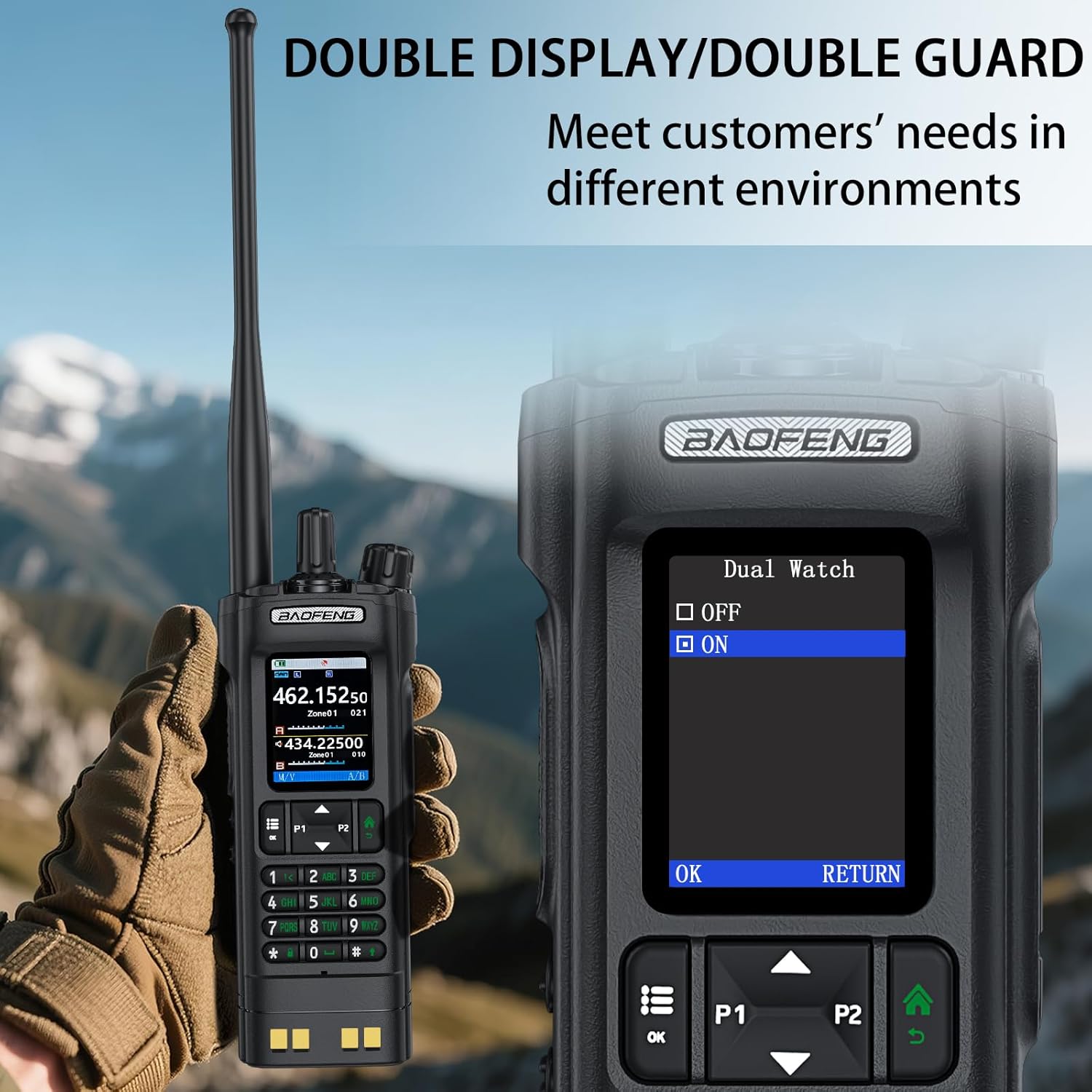
Image: The BAOFENG UV-32's power adjustment menu, showing options for 10W, 5W, and 1W output.
5.8 GPS/BeiDou Tracking
The integrated GPS/BeiDou module allows for real-time location sharing. Refer to the radio's menu for GPS functions, including sending your coordinates and requesting those of other UV-32 users.
6. Pangropéa
- beberesih: Ngagunakeun lemes, damp lawon pikeun ngabersihkeun bagian luar radio. Entong nganggo bahan kimia atanapi pangleyur anu keras.
- Perawatan batré: Avoid fully discharging the battery frequently. Store the radio and battery in a cool, dry place when not in use for extended periods.
- anteneu: Pastikeun anteneu napel pageuh tapi teu kaleuleuwihi pageuh. Ulah nepi ka ngabengkokkeun atawa neken anteneu.
- Tahan cai: alat ieu Henteu Tahan Cai. Protect it from rain, splashes, and immersion in water.
7. Cara ngungkulan
| Masalah | Mungkin Cukang lantaranana | Solusi |
|---|---|---|
| Radio teu hurung. | Batré lemah atawa teu dipasang bener. | Cas batréna atanapi pasang deui kalayan pageuh. |
| Teu tiasa ngirim atanapi nampi. | Frékuénsi/saluran anu salah, batré lemah, atanapi masalah anteneu. | Verify frequency, charge battery, check antenna connection. Ensure you are within range of other radios. |
| Kualitas audio goréng. | Kakuatan sinyal handap, gangguan, atanapi setélan squelch anu salah. | Move to an area with better signal, adjust squelch level, check for sources of interference. |
| APP programming fails to connect. | Bluetooth not enabled, app not updated, or radio not in programming mode. | Ensure Bluetooth is on for both devices, update the app, and follow app instructions to put the radio in programming mode. |
8. Spésifikasi
| merek | BAOFENG |
| Nomer modél | UV-32 |
| Jumlah Saluran | 1000 |
| Rentang Frékuénsi | UHF350-390/400-520MHz, VHF136-174MHz/220-260MHz |
| Ngawangkong Range Maximum | 10 Kilometer (approx. 6.2 miles) |
| Kaluaran kakuatan | 10W / 5W / 1W (Adjustable) |
| Voltage | 7.4 Volt (DC) |
| Tingkat Résistansi Cai | Henteu Tahan Cai |
| Protokol konektipitas | Bluetooth |
| Tipe Ngecas | USB-C, Desktop Dock |
| Ukuran (Kira-kira.) | Height: 6.26", Width: 2.28", Depth: 1.57" |
| Beurat (Kira-kira.) | 13.58 oz |

Image: Detailed dimensions and weight of the BAOFENG UV-32 radio.
9. Garansi jeung Rojongan
Your BAOFENG UV-32 Ham Radio comes with a garansi 1 taun ti tanggal beuli. Garansi ieu nyertakeun cacad manufaktur dina panggunaan normal.
For technical support, warranty claims, or service inquiries, please contact BAOFENG customer service through their official websitus atanapi pangecér dimana produkna dibeuli. Punten nahan bukti pameseran anjeun pikeun validasi garansi.